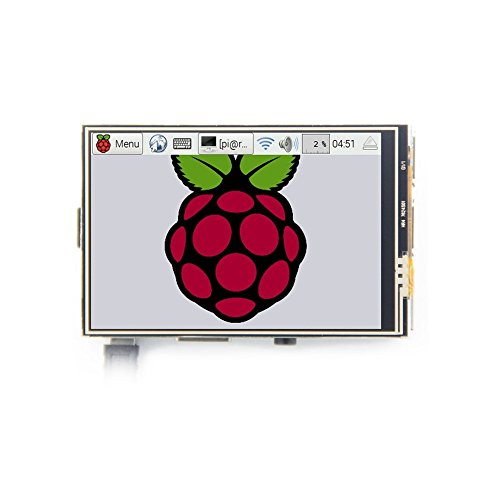

🚀 Elevate your Raspberry Pi game with a pocket-sized 4K touchscreen powerhouse!
The xcluma 3.5" LCD TFT touchscreen display is a compact, high-resolution (4K UHD) module tailored for Raspberry Pi 3. Featuring the fastest SPI transmission for smooth data flow and a portable design, it serves as a practical alternative to traditional HDMI monitors. Ideal for professionals seeking a sleek, on-the-go interface, it supports the latest Raspberry Pi UI desktop system and includes a stylus for precise control.
| ASIN | B072TG662W |
| Are batteries included? | No |
| Auto Focus Included | No |
| Best Sellers Rank | #11,297 in Computers & Accessories ( See Top 100 in Computers & Accessories ) #7 in Barebones |
| Brand | xcluma |
| Connectivity Technology | HDMI |
| Country of Origin | India |
| Customer Reviews | 3.4 3.4 out of 5 stars (46) |
| Date First Available | 18 June 2017 |
| Display Resolution | 3840 x 2160 |
| Display Size | 3.5 Inches |
| Display Technology | LCD |
| Generic Name | Electronics Module |
| Hardware Interface Type | HDMI |
| Imported By | Bytesware Electronics [email protected] SHOP NO 1, 1ST FLOOR,NO 101/P8, DODDAKANNELLI,NEXT TO AET COLLAGE CIRCLE, GEAR SCHOOL ROAD,BANGALORE, KARNATAKA-560035 |
| Importer | Bytesware Electronics, Bangalore-35, IN, [email protected] |
| Included Components | 1 xcluma 3.5" Lcd Tft Touchscreen Display For Raspberry Pi 3 Board w/ Stylus |
| Item Dimensions LxWxH | 10 x 10 x 10 Centimeters |
| Item Height | 10 Centimeters |
| Item Weight | 77 g |
| Item Width | 10 Centimeters |
| Item model number | BE-000318 |
| Manufacturer | Imported |
| Maximum Display Resolution | 3840 x 2160 |
| Model number | BE-000318 |
| Net Quantity | 1 Count |
| Number of HDMI Ports | 1 |
| Number of Memory Sticks | 1 |
| Operating System | Linux |
| Packer | Bytesware Electronics [email protected] SHOP NO 1, 1ST FLOOR,NO 101/P8, DODDAKANNELLI,NEXT TO AET COLLAGE CIRCLE, GEAR SCHOOL ROAD,BANGALORE, KARNATAKA-560035 |
| Product Dimensions | 10 x 10 x 10 cm; 77 g |
| Resolution | 4K UHD 2160p |
| Special Feature | Portable, Touchscreen |
B**S
Avoid this one. Too much futile effort is guaranteed
The product is great but this class of products don't come with drivers installed. Which is a nightmare to find and install from GitHub. And even if you find it , it may not work as in my case. And even if it works, an upgrade of your OS will render it useless unless you can write your own drivers in C++. Better avoid this and buy the Waveshare ones with embedded drivers. The time, effort and the despair is not worth it !! I say this with all due respect.
R**Y
It’s just basic display not touch screen
It’s just junk wasting our time, received the parcel with just display with out documentation. Finally got installed the diver and it’s worked but no touch screen works. I strongly not recommend this product with out any basic information.
M**E
Works well with Pi B+ as display
Neatly packaged, came with link to install driver packages. As I am not a pro, was able to follow the instructions to make it work. Pin diagram was included to help the connection. Instructions didn't help in the correct screen orientation, so had to perform some trouble shooting. Gave up on touch screen functionality as it didn't work even after multiple calibration per instruction (do not know if it is screen or the Pi model I am using, but I am almost certain it is the Pi as I am unable to make wifi dongle, bluetooth dongle etc to work). Overall very satisfied. Kept it on for couple of hours at a time, no issues till now.
E**R
Good but not best ...........
I used it for 1 year . Then it didnt fall or amything but it broke And touch interface stop working and glass was coming out but it was working
P**A
Cool....
This 3.5-inch touch screen module is designed especially for raspberry pi The latest raspberry pi official UI desktop file system and the fastest SPI transmission data An ideal alternative solution for HDMI monitor and convenient man-machine interface for raspberry pi combined with the portable power DIY anywhere anytime.
R**.
Very much satisfied
Good
P**E
Very big hassle to find proper drivers for kali or any other debian based system.
Buy if you have a week of time to search for the proper drivers or if you can manually compile. Nah that to takes too much troubleshootinf just stay away from this , get the hdmi version it's plug and play
V**H
Important Notice for New LCD Screen Users
To use a display with a Raspberry Pi, you need to install the appropriate driver first. Therefore, establishing a remote connection to the Raspberry Pi is mandatory before you can use the display.
Trustpilot
1 week ago
3 weeks ago



