
DOWNLOAD THE APP


Customer Services
Copyright © 2025 Desertcart Holdings Limited
DOWNLOAD THE APP
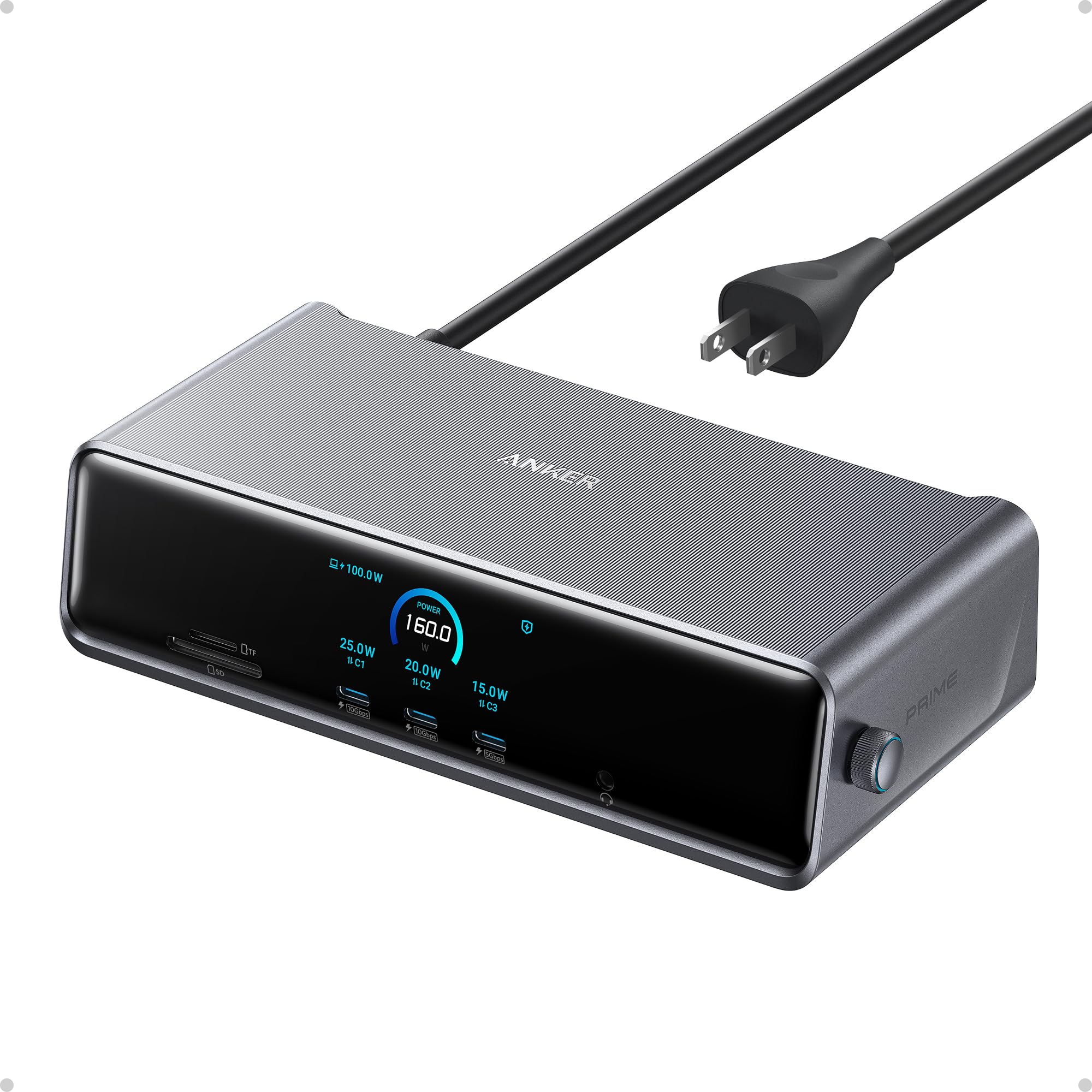
🚀 Elevate your workspace with power, speed, and triple-display brilliance!
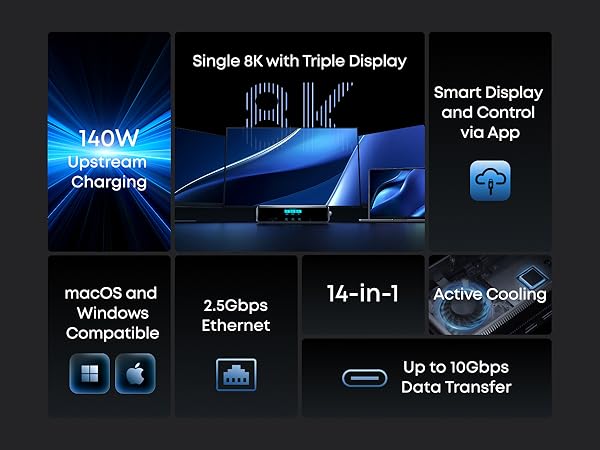
The Anker Prime Docking Station DL7400 is a premium 14-port hub designed for professionals craving ultimate connectivity and multi-monitor setups. Supporting triple 4K 60Hz displays plus an 8K output, it delivers up to 140W charging power, smart cooling, and real-time system monitoring. Compatible with macOS and Windows, it’s the perfect all-in-one docking solution to future-proof your desk and maximize productivity.



| ASIN | B0DTSZC5Y7 |
| Best Sellers Rank | #2,382 in Electronics ( See Top 100 in Electronics ) #36 in Laptop Docking Stations |
| Brand | Anker |
| Color | Phantom Gray |
| Compatible Devices | MacBooks, USB C Windows laptops |
| Customer Reviews | 4.1 out of 5 stars 213 Reviews |
| Hardware Interface | 3.5mm Audio, DisplayPort , Ethernet, HDMI , MicroSD, USB |
| Input Voltage | 240 Volts |
| Item Dimensions L x W x H | 7.67"L x 3.62"W x 1.89"H |
| Item Weight | 834.1 Grams |
| Manufacturer | Anker |
| Number of Ports | 14 |
| Product Dimensions | 7.67"L x 3.62"W x 1.89"H |
| Total Number of HDMI Ports | 2 |
| Total USB Ports | 7 |
| Total Usb Ports | 7 |
| UPC | 194644232849 |
| Warranty Description | 24.00 |
| Wattage | 160 |
T**N
Great upgrade for a multi-monitor desk
I picked this up for my work-from-home setup, and it was mostly plug and play. I did run into a small issue at first where my laptop wouldn’t connect to the monitors, but after updating my laptop software, everything worked as expected. I use this dock to run three monitors, and it’s been reliable with no lag or display issues. The build quality stood out right away—it feels sturdy and well-made, not flimsy like some other docking stations I’ve used. I also appreciate the number of ports available. I regularly plug in my phone and AirPods at my desk, and it’s convenient having everything connected in one place. I picked this up during a Black Friday sale, which made it a great value, and it’s now an essential part of my WFH setup. If you need a solid, well-built dock for a multi-monitor setup, this one has worked well for me.
G**K
Simple, Easy to use Dock!
This dock is a must-have for those looking for a simple, easy-to-use interface to connect their laptops to an external monitor. I must admit, I was on the fence about this one when it came to gauging the value I would get out of this, but I was proven wrong. It is designed well with good weight and build quality. Setup was relatively easy, and it was nice that they threw in a DisplayPort and HDMI cable in the box. It does not take up a lot of space on my desk and the clock feature is a nice touch. Note that the clock is only customizable after you install a firmware update via the Anker Dock Manager PC application, which you can download from the Anker website. The dial is another welcomed addtion as this is present on their Anker Prime Charger 250w. Maneuvering through the settings was a breeze. The device runs cool and does not heat up to such high temps. Anker has done a great job at managing temperatures across it's devices. There are plenty of ports for connectivity, including 3 front USB-C data/charging ports, a SD + TF card reader. The back ports include 1 DisplayPort, 2 HDMI ports, 2 USB-A 3.2 ports, 1 USB-A 2.0 port, an ethernet port, and your standard upstream data/charging port. Upstream charging to the device is max 140w (unfortunately my gaming laptop supports only 100w), and the connection was relatively simple. This device also supports PPS PD charging for Android devices such as the Samsung Galaxy via the front 3 ports. You can also establish a data connection from your phone to your PC. For display, keep in mind that you need to download the Synaptics DisplayLink driver for your pc/laptop to output via DisplayPort to an external monitor. It is a relatively quick and simple download. Once the driver was installed, and I restarted my pc and reset the dock,the video display was seamless. I am currently outputting a resolution of 3440 x 1440 @240Hz with no stutter and no artifacts. This has improved my gaming setup tremendously, and I have not noticed any issues during hardcore gaming. The Anker Dock Manager application is a nice touch and allows you to see the multiple connections that you have on your setup. You can change from Mirroring to Extended display, even change the display direction if you have your monitor set up vertically. Refresh rate and resolution can also be customized. Overall, this is a solid addition to anyone's future laptop/desktop to monitor setup. Though there are other docks out there with more ports and features, the Anker Prime does a great job of incorporating functionality and simplicity for the everyday user.
O**O
Best dock I've ever used
I got this on sale during black friday to replace an old Dell dock that only supported a 4k monitor @ 30 Hz (FPS). I'm happy with it. I have a 4k monitor running at 60 Hz now as well as an 2nd, 1080p screen @ 60 Hz (that's all the monitor supported -- the dock can go higher). I tested a 1440p monitor and it was able to go to 100 Hz as advertized (monitor supported 165 Hz). There are a ton of ports including 3 front facing USB-C. As far as getting to to work, I tried a laptop and a desktop that both had Windows 11 installed, but had never connected to a displaylink device and they downloaded and installed the driver automatically. The desktop didn't have another monitor attached and after booting a few minutes later the screen started working. Completely painless for an already existing system. If you need to get into the BIOS / firmware it seems like you will need to connect a monitor directly. I didn't buy it to game on, but the desktop has an older Nvidia 1650 GPU that was used to render the video and display on either monitor and it was pretty close to native. It's pretty pricy at regular price, but I'd still buy it. For black friday pricing I'm extatic with the purchase.
I**S
MacBook Pro M4 - Not a good experience
Nothing but problems. Mac M4 64GB, with 2 exact same Samsung Monitors. Too many bugs and inconsistencies. Each time I go to use my laptop 50/50 chance left and right screens have swapped. Most of the time one or both of the monitors could be 30hz, hard to get them both 60hz, even if the Anker device tells me they're running at 60hz - seems like just keep unplugging and rebooting to make it happen eventually if youre lucky. Worst of all... OMG, the frame rate drops insanely on just a single monitor, seems random which one it chooses. This device seemed cool. Maybe it works great on Windows - but this is not a final product for Mac, it's not finished.
E**N
EXCELLENT Docking Station
Excellent Product. I have 2 external HDMI monitors plus MacBookPro. This WORKS. I wasted so much time with a different manufacturers solution for Docking station...and it constantly was turning of one of the external monitors. This Anker device is seamless....no video interuption even when closing lid of notebook. Elegantly packaged and beautiful. Also has internal cooling fan. And works with latest Apple OS Tahoe.
J**R
Good high-PD dock at this price
Solid dock that does exactly what it says. I have not run into any compatibility issues. The only reason for the 4-star rating instead of 5 is the lack of USB-C display output and the limitations of displaylink. 4k60 is certainly livable and I wouldn't have purchased this model if I needed more, but I have a monitor capable of higher refresh rates. I would still recommend it for the price compared to some of the TB5 solutions out there if what you really need is a 140W PD dock, but it might be worth spending more if you want more future-proof display compatibility.
C**L
A Complete Connectivity Upgrade for My MacBook
After trying several docking stations for my MacBook, the Anker Prime Docking Station is the first one that truly checks all the boxes. With other docks, I was only able to connect one external monitor, which was a huge limitation for my workflow. With the Anker dock, I can finally run multiple monitors at the same time. Everything works smoothly without any setup headaches. Another thing I love is the three USB-C ports on the front. This makes it incredibly convenient to plug in any USB-C device—no more constantly plugging and unplugging cables from my MacBook itself. It keeps my desk cleaner and saves a lot of wear on the laptop ports. For older or non-USB-C accessories, the dock also includes USB-A ports, which I’ve used for my wireless mouse and keyboard as well as a few legacy devices. It’s great not having to rely on extra adapters. Since my MacBook doesn’t have an SD card reader, the SD and TF card slots on the front panel have been surprisingly useful. I can quickly upload or download photos and files without carrying an external card reader. Overall, this docking station has made my setup far more efficient. If you’re a MacBook user who needs multiple monitors, plenty of ports, and an easy, clutter-free workflow, the Anker Prime Docking Station is absolutely worth it.
J**O
Will Buy Agian
PROS: Using on my mac mini and works great. Just download the software and it does everything i need it to do! Charging on the front or Data transfer and makes it very easy instead of having to get up and move everything around to plug something in. Cons: Make sure you have Free space on your HD. I was making data transfers and my mac HD filled up to almost full. about 2gb left and it turned the screens off. I had plug everything back into the mac to finish the job and then put back into the dock.
Trustpilot
2 weeks ago
2 weeks ago