We remain fully operational. Our teams are working around the clock to ensure your deliveries continue safely.

DOWNLOAD THE APP


Customer Services
Copyright © 2025 Desertcart Holdings Limited
DOWNLOAD THE APP

🎯 Print Fast, Print Smart, Print in Color!
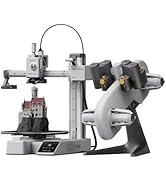
The Bambu Lab A1 Combo pairs high-speed FDM 3D printing with multi-color capabilities via AMS lite, delivering precise models with automatic calibration and active flow correction. Its ultra-quiet design (≤48 dB) and easy assembly make it ideal for professionals seeking efficient, vibrant, and hassle-free 3D printing.




| ASIN | B0D17V4SKM |
| Item model number | PF002-A |
| Product Dimensions | 58.45 x 53.49 x 42.6 cm; 12.93 kg |
A**7
Perfect Beginner-Friendly 3D Printer That Exceeded My Expectations
This review is exactly what I wish I had read when I first started researching this printer. As a beginner, this printer was more than enough to take me to the next level in 3D printing. It is an excellent printer, very beginner-friendly, easy to use, and simple to operate for daily printing tasks. The setup process was straightforward, and the printing quality has been consistently impressive. One important note: the printer does NOT come with filament included, so you will need to purchase filament separately before you start printing.
H**0
جميله جدا وعلى الوصف
M**M
أنة منتج جيداً من احسن الطابعات التي ريتها واتمني الجديد وشكرا
R**D
Bambu lab a1
Very good condition, everything works great!
P**A
Didn’t come with filaments (not combo)
Just received but didn’t come with the filaments.
J**L
Great 3D printer for someone starting out or just a hobbyist. Easy to use and quiet. My wife set it up herself and used it first. I bought this for my wife for Christmas and we've printed gifts for people, containers for fruits and vegetables, and light switches. I've also printed shelves and holders for the network gear and hubs on the office desk. It's compatible with many filament types - you can even print your own shoes similar Crocs. Recommend any first timer for any 3D printer watch a few videos about protecting filament from moisture in the air and you'll have great success with print jobs. I've found the Bambu filaments the most reliable and easiest to use - especially since their spools are tagged so the printer automatically knows what kind and color filament is on the roll. The AMS lets you keep four different spools loaded which is great for multi-color prints
D**W
After reading many reviews about 3D printers, I settled on this one with AMS Lite. I was not disappointed. The Bambu Lab A1 was recommended as an excellent unit for beginners and intermediate users, at an affordable price point. I have to admit that I am a complete 3D printing novice but reasonably tech savvy and quick learner. I was still a little nervous about setting it up, but the instructions from Bambu were very clear, and all the parts were well labelled and packaged. With lots of care, I took about 90 minutes to set it all up and needed about another hour or so to figure out the basic configuration and settings. After downloading the Bambu Handy app for my iPhone and later, Bambu Studio for my computer, I was off and running. Depending on your level of familiarity with tech devices and 3D printing, your experience could be quite different. The initial learn could take some time. But I am pleased to say that I managed to set up my printer including my AMS Lite (external filament spooler) and completed my first print job in the same afternoon. The printer comes with some 3D models preloaded into the printer and I selected a simple scraper which can be used to scrape the printer bed. By the next day, I was able to download 3D models from the internet and had them imported into Bambu Studio and successfully printed off on the Bambu Lab A1. But a word of caution, you do have to be patient as 3D printing takes time and there are many concepts and terminology that you have to become familiar with, and I still have a long way to go. But it was very satisfying to have my first 3D printer fully set up in an afternoon and successfully get my first few 3D prints working. I have already printed off 4 models, one taking up to 8 hours to complete. But if my experience is anything to go by, the Bambu printer is an excellent unit to get started with and offers so much more. The results so far have been amazing. I'm very happy with my purchase.
M**D
This 3D printer is amazing! The directions were a little challenging to follow, as I didn’t understand the lingo, but we were able to get it put together pretty quickly. The APP that you use along with it is super easy to navigate and the prints are great. There are so many choices of things to create! It was very easy to connect to WIFI and get going. It is not noisy and doesn’t require a large area for set up. We set ours on a nightstand and it’s the perfect size. Definitely worth the money as it is easy to use and works amazing!
A**ー
【良かった点】 ・最大500mm/sの高速造形でも品質が安定していました ・AMS liteによる多色造形で、作品に彩りを加えられました ・全自動キャリブレーションで、面倒な調整が不要でした ・アクティブ流量補正により、押出が安定して仕上がりが美しかったです ・静音性が高く、造形中でも生活空間に溶け込みました 【気になった点】 ・AMS liteが必須なので、多色造形を楽しむには追加投資が必要でした ・造形サイズは十分ですが、大型作品を作る人にはやや制限を感じるかもしれません ・ノズル交換は簡単ですが、予備ノズルを揃えておく必要があります 実際に使ってみると、組み立ては驚くほど簡単で、初心者でもすぐに造形を始められる安心感がありました。 高速造形でも造形品質に妥協がなく、細部までシャープに仕上がるのは感動的でした。 AMS liteを使った多色造形では、単色では表現できなかった鮮やかな作品が完成し、創作の幅が大きく広がりました。 静音性も特筆すべき点で、サイレントモードでは48dB以下。 『造形中でも図書館みたいに静かね!』と感じるほど、生活空間に馴染みました。 夜間でも気兼ねなく稼働できるのは大きな利点です。 電気代についても、定格消費電力を約300Wと仮定すると── 300 ÷ 1000 × 27 ≒ 8.1円。 『1時間造形しても電気代は約8円ね!』と安心できました。 毎日数時間使っても月額は数百円程度で、趣味として続けやすいコスト感です。 造形中にフィラメントが途中で絡まり、思わず『糸玉が逃げ出したみたいね!』と笑ってしまいました。 小さな事件も祝福のユーモアに変わりました。 まとめると、高速・高精度・静音・多色対応を兼ね備え、初心者から上級者まで安心して楽しめる3Dプリンターでした。
S**N
Note: Updates added below 31 October 2024 This is my third 3D printer in two years. That's an upgrade every 12 months and each the difference between night and day. I am as over the moon with the A1 as I was going from the Ender3V2 to the Voxelab Aries. Most definitely the best 3D printer I have bought/have. Just check all the advertised features. Something they don't tell you though are some of the minor issues you may have to deal with time after time; 1. If you don't like lights to be on all the time you will have to manually turn the camera light off every time you turn it on/print, 2. To turn the sound off (as a default) you need to be comfortable with changing G-code, 3. Material usage can be reduced (as a default) but you need to be comfortable with changing G-code, 4. If you don't feel the need to allow your printer to communicate over the internet then you will need to use "LAN only mode" and frequently input a PIN code to connect Bambu Studio to your printer before printing, 5. The on-board camera (and light) is rubbish and is also aimed lower than the print nozzle/bed with no ability to adjust, 6. This one is minor and could be my own fault - profiles in Bambu Studio seem to be both annoying and confusing at the same time, and 7. This one is also minor and could be my own fault - MakerWorld is a great resource but MakerLab is only useful if what you wish to design fits a template already on offer - no design from scratch from what I can see - and the search function at the top of the page searches all of MakerWorld rather than searching for a template. The above points are minor, and compared to my other printers these annoyances are only there because of the added features that those other printers don't have and likely never will. The A1 is a printer that takes most of the repetitive annoyances out of the users hands, and will likely notify you when you need to carry out some minor maintenance (grease and oil) at some latter date. Conclusion; a dream of a 3D printer. UPDATE: 21 November 2024 (orig 5 stars now dropping to 2) Just under a month, printing more as printer would allow, and I may have to go back to the tried and true Aries. 1. There have been some patches to both BambuStudio (definate) and the A1 firmware (from memory) and that means that profiles I have saved have gone missing. 2. Whats more is the printer has suddenly become very unreliable, going nuts 3 times this week and only partly completing many jobs sent to it at around 58% complete while reporting job complete at the printer screen and failing to move away or lower temps - may become a fire hazard if left unattended. 3. Failing to move away on reported completion of job has allowed printed parts to become fixed to the nozzle and may have damaged the "poop ejector" components. 4. It has also started to report FTP issues when sending files via the network and other file related issues when attempting to transfer files via SD card. Hoping it is (and also isn't) only an issue with the previous update and will be fixed with a new update. More to follow... UPDATE: 22 November 2024 (moved back to 5 stars) Issue caused by the supplied 32gb SD card becoming corrupt above 9gb. Some files corrupting but failing to report error caused incomplete g-code sent to printer. Swapped to a known good SD card and issue no longer occurs. Bambu Lab Support responded to a ticket in less than 24 hours and correctly diagnosed the issue first time. So pretty decent support.
Trustpilot
1 month ago
1 month ago