We remain fully operational. Our teams are working around the clock to ensure your deliveries continue safely.

DOWNLOAD THE APP


Customer Services
Copyright © 2025 Desertcart Holdings Limited
DOWNLOAD THE APP

♻️ Write smart, erase waste, and sync your genius instantly!
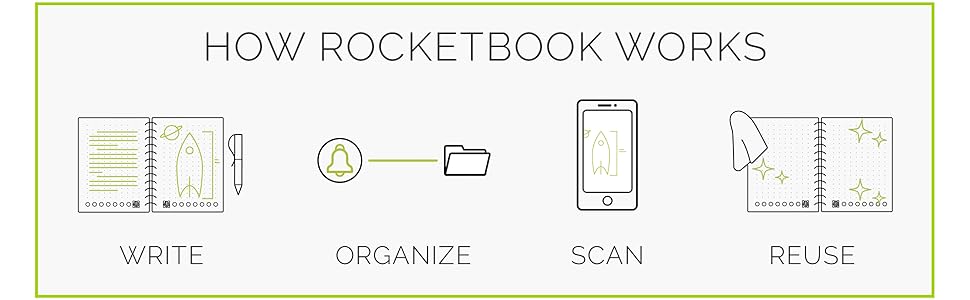
The Rocketbook Smart Reusable Notebook Mini (3.5" x 5.5") features 48 erasable pages designed for endless reuse with Pilot Frixion pens. It pairs seamlessly with the free Rocketbook app to upload handwritten notes to popular cloud services like Google Drive, Dropbox, and Evernote. Its compact size and AI-powered search tools make it perfect for busy professionals and creatives who want to digitize and organize notes effortlessly while reducing paper waste.



| ASIN | B07CYZYVMD |
| Best Sellers Rank | #9,239 in Office Products ( See Top 100 in Office Products ) #152 in Spiral Notebooks |
| Binding | Office Product |
| Brand | Rocketbook |
| Brand Name | Rocketbook |
| Color | Black |
| Customer Reviews | 4.4 out of 5 stars 11,261 Reviews |
| Global Trade Identification Number | 00855510007137 |
| Included Components | microfiber cloth, notebook, pen |
| Item Dimensions L x W | 5.5"L x 3.5"W |
| Item Dimensions L x W x Thickness | 3.5"L x 5.5"W x 0.4"Th |
| Item Type Name | Everlast Mini Smart Reusable Notebook, Infinity Black |
| Item Weight | 1.44 ounces |
| Manufacturer | Rocket Innovations, Inc |
| Number of Items | 1 |
| Pages | 48 |
| Paper Size | 3.5 x 5.5 inches |
| Pattern | Solid Color |
| Ruling Type | Dotted |
| Sheet Size | 3.5 x 5.5 inches |
| Special Features | Soft Cover |
| Style | Classic |
| Theme | Book |
| UPC | 855510007137 369374726863 850015045189 |
| Unit Count | 1.0 Count |
C**R
Best tool for a cop!
Cannot say enough great things about this product. I work in law enforcement and anyone who does, knows you go through a sh-t ton of notepads. This is the almost the same size and fits perfectly in my pocket. The pen works perfect that came with it. Can also write on regular paper with it too! Best thing is the price and the fact you can clean the screen with a soft cloth with a little moisture. Write your notes, take a pic, tell it where to send it and clean the book. Rinse and repeat. Best money I've ever spent and super HIGHLY recommend this to all my cop family. Folks, we buy so much crap, treat yourself to this quality item. You will NOT regret it!!!!
N**Y
Like Having a Scanner in Your Pocket
The jury's still out for me on this purchase. I ordered this mini notebook to try out the Rocketbook concept but this tiny-sized notebook was about $15. It comes with a pen and a cloth for wiping, but if you lose the pen, it's worthless unless you bought more pens. I must admit the "wow" factor is pretty cool. I showed the notebook to my 10th grade class and they had never seen anything like it. One student had used a single-paged tablet-type device but it appeared to be electronic. I projected my notes for our novel and they seemed impressed. The novelty was how I was able to capture the notes, so I did a demo. I didn't have any water, but when I erased a few pages at home, the ink slid off so easily, it was like magic. I can imagine all the fun things you could do to mess with people, like pretending you erased all the notes for something important but really, you had safely scanned everything. Setup for the app was simple and I had my first test page done and emailed instantly. Once I realized I could send scans directly to my Google Drive, I immediately sent one and it appeared in the drive right away. Now, for the drawbacks. First, the ink skips intermittently. When you have just one pen, the skipping ink causes anxiety. Second, the cost is prohibitive. Fortunately, the pens aren't too pricey on Amazon. The Rocketbook materials say it's the last notebook you'll ever need but in just one day, some of the pages already have scratches/remaining grooves from erased notes. Third, the "paper" is really just plastic. Oddly, the paper says not to microwave it. At a certain temperature, the the ink disappears...what?! It even tells you not to leave it in the car and to freeze it if the ink erases. So weird. But I guess that's cutting-edge tech and advanced product development for you. Finally, if you own a scanner - or have access to one - you really don't *need* this product. I *wanted* it and bought it and it's.. okay.
T**D
GREAT FOR PAPER CONSERVATION AND EASE OF ACCESS!
⭐️⭐️⭐️⭐️ Stylish and professional! The Rocketbook Mini is compact yet highly functional, perfect for on-the-go note-taking and great for conserving paper. I didn’t realize it was the mini version, but it’s still excellent and very convenient. Tip: You need to write in print/script, not cursive, for it to be properly recognized.
K**E
Great Notebook
This notebook is perfect if you want to digitalize your notes, especially for the price point. I have it go straight to my OneNote.
K**M
Note Taking to a Whole New Dimension!
For starters, if I were in a role playing game I'd be a Scribe-Wanna-be-Warrior. I kinda document stuff like a hoarder keeps anything they might run across. I don't remember details well past a few days, but my job relies on details. I've learned to thrive by writing/sketching down a lot of stuff that most people wouldn't even think to keep. The Everlast Mini is my newest attempt and I'm very happy with it! Initially, I was looking for what is apparently the older version – the one you throw into the microwave, but it sounded like the Everlast model is the newest approach Rocketbook is going with. Before this, I've used Notability, Livescribe, and of course pencil/pen & paper. I've been using the Mini for a month or so now. I chose this size because I wanted to have something super-portable. The size is perfect. I can still get a full-page sketch scribbled out or a decent amount of text before switching pages. Given the relatively short time, I wonder how durable these notebooks are. I don't think the pages will tear easy or the binding will break so that is good. There is some slight etching on the page that is left over, but that doesn't really limit future writing/drawing. I have a sense that the page will eventually take on a new "finish" because the etchings will cover almost the entire surface. You can only see them when you hold the page at a certain angle, so it doesn't affect the function at all. Anyhow, I gave a four star rating because I just don't know how durable the notebook will be. The pages erase quickly with water and a paper towel. I keep forgetting, but I want to pack a small water atomizer that I have left over from my Skinomi smartphone class protector kit. They send you one to wet the protector before installing over your iPhone. Anyhow that would perfect to be able to spray the page with water and then wipe it clean. After relying on digital-inputted notes for so long, it is great to go back to analog! There's something so much more personal about writing something out. It's also better in a consulting role to scribble out notes than separate yourself from the other person with a screen and keyboard. I've found this notebook encourages even more creativity because unlike pencil & paper, the only consumable is the ink, so I end up writing/sketching way more than I used to because I can just keep going and going. It reminds me of the transition from film to digital photography. I could take tons of pictures and not be worried about the developing and printing costs and I used to have my own darkroom. I'm interested in trying out the other pen types that Pilot makes for their Frixion line. Rocketbook makes it sound like any of these pens will work with their notebook. I want to try out some thin markers next. It would be great to have some kind of pencil-like experience too! Pilot, please invent the Frixion "pencil" - erasable with only water! There is an odd feel when writing though that you'll get used to. It does feel a little like you are writing on plastic at first, but I've gotten a hang of it. On a related note, the ink can be inconsistent at first because it doesn't always take to the surface of the page consistently. Once the pen gets going though, it's no problem. It's only the first character or two of your first word though, and not all the time. That might be more the pen than the notebook, but they are used together as a system. The ink also may take significantly longer than just 15 seconds to dry. I've noticed that some of my sketches take up to 90 seconds to dry before I can flip a page or close the notebook. The software doesn't pickup "edge bleeds" well. I wouldn't recommend writing/drawing to the black edge of the page. The software has a difficult time scanning these pages. The software doesn't always properly auto rotate the page. When it doesn't, it leaves the QR code and then it actually deletes part of your page. Caution, you can lose important information if you have it in the opposite corner. What is the QR code for if not to detect rotation? They all appear to be identical. Normally, it is deleted by the software so it's not an issue with your scans. One other minor thing is that sharing a scan via some other pre-programmed action takes a few extra buttons. It'd be nice if it were as easy to send to a different email ad hoc. Those minor things aside, I love the app. It is well designed and looks great. It didn't take any time at all to get up and running. Rocketbook may not like this because I have a cheap and super-effective way to keep your pen with your notepad... wait for it... Duct tape! I know their pen keeper doesn't get the best reviews – I haven't tried it. I found this way is perfect for me. Just cut a piece of duct tape that is the length of the circumference of the pen, then stick it to a longer piece of duct tape so that the sticky sides adhere to one another. Then tape it to the back edge of your notepad and you have a 3-min, half-cent, flexible, durable, and even colorful pen holder! By the way, I've started to use their Beacons as well and absolutely love them! I need another set because I lost them :-(
N**R
Another tool for my ADHD toolkit that I actually use
I get it. The ADHD joke. There are piles of notebooks in my house that I've bought to help tame my ADHD, and my Amazon account holds the proof. But this little wonder, this little gem, holds the key that unlocks the secret to the Great Notebook Destash of 2023! I have a couple of Rocketbooks. A larger one, and this small one. This is my sidekick. I like the ability to quickly and easily write notes and then destroy them with a spray of water and a wipe with a microfiber cloth. I'm sure there is value in the cloud storage, but I haven't got as far as exploring that yet, as I use Notion and I understand that it's not yet possible to save my notes to Notion without some great finagling of APIs. The Rocketbook is durable. You write on the vinyl-like "paper" and don't have to be concerned that your vigorous wiping (with the abovementioned microfiber cloth) will somehow pull the pages away from the spiral binding because it can be tempting to wipe hard to get the black ink off the page. Leaving the ink there for a while can cause it to leave a more permanent imprint on the page, I'm told, though I haven't run into this problem yet. The Frixion pen that comes with the notebook writes nicely. It glides on the page smoothly and doesn't seem to smudge. I did buy the pen holder because my desk is a mess and I'm notorious for losing pens, even though I have 2 pen cups on my desk. I wanted to make sure the pen I need to write with didn't get swapped out for a regular pen, a permanent marker, or some other incompatible pen. Safety first! The pen holder was a breeze to apply and has kept my Frixion pen safely attached to my Rocketbook since day 1. The microfiber cleaning cloth is just slightly smaller in size than the notebook, and so it sits unobtrusively in the back of the notebook and is always there when I need it. My main use for this smaller Rocketbook is to take notes of things I need to remember temporarily - things I would normally write on sticky notes, scrap paper, or old envelopes. It sits beside my work computer so I can remember what I need to report on in our Agile stand-up meeting, and then erase the notes as soon as the meeting is over. I can note down action items during meetings, then erase them as soon as I've completed the tasks, or moved the note to my calendar. Prior to Rocketbook, I'd have piles of sticky notes and other paper scraps, and not remember what I'd completed, or where I left the note I had just taken. I think the Rocketbook works well for me because I know there are limited pages, so if I'm only writing in the Rocketbook I have to keep it updated (by erasing notes I no longer need) to have room for more notes. There isn't really a downside to using a Rocketbook. You do need to only use Frixion pens, but you can get them in so many pretty colors that it's really no hassle at all! Now I need to go through and cull my Amazon wishlist, removing all the sticky notes and notebooks that I've amassed over the years. Then I can get rid of all the small notebooks and piles and piles of sticky note pads - I just don't need them anymore. Thank you, Rocketbook!
D**S
Works great !
Love the notebook. Works just like it's suppose too! The kids especially love it!
O**N
This is great if you don’t use the app and don’t use markers or highlighters
This thing is like having a 15 page mini-whiteboard in your pocket. It’s great! You just have to have the right Frixion erasable gel pens for it to work. Unfortunately, though, I find there are some things about it that are a complete waste of money and materials that unnecessarily reduce its value: 1) Don’t use the app, it’s a privacy/security problem regardless of what the “privacy policy” says. Just scan the pages with your own “scan” app that doesn’t collect tracking information. There’s no legitimate reason why anyone needs to collect tracking information of any sort about your note taking and it doesn’t matter if they claim you aren’t identified. None of the features they offer for organization etc are unique to their software. 2) Don’t use the app’s handwriting recognition. There’s no reason why this has to be done on a remote server or why any tracking data needs to be collected on it. If you need this then use other OCR software that does everything on the local device. 3) The QR code is a waste of space and is completely unnecessary. It seems to contain very few bits of information but the company isn’t very upfront about telling you what it’s for. The same exact code is on all pages, so it doesn’t help with page numbering. If the page dimensions are encoded then it’s a very wasteful way of doing it. If it’s for tracking then that’s not only a waste of space but also a privacy violation. The code is useless and it’s a serious waste of space on such a small pad, reducing the value of what you’re getting. 4) The polymer material they are using really only seems to be suitable for the frixion “gel pens”. (0.7mm work best, even though it came with an 0.5mm). Even though they claim other things like markers will work, they put down too much ink of a less suitable formulation and make too much of a mess trying to remove. Some colors of marker are especially resistant to cleaning and won’t even wash off completely under running water. Basically they’ll turn into a messy oily smear that may still leave a slight tint on the page even with a lot of wiping. Yellow seems to be the worst. So I’d just forget about using anything other than the “gel” type mini rollerball frixion pens. (And yes I used actual Pilot Frixion brand markers and highlighters.) 5) The small pad comes with a 0.5mm pen but this is a bit too thin on the hard polymer surface of the pages. This makes the lines too thin to see well and would only make sense if you’re going to write very tiny. I think 0.7mm is much better for most people so I’d recommend getting one of those thicker point pens. 6) I haven’t tried every color but so far every “gel” type ink color I have tried (black, red, blue) seems to erase equally well. 7) The need to let the ink have some time to dry can be more of an issue on the small notepad where you may need to flip the page before it’s dry so you can continue writing. Might want to keep a blotter sheet in there or something.
Trustpilot
1 week ago
2 days ago