
💧 Smart watering made simple—stay connected, save water, and grow greener!
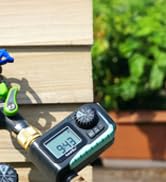
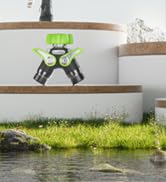
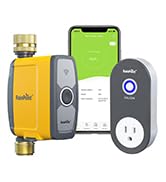
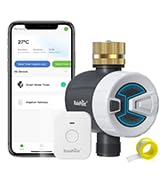
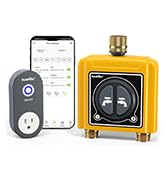
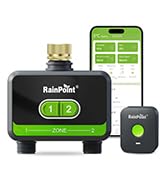
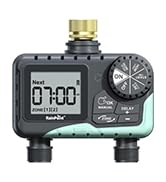
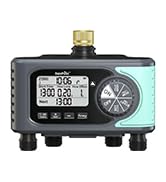
The RAINPOINT WiFi Water Timer is a robust, dual-zone sprinkler controller featuring durable brass inlet and outlet fittings. Designed for 2.4GHz WiFi networks, it offers seamless remote control without requiring a separate hub. Lightweight and compact, it enables precise watering schedules via an easy-to-use app, making it ideal for modern smart gardens. Highly rated for reliability and supported by responsive customer service, it’s the perfect upgrade for efficient, hassle-free irrigation.









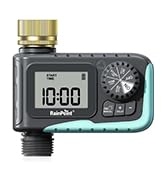





| ASIN | B0D1QQYFRF |
| Brand | RAINPOINT |
| Color | Yellow |
| Customer Reviews | 4.2 4.2 out of 5 stars (239) |
| Date First Available | 8 June 2024 |
| Item Weight | 454 g |
| Material | Brass |
| Model Number | B |
| Product Dimensions | 2.54 x 2.54 x 5.08 cm; 453.59 g |
F**.
I purchased 3 of these in May 2025. One has worked, and continues to work, great with no issues. After using one of the others for months, it began leaking from the bottom. I switched it out to the one that’s remained in its box since May, and that one also leaked (but not as bad). Besides the leaking water, they are exceptional, easy to use, have had no mishaps with the timer, with user-friendly app. I contacted customer service regarding the issue - best customer service experience ever!! He was very professional and is sending me 2 replacements. They truly stand behind their products!!
D**Y
Over the past ~ 3 years I have purchased Qty 7 @ Rainpoint water timers and LOVE their product. I've used them to replacing aging/eaking valves from our old wired system and these work great. I've also used them to install sprinkler systems in new areas of our yard as well. The fact that they are wireless makes them very easy to install. No more having to run wires to a remote location of our yard. I previously owne a water valve/timer from another company that was controlled via Bluetooth only, and I had to have my phone VERY close in order to control it - not good. These Rainpoint units work using WiFi which gives them very good range, and I can control them from anywhere in the world (where I have internet access). For this reason I installed a 2 valve timer at our vacation home also. It makes controllling it very convenient since I can manually turn on/off our watering system from over 600 miles away! I've only had one issue with a timer and their tech support has been very responsive and corrected the problem with a prompt replacement unit. I highly recommend Rainpoint products and their tech support.
J**.
This 2-zone wifi water timer worked great for watering our garden. It was easy to set everything up in the app and it consistently watered our garden every morning throughout the summer. The app even has a rain delay function, so it won't turn on if rain is predicted for that day. It was also easy to use the manual button on the timer to fill up water jugs and/or buckets. I did have an issue with the device after about 4 months of use, but I reached out to their customer service and they responded immediately! They were great to work with! A lot of companies don't stand by their product if something goes wrong, but this company is wonderful. Overall, I would definitely recommend this product. It is a huge time saver versus manual watering.
N**9
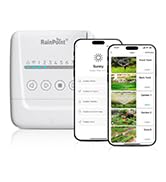
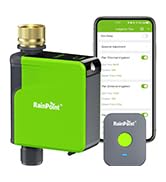
Let me start by saying I have the Rainpoint sprinkler timer, too. It uses the same app, which is convenient. The strange thing is that the app is a little better for this water timer than for the sprinkler timer. Set-up is easy. There's step-by-step instructions to follow. Install the app on your phone and create a log in. Then plug in the WiFi hub. The hub will start blinking and you use the app to connect a new device, choose the hub (everything is represented graphically, so you choose the item that looks like the hub), enter your 2-g Wi-Fi password, and blam-o, it connects. Then put batteries into the water timer and repeat the process. The app automatically connects the water timer to the Wi-Fi hub. Now you're set to start watering. My hose spigot is already pretty crowded. I have a 1-4 expander, so I have hoses that go to the driveway, the backyard hose reel, the soaker hose, and the raised garden bed. Because of this setup, I did not want to hang the somewhat heavy water timer from the expander, so I made a short piece of hose so I could mount the water timer somewhere unobtrusively. Connecting the hoses to the water timer is much as you'd expect. Hand tighten, watch your threads, and use the provided Teflon tape. Before I connected my outlet hoses, I tested the on-off of the water timer, both manually and on the app. This also helped me look for leaks. Because nothing is a manual switch, both the manual buttons and the app have a slight delay to open and close the water, but it isn't more than a few seconds. Then I connected the outlet hoses and tested it again. Good to go! Much like the sprinkler timer, you can go into the app and set up a schedule for the water timer to run. You can set start time (and end time), days to water, and whether you want a rain delay of 24, 48, or 72 hours. You can set up to 3 schedules for each side. If you'd prefer, rather than an end time, you can choose a water amount. Once it reaches the specified output, it'll shut off. I never tested for accuracy, because I'm used to turning on the hose for the garden and setting a timer for 30 minutes, so that's what I did here. The rain delay is a mixed blessing. If the app receives a weather forecast where rain has or is falling, it won't run for the set time. Usually, this is great, but sometimes we might have a forcast of rain and nothing reaches the ground, but the app doesn't know. When the rain delay is on, it will also prevent you from turning on the hose manually. Fortunately, you can turn off the rain delay temporarily, but I think there should simply be a rain delay over-ride. The sprinkler controller is the same way. I get alerts--zone 1 has started. Zone 1 has finished. I like these alerts because with set-and-forget things if it stops working I might not realize until my garden looks dry. Here's what's odd to me: The sprinkler controller (the same app) doesn't notify me when my sprinklers are running! One bonus that I was not expecting: The Wi-Fi hub has an outlet on it. I thought that was nice, so it doesn't take up an outlet. But no, it's better: It's a smart outlet. Plug a light or something into the Wi-Fi hub and control it remotely! You can even set up a timer in the app (not as good as the water timer). The app is not the most user-friendly, and what I mean by that is I didn't pick it up and immediately intuit how to use it. It took me a few minutes. It feels strange to navigate, the first page is all your devices. In my case, that's the Wi-Fi hub, the Wi-Fi hub outlet, the water timer, and the sprinkler timer. Click the Wi-Fi hub and the devices connected to it are presented. Clicking on them here is the same as clicking on them on the prior screen. There are four menu icons on the bottom: Parameter: Shows the two zones, how much water the prior run used (no history beyond last run), battery status (the outdoor timer takes 4 AA's), and the next scheduled run. Manual: Set a run-time up to 60 minutes and turn the zone(s) on. I do like that there's not an option to run forever. Plan: Set up Plan A, B, C for each zone (total 6 plans). Turn plans on or off. So you could have a cool-weather plan, a warm weather plan, and a heat wave plan. Set the Rain delay. This is also where you turn off the rain delay to manually override it. Sensor: The Wi-Fi hub can connect to several soil sensors (I don't have one), so you can see if you need to water or not. I don't know if there's a way to have the soil sensor trigger a run. I doubt it, but it would be awesome. Also, you can see your historic water usage here for the past 10 days. My: Instructions and Contact, as well as where you can connect the water timer to Alexa or Google Assistant. I have not done this. The Wi-Fi hub can connect to other items, so you could add additional water timers and soil meters. I think if you don't have an in-ground sprinkler, this would be a great way of using sprinklers and hoses to replicate that setup. Have a pool and add water in the hot months, I can think of many uses for a bunch of these devices, and Rainpoint seems to have a lot available. Overall, I really like this product a lot. I used to water my gardens manually and the manual timer I had would sometimes stick or I'd forget to turn the water off. Having a simple to use app to control it simplifies things a lot. The only gripes I have: I'd like the rain delay to be easier to override. I'd like the sprinkler controller to send notifications like the water timer. But I wouldn't take away a star because it's not significant enough of an issue.
B**S
Bought these to split up sprinklers around my front and back yard. The instructions were pretty easy to understand and use but getting the wifi setup was a bit weird as some others have stated in their reviews. App is easy enough to use and understand. I took one star away simply for the use of the app itself. The UI is fairly clunky and at time frustrating to use. There is a 1-2 second delay from when you turn the different watering modes on and off. I have since gotten use to it but it could certainly be laid out better and be more user friendly. There is quite a bit of settings to play around with such as picking days to water, time and duration. Also has a rain delay function which is handy. My only gripe with the settings themselves is it doesn't allow you to do more than 3 watering's per day. For some i'm sure it's fine but with new grass seed i'd prefer more. You can manually water within the app but if i'm busy at work I tend to forget about it. Battery life on the device is great. I have used it all year so far, probably 100+ times and haven't had to change the batteries yet. Overall, great price for what you get and would definitely order again if I needed another.
Trustpilot
2 weeks ago
1 month ago



