
DOWNLOAD THE APP


Customer Services
Copyright © 2025 Desertcart Holdings Limited
DOWNLOAD THE APP

🎬 Own your frame, anywhere, anytime!
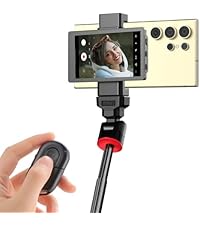
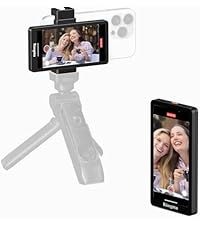
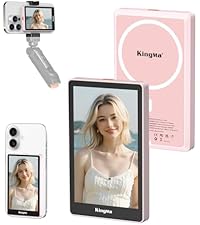
The Selfie Monitor Screen for iPhone is a compact, 4-inch 4K 30fps external display designed exclusively for iPhone 6s Plus and later models. It offers real-time rear camera monitoring via wired or wireless Bluetooth connection, enabling creators to capture flawless selfies, vlogs, and live streams with zero latency. Featuring a magnetic phone clip, 1/4-inch mount compatibility, and a remote control with a 33-foot range, this monitor empowers millennial professionals to elevate their content creation with ease and style.



| ASIN | B0CQ4R977J |
| Batteries | 1 A batteries required. |
| Best Sellers Rank | #43,112 in Cell Phones & Accessories ( See Top 100 in Cell Phones & Accessories ) #116 in Cell Phone Photo & Video Kits |
| Connectivity technologies | USB-C |
| Customer Reviews | 4.0 4.0 out of 5 stars (180) |
| Date First Available | August 20, 2024 |
| Item Weight | 7.1 ounces |
| Item model number | PH01-MAX |
| Manufacturer | Shenzhen Kingma ElectronicsCo.,Limited |
| Other display features | Wireless |
| Package Dimensions | 6.34 x 3.86 x 1.61 inches |
| Special features | Compact |
| Whats in the box | screen |
| Wireless communication technologies | Bluetooth |
I**R
In-depth review of versatile iPhone monitor - teleprompter, remote camera monitor
This device is very useful for someone looking to record for video or audio for podcasts, YouTube, and webinar/course creation. Here are some questions I had. Can it operate without a power cord? Yes. It has a built in, rechargeable battery. Can it be used wirelessly? Yes. If you choose the device as your wireless SSID source (WiFi on your iPhone) and then mirror your phone, then you will see it on your phone. (Note that the monitor also needs to be in mirroring mode. There is a slider switch on the side.) See photo showing the screen-mirror with no cords at all. Why is wireless useful? The devices do not have to be in the same place so you can record a distance away like action footage, you can charge your iPhone while you record and monitor yourself, or you can attach a USB mic like a Blue Yeti to your iPhone while still monitoring- it’s not an either/or situation. What cables does it come with? It comes with 2 cables. It comes with a sharp USBC to USB A cable to power and charge the monitor. (I used one that I already had.) It also comes with a short USB C to USB C device to connect the monitor to your iPhone if it has a USB C connection. My iPhone 12 has a lightning port. And it works with a lighting to USB C cable that I had. It should also work if I added a USBC to lightning adapter with the provided cable. (I did not use either of the supplied cables.) What happens when you use a wired connection? It’s very, very easy to connect this way. You just turn it on and wait a few seconds. Then it will mirror your screen. See photo. ( I also switched the screen mirroring mode to the other side… not sure if this was required as the settings are not readable or mentioned in the manual.) Can it be used with a tripod? Yes! It has a threaded 1/4” hole at the bottom. See pic. Can you mount it to a phone? Yes! See my pic. I am using a MagSafe mount with a cold shoe adapter in the cold shoe port on the monitor. This means it is easy to have a standalone recording set up where you can see yourself. See pic there I am holding this completely wireless assembly; I had not yet attached it to a tripod but hopefully you get the idea. To me, paying $50 for a monitor that shows you that it is not viewing the area behind it instead of you is a much better deal than a $25 reflection mirror because the two can operate a distance from each other, such as a teleprompter mode. Additionally, being able to pick up a tripod with the iPhone and move it to a different area. Do you need to install an app? No. There is a QR code that takes you to an IP address - just like a router’s admin settings does. Do you need the manual? No, not really. The instructions are on screen when you turn the device on. But, reading both helped me to understand how to use it. Now, I shouldn’t need it anymore. I did find the diagrams on the features page to be very helpful to make sure that I had the USB cords connected in the right slot and knew how to power it on. Comments - As you can see from my set up, seeing what I am doing is very important to me. I am using both a mirror and a camera screen to see what is being recorded and to make talking to a camera feel more natural. Along those lines, I like that I can see what the iPhone is recording if I am using it as a camera and not just what should be in frame. Here, I am using it with my camera as a teleprompter. I like that it is a monitor that I can set up once and leave in place rather than having to keep fussing with the setup. I like that it leaves me free to use my iPhone. So, I feel that this device is extremely versatile and infinitely helpful. If I had known about it, I am not sure if I would have bought a camera. But, as I have both, I feel like this really adds the possibility of both a fixed teleprompter setup where my phone is free to use and the opportunity to create a multicam set-up where I can see what is being recorded. If this is not what you are looking for, I hope that this review gives you an idea of what this is and helps you to not fall into the misunderstandings that other buyers seem to have fallen into. Final note - I noted that the wireless mode is limited to 1080p. First, if does not matter at all if I am using my iPhone as a teleprompter. As a camera, there is a debate as to where 4k is needed at all. Some argue that a majority of people are using their iPhone or other mobile devices to consume content rather than a large monitor. This sounds compelling to me. Still, I do like having the option for 4k if wired. But, as this is just a monitor and not what is being recorded, I am confused about this still at this time.
I**N
Does the job really well!
I love this little gadget - I can cast the screen wirelessly and wired. I'm a little disappointed that the wired connection doesn't work when I connect it through a USB-C hub, but I am using it wirelessly. Overall, I cannot see any lag and the wireless clicker is a life saver... Overall, this has helped me improve the quality of my videos. It was very easy to use and install.
M**I
Poor connection and constant lag
The screen freezes all the time and often shows “camera not available.” It sometimes connects after several minutes, and other times it doesn’t detect the phone at all. Bluetooth is unstable, and the image frequently cuts out while recording. I expected an easy tool for vlogging, but it turned out frustrating and unreliable. Definitely not worth it.
G**O
Good quality
Excellent product !!! I’m happy with it!!!
C**C
Fair and Honest Review = Pretty Useful
I will be completely objective and hope you can trust my review. I'm a content creator who heavily relies on my phone when capturing videos and photos, but the selfie camera is never as good as the back camera. I bought this product to help take higher-quality selfie videos and photos, and I'm very pleasantly surprised by this product. This product definitely takes your selfie game to another level with selfie mirroring, zero latency, and the ability to continue to use your Bluetooth device at the same time. However, I don't really use the product since it's a second device to charge, setup, manage, and carry around. Compatible with: Samsung Galaxy S20 5G Pro's: - Selfie Mirroring - Zero Latency - Ability to Use a Separate Bluetooth Device - Magnetic Backing - Like a Second Screen Con's: - Cable MUST be Connected - Connection Does Not Charge Device - Bulky - Tedious and Slow Setup - Not Touch Screen
D**S
Ideal screen for vlogs and moving content
The KingMa VL-PH01 Max screen is perfect for recording vlogs with your mobile. It connects wirelessly and allows you to see you while recording, improving the framing. The image is clear, light and easy to use. Ideal for content creators looking for practicality and good visual quality.
D**M
No from me
I'd pass if I were offered another chance to buy this. INCREDIBLY laggy and dies quick in my humble opinion. Pretty hefty for such a small device...TTS definitely has a better deal & better product contrasting from this WHOPPING $50 mirroring device. No thanks...skip the hassle. The only reason it gets a 2 star instead of a 1 star is it's durability. I'm a clumsy gal and have dropped it a few times on carpet from a drop height of 5 feet and some change ish (my height). So yeah....besides durability I'd give it a 0 star if I could.
A**A
Great for back cam selfies, not for video
Great item and easy to connect to my phone. Perfect for selfies with the back camera and the quality of the screen is very clear. This item though is not great for videos. There is a lag, and a big one at that. You’ll be sitting there forever waiting for the video to catch up.
E**M
No sirve
Trustpilot
1 month ago
5 days ago