
DOWNLOAD THE APP


Customer Services
Copyright © 2025 Desertcart Holdings Limited
DOWNLOAD THE APP



🖥️ Code smarter, see clearer, work longer — the ultimate pro coder’s display.
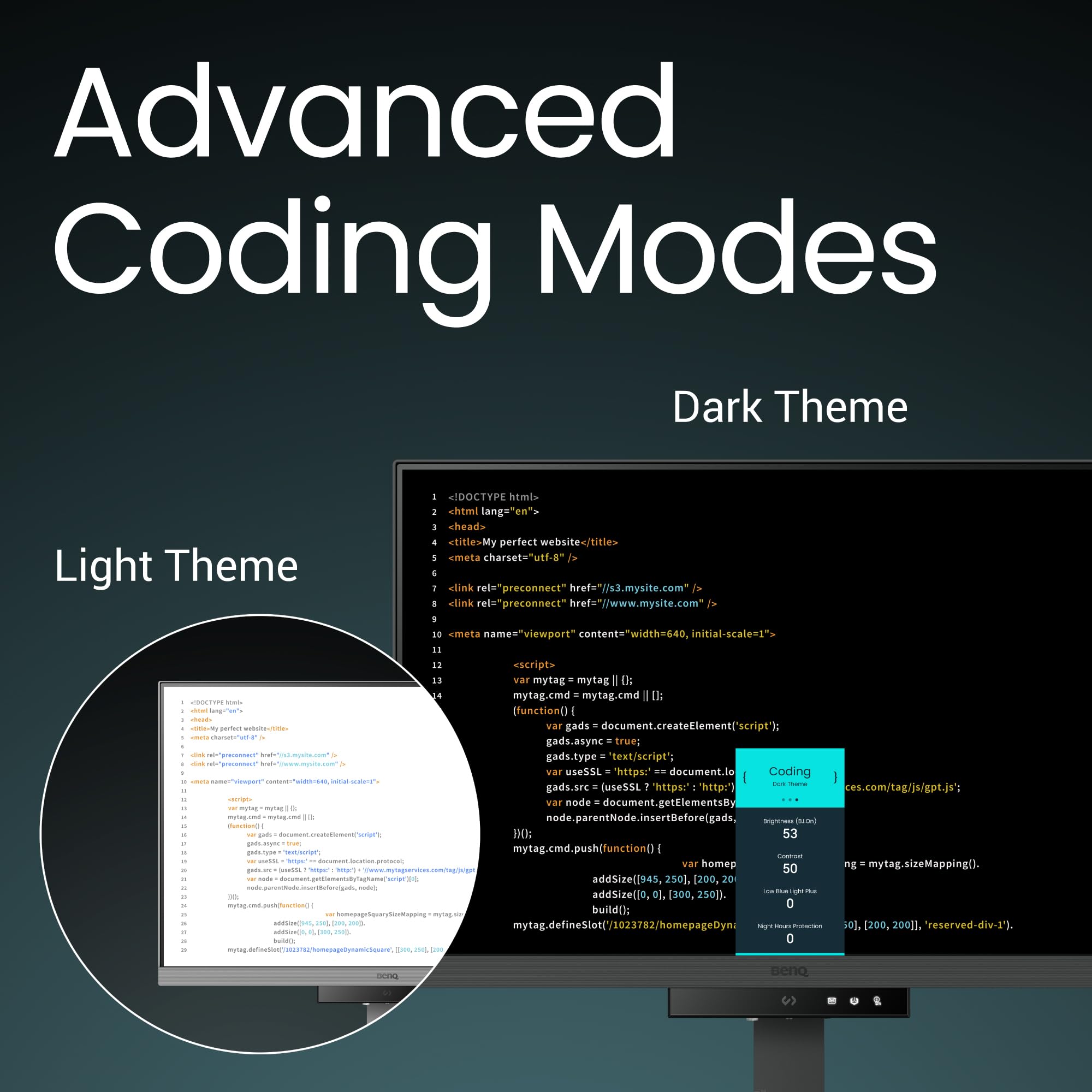
The BenQ RD240Q is a 24.1-inch WQXGA (2560x1600) LED monitor designed specifically for programmers, featuring advanced coding modes for enhanced font clarity, a rare 16:10 aspect ratio for increased vertical workspace, and a 90W USB-C port that powers and connects your devices with a single cable. It includes eye-care technologies like Brightness Intelligence Gen2 and TÜV Rheinland certification to reduce eye strain, an ergonomic adjustable stand, and eco-friendly materials, making it a premium, productivity-boosting tool for professional developers.


| ASIN | B0D2KVY1FG |
| Adaptive Sync | FreeSync |
| Aspect Ratio | 16:10 |
| Aspect ratio | 16:10 |
| Best Sellers Rank | 12,522 in Computers & Accessories ( See Top 100 in Computers & Accessories ) 249 in Monitors |
| Brand | BenQ |
| Brand Name | BenQ |
| Colour | Black |
| Compatible Devices | Devices with HDMI, DisplayPort or USB-C ports |
| Contrast Ratio | 1000:1 |
| Customer Reviews | 4.2 out of 5 stars 140 Reviews |
| Display Technology | LED |
| Display Type | LED |
| Global Trade Identification Number | 04718755093272 |
| Hardware Connectivity | DisplayPort, HDMI, USB Type C |
| Has Color Screen | Yes |
| Image contrast ratio | 1000:1 |
| Item Dimensions D x W x H | 22.8D x 53.3W x 52.2H centimetres |
| Item Weight | 7.6 Kilograms |
| Item height | 52.2 centimetres |
| Manufacturer | BenQ |
| Maximum Display Resolution | 2560 x 1600 Pixels |
| Model Name | RD240Q |
| Model Number | RD240Q |
| Mounting Type | Desk Mount |
| Native Resolution | 2560x1440 |
| Network Connectivity Technology | DisplayPort, HDMI, USB Type A, USB Type C |
| Picture Quality Enhancement Technology | Wide Color Gamut, Brightness Intelligence Gen2 |
| Pixel Pitch | 0.274 |
| Product Features | Blue Light Filter, Eye Care, Height Adjustment, USB Hub |
| Product Warranty | 2 year manufacturer. |
| Refresh Rate | 60 Hz |
| Resolution | QXGA Wide |
| Response Time | 5 Milliseconds |
| Screen Finish Type | Matte |
| Screen Size | 24.1 Inches |
| Screen size | 24.1 Inches |
| Screen surface description | Matte |
| Shape | Flat |
| Specific Uses For Product | programming |
| Total HDMI Port | 1 |
| Total USB 2.0 Ports | 3 |
| Total USB 3.0 Ports | 3 |
| Total USB Ports | 3 |
| Total Video Out Ports | 1 |
| Viewing Angle | 178 Degrees |
| Voltage | 240 Volts |
| Warranty Type | 2 Years Manufacturer Warranty |
M**S
Great for coding
This monitor is excellent. I'm a professional developer with a 3 monitor setup, and this is the best display I've used. It has modes for coding in light mode, dark mode, and an SRGB mode for when colour accuracy is important. I mainly use dark mode, and it's fantastic. The contrast ratio is just like using an OLED, and it's very easy on the eyes. The anti reflection coating is pretty good, but not as good as on the flagship Samsung TVs. The halo back light also helps to reduce eye fatigue. The 3:2 aspect ratio is brilliant for developing. You don't miss out on any screen size, as it's a 4K monitor with some extra pixels at the bottom of the screen. This means any 4K media plays in native resolution, just with bigger black bars than on 16:9. The monitor also has a built in USB hub, and KVM. It has a thunderbolt 4 connection with 90W of power delivery. By plugging your keyboard and mouse into the monitor, you can plug the USB C thunderbolt into your computer as a one cable solution for power, display, and peripherals. The KVM means it can be connected to 2 computers at once, with an easy way of switching between them. It's pretty cool being able to connect with just one cable, and makes it easier to connect laptops and tablets without needing an expensive dock. I'd like more than one of these monitors, but the price is quite high, and I also need to keep at least one standard monitor, so I can test UIs on a more standard resolution and aspect ratio. I might buy another if the price comes down on black Friday.
T**D
Fantastic monitor
What a great fantastic monitor with great black levels unlike my other Dell ips screen. Nice and clear text and the added resolution really does help and the size is perfect. The moonlight is adjustable is colour white to yellowish and the intensity. Attached is the lowest setting with yellowish colour. This monitor also does 90w power deliver and video and also has mst so you can connect second screen to this monitor which will pass it through to any device so with built in kvm I can switch from my work laptop and PC and use a added second screen. I have mine paired with a small portable monitor.
G**N
Big fan of this size, and the automated brightness control
I'm a full time software developer. I was using a 25" 1440p Dell (nice, but discontinued) and needed to get a second monitor for another location. I initially picked 25" over 27" on purpose, having read Nick Janetakis's article on the ideal screen size for developers (long, but worth a read). I find text on a 24" to be just as legible as my 16:9 25", but appreciate the extra height of 16:10. I also prefer the colours and contrast on the BenQ, and its ability to adjust itself to the ambient lighting conditions is superb. So in all respects, I prefer this BenQ to my Dell. I'm still using the Dell, but on a different desk. No need to buy stuff we don't need, right? I was also 28" curious, and did try the 28" version. It's got a very nice image, but (as a tiling window manager user) I found that I was turning my head left and right a lot, and rarely looking at things in front of me. It's tall too, so a lot of stuff I'd need to read would be near desk level, which has a fairly negative impact on my posture. Conclusion: I'm far better off when my windows (which fill my screen) are on a display whose edges aren't so difficult for me to see. This is also why I prefer a single screen. I usually put code on one workspace, documentation on another, and switch between them with a keystroke more quickly than I could turn my head to look at another screen. Occasionally I need docs and code side by side, in which case I'll put a browser next to my editor. That works great too. Often I'm working on an app, and will put the app's UI next to the editor so I can see the impact of my changes in real time. Also great. And if I need to see two different files, they're visible side by side in a full screen editor. End result: I'm pretty confident I've got the best monitor on the market for tiling window manager users who don't want to be turning their head a lot, looking up/down too much, etc. Also, on looking up/down, beware a monitor that's so tall that you need to read things above eye level. It requires your eye to be wider open than normal, which increases the rate at which the lens dries out. Combined with our tendency not to blink when looking at a screen, this can increase your chances of getting dry eye disease. I'm now an eye drop user, and I think it's because I used to position a monitor a bit high. So that's another reason not to get a bigger one.
S**T
I'm not sure why we ditched 3:2 aspect ratio monitors!?
As a lifelong software engineer I've used a lot of monitors. More recently the Apple Studio display (which is top of my leaderboard still). The Asus ProArt which is amazing for content creation (Photoshop, Premiere Pro) but alas they are all wide, very wide. When I first saw this "coding" monitor I thought it was a gimmick but after watching a lot of reviews and reading their literature I realised this is what I needed all along. Rear halo light aside, the ability to have a tall high resolution screen that at the tap of a switch change the display modes on was and is just a god send. I can now how modes that look terrible for content and surfing but awesome for the contrast of my pages of code and with a simple switch change back to normal mode. Brilliant idea for a product. You might have issues with some games but that's what my 16:9 display is for. As for ports again another great selection. Latest display port, HDMI and two USB-C one and a KVM feature to stop swapping mouse and keyboard connections! Perfect when you have a PC and Mac you switch development between! The speakers aren't great as is with most monitors display hence the 4 stars I would've given 4.5 stars but couldn't!
S**N
Game changer for my home office
I work from home and decided I needed a new monitor to help me deal with eye strain and headaches that I sometimes get after long days at work. I have a decent 1440p high refresh gaming monitor which looks fantastic for gaming and videos, but wasn't ideal for what I actually do 95% of the time I am at the computer i.e reading text. I decided I wanted a 4k monitor for increased text sharpness, it also needed a KVM switch for easy switching between my personal PC, USB-C power delivery and display port for easy connection to my work laptop, and daisy chaining for easily connecting a second display. These conditions limit the options somewhat, Dell do a good USB-C hub monitor that meets the criteria but I opted for this because I was intrigued by the 3:2 aspect ratio, the eye care features, and the focus on displaying text well. So far I absolutely love this monitor! It's much more comfortable on the eyes than my previous setup, text looks super sharp and I can read whilst sitting farther away. I keep it in dark mode most of the time but can switch easily to a brighter mode for photos/videos with the function button. KVM / Daisy chain / power delivery all work just as I hoped allowing me to massively declutter my work area. I think how much you value the 3:2 aspect ratio will depend on your workflow but I find it hugely beneficial. I'm never going back to 16:9, in fact even though I got this specifically because it could daisy chain a second monitor, so far I haven't even needed one and am back to a single monitor setup. The light sensor and backlight are terrific ideas, it allows the monitor to adjust to the light levels automatically without you having to fiddle in menus, this gives comfortable viewing night or day. Overall I'm delighted with it, but I have some nit picks / things you may want to be aware of. * 3 USB ports isn't enough for a hub monitor I don't think, and there should be some on the back for better cable management. The Dell monitor had 6, even my gaming monitor had 4. * Although light sensor is great, but the screen flashes up a notification when it is changing the brightness which is unnecessary and can't be turned off. I don't need to see a pop-up on my monitor when I open the curtains. * When the monitor goes to sleep it powers down the USB ports, which might cause issues for waking PC from keyboard or other features. Overall I'm not knocking of a star because the image quality, eye care features and 3:2 aspect ratio are real game changers for me. I'm a programmer but would recommend this to anyone who's work primarily involves reading/writing text all day.
C**4
Extra vertical space!
The rare 3:2 aspect ratio is also ideal for anyone who deals with documents, websites and text. A very useful deep screen and super sharp text - I'm really happy with this monitor.
J**R
A huge improvement on my older screens
Only had this monitor a few days but it feels so much better than my older Dell HD one. The black is so much better - I never realised how dark gray my old monitor was. Text is sharp and using the monitor is a few better experience than I've had previously
M**N
Good screen, poor KVM
Good screen for any text-based work. Unfortunately the KVM function isn't good - when it works it's quite slow, and often it doesn't work at all with the bundled Display Pilot 2 software. You can set up keyboard shortcuts on Windows and Mac, but these only work intermittently. Contacting Benq support just involves you doing their testing for them. Yet another piece of new tech let down by flakey software. What this screen really needs is a hard-wired KVM button like others. Look elsewhere if you need this functionality.
Trustpilot
3 days ago
1 month ago