
DOWNLOAD THE APP


Customer Services
Copyright © 2025 Desertcart Holdings Limited
DOWNLOAD THE APP

🖤 White never looked this powerful — build bold, build visible.
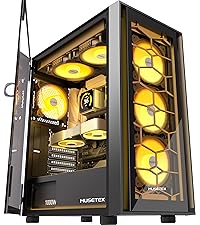
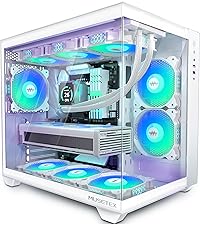
The MUSETEX Y6 ATX Mid Tower PC Case redefines gaming aesthetics with its 270° tempered glass panels and pristine white finish. Designed for serious builders, it supports up to 400mm GPUs, 360mm liquid coolers, and features a dual-chamber layout with three pre-installed 120mm fans for superior cooling. Equipped with USB 3.2 Type-C and USB 3.0 ports, tool-free panel access, and magnetic dust filters, it balances high performance with sleek, modern design—perfect for professionals who want their setup to impress and perform.




| ASIN | B0CWTYD1XJ |
| Best Sellers Rank | #128 in Computer Cases |
| Brand | MUSETEX |
| Color | White |
| Customer Reviews | 4.6 4.6 out of 5 stars (184) |
| Date First Available | March 1, 2024 |
| Item Dimensions LxWxH | 16.54 x 11.61 x 14.49 inches |
| Item Weight | 15 pounds |
| Item model number | Y6 |
| Manufacturer | MUSETEX |
| Number of USB 2.0 Ports | 2 |
| Product Dimensions | 16.54 x 11.61 x 14.49 inches |
| Series | Y6 |
A**O
Stylish and Spacious Case, Great for First-Time Builders
As someone new to PC building, I found the MUSETEX ATX PC Case to be a fantastic choice. Pros: -Aesthetically Pleasing: The tempered glass panels provide a clear view of the internal components, and the overall design is sleek and modern. -Spacious Interior: There's ample room to work with, making the installation of components straightforward. -Pre-Installed Fans: The case comes with multiple pre-installed fans, which is a great bonus for beginners. -Cable Management: The case offers decent options for cable routing, helping to keep the build tidy. Cons: -Instructions: The included manual could be more detailed. As a beginner, I had to refer to online resources for certain steps. -Fan Control: While the fans are pre-installed, controlling their speed and lighting requires additional setup, which might be a bit challenging for first-timers. Overall: This case offers great value for its price, especially for those new to PC building. With a bit of research and patience, it's a solid foundation for a custom build.
H**N
Great case, looks nice!
Looks great, comes with 3 240mm fans, magnetic filters hold great, dont move much, easy to remove front back and side glass panel, doesnt bend or flex when moving, the only thing I dont like is with a ATX sized motherboard it blocks the bottom passage, so all my wires under my graphics card are visible, but no other complaints. airflow is great has PSU airflow and only have to clean dust around once a month. USB type C has a USB type E connector that my am4 motherboard doesnt support but you can buy adapters for it. Quality is great, was easy to build inside of.
C**Y
Great value for the money, beautiful case, looks like it is an expensive case.
Beautiful case. Open and easy to work on/in. The cost is really good for something that looks this good. It does lack some convivence features that high-end cases have. But if I am honest those features I only use or care about when I am building the PC or working on it. I used to work on the PC more often but with how things change so much in-between builds I end up needing to replace everything. This has slowed down how often I am needing to open up the computer case. The one downside I can see is the dust in the PC will be pretty obvious now and it will require more air dusting. But totally worth it to get such an open view of the computer. I am coming from a time when I bought my first window and had to cut the hole in the PC side panel just to be able to have a glimpse of what is inside
A**R
Superb budget fish tank case
Excellent case, amazing airflow, and the space in back for cabling is unmatched! The panels being snap in and not screw on like other glass cases is a HUGE plus! If you have a full ITX motherboard pre-run those cables underneath before you screw it down not a lot of space under the MB for wiggle room.
V**S
Very sexy case
Very nice PC case. Just be careful with the glass, they are very fragile. I accidentally drop one of the glass panel and they shattered instantly so I had to go buy a new one.
T**A
Love this white case! Easy Cable Management
Love this case it’s wider than tall has room to add more fans as you please 6 more to be exact love the panel because it has 2 USB 1 USBC and an auto restart button including a headphone jack it’s roomy inside as well so good air flow, and just very aesthetic my vision was an all white build and this case definitely made it more clean and appealing for me. Has plenty of screws it’s quiet as well you can hear that its on but it’s quiet like a low hum in the background which I’m perfectly fine with overall the build quality is solid if you’re contemplating it I would look at the other white cases to compare as I did but as you can see I decided on this one in the end and very happy with the decision. Oh and the case design I really loved for cable management it came with 3 Velcro strips and a pack of clear zip ties so I was able to organize the cables easily
X**R
nice
good looking case. it was bigger than i expected but thats ok.
K**B
Don't spend money on more expensive alternatives
Absolutely awesome and flexible case with easy cable management and tons of room for lighting and access.
Trustpilot
3 weeks ago
2 weeks ago