
DOWNLOAD THE APP


Customer Services
Copyright © 2025 Desertcart Holdings Limited
DOWNLOAD THE APP

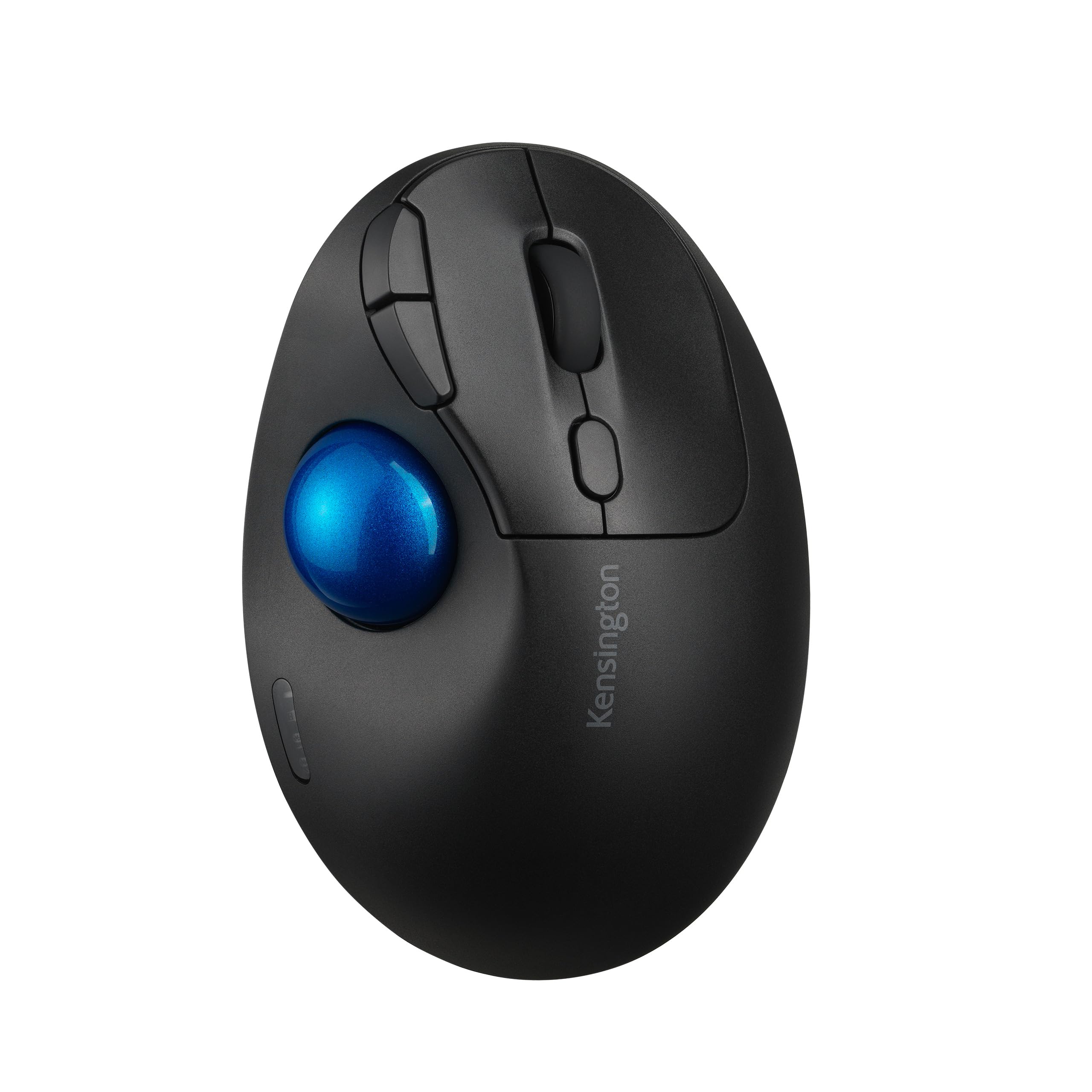



♻️ Elevate your workspace with eco-smart precision and wireless freedom!
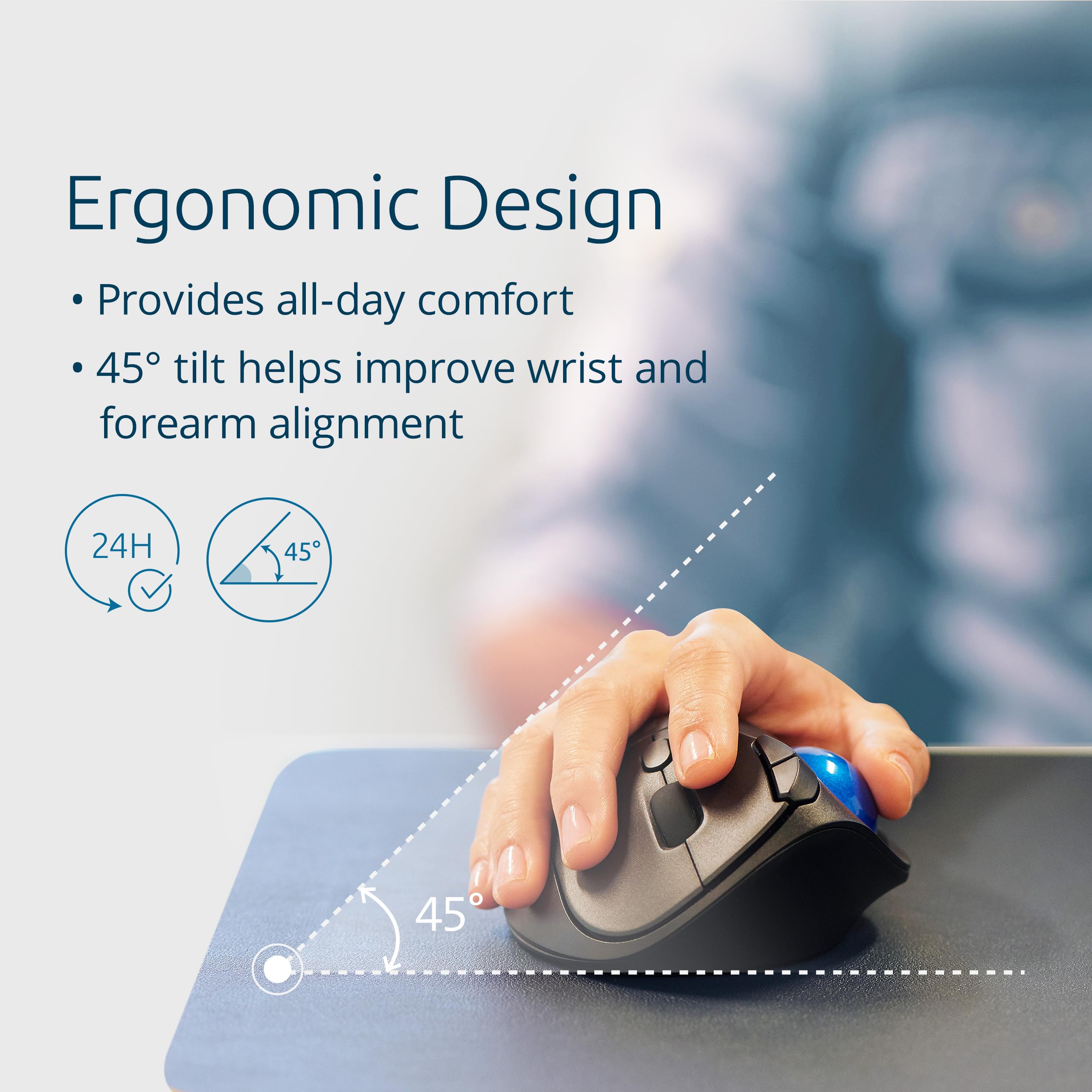
The Kensington Pro Fit Ergo TB450 is a premium ergonomic trackball mouse featuring a unique 45° tilt for wrist comfort, dual wireless connectivity via Bluetooth LE and 2.4GHz, and up to 18 months of battery life. Crafted from 50% recycled plastic, it offers four adjustable DPI settings and advanced 128-bit AES encryption for secure, smooth, and sustainable productivity.


| ASIN | B0CF8874DR |
| Are Batteries Included | Yes |
| Average Battery Life (in hours) | 18 months |
| Batteries | 1 AA batteries required. (included) |
| Best Sellers Rank | 12,465 in Computers & Accessories ( See Top 100 in Computers & Accessories ) 10 in Trackballs |
| Brand | Kensington |
| Colour | Black |
| Computer Memory Type | DIMM |
| Customer Reviews | 4.2 4.2 out of 5 stars (463) |
| Date First Available | 1 Jan. 2023 |
| Delivery information | We cannot deliver certain products outside mainland UK ( Details ). We will only be able to confirm if this product can be delivered to your chosen address when you enter your delivery address at checkout. |
| Guaranteed software updates until | unknown |
| Hardware Platform | Laptop, Personal computer |
| Item Weight | 129 g |
| Item model number | K72194WW |
| Manufacturer | Kensington |
| Operating System | Compatible con varios sistemas operativos (Windows, macOS, Linux) |
| Power Source | Battery Powered |
| Product Dimensions | 13.82 x 9.35 x 5 cm; 129 g |
| Series | ProFit Ergo TB450 |
C**S
Love it !
One month review: I've been using this device for several hours each day since 19 January 2025, connected to a Chromebook via the USB wireless dongle. It's tremendous! Set up was instant - just plug and play. The Chromebook found the device and offered a range of customisation in Settings/ Device. I've configured the top two small buttons to be magnifier on/off and audio on/off. The mouse is easy to use, with smooth and responsive cursor and scroll movement. It's comfortable on hand and wrist. The only improvement I'd want is for the scroll-wheel to have a knurled texture, rather than slippy-smooth, but I'm getting used to it. Through the customisation options I've changed the track-ball and cursor movements to suit my preference for speed and precision. Very happy with this product.
A**R
Great trackball
The best and smooth trackball mouse.
M**E
Nice mouse, needs a little wearing in
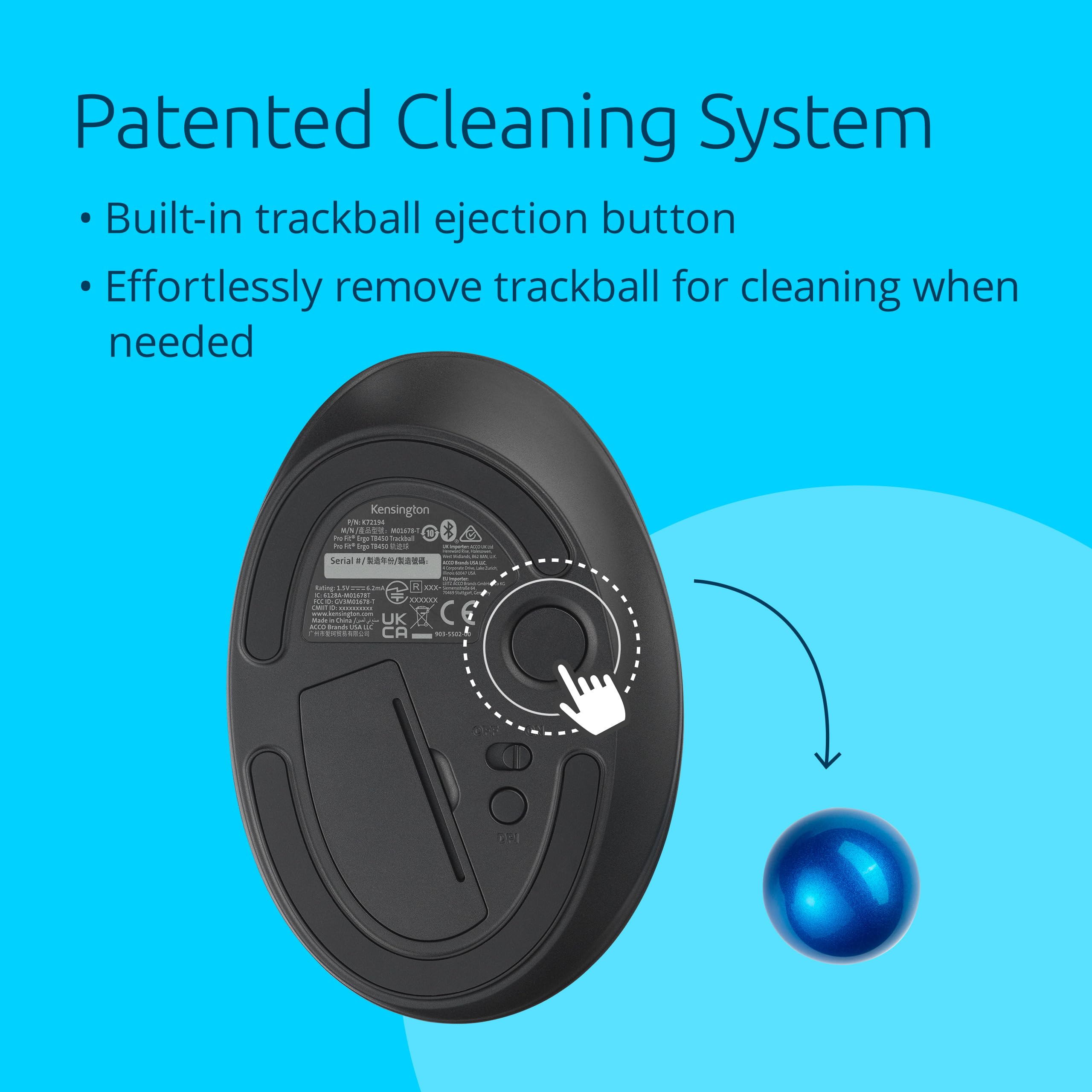
Having a small collection of mice and a couple of ball mice like this, I thought I would give this a try for something I can take out with me when I am working. The mouse is quite compact, with the receiver going inside the mouse, this is useful if you are like me and end up losing the dongle in my bag. The unit came with a battery which is stated to last 18 months. Quite useful as it will likely last a lifetime in my bag as it won't always be getting use. The ball itself is a beautiful shade of blue, its a glossy well polished finish. The ball can be easily popped out using the button on the underside for cleaning. My only gripe with this, much like other ball mice like this is that the contact points for the mice aren't that well polished. You will need a few weeks of use to smooth these out from use. The ball is no means scratchy, but from time to time, you will get a sticky point or a crunchy turn that means you aren't quite as precise. I have an Elecom Huge and I ended up swapping these out for glass ones which smoothed out the feel quite dramatically. I can recommend doing the same with this, if you don't want to go through a break in process. The body of the mouse is a black plastic, its quite smooth and I did find my hand slipping off of it. However the texture is nice and the plastic doesn't feel cheap, it feels quite premium and a nice surface to touch! The whole mouse is at a slight angle and means that your wrists sits in a far more natural angle. This means that you can navigate for much longer amounts of time and would be good for people with wrist aches or some sort of RSI. The buttons on the mouse are nice and tactile, a great amount of sound feedback and clickiness to tell you it has been pressed. The scroll wheel on this is really what lets it down. It has a very very smooth surface, so much so, it can feel like you are scrolling the wheel without actually doing so. I found this quite frustrating and would of preferred it was knurled or bumpy so that I could tell if it was turning or not. When you do turn it, there is an audible click to it. The mouse overall though is a really well made one. It feels premium and over time, I can see myself enjoying this mouse more and more. 4/5!
S**N
I like it
Take time to stop trying to move the mouse but it's dose not need to have the mouse resented on the mouse mat
K**.
Great Thumb workout
Still on the fence with this one, its ok, but expensive when you consider what else is out there, The ball needs cleaning regularly, as any grease or food bits get stuck in between and stop the smoothness of operation
H**O
One of the best Thumb trackballs I ever used
I've been using trackballs exclusively for over 20 years. In the last three years, I switched from large index trackballs to thumb trackballs. Logitech products didn't last long before the clicks dulled, so now I use the Elecom Bitra for portability and this one for home use. The tracking is very smooth and responsive—I can tell it has high DPI. The ergonomics are spot-on; my hands have never felt so relaxed on a trackball before. connectivity is also spot on. I struggled with Bluetooth connection on other devices before, but this one didn't even feel like Bluetooth. One thing to note is that it doesn't have a quiet click. Perhaps louder clicks are better for ergonomics, but it bothered me as I'm used to the Elecom's quietness.
A**A
ball is not smooth at all
using ergo mice for some time. pros: easy to pair, has two profiles easy selectable..., dpi button cons: ball is not smooth at all the opposite. easy release ball is a gimmick buy again? no. better alternatives on the market.
P**L
The best wireless trackball out there. IMHO
This trackball has all the best points of every other thumb trackball out there. The only issue I have with it is the hand position angle could be a bit steeper, but I have that issue with all of them. I have had Proto Arc, Microsoft, Logitech MX Ergo and some of the older Logitech offerings. This is superior in build quality and functionality. The mouse buttons give a positive click that is not too loud but lets you know by sound and feel you pushed a button. I also don't keep right button mis-clicking like I do with the Proto Arc because the mouse button actuation is so light. I am a heavy PC user often up to 14 hours per day when not working had the mouse over a month and the battery still hasn't needed a charge. I also never switch it off at the end of the day even though I probably should :P The price is also excellent vs the competition. Hopefully this will get Logitech to raise their game. I recommend a trackball if you have limited desk space or get RSI from using a mouse; I know from experience.
T**.
Il y a mieux, je ne parviens pas à configurer avec le Bluetooth de mon pc 💻
R**B
Tengo un logitech ergo M575 y quería otro trackball de backup, pero no quería uno con batería integrada, por eso elegí Kensigton TB450 solo para probar y aquí hago mi reseña inicial: Punto neutro: - La inclinación de 45º es cómoda, pero casí no noto diferencia con la postura en mi ergo M575 que no tiene inclinación. - La conexión del ratón con el ordenador es encriptada, lo cual tiene sentido con teclados wireless (para evitar sniffing de lo que escribe el usuario) pero para un ratón... no termino de ver el valor que aporta. - Los clics son más agradables comparados con el logitech M575, aunque esto es relativo a cada usuario Puntos positivos: - La calidad del plástico se ve muy bien, muy bien el acabado - La precisión del trackball es superior en Kensigton, ya que si giro muy rápido la bola con el pulgar, el puntero se mueve correctamente; si hago lo mismo con mi logitech, se siente que la bola gira muy rápido pero el sensor no lee el movimiento y en consecuencia el puntero ni se mueve. - La bola está mejor sujetada en el Kensigton; es decir, si giro muy rápido la bola entonces el puntero se se mueve según lo esperado; en mi Logitech, cuando giro la bola muy rápido, a veces se escucha que la bola golpea contra la pared interna del ratón lo cual hace que el puntero casi ni se mueva y es molesto tener que bajar la velocidad del pulgar sobretodo cuando quieres cruzar 2 monitores rápidamente - El software de KensigntonWorks me permite configurar una velocidad custom del trackball presionando alguna de las teclas shift,alt o ctrl (o alguna combinación). Por ejemplo, tengo la velocidad del trackball muy rápida para cruzar toda la pantalla sin esfuerzo del pulgar y luego cuando presiono la tecla "alt" la velocidad del trackball cambia, esto lo uso donde necesito más precisión. Este comportamiento tan práctico, no lo puedo configurar con LogiOptions, lo que puedo hacer con LogiOptions es presionar un boton para cambiar DPI o configurar DPI según la aplicación, pero la solución de Kensignton me parece más práctica. - He leído en otros reviews que el boton de cambio de DPI debería de estar arriba pero la verdad es que no necesito estar presionando el cambio de DPI si puedo configurar 2 velocidades en el mismo trackball. Imagino que el cambio de DPI lo necesitaré en linux donde no tengo la aplicación KensingtonWorks - Logitech implementa el scroll inercial en algunos ratones, y es algo que siempre he querido que lo querido en mi logitech Ergo M575 pero no existe. En el Kensignton lo implementan a nivel de software: el scroll fisico del ratón no se queda girando pero simulan una inercia para desplazarse más de una línea si se le da con fuerza al scroll y te permite avanzar muy rápido en documentos largos. - Si no nos gusta el scroll inercial, Kensigton permite configurar el avance del scroll, puede ser configurado a ir línea por línea o hacer scroll de 5 o 10 líneas a la vez, por lo que es otra forma de hacer scroll en documentos largos Lista de deseos: - El ratón no tiene memoria integrada, es decir que necesito estar ejecutando KensigtonWorks para usar mis configuraciones; esto puede ser problema en equipos de trabajo con políticas de seguridad que impidan instalar cualquier software o en linux, donde puedo usar el ratón pero sin personalización. - KensigntonWorks oficial para linux - Sería ideal el mismo concepto de 2 velocidades del trackball (la velocidad normal y otra presionando la tecla shift, alt o ctrl) para la velocidad del scroll vertical; así podria tener por defecto un scroll vertical configurado de unas 10 líneas y presionando shift + scroll hacer el scroll de sólo una línea - Se le podría agregar el desplazamiento horizontal (implementado en el TB550) que en mi caso lo usaría para programar más botones (ya que el desplazamiento horizontal prefiero hacerlo con la tecla shift + scroll) - El software KensingtonWorks, funciona, pero no identifica todas las aplicaciones instaladas en windows; por ejemplo con el LogiOptions+ puedo personalizar los botones de mi M575 para que suba o baje volumen en aplicaciones como Amazon Music, Spotify, Prime Video, Netflix y esto es porque las identifica el software; sin embargo en KensigntonWorks no puedo... y si le doy a explorar, luego tendría que darle permisos de administrador al KensigntonWorks para explorar la carpeta c:\Program Files\WindowsApps... y no me parece dar permisos extra Nota final - Estoy repensando en comprar el TB550, tiene 2 botones más (dezplazamiento horizontal) que pueden ser programables, pero me tira atrás la batería integrada; ya que siempre se degradan y para mí es más práctico usar 1 batería AA recargable. No quiero terminar siguiendo los pasos en algun video de youtube, abriendo el ratón para cambiar la batería integrada
D**U
Utilisé en remplacement de ma MX Ergo. Rien à redire, très agréable à l'utilisation.
M**D
The ball sticks too much at slow speeds making it impossible to use for precise work. If you want to whiz your mouse pointer around the screen then it's generally fine. Also, the item description is misleading. This does not have bluetooth, it only connects using the included 2.4GHz dongle.
M**O
En general creo que está bien lo recomiendo. La función de multidispotivos no es tan rápida. Tarda en cambiar. El Bluetooth es más rápido que la función de usb. Si es cierto que se tiene que estar limpiando digamos cada 5 hr de uso. Y se tiene que limpiar el dispositivo que tiene para expulsarlo. La sensibilidad siempre lo tengo al mínimo, siento que los otros 3 niveles son muy rápidos. Yo lo uso diario y me es muy práctico. Si le doy las 5 estrellas y tengo 8 meses de uso
Trustpilot
2 months ago
5 days ago