🚀 Upgrade your home network to pro-level speed and reliability — don’t get left buffering!
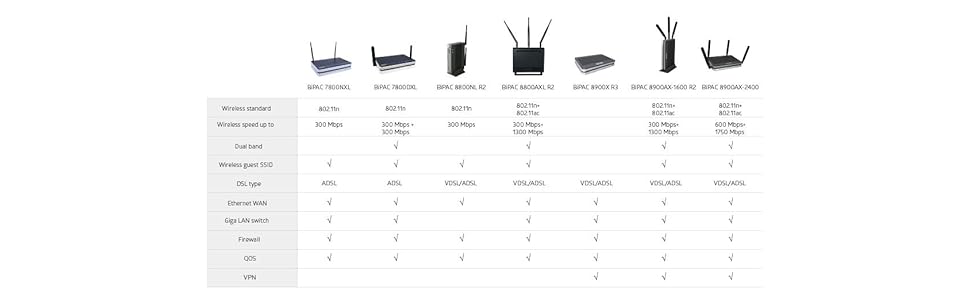
The Billion BiPAC 7800DXL is a future-proof broadband router featuring triple WAN interfaces (ADSL2+, Fibre, 3G/4G LTE) with automatic failover, simultaneous dual-band wireless (2.4 GHz & 5 GHz) for enhanced coverage, and Gigabit WAN/LAN ports. Powered by a Broadcom chipset with SNR tuning, it delivers up to 600 Mbps data transfer rates and advanced security controls, making it ideal for demanding home and remote work environments.

| ASIN | B00BJ2PCAG |
| Antenna Location | Home |
| Best Sellers Rank | 203,452 in Computers & Accessories ( See Top 100 in Computers & Accessories ) 1,509 in Routers |
| Brand | Billion |
| Brand Name | Billion |
| Compatible Devices | Laptop, Personal Computer, Smart Television, Tablet |
| Compatible devices | Laptop, Personal Computer, Smart Television, Tablet |
| Connectivity Technology | Ethernet, USB, Wi-Fi |
| Control Method | App |
| Country of Origin | Switzerland |
| Customer Reviews | 4.0 out of 5 stars 503 Reviews |
| Data Transfer Rate | 600 Megabits Per Second |
| Frequency | 5 GHz |
| Frequency Band Class | Dual-Band |
| Frequency band class | Dual-Band |
| Global Trade Identification Number | 04719170003662 |
| Is Modem Compatible | Yes |
| LAN Port Bandwidth | 1000 Mbps |
| Manufacturer | Billion |
| Maximum Upstream Data Transfer Rate | 600 Megabits Per Second |
| Model Name | 7800DXL |
| Model Number | 7800DXL |
| Model name | 7800DXL |
| Number of Ports | 4 |
| Operating System | Windows |
| Product Warranty | 1 Year |
| Recommended uses for product | Home |
| Security Protocol | WEP, WPA-PSK |
| Wireless Compability | 802.11b, 802.11n |
| Wireless communication standard | 802.11b, 802.11n |
M**T
Excellent Product, Huge Connection Speed Improvement
My previous 2 hub/routers (BT Homehub 3 subsequently replaced by TP-Link TD-W8970) functioned reasonably well but I constantly suffered from a slow broadband connection, typically 1.6Mbps. Recently speed had fallen to around 1Mbps due, I suspect, to 9 new houses having been built a few hundred metres away but without corresponding upgrades to the exchange or the 4km of copper wire leading to it; furthermore drops were becoming frequent. Given the rural location fibre is still some years away (if it appears at all) thus I needed to make the best of the existing infrastructure (and mobile links are not a viable option here given that both major networks are still 2G). Having read the reviews on Amazon and also on some other forums I opted to upgrade to a Billion hub/router and to go for the 7800DXL rather than the 7800N as it wasn't a lot more to spend in percentage terms for the latest firmware and better future-proofing. Setup was quite simple and took just a few minutes. Rather than follow the steps in the instructions in sequence I opted to perform the following steps first by directly connecting new device to the PC but not connecting the ADSL cable; in this way I'd still have internet access on a tablet if I needed to research some configuration parameters. 1) Rename SSID to that of existing hub/router. 2) Change IP address to that of existing hub/router. 3) Allocate the same block of DHCP addresses as already existed. 4) Use the existing wireless key. I have a number of hard-coded IP addresses spread over various devices and it was much simpler to setup the Billion with the same parameters rather than have to re-specify IP and Gatway addresses and wireless key on multiple devices. Once the above settings were input I swapped over the hub/router and devices connected immediately with around a 20% improvement in link speed using the default SNR setting (-1 for auto). SNR setting was reduced in stages to the minimum value (1) without my noticing any stability issues; speed immediately increased to 50% higher than that using the old device and has further improved to 2.15Mbps next day presumably as the exchange equipment 'learns' that a higher rate can be used on my line. Overall a near 100% speed improvement and no dropouts within 24 hours of installation. With regard to some reports on these reviews that the Wi-Fi signal compares unfavourably with some cheaper devices it's not an issue for me as both the old devices and the Billion only cover 4 rooms, all close to the router. Due to thick stone internal walls range extenders are essential regardless of what hub/router I use. Devolo homeplugs from Amazon nicely solve the problem in my case, not the cheapest homeplug but extremely fast and reliable. If low broadband speed is the issue don't hesitate to try the Billion and if reduced Wi-Fi coverage then is a problem buy a pair of Devolo's.
P**L
Billion 4 x 4 MU-MIMO AC 2400 Dual Band (also known as BiPAC 8900 Series)
Bought this as not happy with the my broadband speed and I felt original router that I received by my supplier, may have something to do with this, taking into consideration what I had read on various websites about slow broadband and changing the router can make a big difference. Went on various websites and this modem/router had been given a great review. Checked on Amazon and going through the reviews (multiple reviews on multiple products by Billion), the reviews for this model gave great reviews and 5 x stars from what I had found. Waited a while and the price came down so took the plunge and ordered. Expected it on 24 August at he earliest. Received a day early - 23rd - great service by the supplier. Set to work to get the modem/router to talk to my broadband supplier. Followed the instructions once logged on to the router. Initially you will be asked for new password to access the router, then progress to setting up for the built in modem to access broadband via your supplier (USER and PASSWORD details are required for this part - if not known, contact your broadband supply or check their website). This device can be used for ASDL and VSDL. I have Fibre (FTTC). Settings needed to be for VDSL settings and not ASDL (found that out through trial and error). For me it did not help that my broadband supplier gave details on setting up a router for ASLD and not VDSL on their website - say no more. After a little work, got the device to talk to my broadband supplier. I am not expert believe me, but can hold my own in setting up initial WAN service and the 2.4G & 5G networks. From what I can see you can set up 3 x access points for each network and each can have 16 devices attached. Each network I mean the 2.4G & 5G frequency networks. The device is quiet in depth on what a person can do, access and settings that can be changed. From security, multiple Access Points, VPN, Access Controls, sending a message to a designated email or mobile via SMS, if changes occur on the router settings. Other features include, MAC Filtering, Time Restrictions and various other settings and security features that can be utilized. There is also the ability to change the SNR setting, which more experience and knowledgeable IT people may know how to utilize to their advantage - something I will look into myself. It is possible to attach a 3G/4G LTE supported device to the router (beyond why I purchased). Regarding my supplied router from my broadband supplier affecting my download speed, this device seems to have confirmed my initial thoughts. My broadband download speed jumped from 13.6 Mb to 26 Mb (this is still slow for what I am paying for, I may add). Had a very small drop in upload speed from 6.5Mb to 6.2Mb. Noticed the difference during web browsing immediately and in watching movies from Amazon Prime. Everything seemed more snappier and quick - to me at least. I do work from home on occasions so hoping to notice a difference in this aspect and the systems I access become quicker to use. I have Android devices and once I set up the networks with my security details (kept the same settings as previous router), they all connected straight away, no issues. My daughters IPhone did not see the network (I hide my SSID for security reasons). Even though the details were the same as my previous router, it had problems linking to the network until I made the network visible. Not sure if just my daughters IPhone or may be a general IPhone issue. Saying that my Smart TV (set up on the 5G network) also had initial problems, but once I entered the network name and security details, the TV has worked fine since (network not made discoverable at the time). I only received this device today. Overall I am very pleased with my purchase and has meet my expectations. Time will tell what my experience is going forward. Was not my first choice of brand I was initially considering. Would I recommend this device - Billion 4 x 4 MU-MIMO AC 2400 Dual Band - just to make sure it is clear the device I am writing about here - YES. Yes it may seem a little expensive to some and the wealth of security features and settings can seem daunting on this device. Saying that and in my case this device is superior to the supplied router I received from my broadband supplier and has doubled my download speed (may not be the same for other people). It can be used for ASDL now and later for VDSL, when a person upgrades later. It has various settings and security features that can be changed, some which are beyond my knowledge or expertise, but more experienced owners can utilize to increase security and user experience. I purchased this device via Amazon and is my personal experience of this device.
R**I
Excellent Product. You Simply Can't Buy a Better ADSL2+ Router Right Now.
I read MANY reviews all over the net, looking for a replacement router for the frankly awful FREE (not really, they charge you for it in your first months subscription) router supplied by Fuel Broadband. This item had great reviews and I decided to purchase based upon those reviews. So glad I did. This router is simply a night and day experience in regards to performance. Router was delivered extremely quickly and it literally enhanced my adsl2+ connection immediately. Speed was up, less errors and hugely increased stability. Furthermore, it actually increased by broadband speed as well! The router interface is fairly easy to navigate and feature packed. The BEST feature in my opinion is you can even force the exchange to increase your line speed by changing the target SNR margin. If you don't know what this means, basically you are decreasing the 'noise' value (interference) from the local exchange to your house, therefore theoretically increasing your broadband speed. THIS IS THE MAIN REASON TO BUY THIS ROUTER OVER ANY OTHER ADSL2+ ROUTER. Buy one, you won't be disappointed. No, I don't work for Billion :) OK. This router isn't perfect, but... what is right? You do get the occasional drop out and I have had to reset it a few times. But, NOTHING compared to the free but it isn't really router supplied from Fuel. Size wise, the outer is on the large side of things. Compared to other routers of a similar standard it really is big. The antennas are great though and my daughter can get a solid wi-fi connection through 2 brick walls in her bedroom, so not all bad. As others have mentioned, when you are setting up your wifi security, the default password for the browser login is under the router on a sticker. A great router that I would recommend to anyone who needs it. Coming from a hardened wifi user and user of MANY routers over the last 15 years, that really is a huge compliment.
S**H
Excellent for somebody in a rural location better than my Asus broadband went from 0.80meg to 3.99 meg
I am on BT ADSL (my broadband goes through my phone line) broadband and live in the middle of nowhere in South West Scotland some 7 miles form my exchange. I have micro filters on each phone point and a BT faceplate, I also use cat 6 cables when hard wired. I run a business from my home which is heavily dependent on having internet connection, mainly for email so nothing to heavy. I also have 2 PS4's, 3 laptops, 1 PC, internet music streaming hardware and ipads and iphones all trusty for internet connection. I try not to have everything connected at the same time and prioritise. Through the process of trying to gain better internet stability and speed my knowledge has spiked dramatically over the last two years along with my frustrations, I have tried or considered several routers or router modem combinations, satellite broad band, having an extra phone line fitted and just using mobile broad band, Living so far from the exchange throws up all sorts of problems, any slight changes can alter your SNR (signal noise ratio) which BT use to decided how many decibels to put through your line to gain a medium balance between stability and speed, this is all automatic. You can find out what your SNR is by ringing BT. 6 is considered to be a good start point however everybody is different. When my internet was dropping I would ring up BT they would do a line test, my SNR would be 12 or 13 they would run tests over a few days and my connection would stabilise again at around 6. The best download speed I have every got was 3.00 meg that was using a Ausus RT AC 66U router (with Merlin firmware) with a Dratek Vigor 120 modem, however I would only have those speeds for a few days then my SNR would start creeping up again from 6 to 13. So I knew the problem, I tried many different routers in the past and was simply at a loss. Although I had recently brought a new router (the best on the market via reviews) I saw that this unit could let you manipulate the SNR and trick the exchange into thinking you have a higher SNR than you actually did which would be perfect for me. The set was easy enough and I could do away with my old modem as I could plug the phone cable direct in to the "DSL" socket on the router. I was running at 0.80 meg with frequent drops outs. I hard wired a laptop in and had a played around with the SNR (make sure you search the web for a chart that explains how to change the values). Nothing seemed to change no matter what value I put in, I checked with BT what my SNR was and surprise surprise it was at 12 again so I adjusted the setting in the Billion so it would lower the unit by 6 decibels and left the unit. After a few days I was really impressed that I hadn't had a single drop out even when playing games on-line with my PS4, I decided to do a speed test and was absolutely shocked to see I was getting a steady 2.94 meg download speed and this was done wireless! This is a brilliant piece of kit, it also has a " Broadcom" chip for people that live far from the exchange. having spent two years messing around and suffering poor internet this has been a savoir. This was the last shot bar moving house which wasn't going to happen. So here are the Pros Stable increased broadband connection Easy installation Helpful UK based help line they can explain how to set up the SNR All in one unit Not to big Use 2.4ghz and 5ghz wireless Future proof if you ever do get fibre or BT infinity Saved my sanity If you are having problems and struggle with your broad band I would recommend this product without a shadow of a doubt is marvellous, I don't usually do reviews how this product has inspired me to do so! *I thought I would add this little bit extra, I set my SNR to the maximum lowering and just tested this morning and got 3.99 meg which is truly astonishing. Prior to getting this roter round I had a BT engineer come to my house and the max he got was 3.00meg then after a week or so it went back to under 2meg! I know use my inferior ASUS RT66U as a repeater. UPDATE* I live 7 mile from the exchange so a long way out, I have discovered a setting where you can set the router to just ADSL as opposed to ADSL2+ and which has now taken my download to 5.00meg which is incredible ADSL2+ is newer as is uses a far wider range however it is only really good if you are close to the exchange, ADSL is better for me anyway, experiment with the two.
D**E
Good modem but......
Bought this just a few days ago, and it was well packaged, and quick delivery. If you have sky.... be careful. Your passwords are hard wired into the sky router and are quite difficult to extract. Sky certainly will not give them to you. One hour later i finally managed to extract the hexadecimal codes and even then i had to contact 'Billion' support who gave me the correct setup configuration. Yippee it was up and running, but not fully. Another warning ... if you have an intel centrino wireless adapter on any device trying to connect to the modem, your gonna struggle. " connected "... but it isnt???? confused... so is every body else. Connects okay at the start then any no. of hours later its gone.Warnings pop up saying reset your wireless adapter.But its working fine.MY other devices are running okay and they are still connected to the net. Problem here is device drivers or some other software problem causes it to drop connection, im still trying to solve it now, patience running thin though, i may send it back. It's the Billion modem and my centrino wireless adapter are just conflicting. Bet this product works fine most of the time, but just not with intel centrino. Iv'e also read on other support sites that Billion customer care just deny anything is wrong. What a shame. Gotta add this as well tried to return this item because it just aint working for me..the problem is beacuse its a third party seller,(i just love to go shopping.. ILGS)they simply dont want to know me..they said "it is still under warranty so u can return it to the manufacturer, *at your cost*, if they find nothing wrong with it they will arrange for return postage *at my cost again*, they are made in australia by the way, these 3rd party sellers r really letting the amazon brand name down and this needs to be addressed. I suspect there is nothing wrong with the modem just not compatible with my wifi stuff, if i had been made aware of this b4 i bought it i wouldnt touch it with a barge pole....BEWARE Im stuck with it. £ 139.00 of non compatible hardware.
J**B
Steady, speedy, and great for rural broadband
Living where we do, in a small village in the countryside, our broadband connection is unstable at times, and often dropping out. However, the speed isn't too bad at 6meg. We have survived for years on an old Netgear router, which was beginning to get very hot, and a little unstable. A router upgrade was long overdue. Enter the 7800DXL... I had been recommended Billion, as a brand, by a friend who works in networking, and has done for years. Although I would say this device is at the upper end of the price bracket, it has already proved it's worth. Our connection is now synced at 7meg (a full 1meg faster!), and is rock-solid. We have suffered no drop-outs. Traffic in the home seems to be prioritised better, with the PS4 and Xbox One consoles enjoying more bandwidth. The unit itself isn't particularly modern looking, but doesn't get hot, and can be wall-mounted if needed. Setup is quite straight-forward, but some tech knowledge may be useful compared to simpler units such as a BT HomeHub. The router supports dual band wireless networks so on setting up, you are actually configuring two wifi access points; one on 2.4Ghz (the norm for some years), and one on 5Ghz (more modern). The unit broadcasts both of these access points, so your devices can be connected to 5Ghz (if supported) for faster networking speeds, or 2.4Ghz. This is a great feature, and means that the slower devices won't slow the whole network down. The features of this router are far too extensive to go through in detail here, but there is a huge number of settings that can be adjusted. For the very tech-savvy, you will not be disappointed with the endless twekaing this unit allows you. Most notably, and one of the main features that led to my purchasing this device, is the ability to adjust the SNR on the line. This feature, by itself, may be very, very useful for those who work from home on an older ADSL phone line, or live remotely enough that increased broadband speed would be well received! Put simply, tweaking this number can often eek a significant speed increase from your existing phone line. It can be confusing, but an internet search for this model number will find a useful guide. To summarise; this router has turned our home ADSL connection from unsteady but acceptable, to useful and speedy. I am very happy with the result, and can highly recommend. Note: I also purchased a Netgear WN3000RP Range Extender to use with this router. No problems in setting up, and provided the required result. Great.
I**B
Should be more performance for the price!!!
This is not really a new technology and networking should be pain free and reasonably achievable even by the novice. Setup was fine, but the deal breaker for me was the WiFi signal which was very average at best. At this price I was expecting a lot more particularly that it's only a wireless N and not the newer AC version. Disappointed and therefore had to return it, but might be fine for someone else. Update: I spent the last couple of weeks trying the TP-Link TD-W8980, the ASUS DSL-N55U and the Billion BiPAC 7800DXL. These are all ADSL (landline) modem routers with wireless N and not the newer AC. They all have dual band (2.4 and 5 GHz) networking with USB connections for HDD that could work for sharing files, media server, FTP server or printer server in all three of them. It is very surprising that one gets problems with modem routers. You would think that the networking technology has been around for so many years that it should be pain and hassle free to setup and make these things work as efficiently and as brilliant as they all claim to be, but no, far from it. Each one of these had its own problems and on balance the TP-Link came out on the top of my list despite being the cheapest of the lot at the time of writing. First thing I did was to upgrade to the latest firmware for all 3 of them and there were no problems to mention there. I was really disappointed with the Billion. Although it was the most expensive, by quite a bit, it performed less than the other two. It had only one USB port asopposed to two ports in ASUS and TP-Link, and it struggled a bit with the media server functionality. The real deal breaker however for me was the WiFi coverage which was, at best, average. Perhaps my expectations were too high, perhaps it would have excelled in reliable signal and less dropouts, but in my view, its poor WiFi and having one USB port only was not worth the price difference at all. The ASUS failed to impress as well, and although its WiFi was better than the Billion, but this was only slightly. The real problem with the Asus was setting it up. The UI is really good, but each setting I made seems to take ages to take effect and it seems too sluggish to cope with any changes I made to the settings. It also needed restarted few times as there were lots of dropouts in the WiFi and my devices were disconnecting for no reason. Out of the three, the TP-Link had the most impressive WiFi with excellent coverage up and downstairs. It was easy to setup and it has solid connection to the internet and my devices are always connected with no dropouts. I had to restart it twice in the first day I used it and nothing since then for a week. The only problem is that it does have limits on how many files you could share on the network via a connected external HDD to the USB port, it loses one star for that. Also, none of these routers had an external button to eject the USB device before disconnecting it like I had on my older Buffalo. Instead, you have to disconnect the USB HDD by logging into the router administration page through the web browser. On balance, I decided to stick with the TP-Link and perhaps would consider NAS in the future, but I am in no rush for now.
M**B
Unreliable performer
Whilst I have a former Billion Router at home, I bought this for our office and the performance is simply unacceptable. First the configuration - whilst I have configured many routers, the Billion interface is by far the worst design of the major manufacturers. Yes, it is powerful but this versatility makes it almost unusable. A simple example; to setup port forwarding rules....there is no section called "port forwarding", unlike every other router. Instead this is within "Advanced Configuration" and "Virtual Server" (and even then it's not called port forwarding). This would be forgivable if it actually worked, which it does for around 3 days - then it crashes. Oh the lights are on but no connection can be made neither by wired LAN or Wireless. A reboot corrects this for another few days, when it requires another reboot. Firmware is the latest version and Billion's support are unable to assist - given we are using it partly to access a (wired LAN) office computer remotely via LogMeIn, and we use a SIP VOIP telephone system this is utterly useless when it fails. Whist they may have good reviews for techincal abilities (such as SNR ratios etc), if you are a business user and need reliability as usual there is only one option - Draytek Routers. Save yourself the bother, stump up double the price and get one of these that actually work.
Trustpilot
2 weeks ago
1 month ago