
DOWNLOAD THE APP


Customer Services
Copyright © 2025 Desertcart Holdings Limited
DOWNLOAD THE APP


🛡️ Protect your media, preserve your memories — play like it’s day one!
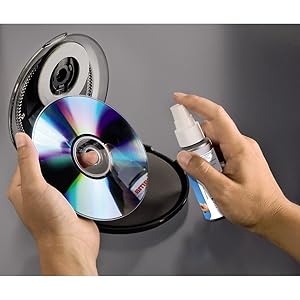
The Hama CD/DVD Repair and Cleaning Kit is a comprehensive manual solution designed to restore and maintain your discs’ playback quality. Featuring a 45ml cleaning fluid spray, 25ml repair paste, 5 lint-free polishing pads, and a cleaning shell, it effectively removes scratches, dust, and grime to reduce reading errors and extend the life of your CDs and DVDs. Trusted since 1923, this kit empowers you to effortlessly revive your media collection and enjoy flawless playback without costly replacements.


K**L
Recommended, great value and works.
Cheap and cheerful but effective on all the disks I have used it on. I also bought an expensive "SkipDr/SkipDRx DVD and CD Disc Repair" which destroyed the first dvd I tried on it. This was able to recover that DVD although I did have to use some Meguiar's Ultimate Compound and had to spend 5 minutes manually turning the handle. I eventually got the disk to play again using this. It is not a premium quality product. The lid can be hard to open. It is not overly tight when rotating the handle. BUT it is cheap AND it works. I am very, very happy with it. One tip. Try not to get polishing compound near the centre as it will get in the gap between the two layers at the centre. You could put a little disk of sellotape over this to prevent it. It doesn't affect playback but looks a bit off. And make sure it is firmly located on the spindle before closing the lid. The disk can pop off if not firmly seated. I still recommend it though.
R**Y
Instructions for using the CD Repair kit
Works well, however, the instructions are only legible with a microscope. I did eventually find a user video online. I've managed to copy the text via a photo if it is of use, also see photo: Cleaning kit Spray The underside of the CD/DVD to be cleaned twice from approx. 15 cm. Place the CD/DVD with the wet side facing upwards in the cleaning device and secure ip place. Place the cleaning device on a flat surface and hold is firmly with one hand. Allow the housing to rotate clockwise around 20 times. the radial structure of the mechanism ensures chat the CD/D/Dis always cleaned correctly from the inside out; wards, do not apply pressure to the housing. This can cause damage to the media. Repair kit Drizzle a small amount of repair paste onto the underside of the CD/DVD to be repaired. Never apply the Liquid to the printed side of the CD/DVD! Distribute the polish using the polishing pads over the scratched surface and allow it to dry for around 5 minutes. Then treat the scratches using the polishing pad working from the inside outwards (not in a circle) until the surface is clean and smooth again. Repeat this process if necessary. After this polishing the laser of the playback device can be reflected uninterrupted to the Lense Note. If the repair paste is too thick, warm tin a bath of water or in the microwave for max, 2 seconds. Shake well before use
G**C
Don't worry!
A lot of people are whining about the lack of instructions and how they didn't realise how they were supposed to use the repair paste etc. I would suggest that if you require more detailed instruction than those provided, then you are not to be trusted with a device which plugs in to the mains (like a CD player). This kit is easy to use. Also, if you lack the strength or dexterity to turn the wheel on the cleaning device, I can only hope and pray that you don't have anything like a driving licence. You should probably avoid shopping trolleys too. Get a grip people. This kit is perfectly fine. It's a good cleaner, and when it comes to the repair side, you're going to have to manage your expectations. If you've had your CDs strung up in the garden to scare birds or whatever, chances are they're shot. Be realistic. If it's badly scratched, this isn't witchcraft.
J**E
Poor Quality, but can work.
Updated review: The instructions are included, they are printed on the inside of the card that is stuck to the blister packaging, carefully cut the card out as close to the edge as you can. I have left my notes from my earlier as it outlines the painful procedure I used to get some results. I didn't follow the instructions provided by the manufacturer as I found them too late. I have used a similar mechanism to repair my CDs, ages ago. This one looked promising however there were several problems with this product: No instructions, there are a couple of photos one labelled "Cleaning" showing how to spray the cleaning fluid on to the disc and "Repair" which actually just shows how to wipe off the cleaning fluid and seems to be showing someone doing it the wrong way, which could make the disc even worse. The so called repairing fluid is just a polishing compound of unknown grade, so it is very unlikely to "fill in" any light scratches as promised in the description. Worth noting that my one had dried out so much that the dispenser button could not draw out any fluid, adding just a couple drops of water fixed this. My procedure: Using the cleaning bottle, spray the disc and wipe it (on the non-printed side) using the lint free cloths provided, use a radial motion from the centre of the disc out to edge. Ensure the disc is dry before polishing. Polish, as with any polishing operation you need to be patient, squeeze a small amount(petit-poise size, maybe smaller) of the polishing compound half way between the centre of the disc and the edge. Align the polishing disc so that it's centre lines up with the paste, close the lid. Hold the tiny lever and rotate the mechanism. Give this some effort as you really want to just do this once, work on it for at least 15 minutes of polishing, even for light scratches. If the polish starts to dry out or polishing action becomes laboured add more polishing compound using the same procedure. Tips: Place the device on a solid surface, preferably with a good grip. Use a pair of pliers to grip the handle of device, given that you will need to polish the disc for 15 mins or more, it will help. It also makes it easier to apply medium downward pressure evenly while polishing. When removing the paste rinse in luke warm water wiping away the paste using a lint free cloth or your fingers, radially from the centre outwards. Do not wipe discs any other way as any scratches, however slight, along the direction of play can make render that area unreadable. This also applies to using the cleaning fluid. Clean the polishing pad by wiping it with a face wipe or normal tissue (not toilet tissue) to remove the polishing compound. Not sure whether this will actually help but any leftover compound is going to dry hard so it might be easier to clean later on if you remove as much as possible after use. I gave this 3 stars mainly because it actually worked, shame about the quality and lack of instructions. Also, the cleaning fluid appears to be heavily watered down isopropanol, It left some smears when I used it.
J**N
Very useful
Don't stream, most of my movies probably would not make it to streaming without being censored, so I use my blu ray a lot. The discs get damaged, for me, this was good. If you do buy it, a word of warning, be careful how much pressure you use as if you use too much, you may damage what you want to repair.
B**N
Mr
It works very well. Well pleased
S**D
Do not buy
Rubbish sorry dont work
M**E
No instructions on exactly how to use it.
The cleaning spray is good with the cloths provided but there were no instructions on how to use the repair paste, apart from that i would recommend the spray good for the price.
Trustpilot
2 weeks ago
1 month ago