


🎞️ Scan Like a Pro, Share Like a Star!
The Plustek OpticFilm8200iAi Film Scanner is a high-performance device designed for film enthusiasts and professionals alike. With a remarkable 7200 dpi resolution and 48-bit color depth, it ensures that every scan captures the finest details and vibrant colors. Compatible with both Windows and Mac operating systems, this lightweight scanner features a Multi-Exposure Function for enhanced image quality and connects via USB 2.0 for fast data transfer.


| Brand | Plustek |
| Product Dimensions | 12 x 27.2 x 11.9 cm; 1.6 kg |
| Item model number | OpticFilm8200iAi |
| Manufacturer | Plustek |
| Series | 8200iAi |
| Colour | Black |
| Computer Memory Type | DIMM |
| Are Batteries Included | No |
| Item Weight | 1.6 kg |
| Guaranteed software updates until | unknown |
L**R
Potentially extremely competent hardware and software
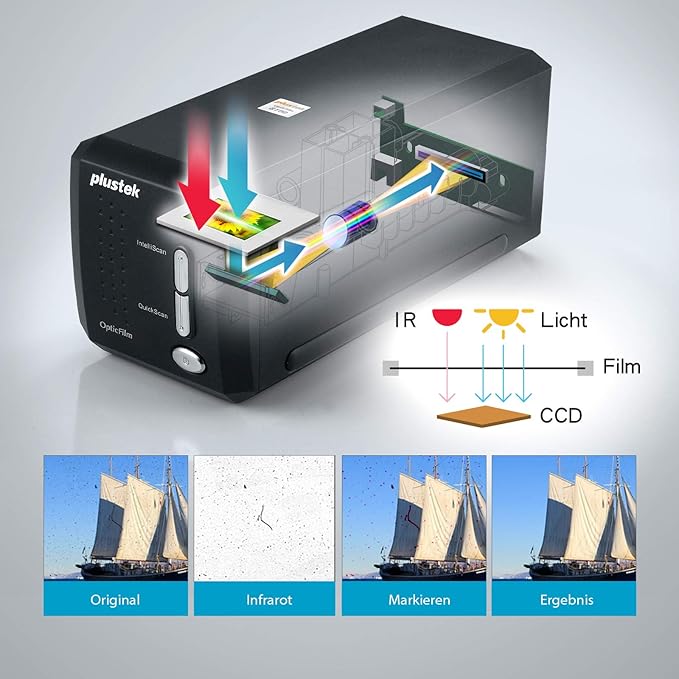
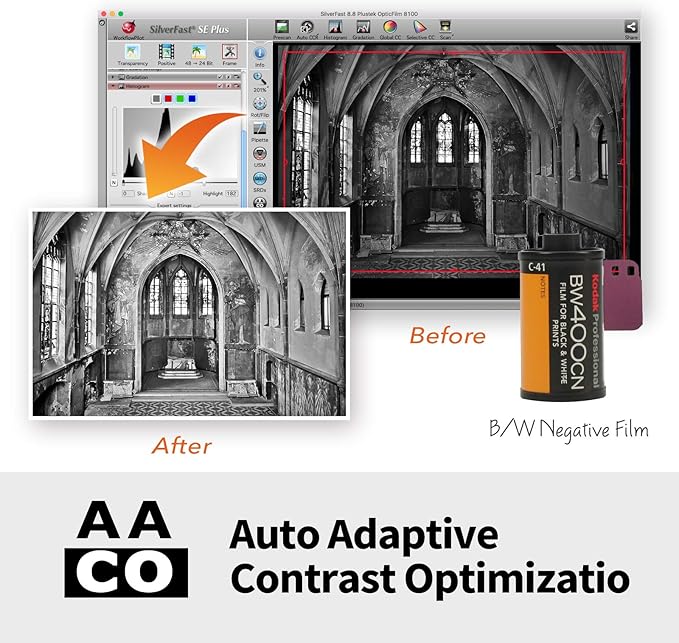
Owners of large archives of colour slides or negatives may be aware that they will eventually fade. Digitising them is practical means of preservation even if deterioration may have started but not drastic. Black and white films are effected more slowly. The "Plustek 8200I SE OpticFilm 8200iSE Film Scanner - Black" is a digitiser for 35mm colour and B&W films. SilverFast 8 SE for Windows is included although v9 is available. Carriers for 35mm strips (up to 6 frames) and four 2 x 2 mounted slides are included; those for formats such as half-frame 35mm, 126 and 110 are no longer available as optional extras. The scanner is about the size of two 1Kg bags of sugar placed end to end and quite lightweight. Space will be needed for the carriers' travel. It initially appeared that its power supply was missing. A report was made to the seller, Fuzion, who immediately responded and offered to replace it until they discovered the hiding place which they had twice missed! Excellent service from a UK company. Although the software is provided on CD for Mac and Windows, it can be downloaded or, when possible, copied to a flash drive via any computer with an optical drive. Silverfast should be installed first followed by the driver package. It is then possible to enter user details and the serial number from the CD case. Its many demo movies may be viewed pre-registration. Once fully installed, updates and upgrades are offered. Depending on the choices made, updates start at €49. Once registration is confirmed, there is an option within two months of purchase for a free like-for-like update (8 SE to 9 SE in this instance). Controls are limited to a power button and two mode selectors on the front panel. Power input (UK and Euro adapters are provided) is at the rear as is its USB output. Other than the mode buttons, all other functions are controlled in software. Series 8200i includes infra-red capabilities to identify and locate dust on the surface of the film or slide; with their locations noted, they can be later collectively removed. The alternative is to digitally retouch spot-by-spot, or use a 'healing brush' or equivalent within a photo-editing package although potentially time-consuming. Scanning a colour slide or negative is complex as there are numerous variables. There is a considerable learning curve needed to become familiar with the various settings and their effects for the best results. Although some scans may need minimal correction, others may need several changes to most settings; that takes time! Silverfast can take-on much of the work but scans can be saved as TIFF files (equivalent to RAW format) to maximise the saved data and detail for later correction in graphics software if desired; if initially saved as a JPG file, some of the detail will be lost and only recoverable if re-scanned. Post-correction, the images can then be saved to relatively small JPG files and the TIFF deleted when no longer needed. TIFF files can be 70 Gb each if scanned at 7200 dpi although 2400 dpi is ideal for high quality A4s printed at 300 dpi and the TIFF files then smaller. A faded slide can have a strong cast, often pink, blue or green. Changes to individual channels, curves, contrast and brightness with possible changes to black and white points may recover much of what was lost although it can take time as continuous reassessment and adjustment is likely. Experience may allow some settings to be roughly pre-set with expected approximation to ideals. While Silverfast offers a considerable variety of adjustability, most graphics software can do more with many supporting plug-ins for additional effects. Silverfast supports numerous scanners, flatbeds included, but those supported each need a dedicated version of Silverfast that will need to be purchased and that can prove expensive when several are used. There is an alternative software that claims to offer several advantages, not least internal drivers for all supported models, a Linux version and its low price for a Pro version which alone supports any combination of slide and flatbed scanners for those who cannot install or use Silverfast. A comparison chart for the versions of SilverFast 9 is available and lists all the new and improved functions where applicable. SE Plus may be a worthwhile and relatively inexpensive upgrade for many users while Ai offers considerably more but with the highest fee (up to €249!). Advanced users may gain considerable benefits if able to justify the greater outlay. The software/hardware combination is very competent and capable if the owner or user is prepared to put in the effort. Familiarisation with the software controls and awareness of the changes to settings and their effects will pay dividends. The package is not cheap but can pay for itself by preserving slides and negatives that may otherwise be eventually and permanently lost. Irreplaceable family photos (snaps, school photos etc) will need a suitable photo scanner to preserve them; some include a version of Silverfast.
C**E
Good scanner, non-intuitive software
The scanner arrived in excellent condition before the scheduled delivery date: I was kept informed of the actual date. The first device I received had a minor fault because the dust 'door' on the left hand side stuck open. I contacted Amazon who arranged for me to return this relatively large package via the local post office free of charge. A replacement arrived extremely quickly. So, in terms of service, I have to congratulate Amazon - this is the first item I have returned. This scanner has the ability to produce extremely high resolution scans, up to 7200dpi. Obviously these are very large, and most probably beyond the resolution required by most people most of the time. It can scan at set increments of this value (1800 and 3600dpi), and you can also select intermediate values. The time taken to scan slides is dependent on the resolution, but I do not think I could scan more than 8 slides an hour at the lowest resolution by the time I have used the software to adjust the resulting image file: higher resolutions will not take proportionally longer times because the processing time is significant. The results are between good and excellent on the 50+ slides I have processed. The provided software, Silverfast 8, has the potential to be very powerful, and this is probably its weakness. My comments will reinforce those of most reviewers. One is left with a multitude of options in Silverfast, all of which have an effect on the final image: there is little guidance on how to use these. The option that is most used (and useful) is the dust and scratch removal tool, which integrates the normal scan with an IR one. It can really improve quite dusty images when you have worked out how to use it - that takes quite some time and experimentation. Another option that can have a tremendous effect on the acceptability of the image is that affecting the colour cast of the image - again little advice is given on how to use this. However, if you persevere good images can be obtained. You can see that I have been a little frustrated by Silverfast 8, and I never seemed to have these problems with an old Nikon Coolscan plus associated software I had in the past. Other reviewers have suggested using other software but, being mean, I have resisted this approach: I might resort to it in the future. So, to summarise, this scanner has great possibilities and a high resolution; it is not quick (but probably all others are a similar speed, although the expensive flat-bed ones will do multiple slides in one scan); and Silverfast can both annoy and impress. If you have a lot of slides you wish to archive this scanner will definitely do the job - with practice, and in time.
A**Z
Avevo già un altro scanner per diapositive (i famosi Nikon della fine anni 90, inizio anni 2000), su interfaccia SCSI. Quindi mi arrogo il diritto di dire che "ho una certa esperienza". Come qualità di acquisizione è molto superiore (l'avverbio molto deve essere preso con giudizio dato che anche quello vecchio era assolutamente ottimo), la velocità di digitalizzazione è comunque soddisfacente. Considerando che la risoluzione è di 7200 dpi (e non ha senso abbassarla in fase di acquisizione) su un quadratino di ben 35mm, significa comunque avere un file con una risoluzione finale sul lato lungo di oltre 3700 punti. Ci mette del tempo a fare tutte quelle passate. Non è certo una fotocopia sgranata a 100 dpi. Consideriamo quasi due minuti per ogni diapositiva. Purtroppo e sottolineo mille volte il purtroppo, questo scanner non opera in automatico. Al contrario di altri più economici ma di più bassa qualità oppure altri molto più costosi, non ha il caricatore automatico, per cui è necessario stare sempre davanti al computer ad attendere che abbia terminato il lavoro. Lungo e noioso. Molto lungo e molto noioso. Però la soddisfazione è enorme! La qualità finale è stupefacente. Chiaro che poi le immagini vanno rielaborate con un buon programma (io uso Adobe Lightroom), ma è anche vero che nella stragrande maggioranza dei casi, trovate le impostazioni e le regolazioni standard, potete applicare il filtro automatico e rivitalizzare le immagini in un sol colpo. Vanno ritoccate a mano solo quelle "venute male". Quelle che anche dalla fotocamera digitale ritocchereste comunque. Il software incluso ha anche una funzione di rimozione dei graffi. Su questa funzione non posso che parlare bene. Solo in pochissimi casi ho dovuto rifare a mano, con risultati più credibili, anche se qualitativamente inferiori. Consideriamo comunque che in casi come questo, si tratta di "inventare" informazioni nascoste da pulviscolo di sporco oppure eliminato da un graffio. Lo ricomprerei? Sì. Vale il prezzo che costa? Sì. È un prodotto per tutti? Sì. Lo consiglio a chiunque? No, ci vuole molta pazienza, passione e tanto tempo, soprattutto se avete migliaia di diapositive. Però ne vale la pena. visualizza meno elementi
M**B
I have about 100 sets of negatives between 20 and 40 years old, and wanted a good quality scanner because some of the pics are family and therefore important. Scanner was easy to plug in to a USB hub but you should follow the installation instructions carefully. Don't skip this! You may need to download drivers etc. before plugging the scanner in. The software is high quality and includes per-set tasks that can be customized, extra or fewer image correction stages included in the scanning process and so on. The most impressive feature is the infra-red scan which can detect dust and scratches and remove them automatically. For sure, it won't remove severe damage but I was surprised how well it worked on removing white spots and other problems. To get the best results you might need to fiddle with color balance settings but I just selected the film type, and already the quality varies between OK and excellent with no more effort. Files can be a bit large so you should experiment with resolution and compression to optimize the size. I found with photos from a cheap-ish SLR there was little advantage from using any more than 1200dpi or 1800dpi. Impressive, not cheap, but does a good job if you have the money.
J**T
Finalement ce scanner Ne fonctionne sous MacOS quelque soit sa version mais sous Windows 10 ou les résultats sont honnêtes mais sans plus
B**R
Kurulumu çok zor ve sıkıntılı. Beraberinde verilen yazılım Internet bağlantısı olmayan mekanlarda çalışmıyor. Optik performansı da fiyatına kıyasla düşük.
J**S
es lento para escanear a resolucion completa coincide exactamente con la descripcion y fotografias instalar el software es lioso pero se acaba puciendo si lees las instrucciones o ayuda Para sacarle partido al programa de edicion es necesario mirar el manual, aunque tiene una opcion practicamente automatica que va genial
Trustpilot
2 months ago
1 month ago



