
⌨️ Elevate your Mac setup with the keyboard that works as hard as you do.
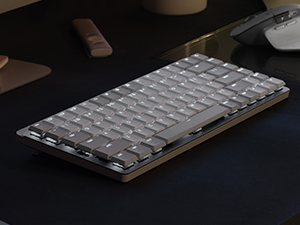
The Logitech MX Mechanical Mini for Mac is a compact, wireless mechanical keyboard engineered for Mac users seeking a premium typing experience. Featuring tactile quiet switches, smart backlighting, and multi-device Bluetooth connectivity, it offers up to 10 months of battery life without backlighting. Its minimalist design incorporates recycled materials, making it both eco-friendly and stylish. Perfect for professionals who demand precision, seamless workflow, and sustainability in one sleek package.








| ASIN | B09LK63PKB |
| Additional Features | Illuminated |
| Antenna Location | Office |
| Best Sellers Rank | #388 in Computer Keyboards |
| Brand | Logitech |
| Built-In Media | Logi Bolt Receiver, Master Series MX Mechanical Wireless Illuminated Performance Keyboard, USB Cable, User Documentation |
| Button Quantity | 78 |
| Color | Pale Grey |
| Compatible Devices | Tablet |
| Connectivity Technology | Bluetooth Low Energy |
| Customer Reviews | 4.4 out of 5 stars 550 Reviews |
| Enclosure Material | Plastic |
| External Testing Certification | Não aplicável |
| Global Trade Identification Number | 00097855174505 |
| Hand Orientation | Ambidextrous |
| Is Electric | Yes |
| Item Dimensions L x W x H | 12.3"L x 5.2"W x 1"H |
| Item Height | 2.4 inches |
| Keyboard Backlighting Color Support | Single Color |
| Keyboard Description | Mechanical |
| Keyboard Layout | QWERTY |
| Manufacturer | Logitech |
| Mechanical Keyboard Switch Model | logitech_romer_g_tactile |
| Model Name | MX Mechanical Mini Master |
| Model Number | 920-010553 |
| Number of Keys | 84 |
| Number of Sections | 8 |
| Power Source | Battery Powered |
| Recommended Uses For Product | Office |
| Special Feature | Illuminated |
| Style Name | Keyboard |
| Switch Type | Tactile |
| Theme | computing |
| UPC | 097855174505 |
| Unit Count | 1.0 Count |
| Warranty Description | 1 Year Limited Hard Warranty |
M**W
Great keyboard for any Apple user; comparison between Logitech, Nuphy, and Keychron
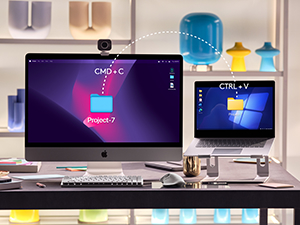
First of all, the seller that fulfilled my order was great- it's on Prime and the keyboard came new in its packaging. I was able to snag this keyboard at a 45% discount from the MSRP. For the keyboard itself: it's great! I'm happy with the purchase and it has a lot of benefits which I'll cover below. I actually have had the Nuphy Air75 v1, and if you're a heavy Apple/Mac user, you're likely looking between Nuphy, Logitech, LoFree, and Keychron for Mac-forward/specific keyboards. All offer wireless but have some differences between them. Are you a person who's looking to customize their keyboard to the extent of changing switches? Then you're going to go for Nuphy, LoFree, and Keychron. Nuphy is cheaper than Logitech at full price, and also cheaper than LoFree. But! LoFree is a nicer build out-of-the-box where the feeling and sound is better than Nuphy. In comparison, Keychron has more Mac-forward options and many options are cheaper than the other mentioned brands but lacks that portability the others have. All are solid keyboards with their pros and cons and again offer some great customization options. Keychron is cheapest (while still being heavily lauded), and then Nuphy is next (while also heavily lauded), then Lofree is the most expensive (while being most lauded) but it does offer a great typing experience and feel in comparison to the rest. Now back to this Logitech MX Mechanical Mini- does it offer the same customization down to the switch-level? Absolutely not. You cannot hot-swap on the Logitech. However, what it does the best is the incredible battery life (10 months w/o the backlighting) and the software/connectivity. An oft-complaint with Nuphy, Lofree, and Keychron is that on wireless, it will take time to have the keyboard turn on + connect (in the matter of seconds, some say 3-5 seconds and more/less). For Logitech, it has a nifty feature that turns on the keyboard as your hands come close and it quickly turns on/connects. The software is easy to use and you can customize buttons. It's also very easy to switch between devices on the Logitech keyboard. All say they can connect with different devices (at least 3) but Logitech has them beat on the connectivity of the keyboard. Now, you CAN customize the keycaps but certain keys have odd configurations and therefore cannot be replaced. Specifically, the space bar and maybe the right shift key. The Logitech space bar has a proprietary configuration and cannot be replaced (at least not easily). But I'd still recommend finding low-profile PBT keycaps. For a keyboard that retails at $150, it's a bit of a surprise that the keys that come with it are not PBT or higher quality plastic. These keys will display wear (and stuff like oil, etc.) much more quickly than PBT keycaps, and so I would recommend replacing them at some point. Besides that, PBT keycaps just feel better. So: are you a person looking for a good typing feeling with a keyboard that has great connectivity (and especially for switching devices/waking up the computer) and battery life that is also portable enough to take with you? And you don't care so much for customization of the switches and keys? Then Logitech is for you! However, if this was at full MSRP, I would hesitate and consider the other options. But at a discount, I think the Logitech is a sound choice and what I went with AFTER having the Nuphy Air 75 v1 (of which I never customized anyways). I liken this keyboard to being something that's office/professional-coded while giving you some of the benefits of mechanical keyboards. I think it looks fantastic and I'm happy with my choice!
E**0
Great aftermarket keyboard.
Tired of my apple keyboard battery life. 2-3 days without heavy use and less than a year old. This has a different feel that took a couple weeks to reprogram my fingers to but it’s all good now. The keyboard sits a little higher, is a bit bigger overall but that isn’t a problem. Good key tactile feel, multiple level key backlights and great battery life. Can we say months! I love this keyboard. Quality, color, size, adjustability, battery life what more could I ask for. Good price for an excellent keyboard.
G**.
Hard to fault this keyboard!
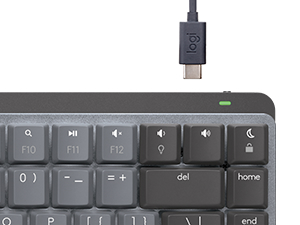
I love the new Logitech MX Mechanical keyboards, including this one. This keyboard integrates with the iMac 24" very well, with no connectivity issues on Bluetooth at all, very solid connection. Which brings up the fact that this keyboard does not come equipped with the Logitech Bolt USB dongle, as does its brother, the MX Mechanical. However, I have had zero issues, or delayed start up, while using the BT connection on this keyboard. The quality is very high, well made, and I really like the keycap material and feel. Typing is excellent, although this keyboard is equipped with "tactile" key switches, while very nice, do not have a "clicky" experience, but is more like Cherry MX brown type switches, with a tactile bump, but not really much of a click. Others have mentioned that they are somewhat stiff in operation, while I find them about average. I waited for this "Pale Gray" color way, and I love it. Not a huge fan of the darker/bi color keycaps of the original. I have had no issues with the key backlighting, as some have mentioned, mine works very well, and the key caps are very well, and uniformly lit, Logi did a great job here. It also has all the Apple/Mac keys you would want, including for display brightness, and key cap brightness, and the usual, volume up/down/play/pause. Nicely laid out, and easy to find everything. I find myself very much enjoying typing on this keyboard. It's like the keyboard that Apple should have made! Not a fan of the very short travel Magic keyboard keys. This is a great keyboard for your Mac, I know I love it for mine!
M**N
One-and-Done "Clicky" Yet Satisfying Keyboard
Taking a look at the Logitech MX Mechanical Mini for Mac Wireless Illuminated Keyboard from a video editor's perspective, there's a lot to appreciate, but a few considerations too. Starting with the positives, the compact design is a real space-saver on your desk. The mechanical keys deliver that satisfying click, making typing a breeze and potentially boosting your editing speed. The Mac-specific keys are a handy touch, and the illuminated feature is a game-changer, especially if you're burning the midnight oil on edits or working in dimly lit spaces. However, here are a couple of things to keep in mind. The smaller form factor might feel a bit cramped initially, especially if you're accustomed to larger keyboards. Plus, those function keys might be a touch too small for some intricate editing shortcuts. Lastly, while it's a great keyboard, the price might give you pause. It's tailored for Mac users, but the premium might feel a bit steep considering there are other mechanical keyboards available for less. All in all, the Logitech MX Mechanical Mini for Mac Wireless Illuminated Keyboard brings a lot to the table for video editors. It's got the tactile keys, Mac-specific features, and that illuminating perk—just be ready to adjust to its smaller size and consider if the price matches up with what you need for your editing setup.
J**E
Great keyboard
Overall I really like the keyboard. The keys feel good, I have no issues with key strokes not registering whether I'm wired or wireless. The keyboard has a nice weight to it even though it small, so it's not sliding all over my desk. It feels high quality. I've been using it 5 days a week for 10+ hours a day with no problems. I've owned the keyboard about 1.5 years now. There are a few annoyances, I wish they prioritized the function keys at the top differently. Having a play/pause button but not a next/previous button for iTunes is annoying. I would prefer to have those keys over a key that opens the emoji explorer (why? who uses this feature enough to justify a button?) and a key that opens spotlight (again, why? spotlight can more easily be opened with CMD+Space). I like the addition of the screenshot and focus keys on the function key row. Others have complained about the placement of the arrow keys. I share the frustration but cannot think of an alternative placement that would maintain the size of the keyboard, so I don't mind it so much. If this keyboard broke I'd likely just purchase the same one as a replacement.
D**N
Fantastic battery life!
I have spent many years searching for a good mechanical keyboard for my MacBook. I have used Apple's Magic Keyboard (and I keep it as a back-up), tried a couple of couple of Keychron ones (one off of Kickstarter even), but this one is absolutely SOLID. Excellent click feel and sound, construction is top notch with an aesthetic that flows perfectly with a MacBook, the different light patterns are nice, but it's the battery that is what amazes me. Received in September and charged to 100%, worked with it every day (4-5 hours per) since and only dropped to 70% by January. That's another plus - Apple recognizes current battery level for this keyboard, no other non-Apple keyboard I have tried has this benefit. The switch between 3 bluetooth devices work flawlessly and its wake function is very effective and virtually instantaneous - just pass your hand over the keyboard and it never falls over the "disconnected" edge as my idle Keychron keyboards would. I only withheld a star on value was due to the price, 150 dollars is a bit steep, but I can see having this keyboard for 10 years or more.
J**N
Close, but the keys require to much pressure to type on
There's a lot to like about this keyboard: battery life is excellent, the Bluetooth connection is rock solid and it resumes the connetion instantly. It looks great, and feels high quality. So why am I returning it for a refund? Because the keys take far too much pressure to type on. Using this keyboard makes my hands feel fatigued after a day's use. Other mechanical keyboards, such as the Lofree Edge, have a much softer typing experience that I prefer. This keyboard is also pretty thick which makes it less than ideal for taking with me in my backpack.
W**E
If you are picky with keyboards, this one is for you!
I had originally purchased the new Logitech MX Waves for Mac keyboard, and did not care for it much. I am very picky with my keyboards, and was coming from the Ergo 860 from Logi. After reading a bunch of reviews on Logi's Mechanical mini for Mac, I decided to give it a try and I am really happy with it. The keys are laid out nicely, and didn't take long for my fingers to reprogram to this new layout. The brown switches (only option with this keyboard) are just right, I wish they had a little less resistance, but overall very nice response. The build quality is great, very heavy feel it it so doesn't slide around at all on my keyboard mat. The keys are backlit, but only in a dim environment, but honestly I didn't really care about that. The battery life is amazing, and one of the reasons why I went with this one over the Keychron keyboard. Love the white/light color on it, matches my monitor setup. Very easy to use and setup with the Logi options, and the price didn't break the bank.
Trustpilot
2 weeks ago
1 month ago



