📸 Capture brilliance everywhere — your pocket-sized DSLR revolution!
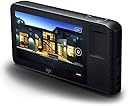
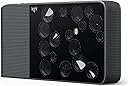
The Light L16 is a groundbreaking compact camera featuring 16 lenses that work together to produce ultra-high-resolution 52MP images with DSLR quality. It offers a versatile zoom range (35-150mm), advanced computational photography for superior dynamic range, and on-device editing via a 5-inch touchscreen. With built-in WiFi, Bluetooth, and a massive 256GB internal storage, it empowers professionals and enthusiasts to shoot, edit, and share stunning photos on the go.
| ASIN | B07RZBNPHV |
| Age Range Description | Adult |
| Are Batteries Included | No |
| Aspect Ratio | 16:9 |
| Auto Focus Technology | Contrast Detection |
| Autofocus | Yes |
| Autofocus Points | 1 |
| Best Sellers Rank | #98,361 in Electronics ( See Top 100 in Electronics ) #810 in Digital Point & Shoot Cameras |
| Bit Depth | 12 Bit |
| Brand | Light |
| Built-In Media | Camera Body & Accessories |
| Camera Flash | Built-In |
| Camera Lens | Zoom lens |
| Color | Black |
| Compatible Devices | Wi-Fi enabled devices, Bluetooth enabled devices |
| Compatible Mountings | Canon EF, Canon EF-S |
| Connectivity Technology | Wi-Fi |
| Continuous Shooting | 5 FPS |
| Crop Mode | 16:9 |
| Customer Reviews | 3.7 3.7 out of 5 stars (85) |
| Digital Scene Transition | False |
| Digital-Still | Yes |
| Display Fixture Type | Fixed |
| Display Resolution Maximum | 52 megapixels |
| Display Type | LCD |
| Dots Per Screen | 326 or higher |
| Dynamic Stops | 3 Stops |
| Effective Still Resolution | 52 MP |
| Expanded ISO Minimum | 100 |
| Exposure Control | Aperture Priority, Shutter Priority |
| External-Memory Size | 256 GB |
| File Format | JPEG |
| Flash Memory Bus Interface Type | Single Data Rate (SDR) |
| Flash Memory Installed Size | 256 GB |
| Flash Memory Speed Class | Clase 3 o superior |
| Flash Memory Supported Size Maximum | 256 GB |
| Flash Memory Type | SDXC |
| Flash Memory UHS Speed Class | U3 |
| Flash Memory Video Speed Class | V30 |
| Flash Modes | Auto, On, Off |
| Focal Length Description | 70 millimeters |
| Focus Features | Autofocus |
| Focus Mode | Continuous-Servo AF (AF-C) |
| Focus Type | Auto Focus |
| Form Factor | Compact |
| Hardware Interface | Bluetooth |
| Has Color Screen | Yes |
| Has Self-Timer | No |
| ISO Range | 100-3200 |
| Image Capture Type | Stills |
| Image stabilization | Digital, Dynamic, Optical |
| Item Weight | 1.01 Kilograms |
| JPEG Quality Level | Fine |
| Lens Type | Zoom |
| Light Sensitivity | ISO 100-3200 |
| Manufacturer | Light |
| Maximum Aperture | 12.5 Millimeters |
| Maximum Focal Length | 70 Millimeters |
| Maximum Image Size | 150 Inches |
| Maximum Shutter Speed | 5 seconds |
| Memory Storage Capacity | 256 GB |
| Metering Methods | Evaluative |
| Minimum Focal Length | 35 Millimeters |
| Minimum Shutter Speed | 1/5 seconds |
| Model Name | L16 |
| Model Number | L16 |
| Model Series | L |
| Movie Mode | No |
| Night vision | No |
| Number of Diaphragm Blades | 7 |
| Optical Zoom | 4.28 x |
| Photo Sensor Resolution | 52 MP |
| Photo Sensor Size | Full Frame (35mm) |
| Real Angle Of View | 4.2 Degrees |
| Remote Included | No |
| Screen Size | 5 Inches |
| Sensor Type | CMOS |
| Series Number | 16 |
| Shooting Modes | Shutter Priority |
| Skill Level | Professional |
| Special Feature | Wireless |
| Specific Uses For Product | Photography |
| Supported Image Format | JPEG |
| Supported Media Type | ProductImage, Video |
| Total Still Resolution | 52 MP |
| Total USB 3.0 Ports | 1 |
| Total USB Ports | 1 |
| Touch Screen Type | LCD |
| UPC | 052756982000 |
| Video Resolution | 2160p |
| Viewfinder | Optical |
| White Balance Settings | Flash torch |
| Wireless Technology | Bluetooth, Wi-Fi |
| Write Speed | 5 fps |
| Zoom | Optical Zoom |
C**E
Fun camera on a budget, if you work within it's limits
The Light L16 is a strange device any way you look at it. The 16 lens' on the front are a conversation starter in and of themselves, not to mention the Android operating system under the hood and the very solid build. As for using the camera itself, the potential picture resolution is huge, and when used in the right conditions can produce photos that exceed a lot of smartphone cameras. However, the low light performance of the camera is poor at best, and to actually get the photos off of the camera you need the Lumen software which is slow and kinda janky. So for the prices they go for nowadays, I think it's a fun device! Just be aware of the (large) drawbacks.
D**J
WASTE OF MIONEY - THANKS AMAZON
great idea - great camera...until you learn that there is NO WAY to use this thing whatsoever! you CANT get the latest firmware update. you CANT even get the proprietary software NEEDED to utilize the benefits of having 16 lenses...it is now a $300 paperweight. Amazon should NEVER have even sold this to me...and now - after exhausting ALL my attempts to get this thing working - Amazon will NOT let me return it OR the memory card (it did NOT need) or the SERVICE warranty I paid extra for. thanks for NOTHING - literally.
P**A
Patience is a Virtue but Picture Quality Can Be Wonderful
Ok, so this camera, the Light L16 was discontinued in 2019, and here we are in 2022 and whoever had a remaining supply of them new has decided to clear them out. Original price $2000, current price… I paid $169, and since my purchase it has dropped to $159, and possibly lower (now in early 2023 they are up to $250). Originally described as a DSLR in your pocket, the L16 has 16 cameras and lenses… Yes, 16. It takes photos with between 5 and 10 cameras at a time, and the closer to 35mm and 75mm you set the zoom, the better the image quality. The largest resolution photos are taken at 28mm (80MP), and the lowest resolution shots are at 69mm and 150mm (13MP). So, if you want the absolute best image quality you will shoot at 35MM and 75MM and you will have about 52MP resolution and the shot will be taken with 10 camera. This is a good camera for someone who has patience, and who isn’t in a hurry to take a shot. It isn’t well suited for sports photography, or for shooting anything that is moving fast, like a baby or a toddler. It is a great conversation starter. When you pull it out of its case, everyone will be asking what it is. As I said, patience is important, and that is even more tru for processing the images into a usable result. To get anything better than 13MP, you absolutely HAVE to process the photos with the Luma software., which can be quite slow. Fortunately it puts out DNG files, so you can use Adobe Lightroom to finish put the editing. About the software, it runs on Windows10, so since most of yo have that, then you are good. For you Mac owners, like me however, things get a bit more sticky. Lumen does run on a Mac, but it only runs on macOS Catalina (10.15.7), not the lastest macOS Ventura, so you will either have to keep a Windows machine around to post process the L16 images, or you will ahve to keep an older Mac around, or run older macOS software in a virtual machine to get it to run on Ventura. Not a simple task, and I am still working out the details of my workflow. Oh, and before I forget, I need to mention that you need lots of storage for your images too, several hundred MB for each photo, so be sure to buy that external 4TB drive so you don’t run out too quickly. Overview: Ok, so by now you know that camera isn’t for everybody. If you are up for a challenge, and I do mean a challenge, then the low price of the camera at this point might be enough to make you opt-in. If you do, don’t say I didn’t warn you, and if you find the challenge is too great, then let me know I will take it off your hands if you will let it go pretty cheap. Good luck!! Update 1: As I mentioned above, Macintosh computer users may have some problems trying to get the Light Lumen software to work on their computers. If you have a Mac with the new M1/M2 cpu like I do then my experience is that we are out of luck. The Lumen software does not run on Ventura. I was hopeful that I could run an older version of the macOS, virtualized on my current Mac, but that turns out not to work “YET”! I tried UTM, VirtualBox, VMWare Fusion, VirtualBuddy, and Parallels, and I was not able to get any of the x86 version s of the macOS to run on any of them on my M1 Mac. There are Arm versions of macOS that will run, but those versions of macOS don’t run the Lumen software. So, it seems like we are stuck running Lumen on an old Macintosh with an Intel processor or on a Windows10/11 machine. I have not yet tried virtualizing Windows10/11 x86 on my M1 Mac, but it seems unlikely that will work either. My final takeaway for this update is that there just doesn’t seem like there is any way to run Lumen on a modern Mac, even in a virtual machine. This is sad because it means the workflow to use a Light L16 camera is very cumbersome and involves moving hundreds of MB of photo data between at least two computer. Sad indeed! Update 1.1: I ended up buying a small BeeLink SEi8 Windows11 machine (from Amazon) for use with my initial Light L16 for importing and initial image processing. Then after I have the images in the computer I use a program called FreeFileSync to copy the images over to a shared folder on my Mac mini. This works well and allows me to do any final image editing on Adobe Lightroom. Update 2: *** Hope Where Little Hope Exists *** When Light.co went out of business, the company was bought by John Deere corporation. Deer got all the software and firmware from Light.co to use in their international like of optically controlled automated farm equipment. They wanted Light.co’s technology, and that was a smart move that has probably advanced Deere immeasurably in the design and manufacturing of their big automated harvesters. I know, an interesting story. Well, the reason I tell you this is because I have been unable to contact anyone in the Deere software development group in the hope of convincing them to license or release the L16 firmware source code so that it can be further developed for the community. As a software engineer, soon retiring, I would love ot have a personal software development project on the L16 to bring it up to date on the latest Android 11, and to enhance the current PC/Mac software to run on the latest computers. I don’t want to make any money doing this, as I am already setup for retirement, and it would need to be a community project so others could participate in the development. It would not harm the John Deere corporation in any way, and would provide a show of support to the community that would enhance their already stellar reputation. So, I am asking/pleading with John Deere corporation to contact me to start this process of bringing new life to a product that died way too early. Thank you for listening. Tom Zimmer PhotoBubba “on the web” (dot) com
C**S
Fascinating device
What a fascinating and interesting device. I appreciate the challenges in terms of the software and updates etc (there are not any) but once you have downloaded the last available update which is freely available from a number of sites and also up downloaded the pc windows lumen software again available from a number of sites for the price, this device is unbelievable. From a phone comparison perspective I have been using Sony Xperia Pro I and the Sony Xperia 1 VI for the last 4 years so my comparison is based on those which are recognized for high quality photos from their main sensors. The Light L16 is better for portrait, landscape and city scape photos. There is more depth and the images sharper. Yes you have to master the software and editing to get the most out of it which I am happy to do. An amazing concept that actually works.
F**O
Interesting piece of tech history.. terrible camera.
Ok.. let's be honest here. You don't buy this to take pictures.. you buy this because it's iconically bad. This was a tech demonstrator that was designed by engineers.. and NOT photographers. It's been absolutely curb-stomped by all modern cell cameras because they are engineered TO TAKE PICTURES... as in.. smartphone manufacturers know that the experience matters... and that the pics need to look good on a device, and they need to be easy to move on/off the device. These guys tried to replace DSLRs with this thing and just couldn't quite pull it off.. but my gosh it's a neat gadget. Too bad the workflow is awful and I needed an obsolete windows computer to get the pictures off the device. WHO CARES. For less than 200 bucks I grabbed a camera that was crowdsourced in the thousands... with no plans to seriously shoot with it. As a tech nerd and photographer, it's an oddity, and for that, I love it. I will keep mine and so one day I can sell it to a museum to sit next to the Edsel automobile.
Trustpilot
2 weeks ago
3 days ago