We remain fully operational. Our teams are working around the clock to ensure your deliveries continue safely.

DOWNLOAD THE APP


Customer Services
Copyright © 2025 Desertcart Holdings Limited
DOWNLOAD THE APP

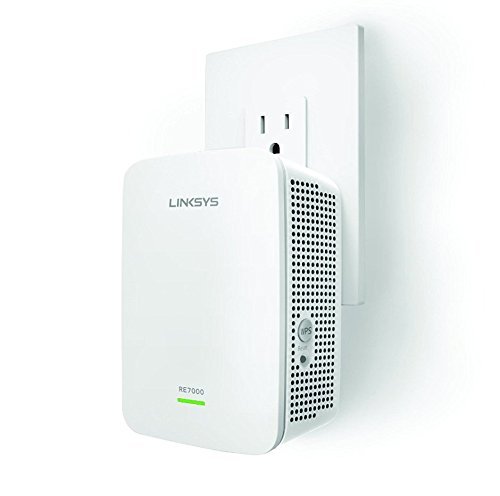


🚀 Boost Your WiFi, Boost Your Life — Never Miss a Beat!
The Linksys AC1900 Max-Stream RE7000 is a certified renewed WiFi range extender that delivers up to 1900 Mbps dual-band speeds and expands coverage up to 10,000 sq ft. Featuring MU-MIMO technology and Spot Finder for optimal placement, it eliminates dead zones and supports multiple devices simultaneously. Easy push-button setup and a 90-day warranty make it a reliable upgrade for any home or office network.
| ASIN | B06XWJ6Q5D |
| Best Sellers Rank | #4,817 in Amazon Renewed ( See Top 100 in Amazon Renewed ) #156 in Repeaters #1,504 in Renewed Computers & Accessories |
| Brand | Linksys |
| Built-In Media | Range extender device |
| Color | White |
| Compatible Devices | Router |
| Connector Type | RJ45 |
| Customer Reviews | 4.0 out of 5 stars 1,442 Reviews |
| Data Transfer Rate | 1900 Megabits Per Second |
| Frequency Bands Supported | 2.4 GHz, 5 GHz |
| Included Components | Range extender device |
| Item Weight | 8.96 ounces |
| Manufacturer | Linksys |
| Range | 10000 Square Feet |
| UPC | 745883742165 |
| Unit Count | 1.0 Count |
| Warranty Description | 90 days limited warranty |
| Wireless Communication Standard | 802.11ac |
| Wireless Compability | 802.11ac |
C**L
Worked well.
Starlink doesn't like traveling through walls , especially block ones. Needed this to be able to get wifi three rooms down from the receiver. It did the trick and the kids were happy.
L**R
Easy Setup, Great Performance
The Linksys AC1900 Gigabit Range Extender / WiFi Booster / Repeater MU-MIMO (Max Stream RE7000) (Renewed) is an excellent option for those looking to extend their WiFi range and improve their network's performance. The RE7000 model is designed with MU-MIMO technology which allows for fast and efficient data transfer. I was very pleased to receive my unit in pristine condition despite it being a renewed unit, it looked like new. The setup process was straightforward and easy to follow, the instructions that were included in the box made it simple to set it up manually. I had to set it up manually because my router was locked up by my landlord and didn't have access to the WEP key. The setup process only took a few minutes to complete and after it was set up it greatly extended my wifi range and the speeds were fast enough to stream TV shows without any lag or delay which was great! I would highly recommend this to anyone looking to extend the range of their wifi network and improve its performance.
A**S
It works OK - decent for the price
I bought this range extender to get more range/coverage out of an older EA9300 router. I had tried out a TP Link Deco X20 mesh system which worked great for coverage in my home, but I had network compatibility issues with one of my devices. Switching back to the old router fixed the issues, but then I was suffering the same poor coverage in portions of my home. I purchased this to extend the coverage and try to get something better than before the failed upgrade. Pros: Very good coverage Works fine for a refurb Well packaged for a refurb (looked brand new) Cons: Setup is not as easy as it could be Speed is so-so (not worse than the main router, but not faster) Item was well packaged and if I didn't know any better I would think it was not a refurbished unit. Set up was "easy" in the sense that it powered on, was easy to find, and followed the general set up wizard. However, one of the main reasons I purchased this range extender was so that I could create seamless roaming with it (since my router supported it). That requires that you keep the same network name - however, this could not easily be done with the wizard and it defaults you to use a new network name XXXX_Ext (where XXXX is your existing network). That's fine - but if you try to force it and use your old name without the _Ext, it will create interference (if you use the wizard). What you have to do to make that option work correctly is set up the _Ext network, and then relogin back into the range extender directly. When you do that, you have the option to carryover your old settings and the interference issues go away. Had I not read some of the reviews, I probably would have given up on it. I would assume that most people want this option when they purchase the range extender but I understand why Linksys may have chosen that option. In terms of performance, coverage is pretty good. It does not extend that much but signal is strong. Speed is average - but the EA9300 was also hit or miss as well (not horrible but generally falls in the 60-80 Mbps range).
L**Z
Has many connection options
I think it’s ok, I think after I got it the signal went down on the bars but haven’t failed me yet still running strong and for easy setup use cable don’t waste your time any other way
B**E
Strange setup
Update 17 March 2025: This wifi extender has some nasty little habits. It is using massive amounts of bandwidth with nothing connected to it, it's freezing up my router and the only way to rectify this is to remove extender cable from router LAN port and restart the router. Unless I can get a fix from Linksys, this one is going back. While it's up and working now, setup on this extender was more difficult than need be. I followed the quick setup instructions to the letter (3 times) but the Linksys setup network never appeared in my available network. I am using this as a wired extender in my detached garage around 70 feet from my provider router. I have cat5 cable running underground in conduit to garage. The setup was first performed at garage with no joy. I then returned to house and plugged extender into wall outlet, waited for the green to orange light on extender, connected short cat5 cable between router and extender and boom! Everything worked fine. I finished setup, took extender back to garage, connected to cat5 cable out there and it was happy. Not sure why it didn't like the garage cable the first time. The price was really, really cheap and with both 2.4 and 5Ghz channels, streaming in my garage is no problem. The 4-star rating reflects the setup process.
J**E
Good Compact 802.11AC Access Point, with a Few Issues
I purchased this refurbished, and it looks and acts like new. I have it setup as an Access Point - a wired range extender. Roaming from one area of the house to another seems to work fine, although there is definitely a momentary drop. I may enable the 802.11r protocol, to see if that helps. Overall performance is OK. As one other reviewer noted, there seems to be a problem with real-time video from surveillance cameras. When I try to view my video cams using my 802.11n laptop (Intel chip, Windows 10), the camera feed will pause from 1-10 seconds. The cameras are connected to an NVR, that is wired to the network, and with my previous Wi-Fi setup, I never had this problem. I've tried enabling QoS, but the settings are either on or off, there is no opportunity to prioritize or adjust throughput, like on my Linksys AC1900 (RE7500) router. I also tried setting the AP to 802.11n only on the 2.4GHz channel, but oddly you can't do that - you can only set it 802.11b, and why anyone would need to do that is beyond me. I can set my router to 802.11n, but it's just the opposite on this AP - weird. See attached screenshot for an example of this setting. All in all, when combined with a Linksys AC router, this is a decent Access Point, most of my devices work fine with it, and there is a definite advantage to using the 5GHz band, as the connection speeds are higher and there is less interference. I just wish the real-time video performance wasn't so choppy. I'm glad I did not pay $99 for it, I would've sent it back.
A**E
Super Easy To Set Up And Works Great!
This was so easy to set up by following the enclosed instructions. So far it’s working great! If anything changes I will post an update but right now I’m getting a strong WiFi connection in a former dead zone of the house.
S**F
Pick up weakest signal & extend it superbly
it simple to setup and use, boost WIFI effectively, and provide wired Ethernet to connect to a router or computer . Great price too.
Trustpilot
2 months ago
2 months ago