🖼️ Elevate your creative space with pro-quality prints that keep you ahead of the curve!
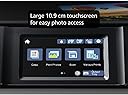
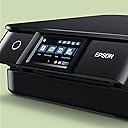
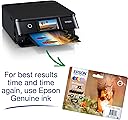
The Epson Expression Photo XP-8700 is a compact, wireless A4 multifunction inkjet printer designed for professionals and creatives who demand exceptional photo quality and versatile media support. Featuring a 10.9 cm touchscreen, dual paper trays, and 6-colour Claria Photo HD inks, it delivers ultra-high 5760 x 1440 DPI resolution prints that last up to 300 years. Its rear specialty feed handles heavyweight papers up to 300gsm, making it ideal for artists and photographers. Wireless printing and scanning via the Epson Smart Panel app ensure seamless integration with your mobile devices, while auto duplex and motorized output tray add convenience to your workflow.


| ASIN | B09GKZ9VJH |
| Additional Printer Functions | All In One |
| B&W Pages per Minute | 33 |
| Best Sellers Rank | 1,142 in Computers & Accessories ( See Top 100 in Computers & Accessories ) 6 in Portable Photo Printers |
| Box Contents | Power Cord |
| Brand | Epson |
| Brand Name | Epson |
| Color Depth | 24 bpp |
| Color Pages per Minute | 20 ppm |
| Colour | gray |
| Compatible Devices | Printer |
| Connectivity technology | Wi-Fi |
| Control Method | App |
| Country of Origin | Japan |
| Customer Reviews | 4.3 out of 5 stars 2,705 Reviews |
| Display Type | LCD |
| Dual-sided printing | Yes |
| Duplex | Automatic |
| Hardware Interface | USB |
| Initial Page Print Time | 500 ms a 1 segundo |
| Ink Colour | 5-colour |
| Item Dimensions D x W x H | 13.4D x 13.7W x 5.6H centimetres |
| Item Type Name | Inkjet Printer |
| Item Weight | 5.5 Kilograms |
| Item height | 5.59 centimetres |
| Manufacturer | Epson |
| Maximum Copies Per Run | 50-100 copias |
| Maximum Copy Resolution Black and White | 5760 x 1440 dpi |
| Maximum Copy Resolution Color | 5760 x 1440 dpi |
| Maximum Copy Speed Black and White | 33 ppm |
| Maximum Print Resolution Black and White | 5760 x 1440 DPI |
| Maximum Sheet Capacity | 100 |
| Maximum print Resolution Color | 5760 x 1440 DPI |
| Media Size Maximum | A4 |
| Model Name | Expression Photo XP-8700 |
| Model Number | C11CK46401 |
| Model Series | XP |
| Model name | Expression Photo XP-8700 |
| Network Connectivity Technology | Wi-Fi |
| Number of Drivers | 2 |
| Number of Trays | 1 |
| Other Special Features of the Product | Auto Power On, Auto-Duplex, CD-Printing, Memory Card Slot, Touch Screen |
| Output sheet capacity | 100 |
| Paper Size | 210 millimeters |
| Power Consumption Size | 2 Watts |
| Print media | Card stock, Glossy photo paper |
| Printer Output Type | Colour |
| Printer Resolution Horizontal in Black and White | 2267 Centimeters |
| Printer Type | Inkjet |
| Printing technology | Inkjet |
| Processor Count | 1 |
| Product Warranty | 1 Year |
| Resolution | 5760 x 1440 |
| Scanner Type | Photo |
| Series Number | 10 |
| Special feature | Auto Power On, Auto-Duplex, CD-Printing, Memory Card Slot, Touch Screen |
| Specific Uses For Product | Home use, document printing, photo printing |
| Total USB 2.0 Ports | 1 |
| Total USB Ports | 1 |
| Unit Count | 1.00 count |
| Warranty Type | limited warranty |
| Wattage | 2 watts |
B**E
Review aimed at watercolour artists
(Review for epson XP 15000 model) (Photo is a close up of the printed gray lines, the blue parts are my masking fluid) Working with 300gsm/130-140lb watercolour paper? (In my case, arches hot pressed) This printer will print on it! Needed a printer that would take arches hot pressed 300gsm paper, and after sifting through the net, i came across a post that stated this printers previous model printed on that exact paper, however it had been discontinued, but the link to this printer was there subtitled that this model was the 'upgraded latest version' of the printer i wanted. I wanted such a printer in order to print digital drawings I've made on my tablet to paint. I was previously drawing, then tracing using a light box onto my watercolour paper. Although the online manuals at epson say you should only use heavy epson paper, I bought it anyway after seeing in other places that this prints on up to 130lb/300gsm paper either way. And it certainly does. After going through the set up, to align the print heads correctly after all that shipping (dont rush that part, its REALLY important, so you dont get streaky print outs), i set the back feed to A3, paper type to thick in the printers settings, loaded up epson iprint on my tablet, set the feed to rear in the apps print settings, and test printed on a thicker standard a3 paper which i believe is 80gsm. So far so good. The print quality is fabulous. Then i placed my arches paper in the back feed (which i must add, epson say only add 1 sheet at a time if using 300gsm paper), And tapped print. I watched as the paper went through without a hitch, and have a wonderful printed image for me to paint on. Highly reccomend for those looking for a suitable printer for 300gsm paper all in all. The printers interface is simple for setting up, but a bit long winded when having to put in your wifi password,but thats okay as i cant imagine id be having to navigate the printers keyboard often if ever again! You can also use the quick connect to connect the wifi if your router has that button. It also has settings for different types of paper. I just have mine set for plain paper and paper type as thick. It prints on CDs and labels and envelopes, but i wont be doing that anytime soon and im confident it will be easy to set up should i ever need to. There are manuals online should i need to consult them. Really really happy with this purchase. And the price is phenomenal. Epson win again!
M**N
Compact all in one printer
Very happy with this all in one printer. It prints reliably from my phone, iMac and iPad, produces excellent quality images on gloss or matt photo paper and also works well as a photocopier for occasional use. The original ‘starter’ ink cartridges seemed to last quite a long time and I’ve had no problems with poor quality printing even if it hasn’t been used for a while. Original inks aren’t cheap (£55/set of 6) but they are probably no more expensive than similar printers. It’s also easy to set up and use. Downloading the Epson Print App adds functionality and more control when you are printing outside of mainstream applications.
T**R
Great printer and good value
This printer is very good and will do everything needed by a home printer / scanner really well. It produces good quality photos and black and white prints. It is a step up from the previous XP 640 I had and is fairly quick when printing documents. The set up is very easy if you use the online drivers and software from the genuine Epson website. One thing to take care with is if you use non-Epson cartridges. Epson has made recent firmware updates which prevent most third party cartridges working at all. If you buy this printer, do not make any firmware updates and block all such updates. Instructions how to do this are widely available on the web or YouTube. Updates to the software are fine and don't affect this. The XP 7100 is perfect for all home needs but Epson ink is expensive. Great if you use non-Epson ink.
A**Y
A fantastic printer if you take the time to setup correctly.
As someone who frequently juggles home office documents, the kids school projects, and a passion for printing cherished family photos and making CD/DVDs, finding a single printer that excels at all these tasks can be a challenge. After careful consideration, I invested in the Epson Expression Premium XP-6100 A4 Multifunction Wireless Inkjet Printer, and I am genuinely impressed by its capabilities. This isn't just a printer; it's a versatile creative hub, deserving of its "Premium" moniker. Documents: For everyday text documents, the dedicated pigment black ink delivers crisp, sharp, laser-like text that is incredibly easy to read and looks professional. Even fine print retains remarkable clarity. Graphics & Presentations: When it comes to charts, graphs, and colour documents, the vibrant dye inks truly pop. Colours are accurately reproduced, with smooth gradations and excellent saturation, making presentations and reports visually engaging. Photo Printing (The Star of the Show!): This is where the XP-6100 truly excels. With its additional photo black ink, the printer produces stunning, gallery-worthy prints. The depth of colour, the fine detail, and the smooth tonal transitions are truly exceptional, rivalling outputs from dedicated photo printers. Whether it's a vibrant landscape, a detailed portrait, or a black and white print, the results are consistently breath-taking. I've printed numerous photos on various Epson photo papers, and each time, I'm genuinely surprised by how professional they look. Borderless printing is a breeze and adds to that premium feel. Now, for a vital piece of advice that will ensure you unlock the XP-6100's full potential: take your time with the initial setup. Like any sophisticated piece of technology, proper setup is paramount. It’s not overly complicated, but rushing through the steps could lead to less-than-optimal results down the line. Read the Instructions, go through the included setup guide carefully, step by step. Epson has made it quite visual and easy to follow. Setting up the wifi was a breeze, helped by step by step instructions on the printer screen. If you're looking for a versatile device that delivers professional-grade results for both everyday documents and cherished memories, and you're willing to invest a little care into its initial setup, the XP-6100 comes with my enthusiastic and wholehearted recommendation. It’s a truly premium experience.
S**M
Fantastic product (with a few minor gripes)
UPDATE: Everything below, I stand by. However after using this printer for a few months now it is quite frustrating how slow it is, not slow in actual printing, but slow in getting ready to print, particularly discs. After using the Print CD software, and you press print it takes a while for the printer to realise you want to print something, then it starts making noises, presumably to move internal parts to allow CD printing. Only once it has stopped making noise can you push the CD tray in and then after another adjustment of some kind it will begin to print. From clicking print, to the start of the printing takes about 20 to 30 seconds, Ok so not an absolute age but something I think worth noting. This is an amazing printer, I must confess I am an Epson fan and have never owned any other brand. I bought this purely to print A3 photos and artwork, I own 2 other Epson A4 printers and they have served me well, so stuck with the brand. This is a very smart looking printer, very clean lines, not too big, in fact only about 3cms wider than my A4 but same height and depth. Wi-Fi is simple to set up, took about 3 minutes using push button (WPS) method. Print quality is exceptional, even borderless. The LCD screen is very clear and bright, and very easy to understand and navigate. The front automatically flips up when power is turned on, the paper outfeed tray is also automatic and comes out when needed. It has 3 paper feed trays, 1 at the rear and 2 in the front, this is very useful as you could keep different size papers in each tray, saving you the trouble of swapping paper, you could keep A4 in one tray and 6x4 photo paper in the other, the rear feed is primarily used for A3 although it adjusts to any size. You will need to tell the printer which tray you want to use via the print dialogue box that pops up on your PC (after installing the supplied software) Make sure you set correct paper size. The minor gripes. When printing onto A3 using the rear paper feed, you must wait until you have sent the job to the printer, before placing paper in the feed, you can not have paper already waiting in the feed tray, you can only print 1 at a time. You can choose to print more than 1 but you have to go through the same process as printing just one, ie wait until instructed to place paper in the rear feed, this sounds like a headache, but really is not too bad, just time consuming. The CD tray is not motorised as in my (older) A4 printer, possibly lack of room because of the 2 paper trays, this is a minor gripe really as slotting it in is extremely simple, the CD tray is stored below the paper trays at the front. Again not a major issue. Features I have not used yet are printing from SD card using the onboard slot. I have not used the Photo+, nor Photo+ tool, or Scansmart. All of these utilities are on the supplied installation disc. Overall an exceptional printer, smart looking, easy to operate, great features, excellent print quality. Highly recommended.
C**.
Too complicated and options don't work
Original review: (Four stars) I bought this machine because it offers more than the usual black, cyan, magenta and yellow inks, helpful when printing photographs. Like much modern technology, this printer can do a lot more than most people, I suspect, would need. In essence, I want to be able to photocopy, scan and print. This machine does all this but has a load of bells and whistles which makes navigating the many options, for me, frustrating/irritating. For example, I sometimes find myself in a cul-de-sac which offers very few paper size or type options; how or why I got there is a mystery. Print quality is good though whether as good as my 10 year old Canon, which expired just after I bought a new set of inks for it, is open to debate. This Epson is far less robust: it has a flimsy feel and makes alarming squeaking noises when in operation. I cannot say whether this is normal or my printer has some inbuilt flaw but the printed page does eventually emerge. UPDATE AFTER VERY LIMITED USE: I now very much regret my purchase. The complications involved in getting it to do what I want are enormous, there are many options which are often irrelevant and still don't include the simple process that I want to get to. Today I wanted to print the address on an envelope. After three hours (I am retired) of trying, I gave up and wrote the wretched thing by hand. If you set 'envelope' in the menu you have to insert the CD. Finding the CD was easy - in my desk drawer, but the animation to show the location of, and use, of the CD holder was very, very confusing. It seems that, every time you want to print an envelope you have to find the CD, put it in the holder and then insert that into the printer to just the right depth. This is, I eventually discovered, indicated by matching with a white line in the body of the printer. My reward for all this effort was - nothing. I inserted an envelope into the the rear paper holder and all that happened was it got scrunched up and, with some effort, I removed the now useless bit of stationery. I tried again: same result. I then used the front paper feeder. Again, I was told to insert the CD in its holder. I made sure that the settings were for the appropriate paper feeder, envelope size and type of paper. Result: the screen told me the printing was complete (I had been able to hear noises). But, there was nothing in the output tray and one unsullied envelope remained resting in the input tray, just where I had put it. Another series of attempts, with various modifications, brought the same negative result. I cannot recommend this flimsy, overcomplicated, unworkable bit of plastic. Avoid.
S**Y
I escaped the Canon WiFi Bermuda Triangle!
After years of loyal (some might say masochistic) service to the Canon printer empire, I finally broke free! Last week, I, a creature of habit, even bought another Canon. Oh, the foolish optimism! The WiFi setup, a task that I believe Canon engineers designed specifically for masochists and telekinetic wizards, proved utterly impossible. My router and the printer engaged in a silent, passive-aggressive standoff, refusing to acknowledge each other's existence despite my increasingly desperate pleas (and a few muttered expletives). Back to the seller it went, a monument to my fleeting hope for a wirelessly connected life. And then, like a beacon in the inky blackness of my printer-related despair, came the Epson XP-8700. What a revelation! I swear, the setup process was so easy, I thought I'd accidentally downloaded a self-installing spiritual guide. It practically set itself up while I was still trying to locate the power button. No wrestling with cryptic error messages, no consulting ancient online forums for a solution to a problem only five other people on Earth have ever encountered. Just… it worked. It connected to my WiFi faster than I can say "ink cartridge replacement." But wait, there's more! Not only did this printer spare me from a nervous breakdown, it also looks like it belongs in a sleek, minimalist art gallery, not my cluttered home office. Its compact design is a breath of fresh air compared to the blocky, utilitarian appearance of its predecessor. And the functionality? Oh, the functionality! The intuitive touchscreen is so user-friendly, even my technophobe dog could probably navigate it (if she had opposable thumbs, which, thankfully, she doesn't). This bad boy isn't just a pretty face. It prints photos that actually look like photos, not blurry approximations of them. The separate ink cartridges are a godsend – no more replacing an entire multi-color cartridge because I ran out of just one shade of blue! It has automatic duplex printing, saving trees and my sanity. And the front-loading paper tray? Pure genius! No more contorting myself to load paper from the back, feeling like I'm performing some kind of printer-based yoga pose. Plus, it's got a dedicated photo tray, so you don't have to swap out paper every time you want to print a masterpiece. And yes, it scans and copies with admirable speed and clarity – a true all-in-one champion. In conclusion, if you're teetering on the edge of printer-induced madness, do yourself a favor and buy the Epson XP-8700. It's not just a printer; it's a therapeutic experience. My blood pressure has plummeted, my WiFi is no longer an enigma, and I can finally print without wanting to throw something out the window. Bravo, Epson. Bravo!
S**E
Decent Printing Quality for High-End Photography, But Very Slow
I have had this printer for 5 years now and using it for printing high-end photography prints as well as day-to-day printing and for the most part it's been absolutely fine. It's taken me a while to get the settings right in Photoshop to maximise the printing quality. Getting the settings are is absolutely key. The type of paper that you use also plays a key role. Once you get those things right, it is capable of printing decent quality posters. The only major downside of its printer is its speed. It's SLOW. And I don't mean the printing is slow. The preparation leading up to the printing or re-calibration or after when you change a cartridge takes ages. As long as you are not in a rush, this printer does a very decent job. As for scanning, it does a faily good job, nothing special there.
Trustpilot
2 weeks ago
2 months ago