
DOWNLOAD THE APP


Customer Services
Copyright © 2025 Desertcart Holdings Limited
DOWNLOAD THE APP


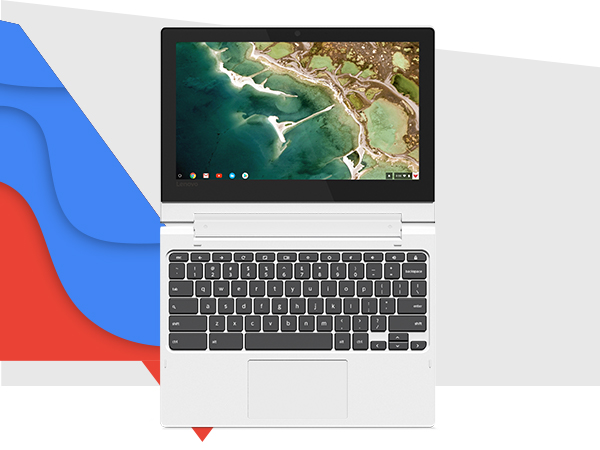
🚀 Flex your productivity with the Lenovo Chromebook Flex 3 — power, style, and freedom in one sleek package!
The Lenovo Chromebook Flex 3 is a lightweight, 11.6-inch 2-in-1 convertible laptop powered by a 2.1 GHz MediaTek MT8173C processor, 4GB RAM, and 64GB storage. Running Chrome OS, it boots quickly, offers built-in virus protection, and delivers over 10 hours of battery life. Its capacitive touchscreen and versatile 360° hinge make it perfect for professionals seeking portability, durability, and seamless connectivity with USB-C, HDMI, and SD card ports.




| ASIN | B08T6N424Z |
| Audio Output Type | Headphones, Speakers |
| Audio features | Capable of audio output through headphones and speakers |
| Automatic Backup Software Included | Microsoft Office 365 |
| Battery Average Life Standby | 10 Hours |
| Battery Cell Type | Lithium Polymer |
| Battery Life | 10 Hours |
| Best Sellers Rank | #34,787 in Computers & Accessories ( See Top 100 in Computers & Accessories ) #5,217 in Traditional Laptop Computers |
| Bluetooth support? | Yes |
| Brand | Lenovo |
| Built-In Media | Computer, Charger, User Guide |
| CPU Codename | Cortex-A53 |
| CPU Model | Mediatek Mt8173C |
| CPU Model Generation | 7th Gen |
| CPU Model Number | MT8173C |
| CPU Model Speed Maximum | 2160 MHz |
| Camera Description | Front |
| Color | Blizzard White |
| Compatible Devices | USB mice, keyboards, storage devices, external displays, Bluetooth-enabled headphones, speakers |
| Connectivity Technology | USB |
| Control Method | Touch |
| Customer Reviews | 4.4 out of 5 stars 4,784 Reviews |
| Display Resolution Maximum | 1366x768 Pixels |
| Display Technology | LED |
| Display Type | LED |
| Form Factor | Convertible |
| Graphics Card Ram | 4 GB |
| Graphics Coprocessor | PowerVR GX6250 |
| Graphics Description | Integrated |
| Graphics Ram Type | Shared |
| Hard Disk Description | Emmc |
| Hard Disk Interface | PCIE x 2 |
| Hard Disk Size | 64 GB |
| Hard-Drive Size | 64 GB |
| Hardware Interface | Bluetooth, HDMI, Media Card, USB 3.1 Type A, USB 3.1 Type C |
| Human-Interface Input | Touchscreen |
| Item Dimensions L x W x Thickness | 11.5"L x 8.48"W x 0.77"Th |
| Item Type Name | Chromebook Laptop |
| Item Weight | 2.65 Pounds |
| Keyboard Description | Traditional |
| Keyboard Layout | QWERTY |
| Lithium-Battery Energy Content | 45 Watt Hours |
| Manufacturer | Lenovo |
| Memory Clock Speed | 2400 MHz |
| Memory Slots Available | 2 |
| Memory Speed | 1866 MHz |
| Microphone Form Factor | Built-In |
| Model Name | Ideapad Flex 3 Chromebook |
| Model Number | 82HG0006US |
| Model Year | 2020 |
| Native Resolution | 1366 x 768 pixels |
| Number Of Cells | 3 |
| Number of Ports | 6 |
| Operating System | Chrome OS |
| Optical Storage Device | No Optical Drive |
| Other Special Features of the Product | Lightweight, Touchscreen |
| Power Device | Internal Rechargeable Battery |
| Processor Brand | MediaTek |
| Processor Count | 1 |
| Processor Series | Mediatek Mt8173C |
| Processor Speed | 2.1 GHz |
| RAM Memory Installed | 4 GB |
| RAM Memory Slot Total Count | 2 |
| RAM Memory Technology | LPDDR3 |
| RAM Type | DDR4 SDRAM |
| Ram Memory Maximum Size | 4 GB |
| Refresh Rate | 60 Hz |
| Resolution | 720p |
| Screen Size | 11.6 |
| Speaker Description | Built-in Speakers |
| Specific Uses For Product | Personal |
| Total Number of HDMI Ports | 1 |
| Total Usb Ports | 2 |
| Touch Screen Type | Capacitive |
| UPC | 195477494329 |
| Video Output | HDMI |
| Video Processor | PowerVR |
| Voltage | 5 Volts |
| Warranty Description | 1 Year Limited Parts and Labors, China |
| Warranty Type | Limited |
| Webcam Capability | Yes |
| Wi-Fi Generation | 5 (Wi-Fi 5) |
| Wireless Compability | 801.11ac |
| Wireless Technology | Bluetooth, Wi-Fi |
S**G
Great quality! Built to last! Excellent Computer!
I bought this computer when it was first released in 2021. So I've had it just about 3 years now. It's works just as great as the day it arrived. It's an excellent computer, built to last, and works perfect for everything and anything I've ever needed it for over the years from online school to running a business and everything in between. I really enjoy the touch screen feature. It's not something I use very often, but it's pretty handy. The transition from laptop to tablet is very smooth especially if you are working on a program that can use both. (I mostly use it for cricut and Netflix). I've never had any problems or noticed any lag in the screen when swapping over. I play a few online game and it keeps up no problem. I have never had a lagging or loading issue. Also nice that I can download the apps I have on my phone onto the computer. When I'm on the road working everything stays connected and it's no hassle to pull up work files and programs when I get back to the computer. Its a pretty touch little machine and can handle just about anything you throw at it. I'm a general contractor and sometimes my computer has to go onto jobs sights with me. Often not a place you would want to bring a computer for risk of damaging it. But this computer can take a beating. It has fallen several times while it was open and had several things land on it while it was closed. This computer is a beast! It was definitely built tough and built to last! The battery is amazing! It says 10 hours, however that's not true. I'm on my computer every day usually all day with multiple programs open and running. It stays charged the entire day and often has battery the next morning when I forget to plug it in over night. I'd say you can easily get close 14-18 hours of battery life on a single charger. That's pretty impressive especially since mine is a few years old now. The sound quality and volume is plenty for me. I don't think I've ever had it on max volume. It's nice that is has the volume buttons in 2 locations: on the keyboard and on the side of the device. It's has an AUX/headphone port, but in this day and age I've never needed to use it. I mostly connect external speakers via the Bluetooth capability. Very easy to do! The only downside is the lack of ports. 1 USB drive isnt always enough. I use a wireless mouse when I'm on the computer so that takes care of the 1 USB drive. No biggie normally the mouse is the only thing I have connect to it but in the off chance I need to plug something else in, I ordered a cheap USB splitter and that works just fine. Overall this computer is a really great buy! I do not think you would be disappointed in your choice if you decided to go this route. I know I definitely have not been. This computer should be able to meet all of your needs for many many years!
D**S
First Chromebook and it's a winner
First off, the touchscreen works fine. I'm on version 100.0.4896.133 and had absolutely no issues. So whatever plagued this model previously has been resolved. Now then, lets focus on the laptop. The first thing I noticed was the screen. In an age of almost no bezels.... Holy bezel Batman! Is this a bad thing? Eh, maybe to some. For me I'm OK with it. Realize the laptop itself is about the size of a 13.3" laptop. I haven't looked into it but I suspect there's a laptop in this chassis with a 12" or 13" screen. But in day-to-day use, it's fine for me. The smaller screen gives a good pixel density and colors look fine. Very good viewing angles too. So all in all, I like it. Touchscreen seems very responsive as well. No issues at all there. Oh, and in the bezel there's a webcam. 720p, does OK in low light, no physical shutter so get your stickers ready :P Going down the laptop we have the hinge. While I'm not a fan of tablet modes that leave the keyboard exposed, it does what it sets out to do just fine. The pivoting action feels very smooth with a fair bit of resistance. Folding over into tablet mode, everything works as expected with good orientation control. So while something I won't use much, it's a nice feature. Down further, we get to the keyboard. Keys have a nice feel to them though travel is a bit short. Not Lenovo's best but certain better than other keyboard I've used. I'm a little disappointed it doesn't include the usual "F" keys given I use Linux on here but so far it's not caused any issues... Finally we come to the touchpad. I must be honest, I despise most any touchpad without physical buttons. However, I must confess this one is actually very good. It's proven to be very responsive with almost no hiccups. At times I will have a small lag if I try and use two fingers (resting one finger on the "button" and moving with the other) but it handles this better than other cheap machines I've dealt with. The physical action is rather mushy but taps work just as well. Finally, we come to the speakers. This is probably the weakest part of the whole machine. I find underside speakers become obstructed way too often. Of course this depends on how it's used, but I'd much prefer top-mounted speakers. But judging what we have, they actually works pretty well. If you're on a hard surface, they have decent sound. Nothing phenomenal, but about what you'd expect from a machine at this price point. And then if they are covered, you can still get OK sound from them. I guess the last point will be I/O. Charging is via USB-C, and yes, this port can be used for other USB devices too. You also have full-sized HDMI, a USB 3.0 and full-sized SD card slot. SD cards aren't flush when inserted so that's a bit disappointing, but I'm glad Lenovo at least opted for full sized ports and such. Now on the adjacent side we have power, volume and a headphone jack...not much to say there. Finally the guts of the beast. At the heart of this machine is an ARM based processor. I was very curious how performance would be using ChromeOS and more importantly the Linux dev environment. Results have been mixed but generally very good. As a Chromebook for surfing the web and watching videos, it works fine. Pages load quickly, videos play without issue, etc. The only hiccup I've found is playing a video in the background. The video remains frozen for a bit when returning to it, but this is only a minor quibble. I've not had many issues with Android apps either. My library is really only productivity software, but it's all worked as expected. Over on the Linux side, the processor is a bit labored. Chromium under Linux is obviously slower than the baked in Chrome, but I'm sure Linux running as a VM doesn't help. Lets end on usage, or more specifically heat and battery life. I've not done any specific testing, but I'd say 10 hours out of this machine wouldn't be difficult at all. And then even while under a load and charging, there's almost no noticeable heat generated by this laptop. If you're looking for a good all around Chromebook and can overlook the oddly sized screen, I highly recomend this machine!
A**E
A good device, finally after ChromeOS October 2021 update
It is a very affordable device. I was looking for a laptop stable, fast and cheap. I got to this and the fact that the manufacturer sells it as a 2 in 1 chromebook got up the points for making my decision. It was very disappointing when the OS got updated and the touchscreen stopped working. No more 2 in 1, fake! But 0ctober 2021 updated arrived and, finally, fixed the problem allowing me having back my 2 in 1 Chromebook. Of course, having Mediatek processor, 4 Gb RAM doesn't make it a powerful machine but for light-work and watching stream videos and music, make this device a very decent and cheap option to use ChromeOS.
N**Z
Buena PC
Dura mucho la batería
T**R
Laptop
Only had it for 3 years then it stopped working. I charged it and the screen wouldn't turn back on
S**H
Good battery life
3years after and it still works. Battery life still good
M**M
A Wonderful Chromebook--Fantastic Price
For the price, this is probably the best Chromebook on the market. With a full 360 rotation, it's a great tablet, tent it for movie/tv watching or use it traditionally like a laptop. Because it is Chrome OS, almost every needed product is available in the Google Play store. It's lightweight and so easy to carry around. I purchased a hardshell cover for it, a very thin keyboard cover (to protect the keys from my long nails; nothing worse than the color removed from the keys), a carrying case with a shoulder strap and for extra storage I have a portable thumb drive. It has onboard storage of 64gb which is extraordinary on a Chromebook. This is the third one I've purchased: 1 as a gift and 2 for myself (one of which I gave to my grandson for online learning) You cannot go wrong with this little gem!
A**R
Do not go for it - it's terrible
For the one I got first time, the touchscreen stopped working after couple of days. Called up Amazon and they replaced with a new one. The second one was working fine for a week - we did not use the Chromebook for couple of week and then when we opened it the touch screen does not respond .. AGAIN !!!! As it has been more than a month, Amazon refuses to refund (they want to charge 15% fee). I called up Lenovo service, spent an hour with them over the phone and they asked me to send it back to their factory for repairing. The time I had to spend so far on this is enormous. It is causing problem for my daughter's study. DO NOT EVER GO FOR IT. I think I will go for the refund (85% of the original price) rather than repairing it - just to get rid of this crap !!! I RETURNED THE PRODUCT TO AMAZON AND HAD TO PAY 15% OF THE PRICE. THIS IS CRAZY - FOR A CRAPPY PRODUCT LIKE THIS I SHOULD HAVE GOT 100% REFUND. THIS PRODUCT SIMPLY DOES NOT WORK. NOT SURE IF AMAZON OR LENOVO EVER READ THROUGH THE FEEDBACKS. MY MISTAKE WAS I DID NOT USE IT FOR 3 WEEKS AND THAT'S WHY MISSED THE 30 DAY RETURN WINDOW.
Trustpilot
3 days ago
2 months ago