
DOWNLOAD THE APP


Customer Services
Copyright © 2025 Desertcart Holdings Limited
DOWNLOAD THE APP

⚡ Power Your Home with Speed, Security & Smarts!
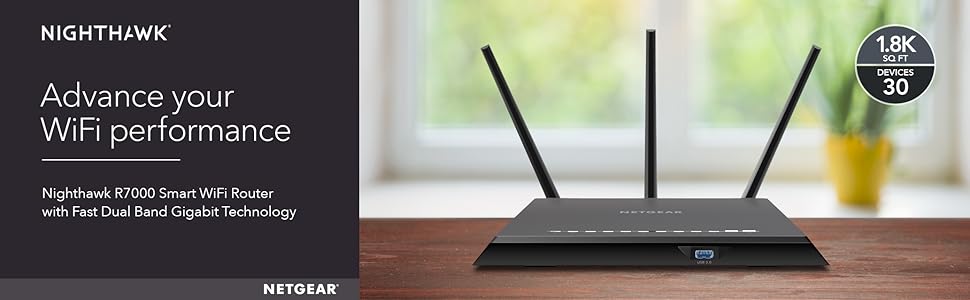
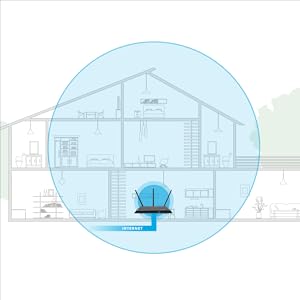
The NETGEAR Nighthawk R7000-100NAS is a high-performance AC1900 dual-band WiFi router delivering up to 1900 Mbps speeds and coverage for medium to large homes (up to 1800 sq ft). Equipped with a 1GHz dual-core processor, 3 amplified antennas, Beamforming+, and advanced QoS, it supports up to 30 devices simultaneously. Featuring 4 gigabit Ethernet ports, 2 USB ports, and NETGEAR Armor security with a 30-day free trial, it ensures fast, reliable, and secure connectivity for streaming, gaming, and smart home integration.




| ASIN | B08DTF7KGC |
| Antenna Location | Security |
| Antenna Type | Fixed |
| Best Sellers Rank | #6,234 in Computers & Accessories ( See Top 100 in Computers & Accessories ) #228 in Computer Routers |
| Brand | NETGEAR |
| Built-In Media | Nighthawk AC1900 Smart WiFi Router (R7000), Ethernet cable, Quick start guide, Power adapter |
| Color | black |
| Compatible Devices | Phone, Mac, PC, Wireless Devices, Media Streaming Devices, Laptops, Computers, Tablets |
| Connectivity Technology | Ethernet, Wi-Fi |
| Control Method | Voice |
| Controller Type | amazon_alexa |
| Coverage | Medium to Large Home (Up to 1800 sq ft) |
| Customer Reviews | 4.2 out of 5 stars 16,919 Reviews |
| Data Transfer Rate | 1300 Megabits Per Second |
| Frequency | 5 GHz |
| Frequency Band Class | Dual-Band |
| Has Internet Connectivity | Yes |
| Has Security Updates | Yes |
| Is Electric | Yes |
| Is Modem Compatible | Yes |
| Item Dimensions L x W x H | 11.22"L x 7.26"W x 1.97"H |
| Item Weight | 1.65 Pounds |
| LAN Port Bandwidth | 10/100/1000 megabits_per_second |
| Manufacturer | NETGEAR |
| Maximum Upstream Data Transfer Rate | 1300 Megabits Per Second |
| Model Name | R7000-100NAS |
| Model Number | R7000-100NAS |
| Number of Antennas | 3 |
| Number of Ports | 4 |
| Operating System | Microsoft ® Windows 7, 8, 8.1, Vista ® , XP ® , 2000, Mac OS ® , UNIX ® , or Linux ® |
| Other Special Features of the Product | Beamforming,Parental Control,Internet Security,QoS,Access Point Mode,Guest Mode,LED Indicator |
| Router Network Type | Both wired and wireless |
| Security Protocol | WPA2-PSK |
| Special Feature | Beamforming,Parental Control,Internet Security,QoS,Access Point Mode,Guest Mode,LED Indicator |
| UPC | 606449099812 606449099843 |
| Unit Count | 1.0 Count |
| Voltage | 240 Volts |
| Warranty Description | 1 Year Warranty |
| Wireless Communication Standard | 802.11ac |
| Wireless Compability | 802.11ac |
D**J
Unleash the Power of Seamless Connectivity
Intro: In a word where reliable and lightning-fast internet connectivity is no longer a luxury but a necessity, the NETGEAR Nighthawk AC1900 Dual Band WiFi Router (R7000) stands tall as a champion. With its exceptional performance, advanced features, and sleek design, this router has proven itself as a worthy contender in the competitive world of networking devices. As an avid user, I cannot help but commend the R7000 for its remarkable performance and the enhanced online experience it delivers. Seamless Speed and Reliable Coverage: When it comes to internet speed, the Nighthawk AC1900 router truly lives up to its name. Equipped with dual-band technology, it offers an impressive combined speed of up to 1900 Mbps, ensuring a blazing-fast connection for all your online activities. Whether you're streaming high-definition content, engaging in online gaming, or handling bandwidth-intensive tasks, the R7000 delivers uninterrupted and lag-free performance, allowing you to experience the internet at its fullest potential. Moreover, the router's powerful amplifiers and external antennas provide exceptional coverage, eliminating dead zones and ensuring a consistent signal throughout your home or office. Say goodbye to frustrating drops in signal strength and hello to seamless connectivity in every corner of your space. Advanced Features for Optimal Control: The Nighthawk AC1900 router doesn't stop at speed and coverage; it also excels in offering an array of advanced features that empower users to take control of their network like never before. The user-friendly NETGEAR Genie (R) app allows you to se up and manage your network effortlessly. WIth features like guest network acess, parental controls, and Quality of Service (QoS) settings, you can customize your network to suit your specific needs and ensure a secure and reliable connection for every device. Furthermore, the R7000 supports beamforming technology, which intelligently targets Wi-Fi signals to connected devices, resulting in improved range and signal strength. This means that no matter how many devices are connected, each one will receive optimal performance and bandwidth allocation. Stylish Design and Ease of Use: NETGEAR understands that aesthetics matter, and the Nighthawk AC1900 router is a testament to their commitment to both functionality and design. The sleek and modern design of the R7000 seamlessly blends with any environment, making it a pleasant addition to your home or office setup. Setting up the R7000 is a breeze, thanks to the intuitive installation process and the well-designed web interface. Even for those with limited technical expertise, NETGEAR provides clear instructions and an easy-to-follow setup wizard that takes you through the process step by step. Verdict: In the realm of WiFi routers, the NETGEAR Nighthawk AC1900 Dual Band WiFi Router (R7000) stands out as a true powerhouse, delivering exceptional speed, reliable coverage, and a multitude of advanced features. Its sleed design, ease of use, and outstanding performance make it a top choice for both tech enthusiasts and casual users alike. Whether you're a gamer, a streamer, or simply someone who demands a robust and stable internet connection, the R7000 will not disappoint. Unlock the true potential of your internet experience with the NETGEAR Nighthawk AC1900--trust me, you won't regret it.
D**Y
Rural Internet made easy
I moved to a rural area about two weeks ago. The road I’m on just got cable and internet service 3 months ago. The cable company doesn’t supply routers. Even the installer said “we have our moments.” The Nighthawk AC 2300 works flawlessly. I work from home a lot and stream all of our television. It works so well I told one of my new neighbors who I’ve known for eight days. Prior to that it was a data plan on his cell phone. I showed him my router, and explained one of my sons I.T. friends recommended it. He bought one after my recommendation, he called to say “how much better it now was”. I haven’t seen any buffering on the TV and there’s been no issues uploading or downloading. Set up was simple right out of the box. It was less than ten minutes. It had very easy to understand instructions. Connecting all devices has been seamless. There hasn’t been a single device that has connected. We have Roku’s,Echoes, iPhones, iPads and all of the connected. It’s a stellar piece of equipment. I thought I was going to need extenders in the house.They weren’t necessary the range it covers seems pretty incredible. All of my fears about rural internet have been put to rest. On a side note I gave tech support 5 stars because I didn’t need them. The written instructions were so easy to understand that’s all I needed.
C**E
Thank God. No more Apple Airport Extreme
I had had enough! With Apple's zealous efforts to keep things "simple" and cutesy, they left out the productive part, meaning a straight forward way to get to the things that need to be done. Fine if you are have a simple "open-the-box-plug-it-in-and-forget-about-it" application but that is not what I needed. It was rare but when the Internet "blinked" it would take literally hours to get that thing up and running and to get the DHCP the way I wanted it. I have an extensive home office with servers, printers, laptops, phones, etc. that share the network resources with personal stuff like TVs, receivers, home automation, etc. All of the heavy traffic stuff like servers and TVs are on Ethernet. Things that can't go Ethernet are left to the WiFi. Also, I like to have hard assets with static IPs. My point is that the AAE software was annoying as hell and the unit itself kept dropping WiFi clients. The last blink outage was the last straw. In came the Netgear AC2300. Setup was a breeze. A simple app on your phone gets you into the router so you can change the WiFi network name and password to your liking. The connection to the Internet through the modem was quick and automatic. In minutes everything that was on the old wireless network was now on the new one. All that remained was to log into the router using a browser for features that can't easily be managed by the app on the phone. A few minutes later, the DHCP base IP and ranges were set and viola, all the Ethernet clients, including those with fixed IPs, came back on online. The whole process from opening the box to getting everything up and running was less than 30 minutes. The WiFi speeds are faster and the range is wider. I can't say how long this unit will last but I couldn't be happier with the first 24 hours. Would I recommend it, absolutely. I have a pretty sophisticated setup and I see no need for a more expensive router.
J**S
Hey, it does its job and it does it fairly well
OK, so this thing will give you lots of internets. That's its job, and so you won't be disappointed with it. It handles a number of devices without issue, and it has a few different signal bands so that you can enjoy fast speeds close to it and any speed at all if you're outside dorking around. It's not too tough to set up. The app that it comes with does NOT work for setting it up (though it claims to). You still have to get a computer or something to do that initial connection. It took me about an hour or so to come to that conclusion (because it is very adamant that the app will work. The app does not work), but if I had started with a lined connection it would have been up and running pretty quickly. It hasn't failed me yet, working like a trooper since I installed it in February. It gives a fairly strong signal (though I wouldn't write home about the range, it's not bad at all). It doesn't need rebooting every 30 seconds like a Verizon router, and it just does its job well. NOTE: The app to connect to it works fine once you've set it up. It does NOT work to set it up initially. This app doesn't have a ton of features, but it works well enough to access some good stuff. They actually make it TOO easy to accidentally click a button that resets all of the networks to default settings without intending to (think- adding a 2.5mhz band, but it re-sets the 5 and 5.1 if you click that button). It also does not have any way to add VPN. They claim you can buy one right through Netgear, but that is both expensive and ill-advised. I tried every trick- from modding the system to working within its given framework, but it just does not work. 3 or 4 nerds have gotten it to work, but 98% of users run into errors and risk bricking their router with every attempt. IT CLAIMS TO HAVE VPN, but it doesn't. And the fact that a really small number of nerds got it modded enough to work with outside VPNs mean that it's on the whitelist for a number of those sites. But it's all a lie. BUY THIS if you have too much money to blow on a router, because it'll solve your internet connection issues. It's expensive, but darn it-- it does its job. DO NOT BUY THIS if you want to get Tajikistan Netflix or something through a VPN. There are better and even cheaper routers that do the same thing or more than this, but it absolutely does its intended job and will work for most of the people reading this.
J**M
Failed in seven weeks
This review applies to the Netgear R7000P ac2300 router. No compensation-bought it out of my own pocket. Two months ago I was upgrading my home network from old 100mbs to gigabit. Did a lot of research and this R7000P seemed to be the best compromise between cost and capability. My son was also upgrading his home and agreed with my assessment. He bought first. Router was excellent so I bought mine shortly thereafter in mid March 2018. It installed easily, plugged it in and it worked perfectly. Setup was a breeze. My home LAN is a mix of wireless and ethernet devices-two computers, a printer, five NAS devices connected through switches, some phones and tablets. Everything connected, the ethernet ports at 1000mbps. Fast forward seven weeks. One bright May morning I looked at the router and noticed that the LAN ports LED indicators had changed from white to amber. The ports had switched to 100mbps. Not a good thing. Speed tests were surprising-the wireless part of the router was still running as fast as always at 39MBps. The ethernet ports could barely hit 6MBps. So I did all the things one normally does to show love for electronics. Rebooted, power cycled, reset to factory specs, flashed new firmware, direct connected computer to the modem(to verify the modem wasn't in some way failing) and to each lan port through brand new cat 5 and cat 6 cable. I even yelled at it hoping intimidation would work. No joy. The router management software reported and speed tests confirmed that the ethernet ports were under 100mbps, not even close to 1000mbps. Phone support was less than helpful. It's beyond 30 days so I can't return it to Amazon and if I spend hours navigating a support system directing me do do all the troubleshooting I have already done I might eventually be able to return it for exchange. I pay shipping both ways, wait a week or three with no network. About a week after mine went wonky my son's failed in exactly the same way. He bought his at Walmart and had no trouble returning it and getting an ASUS. So, the most expensive router I have ever owned is operating in cripple mode. When I can afford it I'll buy something else. Not Netgear. One thing I did learn is that the 21,500+ reviews are not necessarily for this router. There is a filter switch near the review stars that lets you see only confirmed purchasers of this specific router-and that is lots less. Turns out I'm not the Lone Ranger-others have had similar issues. All of which is a very long-winded way of explaining how the R7000P managed to earn a single star.
T**N
Buy it and you will never regret spending money on this wonderful router.
NETGEAR Nighthawk X6S AC4000 Tri-Band WiFi Router (R8000P) is excellent gigabit router. I bought it brand new $179.49 in September 2019 and I fall in love with it at the moment of unboxing. Even though the user manual provides useful information on how to manage this router, however the users must have advanced knowledge to discover ton of its awesome features. I specifically like the stabilization of this router, the only router I've ever used that could run from day to day without overheating or connection drop. Auto firmware update will keep you free from security threads, you may "set and forget" to spend your time on your work, your life and your loved ones. Another awesome feature is Smart Connect - Let the router select the best WiFi band for our WiFi connections. With Smart Connect, we can use the same WiFi network name (SSID), security options, and password for all radios for which we enable Smart Connect. It is awesome to have only one Wireless Network Name (SSID) for 2.4G and both 5G radios. Another awesome feature is available on NETGEAR Nighthawk X6S AC4000 is ReadySHARE USB that lets you plug in even more capabilities and convenient features through your router’s USB port. These include USB storage you can wirelessly access at home, free software to easily backup your PC or Mac, wirelessly printing from any PC or Mac and the ability to play, view, listen to, and share your videos, photos, and music on DNLA connected TVs, game consoles, or media players. Last but not least, if you place your other banded router in your bedroom, your sleep may be bothered by the router led indicator. With NETGEAR Nighthawk X6S AC4000 Tri-Band WiFi Router you will never have that issue, there's a small switch in the back side of the router to turn off all the led lights except the power indicator. I have 36 devices connected to this router at home 24/7, both wired and wireless, some of them are high bandwidth usage like 4K TV and security cameras, I have no connection issue at all with NETGEAR Nighthawk X6S AC4000 Tri-Band WiFi Router. Buy it and you will never regret spending money on this wonderful router.
J**.
You could get a higher priced router, but why?
Works great; setup wasnt terribly complicated...ATT Uverse/Fiber users will need to turn off the radio signals (2.4 AND 5ghz signals) as well as configure the ATT supplied gateway to bridge or IP passthrough in order to make your router function properly. The GUI works great and is very intuitive; I was able to use advanced functions by simply nosing around the tabs for the different functions. The MU-MIMO technology is a godsend, and I now have 11 devices in my house utilizing the same connection, and none interfere with the other. I can game, my wife watches netflix in HD, and my daughter can watch her favorite youtube vines, and we do it all at the same time with no issues..for power users if you absolutely have to divert bandwidth allocation this router can do it. But my personal favorite function as a parent is the ability to use parent controls from the network map to make sure my daughter follows the rules we set. We can even block any device with the touch of one button. Also, if you are a social bug you can configure a guest connection with encryption if you want to stay on the safe side. All and all a quality router at a very affordable price.
J**M
HUGE improvement in download speeds and uptime reliability
Had an older Netgear router that couldn’t handle all the streaming traffic after I cut the cable cord. Decided to go with the Nighthawk X6S AC4000 based on all the reviews I read. The reviews weren’t wrong!! Without changing my internet service provider and only switching to this new router, my download speeds went from a typical 50-54Mbps download to 450-480Mbps download. Unbelievable performance. The old router also used to routinely drop the connection for my cameras as well due to the speeds but since installing this new router a week ago, nothing has dropped yet (fingers crossed). There are a few “quirks” that I’m not too happy about but can live with. First, the old Netgear app that supported my old router had a Network Map function which displayed how all currently connected devices were laid out; the new Nighthawk app doesn’t have this feature. Secondly, there’s a glitch between the Nighthawk app and the web based router setup. Through the Nighthawk app, each connected device can be edited to specify what each is based on pre-configured choices (tablet, smartphone, bridge, etc...). The web based router interface has different labels for all connected devices (iPhone, iPad, Windows Computer, etc...). If you specify on the Nighthawk app that a device is a “smartphone” and then log into the web based router interface, the device is listed as “unknown type”. If you specify a device as an “iPhone” in the web based router interface and then log into the Nighthawk app, the device is listed as “Unknown Type”. Would be VERY helpful if Netgear could sync both the Nighthawk app and the web based router interface to use the same terminology for devices so they are setup once and listed properly no matter which interface you use. Thirdly, there’s another glitch in the setup process (on both the Nighthawk app and the web based router interface) when enabling the remote access feature. If enabled on the web based router app, it fails a few times and then goes through fully enabling remote access. When trying to enable remote access on the Nighthawk app, it fails all the time and says it’s not enabled, even though the web based router interface shows remote access is enabled (and after successfully accessing router remotely through internet). Again, these are all minor glitches that hopefully Netgear will address in future app releases and firmware updates. But overall, just based on the significant improvement in download speeds and uptime reliability, this is the best router I’ve ever owned (and this is probably my 10th router in the past 20 years; having tried multiple Linksys, Netgear, and Belkin routers over the years).
Trustpilot
2 months ago
3 weeks ago