Desert Online General Trading LLC
Dubai, United Arab Emirates
Desert Online General Trading LLC
Dubai, United Arab Emirates



🎥 Capture the past, stream the future—digitize your legacy with ease!
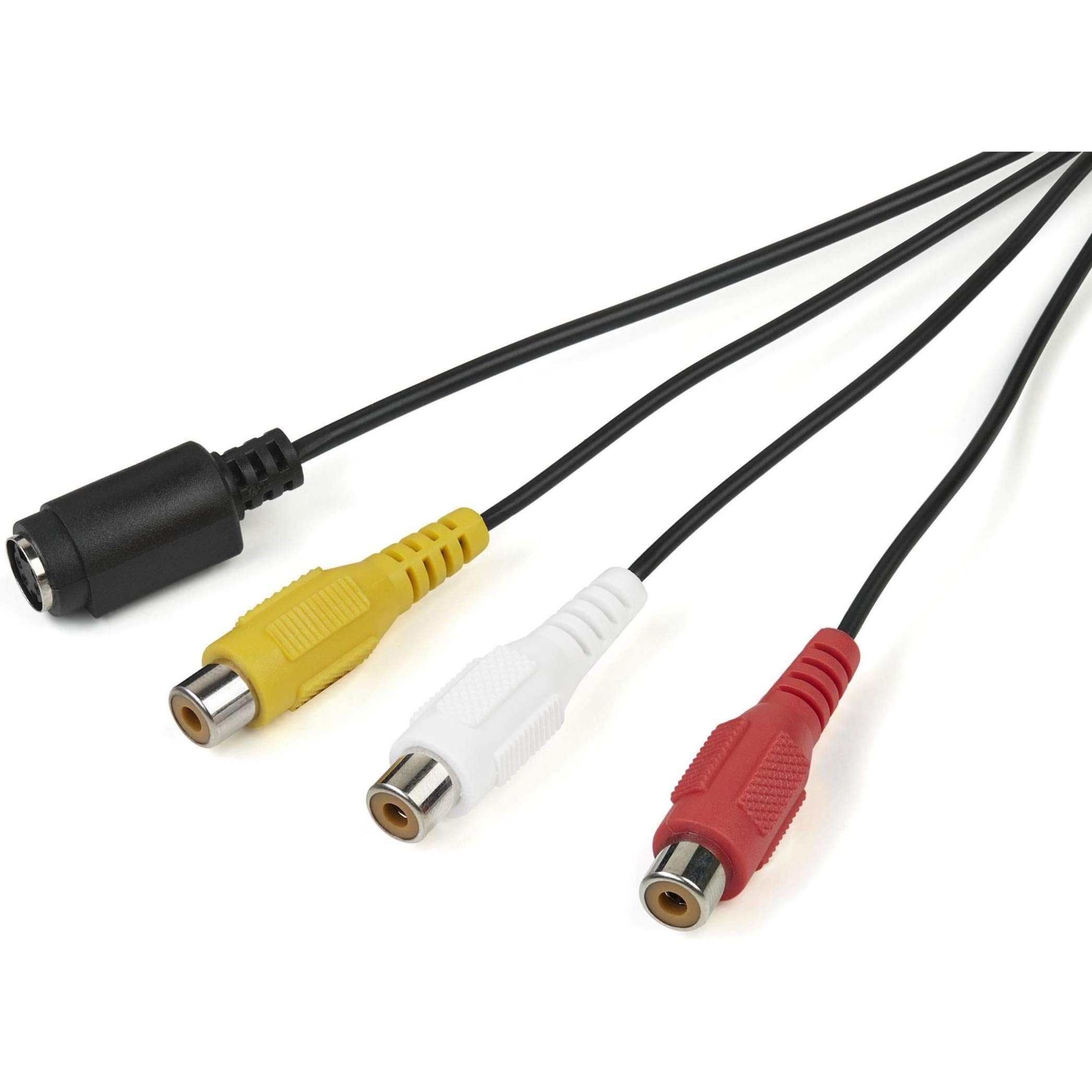
The StarTech.com USB Video Capture Adapter converts analog composite and S-Video signals into digital format at 30fps with 720x480i resolution. Powered via USB 2.0, it supports TWAIN-compatible software and includes Windows drivers for seamless video capture, editing, and streaming. Compact and portable, it’s ideal for professionals digitizing VHS, Betamax, or camcorder footage for modern media use.



| Brand | StarTech |
| Series | USB 2.0 Capture Device |
| Item model number | SVID2USB232 |
| Item Weight | 2.4 ounces |
| Product Dimensions | 3.9 x 1.4 x 0.6 inches |
| Item Dimensions LxWxH | 3.9 x 1.4 x 0.6 inches |
| Color | Black |
| Voltage | 28 Volts |
| Batteries | 1 AAAA batteries required. |
| Manufacturer | StarTech.com |
| Language | Dutch |
| ASIN | B089KQJV6S |
| Is Discontinued By Manufacturer | No |
| Date First Available | June 2, 2020 |
C**E
Decent image quality, works with OBS Studio**
You need to install the proprietary driver in order to use this with OBS Studio. It comes with a disc containing the driver but you can also find a download on Startech's website. Otherwise, it is only recognized as an audio device.
I**E
Works with Windows 10
I followed detailed setup instructions found online posted by a 3rd party. These instructions were all about configuring free OBS Studio to work with the device. Works well so far with Windows 10. Would not work with Windows 11. I've digitized several VHS clips and posted them online.
J**S
There are better transfer solutions...
Star Tech is a great brand and usually has great quality. These work as advertised but if you're looking to preserve old VHS S-VHS, Hi-Band 8mm, or Video 8 Tapes there are better (and much more expensive) options. Not bad but not great.
S**P
Easy to use + Wonderful Tech Support
The product works as described. I had some challenges getting it working on a laptop so I switched to a desktop which has a better graphics card. I used tech support a few times to assist with some capture issues both with the HW and the included Movavi SW as well as limitations within my computer's HW and SW. Both companies provide excellent support and all issues were resolved.
M**F
Captures okay but the software fails - take a pass on this one
So, the good news - the capture is pretty good. Good options. The bad news is the software appears out of date and unsupported. Version 11 came with the hardware and versions starting with 12 appear to be supported. So, when I got the captures done but tried to export them it failed in every attempt.It is frustrating because this is an otherwise good product. But, obviously, exporting the end-product is the goal. By this measure - it is a complete failure.
J**J
Recording quality is great.
I had got one of the $13 ones before this one and the sound kept cutting out and the video looked awful. This Star Tech one though, the souns is good and the video looks as good as a 33 year old VHS can. Definitely spend the extra money in this one.
F**Z
Works Out-Of-Box on Windows 10
I've seen a number of reviewers claiming that the drivers aren't working for them, but for me, this thing worked flawlessly right out of the box. Instead of using the CD driver installation provided, I went to the link mentioned in the instruction booklet and downloaded them from the manufacturer's Support page. They installed successfully on the first attempt and I was able to see the input in my Device Manager.I'm using Windows 10 64-bit, and the footage was captured on a JVC GR-AX750.
M**L
Picture Quality
I seldom give reviews but I have 2 reasons for this one. First, I want to say the Tech Support has been the best I have received. I have yet to get support for other products or services from other companies that was as good as this one. I want to give the hi-5 to the support team. They were friendly and knew the product. Thank you Guys. The 5 stars is for the Tech Support guys. I give the capture 2.5 for the low quality video pictures and Movavi.Now onto the S Video and Movavi. The program did copy, BUT, the quality was not what I expected. I looked at others for the 13 dollar tags but you get what you pay for right? So I went with the higher price one. However, I am disappointed in the quality of the transfer. When I play the Video 8 from the camcorder to the T.V. the picture quality for 25 -28 year old tapes in exceptional. I was very surprised but maybe they were stored well. But when I downloaded to the Movavi the quality was poor. Grainy, not sharp and color was way off.I also found out from support that the Movavi does not play back on Microsoft Media. I had to download VLC media player to see the recording and sound. That does not work for me. I captured 24 Video Hi-8 tapes from My Sony with a program the Roxio Creator 2011 I purchased in 2011. I started a project back then and did not finish it and decided to complete it now. I could not believe it worked and from my external hard drive I created a folder for the videos and they played immediately. I have an old HP tower windows 7 and it worked. The issue I have with the VLC is when I copy the videos to send to my children I don’t want them switching from Microsoft media to VLC and back and forth. I just want them to patch in and play. So this is not going to work for me since I only have about 10 video 8 tapes and over 20 from Hi 8. I upgraded to the Sony Hi-8 from a Sony Video 8. Well the Sony video 8 I have is not working. All would have been good but my particular Sony Hi 8 camcorder is NOT Backwards Capability as many others are. I checked Sony’s site and my model number and it does not play the video 8. If it did I would not be here and would have transferred with the Roxio Creator. So I am looking to transfer family video8 and barrowed a video 8 samsung from someone. The problem is this Samsung only has a S-Video and Audio port. My other Sony has a 1394 firewire which I used for the Hi-8 and the HP Tower has a 1394 port. I purchased the 1394 cable way back with the Roxio creator.I looked around for capture connections with S video to usb but many are the low price ones and one other is an elgato which has mixed reviews. So I am debating if I will spend the dollars on having a transfer house do the remaining Video8. I am so frustrated.I also viewed another product called clear click. The problem is it’s 150 plus. So what do you do with it after wards if it does capture both tapes and the quality is not great. Reviews are also mixed. I don’t have an issue for the 45.00 for the S video and Movavi if it worked with media and good quality but @ 150 and then it’s not the best quality for the clear click, I am not sure I want to risk that. As I said, the Hi8 played back clean so I want the same for the video 8.I just may go find a Sony video 8 used camera on ebay with a 1394 port. But then what do you do with the camera afterwards. I would sell it to someone who needs to transfer family videos as I do and pass it along. It’s looking more and more that is the path I may take since I have a program that is working and a computer that is still ticking along for now.My apologies for the return of the s video cable but you do have a great Tech Support team. Thank you guys again. Enjoyed the conversations and the help. Just wish the product produced a better transfer without the grainy pictures and VLC media was not needed.
Trustpilot
2 days ago
2 weeks ago
3 days ago
2 weeks ago