
DOWNLOAD THE APP


Customer Services
Copyright © 2025 Desertcart Holdings Limited
DOWNLOAD THE APP


🚀 Elevate your home network—fast, wide, and wired for success!
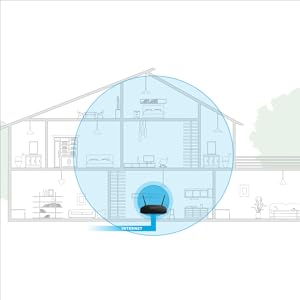
The NETGEAR R6230 AC1200 WiFi Router delivers dual-band wireless speeds up to 1200 Mbps with coverage spanning 1200 sq ft, supporting up to 20 devices simultaneously. Equipped with an 880MHz processor, 2 external antennas, 4 gigabit Ethernet ports, and a USB 2.0 port, it offers versatile connectivity for both wired and wireless devices. Designed for reliable performance and easy setup, this router is ideal for professionals seeking seamless streaming, gaming, and smart home integration.



| ASIN | B0756QFLXP |
| Are Batteries Included | No |
| Best Sellers Rank | 384,884 in Computers & Accessories ( See Top 100 in Computers & Accessories ) 2,634 in Routers |
| Brand | NETGEAR |
| Colour | Black |
| Connectivity Type | Wi-Fi |
| Customer Reviews | 4.3 4.3 out of 5 stars (7,888) |
| Date First Available | 30 Aug. 2017 |
| Guaranteed software updates until | unknown |
| Item Weight | 744 g |
| Item model number | R6230-100NAS |
| Manufacturer | Netgear |
| Number of Ethernet Ports | 5 |
| Operating System | Linux |
| Product Dimensions | 23.55 x 15.09 x 5.44 cm; 743.89 g |
| Series | R6230-100NAS |
| Voltage | 120240 Volts |
| Wireless Type | 802.11ac |
A**R
This router is a great buy that offers excellent "bang for your buck". For such a low price it is hard to find a router of this high a quality that has such an impressive feature set. Setup was easy after power cycling our cable modem, and the internal settings GUI is very intuitive and simple to use. This router supports Beamforming, dual band and has full gigabit ethernet. The range and signal penetration of the wireless N are excellent. (I recommend using that in place of the 5ghz ac when you need more range and penetration and don't mind sacrificing the speed of the 5ghz.) Using the 2.4ghz I can still watch HD YouTube videos while well outside a house with exterior brick walls. Thank you Netgear for providing such an outstanding product at an incredibly fair and honest price. Edit - I'd also like to mention that the NETGEAR email support has been fantastic. There was a web server error having to do with a link they emailed me not working; I reported it to their support team, and they worked on it several days until the problem was fully resolved. After support solved the problem and contacted the appropriate department, that department then emailed me a new link today which worked perfectly. I want to give a big shout-out to Jehan at NETGEAR for handling the case so well.
E**A
Muy bueno. Excelente rango. Sin problemas con la señal de 5ghz como pasa con otros routers. Buenas opciones de configuración; como el apagar la señal de WiFi por horarios definidos por el usuario o acceder remotamente al router y a los archivos compartidos en el disco duro conectado.
C**A
I've had this router for four years now, and it still works perfectly! As I work from home and rely on a stable connection, I haven't experienced any issues. It's easy to set up and maintain, making it a reliable choice!
K**M
This review is for the AC1200, R6230 Router. While setting up, it gave indications that the wireless thru-put internet was iffy. Worked- over and eventually all came together and had internet (wireless and hardwired) to all devices. Some hours into the first day, some of the wireless-connected devices lost internet, but not network. Re-booted everything, changed some cables, and after several hours and lots of foul language from me, everything was back up and functioning. Three days into it, things were iffy off and on, with some devices getting errors/notifications of poor internet connection, but only wireless-connected devices--all wired (ethernet-connected) devices worked perfectly. Did some testing and found a 90% drop-off in internet speed (wireless vs ethernet)--tested with two different computers (one laptop and one desktop) using wireless then ethernet then wireless. Tests run with all devices within 36 inches of the router and used Ookla Speed test, all back-to-back. Huge degradation between ethernet and wi-fi speeds. Completely unacceptable. Returned (today) and Amazon is shipping me a replacement, which should arrive tomorrow. I'll install the new one and report back right here, adjusting my rating as necessary based on the results obtained with the replacement item,. More later...… 9/12/2018....It's now "later", and I received the replacement router , installed and put it into service. Quite a difference from the first one---the installation was smooth, much quicker and with only one small problem which I believe I caused, so really, no problems. Up and running, all functions working, much less difference between wireless and wired speed and over-all, just what I had expected when I originally decided to replace my existing router with this model. I'm now (at least for the moment), quite happy with the device. I have had no problems, no indications of weak or unstable internet (as I had on the first one), so I'm raising my rating from one star to 4 stars, deducting one star based on the first one being bad out of the box. I'm also recommending this as a good buy, price-wise, notwithstanding my initial problems.. If anything changes, I'll be baaaaack!!
J**Y
First of all, you need to know that it's best to plug a laptop into this router via an Ethernet cable or a USB cable to do the setup. Once complete, WiFi is all you need forever. But without the hard connection to start things up, you won't know the required credentials to connect your WiFi. That's right. Even the Quick Start guide does not tell you this information. I also like to get into admin and change other things like the IP subnet and SSID so that curious folks do not know automatically what subnet I am using because I don't use the default. That's really easy with this router once you are connected. The Quick Start guid DOES provide the credentials to get into the administrative functions. Be sure to change those credentials immediately so that everyone in the world does not know your admin credentials. After the above is taken care of, everything else is easy peasy. I took the defaults for everything else and those defaults are just fine. I installed this router in my office which is in one end of a 40x90 foot metal building. I have a reasonably strong WiFi signal throughout the building. No problems. I use the WiFi primarily so that I can use my cell phone in the building with WiFi Calling turned on. No problem. I also use it for when I am working on a car or other mechanical project and want to have Youtube videos running on my laptop to assist me. Works great. I recommend this router. At the time I bought it, the price was $59.99 and I consider it a bargain.
Trustpilot
1 month ago
2 weeks ago