
⚡ Empower your home with real-time energy insight—because knowledge is the new power!
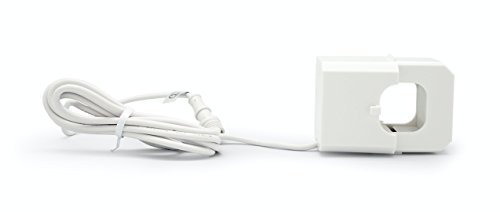
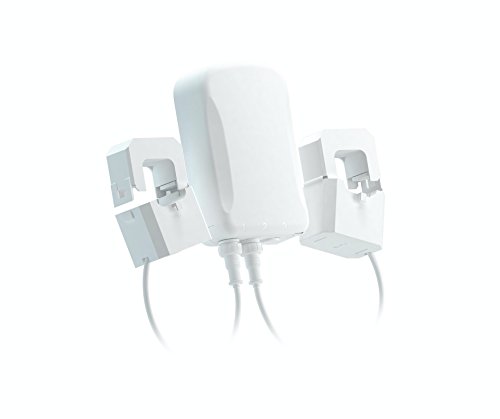
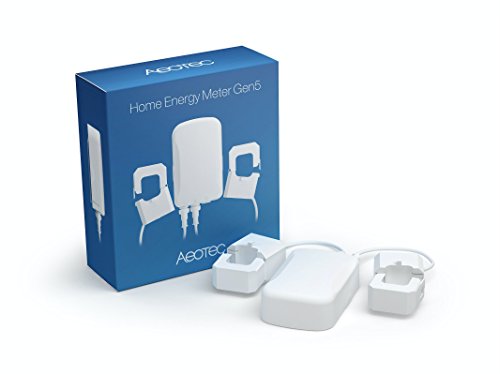
The Aeotec ZW095 Home Energy Meter Gen5 is a compact, Z-Wave Plus certified device that wirelessly monitors your home's electricity usage with 99% accuracy. Featuring two 200-amp clamps, it tracks dual electrical loads and transmits data up to 490 feet to compatible smart home hubs. Designed for indoor and outdoor use with an IP43 rating, it enables professional-grade energy monitoring and management for smarter, cost-effective living.


| ASIN | B00XD8WZX6 |
| Batteries Included? | No |
| Batteries Required? | No |
| Best Sellers Rank | #392,451 in Tools & Home Improvement ( See Top 100 in Tools & Home Improvement ) #681 in Multi Testers |
| Color | White |
| Customer Reviews | 3.7 3.7 out of 5 stars (216) |
| Date First Available | May 8, 2015 |
| Included Components | Home Energy Meter main unit, clamps(2) |
| Is Discontinued By Manufacturer | No |
| Item Package Quantity | 1 |
| Item Weight | 1.3 pounds |
| Item model number | ZW095 |
| Manufacturer | Aeon Labs |
| Number Of Pieces | 1 |
| Part Number | ZW095 |
| Power Source | Corded Electric |
| Product Dimensions | 2.5 x 1.5 x 5.7 inches |
| Size | Small |
| Usage | IP46 for indoor and outdoor use |
| Warranty Description | 1 year warranty against manufacturer defects |
P**Z
This is working great with Homeseer 3 Pro (HS3) - the device installed ...
This is working great with Homeseer 3 Pro (HS3) - the device installed without issue and created the needed children. Data started streaming immediately. I did have to add Volts and Amps the to Root "group" under settings, but then those started flowing as well. I turned off logging to the log file as it flooded the log file with very frequent updates. I was concerned about the orientation of the magnetic pickups and which outlet the z-wave device was plugged into - Aeotec support quickly answered my question that for a basic install, it won't matter. Seem the orientation really matter when you have solar and send electricity back to the Utility. Too soon to say anything about accuracy, but others indicate it is very close to the Utility. The standard HS3 Energy graph works well. Overall, very happy with this and integration with HS3
T**.
Totally useless
I've tried two hubs (Ezlo Atom with Vera, now Smarthings with the Aeotec hub) and it doesn't seem to work with either. It connects just fine, but doesn't give any power readings. I've tried reversing the orientation of one probe. That didn't change anything. Watts and KWH are both zero. Always. Also, one person in "customer questions" said that you can change the way it sums the two legs by changing "parameter 2", but I don't see any sign of a "parameter 2". Another reviewer said you need to get a custom driver. Great. I'll try to find the custom driver and see if that helps. This POS is anything but plug-and-play, expect to spend many hours trying to figure out how to make it work.
J**Y
Works great and is accurate
I have been using this device for almost 3 years now with Home Assistant, and it is still working great. The readings seem to be accurate. I compared my utility Meter to this device from May 29, 2023 to April 29, 2024. The Utility Meter shows 18,176 kWh in that time whereas this device shows 18,014 (0.89% difference) which was much closer than I was expecting. An excellent product.
J**N
The device handler isn't great. It won't let me input my cost per ...
I have 400 amp service and I was worried these wouldn't fit over the cables. I contacted support, and they said-- "of course they'll fit, they're plenty big". Well, they _barely_ fit-- I actually had to remove some electrical tape that was used to color-code the cables for them to fit. The kwh usage is dead-on. Matches perfectly to my outside meter. The interaction with SmartThings leaves a little to be desired. For starters, the device isn't instantly usable. You have to install device handlers from some dude "ClassicGOD" (yes, it's actually in their documentation to have to go pull from his Github, etc). The device handler isn't great. It won't let me input my cost per kwh for it to tell me how much I've spent. Also, the data refresh doesn't seem predictable. I want to have my smartphone in front of me while I flip breakers, and I want to instantly see the change in power consumption. But regardless of how I set the auto-refresh parameters, I don't seem to get regular updates. And the refresh button on the SmartThings device screen doesn't seem to do anything. But I get updates every 20 seconds maybe.
L**.
This meter was easier to install than a three-way switch! Lots of numbers and graphs!
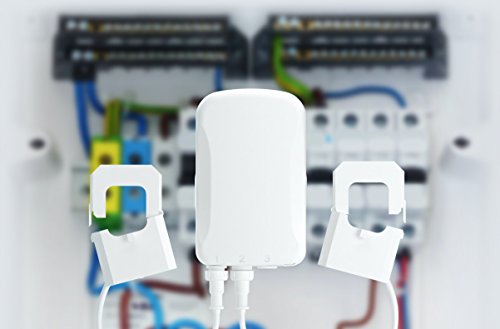
The meter installs in less than 5 minutes, if you have an outlet close enough to the main breaker panel (which I did). The only tool I needed was a screwdriver to remove the front cover of the breaker box, and to attach the meters back plate to the wall. The two clamps require no tools to snap over the incoming live wires (they are insulated, so technically there is no need to through the main breaker, although I did it anyway), then feed the two wires through the side of the panel and plug them into the corresponding jacks. Two screws to attach the back plate to the wall then plug the meter into an outlet and installation is done. Connecting to the VeraEdge controller was even smoother, on my iPhone clicked devices, hit the + icon tapped, Energy then selected Aeotec Meter Gen5, (note: I had the latest version of Firmware v1.7.35 & had the ERGY plugin already installed on my controller) then pushed the button on the device and snapped it onto the backplate. It took less than 30 seconds, to be paired and have 3 new devices with power readings. From my desktop I went to the home.getvera.com user login then logged-in and connected to my controller. One of the new devices just adds the other two (which are the two clamps installed around the two live leads from the meater), I renamed that one Main to be easier to remember. Then clicked on Energy from the left sidebar and Energy Profile from the accordiaon. I selected Main from the drop-down under 'Please select a device for total consumption, if applicable' then went to User & Account Info --!> Unit Settings and added a value to 'Cost per KWH (in my case $0.1125) and selected US$. When I returned to the dashbaord the Energy 'widget was populated and under Energy there are some neat charts and data summaries. waiting a few days, weeks, or months and the data will aggregate and become more meaningful. Great little devices, that was really easy to install and setup. Honestly, I know opening the main breaker seems complicated and scary but if you can install a three-way z-wave switch, then installing this meter is easier. Overtime a great deal of data is accumulated and aggregated, which can be useful in conserving energy and reducing utilities. I should note that visiting ERGY's website indicates that at somepoint they plan on charging for the data aggregation but that they are still working on UI7, so while right now all the data collection, etc. is free in the future that could change.
G**R
Worked well
Ice been using this withhime assistant for a year with no issues.
A**E
Exactly what I wanted. Works great
S**H
Bien sûr jouer dans un panneau de distribution électrique demande de la connaissance et une licence de maître électricien. Mais le tout est très simple à faire. Je l’ai inclus dans mon installation Samsung SmartThing. Cela fonctionne bien mais indique de la consommation en watts avec un historique de base. Il n’y a pas de graphique. Peut avec une autre plate-forme de domotique??? J’aurais aimé voir les monté brutales d’amperage.
P**.
Bon produit. Seul point à faire attention. Le produit est parfois un peut compliqué à installer sur un bridge vera m’a s cela ce fait avec un peu de patience
M**K
Easy to install and connect. I'm running a 2gig panel with Alarm.com integration. Was looking for a device that could be added to monitor our electricity. This was 1 of 2 compatible devices alarm.com recommended. Installed by certified electrician, but works occasionally when I try to get a current reading it fails. Unplug the device and try again before it works. As for accuracy I won't know until my energy bill arrives. But for headaches this is for sure my biggest. I like the convenience of everything in one app. At some point after done testing a few more devices, I will get the Aeon software and gateway to see how that works. Upon several phone calls to 2gig we discovered that this isn't a stand along zwave. They have several models and the model I have isn't compatible with 2gig.
Trustpilot
1 month ago
3 weeks ago



