


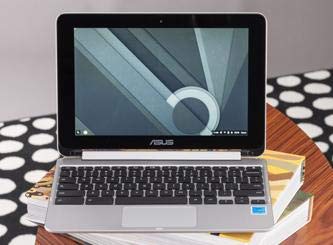


💼 Flip your productivity, anywhere, anytime!
The ASUS Chromebook Flip C100PA is a lightweight, 10.1-inch convertible laptop featuring a 360-degree hinge, 1280x800 touchscreen, and a speedy 1.8 GHz Rockchip processor. With 4GB RAM, 16GB SSD storage, and up to 10 hours of battery life, it’s designed for mobile professionals who need versatile, all-day performance with seamless access to Chrome and Android apps.


| Standing screen display size | 10.1 Inches |
| Screen Resolution | 1280 x 800 pixels |
| Max Screen Resolution | 1280*800 Pixels |
| Processor | 1.8 GHz apple_a4 |
| RAM | 4 GB DDR3 |
| Memory Speed | 1.8 GHz |
| Hard Drive | 16 GB SSD |
| Graphics Coprocessor | ARM Mali-T764 |
| Chipset Brand | ARM |
| Card Description | Integrated |
| Graphics Card Ram Size | 4 GB |
| Wireless Type | 802.11ac |
| Average Battery Life (in hours) | 6 Hours |
| Brand | ASUS |
| Series | Chromebook Flip C100PA |
| Item model number | C100PA-DB02 |
| Hardware Platform | PC |
| Operating System | Chrome OS |
| Item Weight | 2 pounds |
| Product Dimensions | 7.2 x 10.4 x 0.6 inches |
| Item Dimensions LxWxH | 7.2 x 10.4 x 0.6 inches |
| Color | aluminum chassis |
| Rear Webcam Resolution | 1 MP |
| Processor Brand | All winner |
| Number of Processors | 4 |
| Computer Memory Type | Unknown |
| Flash Memory Size | 16 |
| Hard Drive Interface | Solid State |
| Power Source | Battery Powered |
| Voltage | 3.6 Volts |
| Batteries | 1 Lithium Ion batteries required. (included) |
V**L
I spent a month with this laptop, here's a detailed review.
[Body]Just a couple of years ago a lightweight ultraportable laptop with an aluminium shell and an IPS touchscreen for less than $300 would have been unthinkable. So how about Asus Chromebook Flip priced at only $239? That’s pretty crazy, considering what you get for the money. Although, I would insist on paying extra $40 for the version with 4 GB of RAM - in the long run it’s probably even a better deal. With most of its shell made of aluminium, save for the plastic hinge, the laptop is surprisingly pleasant to hold, to carry in one hand, even simply to look at, when it rests on a coffee table. Of course, nice and pretty laptops have been around for many years, but usually they have also had unattractive or outright scary price tags. With a few mild compromises the Flip breaks this tradition, and in that sense attracts even more, quite literally - you just wanna pick it up, open and play with it. Its size might have something to do with it, there’s certainly some cuteness to the feel of a miniaturized “adult laptop” that it gives. It even manages to offer two full-sized USB 2.0 ports, a microSD slot and a micro HDMI port.[Display]In short, it’s nice. It’s bright, with good contrast and rich vivid colors, and the viewing angles are wide both horizontally and vertically. Somewhat thick bezels might be slightly disappointing for some people, but rarely to the point of being a deal breaker - after all it’s a flip screen, so using this laptop in tablet mode implies bezels wide enough to safely hold it with one hand. I’ve seen some negative comments around the web about the display resolution of the Flip, which I think is an unfair judgement. It’s 1280x800 on a 10.1” IPS touchscreen (which translates to adequate 149.5 ppi), that fully folds backwards, in a laptop that costs less than $300. There are laptops currently sold with 13” or even 15” washed out TN panels “rocking” similar 1366x768 resolution for almost twice the price of the Flip. Hell, even the current near $1K MacBook Air 11 still holds on to the same resolution. And many of them don’t offer tablet mode or even touch functionality. Besides, that little extra vertical space that you get with 800 lines against 768 lines is beneficial when it comes to web surfing. Point is - Asus Chromebook Flip offers easily one of the best displays in its class for a humble price, and only falls behind higher-end tablets. My single gripe would be about its reflectiveness (which is what you get for having a touchscreen) - not a huge deal, it’s not crazy reflective, but generally I like matte screens more. It is, of course, a matter of personal preference, and some people like glossy panels just fine.[Performance]I was skeptical about the Flip’s quad-core ARM CPU from Rockchip. While I still believe that ARM belongs in phones and tablets (at least today), I have to say that most of my concerns are gone. First of all, this thing is thin and very light, it’s fanless and absolutely silent. There are other fanless Chromebooks with Intel chips on the market, but so far none of them offer the same build quality with the Flip’s size and weight to battery life ratio, or better performance. And its performance should be perfectly sufficient for most casual users - you can breeze through daily tasks like checking email, social networks, messaging, typing documents, making video calls, listening to music, watching videos or doing basic photo editing - and that is essentially what the majority of people do on their laptops. With the 4 GB RAM version I manage to have a few Chrome apps like TweetDeck and Google Play Music running at the same time, while jumping between several tabs opened in the browser without any problems. I’ve been stress-testing this little laptop quite harshly, and made it stutter when I was intensely “travelling” through Google Maps in street view, while keeping a bunch of tabs with heavy websites open, one of which was playing a YouTube video. But after I focused on one tab and gave the laptop some time to cache everything, things were back to normal. It’s worth mentioning that the bottom side of the laptop got warmer than usual, but never reached an uncomfortable temperature. Overall the Flip demonstrates surprisingly solid performance, but, of course, you shouldn't have any unfair expectations of lightning speeds. Sometimes a poorly optimized clunky website would take few annoying seconds before it lets you scroll or click anything on the page, but a good chunk of modern web seems to be friendly to lower-end hardware these days. When it comes to video playback, the mobile-oriented Mali-T764 graphics processor handles 1080p 60 FPS videos without a problem. Not that it makes much sense to play 1080p videos on the Flip’s screen, but you do have the option to connect it to an external monitor or a TV via micro HDMI port. The combination of size, form-factor, performance, and screen quality makes the Flip a great device to enjoy Netflix, YouTube or Hulu, whether you’re behind a desk, sitting on a couch or relaxing in bed. This also makes it a better communication device than larger and heavier laptops that are mostly used on a desk. The wide angle camera makes it great for Hangouts video calls even when you hold the Flip close on your lap. It won’t shock you with the picture clarity, but your friends on the other end will see you just fine. It drops the framerate slightly in low light, as most cheaper webcams do, but it’s still usable. The microphone gets the job done when used indoors, but it might struggle picking your voice in certain noisy environments.[Keyboard]Asus Chromebook Flip is also not a bad device for casual productivity. Probably working for several hours on very large documents with a smaller than usual keyboard might not be its best use, but anything else it gets done pretty effectively. Other than its size, the keyboard feels rather balanced. The keys don’t wobble too much, they’re not too hard or too soft, and they travel fairly deep. It’s just a bit smaller than what you normally get on a 11” or 13” laptop, and unless you have very large hands, it probably won’t feel cramped. Most people don’t find it uncomfortable. It’s not backlit, so working in complete darkness is not recommended, but for the price it is expected. With a little extra care it can also be a quiet keyboard, making the Flip even more classroom-friendly or library-friendly, if you will. The trackpad, traditionally for all Chromebooks, is also pleasant to use. Of course, because of the size of the laptop, it’s smaller as well, but still very usable. In my personal experience it’s not quite as sensitive as, for example, trackpads on Toshiba Chromebooks. But that’s a mild complain, which is easy to drop remembering the trackpad is accompanied by the touchscreen. It is certainly times better than anything you’ll find on Windows laptops for a similar or even higher price, especially when it comes to multi-touch gestures, like two-finger or three-finger taps and swipes. And don’t forget there are two USB ports, if you prefer using a mouse.[Sound]The speakers are loud enough… for a tablet. As far as laptops go, all recent Chromebooks with 11,6” screens offer much louder, although not necessarily clearer sound. The Flip is great for watching or listening to something in bed at night or in a quiet room, but if you live in a city where street noise easily gets inside your home or office, you will likely be turning the volume all the way up pretty often, and sometimes still struggle to hear everything, especially when the media itself is not very loud. Fortunately, the little speakers don’t tend to cramp up and crackle when turned to the max. So they aren’t bad per se, but don’t get carried away by expectations. The Flip pleasantly surprises when you plug in headphones or an audio system of your choice - for a cheap device, it outputs pretty decent sound.[Battery]Thanks to the efficient Rockchip CPU, one of the Flip’s strongest sides is battery life. Asus officially promises 9 hours on full charge, but that’s a humble call - you can easily make it through 10+ with mild multitasking. If your workflow doesn’t consist of repetitive opening and reloading heavy websites maniacally, while playing music in the background, you might get even more out of it. Streaming TV shows and movies would typically shorten the battery life by a couple of hours, and consuming media offline would affect it even less significantly. As a matter of fact, I was watching a movie downloaded to the local storage, with Wi-Fi turned off, hooked up to the TV via HDMI (with the Flip’s screen turned off), and the OS concluded that it would run like that for 16 hours. What?!? So yeah, it’s likely you won’t need to carry the charger in your bag. Speaking of the charger, unlike a typical “brick” that come with many laptops, this one is pretty small, although it could’ve been even smaller if it had a foldable plug. Well, no biggie. It’s a 24W unit that outputs 2A and takes a bit longer to charge the Flip than other Chromebooks do with their “bricks”, but not too long, usually within 2.5 hours. It might explain why the Flip has a proprietary charging port instead of a popular micro USB (type C is out of question, since more powerful variants aren’t cheap).[Tablet mode]I would’ve liked the Flip, even if it wasn’t “a flip” and couldn’t fold its display backwards. Because it’s so light and well built, I would say it’s worth the price even as a regular laptop. And that’s how I use it most of the time - as a laptop with a touchscreen. But the fact that the screen does fold back, allowing to use the device as a tablet, is pretty amazing. The Flip has volume and power buttons on the side, but unlike 2-in-1 devices, it doesn’t imply that it’s an actual tablet and can be used instead of one. But it kind of can. Kind of. It’s a convertible after all, but also sort of a tablet. Sort of. Chrome OS adjusts its behavior once the keyboard folds beyond 180-degree angle - all windows go fullscreen, the multitask button pops up in the system panel, allowing you to switch between windows, as well as the on-screen keyboard button. Now, if you tap in a textbox, the keyboard will appear just as it does on any other tablet. It looks a lot like Google Keyboard for Android, but doesn’t act like it. For example, swiping for quick access to punctuation and special symbols is not present here, so you'll have to do more tapping. However, it does offer handwriting recognition, which requires to be online and recognizes my scrawls properly (at least in English). The touchscreen is fairly responsive, but doesn’t quite compare to higher end tablets. For the most part it allows scrolling and pinch-zooming with ease, but sometimes heavier websites and apps (like Google Play Music) might get in the way when loading their content or UI elements slower than you can interact with them. Many touch-friendly apps like Spotify, Evernote and TweetDeck generally work well. Google Maps web app would zoom and pan, but doesn’t fully support touch input only. YouTube in tablet mode works as expected - strictly for watching videos it’s fine, but the overall interface of the website is clearly designed for desktop. Netflix in its current visual form is usable, but you have to be very specific in what you tap and what and how you swipe. Reading books in Google Play Books (gosh, Google’s naming…) is possible, but the web app doesn’t support swipes to turn pages, instead you have to tap the small buttons. It’s things like that, which put the Flip in the “kinda-sorta tablet” category - you can do things like X, as long as you’re okay with Y. But given the recent notion of certain tablets desperately trying to replace laptops with a mobile OS for some reason, I’m gonna say that the Flip’s concept looks like a better compromise between the two form-factors today. Mostly because it is affordable, honest with itself and doesn’t pretend to be anything else. Yes, it can act like a tablet on certain occasions, but being a Chromebook first, its key point is a full-blown, no nonsense desktop browser.[Chrome OS and offline capabilities]The operating system has noticeably matured over the years that I’ve been using Chromebooks. No longer it is laughed at or misunderstood by popular tech reviewers and news sources. I presume the reason for this is that at some point they’ve began actually trying it out and using beyond the few days review period. Once you give Chromebooks a chance with an open mind, like them or not, whether they suit your needs or they don’t, you will most likely agree that for the vast majority of computer users they are more than sufficient. The idea that an average user absolutely needs to run a bulky expensive OS, riddled with annoying error messages, inconvenient updates, security holes, vulnerabilities to bloatware and malware, to simply go online, check messages, read news, watch a TV show, talk to family and friends, type a document - is outdated and should go away. Chrome OS gets straight to the point of casual daily computing. But it doesn’t make Chromebooks useless for work - more and more businesses adopt Google Apps for Work, which makes Chrome OS devices a great option for offices and kiosks. They can save a lot of time and resources with the very low level of maintenance they require. And, as you probably already know, Chromebooks are taking education market by storm - again, because of the affordability, simplicity and easy administration. However, to this day the common perception of a Chromebook is that they are practically useless without an internet connection, which is simply not true. Watching videos and listening to music or podcasts from local or external storage, working with documents in Google Docs and Sheets, playing games and using apps - all that is possible offline in Chrome OS, and the number of offline-friendly apps keeps growing. Printing is done online and requires printers that support Google Cloud Print (many current models do), but in the modern computing world, where paper is finally going away, this limitation doesn’t feel unacceptable. Maybe it’s the shortage of local storage of Chromebooks that gives the illusion of their uselessness offline, but in reality for most people who use Windows laptops or MacBooks, the lack of an internet connection very often means pretty much the same as for Chrome OS users. Keep in mind that with the purchase of the Asus Chromebook Flip you also get 100 GB of Google Drive online storage for 2 years, and few other goodies from Google. To sum up everything, if you’re looking for a compact, lightweight, well built laptop with a beautiful touchscreen and great battery life, then in this price range you’ll hardly find a better deal today.
B**L
ASUS C100 2GB VS 4GB
2gb vs 4gb Asus Chromebook Flip.I've had a few ASUS eeebooks since they started making them several years ago, first with the Linux then Win OS. Have always thought the build quality was good and the small size makes them great to travel with.I love getting a new computer but HATE moving everything I need from the old one to the new one and usually only move some things until I get impatient and give up, always leaving some good stuff behind while some of the stuff I end up transferring is junk If my house was kept like my hard drives are I would be called a hoarder, HD maintenance is not something I really do until a crisis happens....sound familiar?With that in mind I decided to give a Chromebook a shot. 99.8% or maybe even more of my computer time is online, I've been saving all kinds of stuff on Gdrive for years....(yup I really need to clean up my Gdrive too) Having a OS that is built around the cloud and online life sounded just right to me. So I started reading the reviews on current chromebooks.Ok let me get this out of the way, I've had personal computers since the 80's, even use to write my own programs back then....but I am FAR FROM a power-user and the most taxing game I play is Angry Birds. I mainly surf and store. I file most of my important documents in a cloud for easy access using android programs like CamScan to scan them with my phone then upload to the cloud. I research everything new I buy on the web first, I scan important receipts and put them in the cloud, download manuals to the cloud and yes store pictures in the cloud. I've found maintaining my data on my desktop, my lapbook, my tablet and my phone to be way to much, so moving it all to the cloud seems like the thing to do. Sure I do wonder sometimes how safe my info is on Gdrive but I've never had a problem or read about anyone having a data loss or data stolen from Gdrive when setup correctly. Sure I've read about others concerns but not about actual losses. My experience on my own PC's Hard Drives however is quite different. I've had several HD crash and not been able to recover the data, I've lost a laptop in a rental car, I've had one stolen and I've been hacked before so I've decided to put my faith in those cleaver Google folks to maintain my data. I'm not blind to the fact that Google probably mines info from my data stored on Gdrive, I don't really care if they know what my income was for the past 10 yrs, or my blood-test labs, or where I vacationed in 2010 as long as they do not share data that would personally identify that data with me and I trust them not to do that. So on to the Chromebook purchase.I was not set on purchasing the Asus C100 until after about a week of reviewing on line. Then I visited BestBuy, I was looking for the chromebooks in the display of laptop/net books they had, the sales reps were around me showing others the differences between the units. When one approached me I told them I saw they displayed some ASUS laptops did they have the ASUS C100 Chromebook Flip on display, his response was, well if we do it would be on the table over there, pointing to a 6' fold up table with some units on it, then he quickly turned and walked away. I walked over to that table and there was a selection of about 8 Chromebooks with minimum information about them. No Asus C100. I spent probably 20 min looking at them, durring that time had several other customers join me looking at them but the sales help noticeably steered clear of the Chromebook display. I find this to be quite common in new technology products, retailers fail to hire or train sales that are enthusiasts of those products until they are mainstream. Just go out and try to talk to a Nissan salesman about their Electric car, the Leaf, or a Chevy salesman bout the Volt or heck even Toyota bout the Prius, you'll find if you have spent anytime at all on the web researching it, you know way more than the sales person. I then went to Office Depot...not a single chromebook there, Sam's club...nope not one so I tried Walmart....BINGO...Walmart had several Chromebooks on display and info cards that provided the basic info (More than BestBuy). I noticed they were sold out of a few and a slot with the ASUS C100 info card was missing the display unit. I scanned the barcode on the display card in the Walmart App and it said they had several in stock so I found a employee ahowed him the app and ask if he would check their stock. Well they had just got 10 in, he unlocked the storage locker under the empty display and pulled one out. I ask when they would have a unit on display, the answer was probably tomorrow or the next-day but Walmart had a 15day return pollicy on them so If I wanted to check it out just buy it....I did.The C100 Chrome Flip I purchased at Walmart was a 2gb unit with 16gb solid-state storage. I took it home and unpacked it. I was imitatively impressed with the build, very nice Aluminum case, incredibly light, nice keyboard and track-pad. 2 USB-2 ports, a mini HDMI port (no HDMI cable included) a MicroSD card slot, a headphone jack and a funny little charging port that looks mike a micro USB but unfortunately is not. A small power button and a volume toggle button. Included in the box is the chromebook, a 110v charger that looks like the typical cell phone charger, a small few page getting started pamphlet and a registration pamphlet.After unpacking I tried to power up the C100,,,,nothing. So I unwrapped the included charger an took a look at it. Its quite small, like a typical cell phone charger with a small square block with the 110v ac plug protruding out of one side (unfortunately fixed, they do not fold in) and a cord of aprox 6 feet long and the diam of a typical USB charging cable, permanently attached opposite the plug, ending in a small rectangular mini plug that looks kinda like a cross between a micro and mini USB but is not either. The charger has ASUS stamped in clearly on two sides (nice so you wont confuse it with other similar chargers) and the spec's printed on it of INPUT: 110-240V~ 0.5A 50-60 Hz OUTPUT: 12V (dc) 2A. Attached to the cord is a handy Velcro strap to manage the cord.I plugged in the charger and the C100 powerd right up. Its been a few weeks so I may not remember the initiation processes exactly but it was very brief and mainly included selecting the wifi connection and signing into my Google Account....(Gmail).I was impressed with the display. Very clear, crisp and plenty bright, as bright or brighter than my Samsung 10.1 Tablet. The keyboard feels good, I'm still getting use to the keyboard size as I'm coming off a 15.6 laptop with a full size keypad, I just seem to miss a few of the outlying keys when touch typing now and then. The keyboard layout is different, keys at the top are not labeled F-1 thru F12 like PC keyboards, they have symbols on them of their use. (I like it). Like the C100 itself the keyboard is designed for online use, there are dedicated keys that will scroll you up and down, left and right, back and forward browser buttons, a search key, a key to lock the unit, all very handy. The touch pad is responsive and has the typical pinch to size and push to click that we are all familiar with.Display--Touchscreen...this was a Have To Have for me, so many applications and process are being built around touch screen input that I feel your buying a handicapped unit if it dose not have a touch screen. The C100 touchscreen works great, just as wall as my Samsung tablet or note phone, I did find my finger did not slide across the glass quite as smoothly but it was hardly noticeable and after adding a screen protector it became unnoticeable. Even just browsing while stretched out on the sofa or in bed I find I use the touchscreen to navigate while resting the bottom of the keyboard on my chest and the screen at eye-level. Then when the C100 is in the tablet position the touch screen is ofcourse the only input.EASEL POSITION: When you flip the screen past the 180 deg position the keyboard is deactivated and your input changes to the excellent touch screen. When required a onscreen touch keyboard will pop up for data entry, it works quite well. Where the C100 really shines is when you flip it around to about 240 degrees and set it on a flat surface like a table (EASEL MODE) to use the touch screen, watch video's or listen to music. When in this position the keyboard is facing outwards on the back side but it is deactivated so it wont respond to your fingers hitting the keys when holding the unit in the inverted position. The speakers that are located on the underside of the keyboard are now facing front so the Easel position is a great position to watch video's.BATTERY: WOW the C100 really shines here, I can use it for hours and hours on end even watching Netflix, or Dish Anywhere and I've yet to run out of battery during the day. I'm guessing 19-11hrs...really. The battery is built into the unit, not sure I like that as batteries do diminish but this is not uncommon in many devices these days. Charging time seems to be less than an hour to 100%. The unit is a 12V dc unit. I really wish it would be 5v and charge on the same micro usb chargers most new phones and devices charge on, it would be one less charger to keep up with and travel with but its not, it is however much smaller than the typical netbook "brick" charger. I checked on replacement chargers and they are not cheap, about $35, car chargers are avail for about half that.ANDROID APPS: The C100 line now have access to the ANDROID Play Store, as of now you need to put the C100 in developer mode...very easy to do and you can reverse back to standard mode quite easily. The advantage of having access to Android Apps is huge. While the Chrome Store has some apps and quite a many Chrome Extensions they pail to the universe of Android Apps. Now I can share and sync the same android apps I use on my android phones and tablets. Everyone I've tried so-far has worked. See 2gb vs 4gb below.MUTABLE USERS / SECURITY: The beauty of the chromebook OS is its security. With the exception of Android Apps everything is geared around being online and cloud storage, when you sign off the chromebook that info is no longer on you unit, most of the info on your unit is wiped except things like the wifi connection and user ID's. I've read this is why the cromebook OS is so secure and not nearly as vulnerable to virus and key loggers. If owner allows anyone can sign into the chromebook as a guest and access the net but not the owners info. Others can also setup and access their Google accounts from the chromebook too.STABILITY & LAG: I've found the C100 to be very stable, no crashes as of yet and even right now I have 10 tabs open with no lag.VIDEO: I downloaded the Netflix and Dish Anywhere apps and watch programs on the C100 frequently. They play as well as the best of my other devices....no problems here.REMOVABLE MEMORY: Ive added a 64gb high speed (95 MB/S) MicroSD card to my C100, Ive not used it enough to comment on its usefulness however the reason I added it was for storage of Android Apps and their data. I did have to format the card on the C100 for it to properly work.C100 2GB vs 4GB: The unit I purchased from Walmart was a C100 with 2GB system memory, it worked fine, a little lag time when having more than 4 or so tabs open, not much just a little. From what I have read 2GB is plenty for the existing Chomebook OS, however with opening up Chromebooks to the Android Apps the future may require more system memory. I know I'll be installing a lot of Android apps so I checked Amazon for the C100 with 4GB, it was available on prime and just $16 more than the 2GB unit I purchased at Walmart. I don't really like to return stuff on a wim, but I justified it to myself that had the unit been on display at Walmart I would have noticed it was 2 GB version, I also was incurraged to buy it to see it instead of the CSR just opening it at the store. If Walmart had stocked the 4GB unit I would have exchanged them, not that I don't love Amazon, I feel it just have been fair.I highly recommend the C100, for the $16 its a no brainier to go with the 4GB version. Since I plan on traveling with the C100 I purchased the Chromebook, a PNY Elite 64GB MicroSDXC card, iLLumiShield - Asus Chromebook Flip Screen Protector &iPearl mCover Hard Shell Case for 10.1-inch ASUS Chromebook Flip C100PA.While the cover kinda diminishes the beautiful C100 aluminum case, it will make it survive being thrown into my work bag or being knocked around in the car with out scuffs and scratches.Well if you have got to this point I hope my review helps your decision. PLEASE answer this question "Was this review helpful to you?" below with a YES.Thank You
Trustpilot
3 weeks ago
3 weeks ago



