Desert Online General Trading LLC
Dubai, United Arab Emirates
Desert Online General Trading LLC
Dubai, United Arab Emirates


🎹 Elevate your studio game with plug-and-play MIDI mastery!
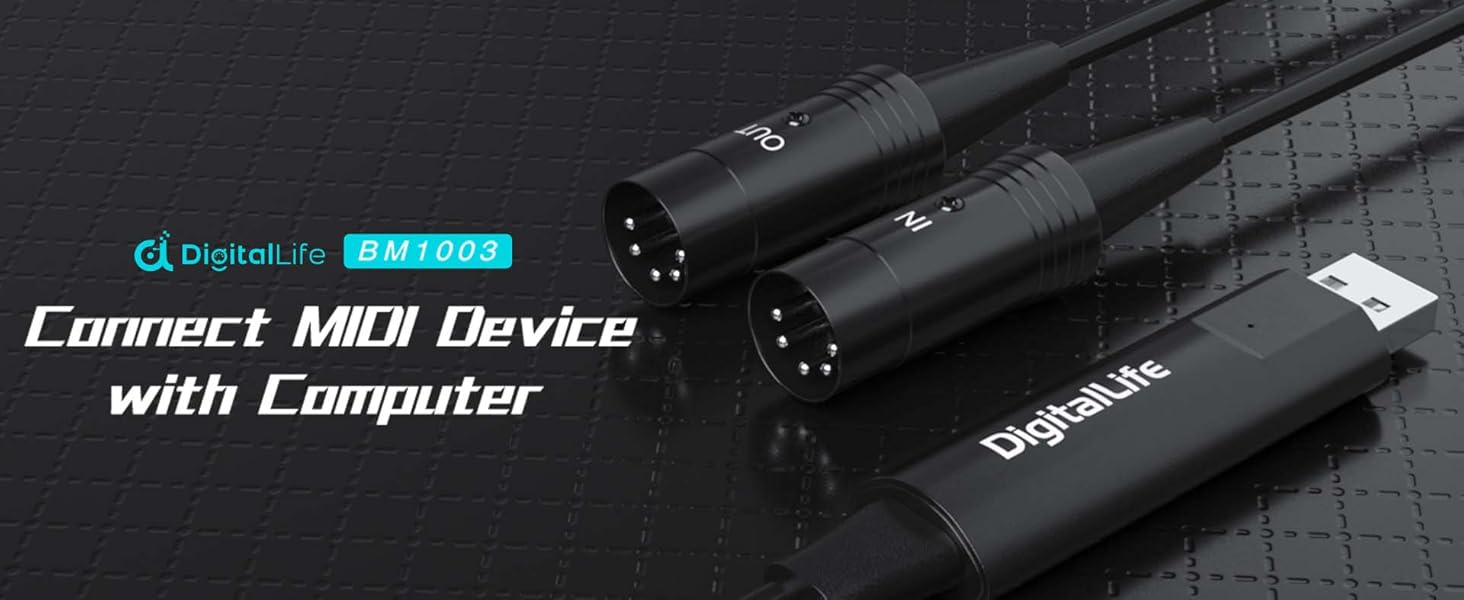
The DigitalLife USB MIDI Interface is a compact, driver-free USB-A to dual 5-pin DIN MIDI adapter designed for seamless connection between MIDI instruments and computers. Compatible with Windows 11 and macOS, it supports 1 input and 1 output port for bidirectional MIDI data transfer, housed in a durable metal casing with a 6.5ft cable. Perfect for musicians, producers, and live performers, it integrates smoothly with major DAWs and comes with 24/7 support and a 2-year warranty.
| Package Dimensions | 20.2 x 7.1 x 2.2 cm; 105 g |
| Item model number | MIDI-SyncX5 |
| Body Material | Metal |
| Colour | Black |
| Compatible Devices | Casio Privia/PX720,100,120,320/PRI-VIA/KO-RG X5/, KAWAI CA13 | Medeli DD-503 | Ringway TB3000 | Korg X5, KB180/KB280/KB281/KBP300/P120S/ P95B/P85-S/E323/, Roland - FP-4F/GW-8/RS-9/GW-8/TD-4KP/TD11KV/TD15KV/, Yamaha - P85 TB3000/E323/PSR-38/P120S/YDP161/PSR-38/ |
| Connector | 5_PIN_DIN_MIDI, USB Type A |
| Hardware Interface | USB |
| Signal Format | Digital / Analogue / MIDI |
| Supported Software | Logic Pro X, Presonus Studio One, Steinberg Cubase, Reaper Fm, Propellerhead Reason, Adobe Audition, Pro Tools First, Soundop, Audacity, Reason 12, Soundtrap, FL Studio, Waveform, SoundBridge,Zenbeats, Garageband, Podium Free, VCV Rack, Cakewalk by Bendlab, Ableton Live, Ardour, LMMS, MPC Beats, Audiotool, Cherry Audio Voltage Modular Nucleus, Logic ProX, Rosegarden |
| Number of Strings | 1 |
| Material Type | Metal |
| Musical Style | world music |
| Region of Origin | China |
| Country Produced In | china |
| Size | BM1005 |
| Proficiency Level | All |
| Operating System | Linux, Windows, macOS |
| Item Weight | 105 g |
A**R
This Works with Windows 11
I purchased this because a Windows 11 driver for my existing PC/Midi interface has not yet been released. As advertised this worked straight from the box on my Windows 11 laptop - there was no need to install a driver.I use the free Anvil Studio software for Midi editing and playing. I plugged the Midi Interface into a USB port on the laptop, and opened up Anvil Studio. Anvil recognised it, without any involvement from me, as an available output, which you can then select. I have chained three slave devices from the Midi Interface Out Plug (drum machine, multitrack recorder and keyboard) and it has worked fine. I have also recorded a Midi track on Anvil of myself playing the drum machine using the In Plug (this is not something I need but which I did in the interest of this review) - again it worked all fine.I have not given a rating for durability, as I have not owned or used it for long enough.But so far, this does exactly what I need, exactly as described, at a good price - hence five stars overall from me.
T**S
Stable, simple and worked for a notoriously tricky device - ideal for laptops
Purchased almost for one purpose - though it's a useful thing to have - and that was updating the firmware on the Mooer Ocean Machine. This needs three things:Windows to run the softwareA MIDI interface that allows the loopback timing to registerA MIDI interface that shows up properly in Windows driversAlthough there's no reason for that to be difficult, forums and user reports suggest it is - and when buying the lowest-cost interface you can for just a simple operation, the driver stability may be first to go.No worries at all here - after trying one cheap interface (it didn't work at all) I got the DigitalLife one partly because it incoporated the MIDI cables into the USB plug, rather than having a box in the middle of the cable - figuring it might be good to use with an iPad or similar later (it works and doesn't set off the 'this accessory needs too much power' nonsense).I'd recommend this interface more for laptops and tablets than desktop computers, where you won't be able to see the MIDI activity LEDs when the interface is behind the computer/hidden in a hub.For the money, plus the fact that it included a free extra MIDI cable, it's great and will join the box of useful cables.So I think you can buy this one with confidence when you need a small cheap MIDI interface, and I'm happy enough with the stability and performance for clock and large sysex dumps that if I got a defective one, I'd ask for a replacement rather than moving on to the next cheap MIDI cable.
G**E
If it doesn't work swap In & Out
I got this to connect a Windows 10 laptop with a Yamaha Piagerro NP-31 so I could use Playground Sessions.Windows and Playground Sessions both detected the keboard as a MIDI device, but Playground Sessions couldn't detect the keys being pressed. Much frustration and looking for a Windows 10 MIDI driver for the NP-31 (it's discontinued and no such drivers exist).In desperation I swapped the plugs so that the plug marked "Out" was inserted into "In" on the keyboard, and vice versa. Low and behold it worked. No drivers needed. I'm now very much enjoying Playground Sessions.1 star deducted for the stress incurred and the swearing my wife had to put up with.
M**T
Works with SysEx (Systems Exclusive) MIDI Data!
I will keep this review short and to the point...I bought a Roland TD-6v drum module off eBay a while ago, and wanted to try using the VEX Packs from V Expressions. After a bit of trial and error using a couple of cheap MIDI cables from eBay, I read somewhere that some of the cheaper MIDI cables do not support SysEx MIDI data.So, I bought an M-Audio MIDISPORT Uno from Amazon, as this was one of the cheaper MIDI interfaces that apparently DO work with the Roland TD-6, but after trying two different ones (both returned) because neither would work reliably, decided to try this cheap and cheerful DigitalLife BM1001, in the hope that it *might* just work.I am using Windows 10 with MIDI-OX for sending and receiving MIDI SysEx data, and this little beauty worked first time, without the need to install any additional driver or anything.So, if you are in the same boat as I was a few weeks back, pulling your hair out with uploading VEX Packs to a Roland TD-6v, buy this cable - it actually works!Good luck :)
A**Y
Works faultlessly
I have been using this to connect a Korg SP200 to a Mid 2007 iMac running El Capitan. It was extremely easy to setup and has been working faultlessly for months.Great product at a great price!
S**T
Not plug and play!
Didn't work with Yamaha keyboard.
A**T
Worked well for my intended purpose (synth firmware update)
Seen the Ver2.0 firmware was released for my Sonicware Liven LoFi-12 groovebox sampler and couldn't get it to update using midi instruments as throughput devices like the manual said should work... some research indicated these USB->Midi devices might do the job, but some youtubers suggested only getting "branded" ones as often cheaper ones had issues, but took a punt on this and it sent the SysEx update file perfectly.Can't comment on it's use for controlling instruments via PC, but plugged in, detected straight away, no drivers needed and connected perfectly for performing firmware update to a Sonicware Liven, so if you need a cost effective way of being able to do that I can 100% recommend.
A**C
Worked 1st time so no worries
Arrived as expected, the box lead came in is ideal for storage when not in use. Never used midi before but worked with an old Casio keyboard to laptop straight away. Output to Garageband for testing no problem.Note that you need to plug “out” into the “input” on keyboard and “in” into the “out” then plug into USB on PC/ Mac. Might sound obvious but only if you know 🥱. It just works
Trustpilot
2 weeks ago
3 days ago