Buy anything from 5,000+ international stores. One checkout price. No surprise fees. Join 2M+ shoppers on Desertcart.
Desertcart purchases this item on your behalf and handles shipping, customs, and support to Poland.
🚀 Print smart, print fast, print like a pro.
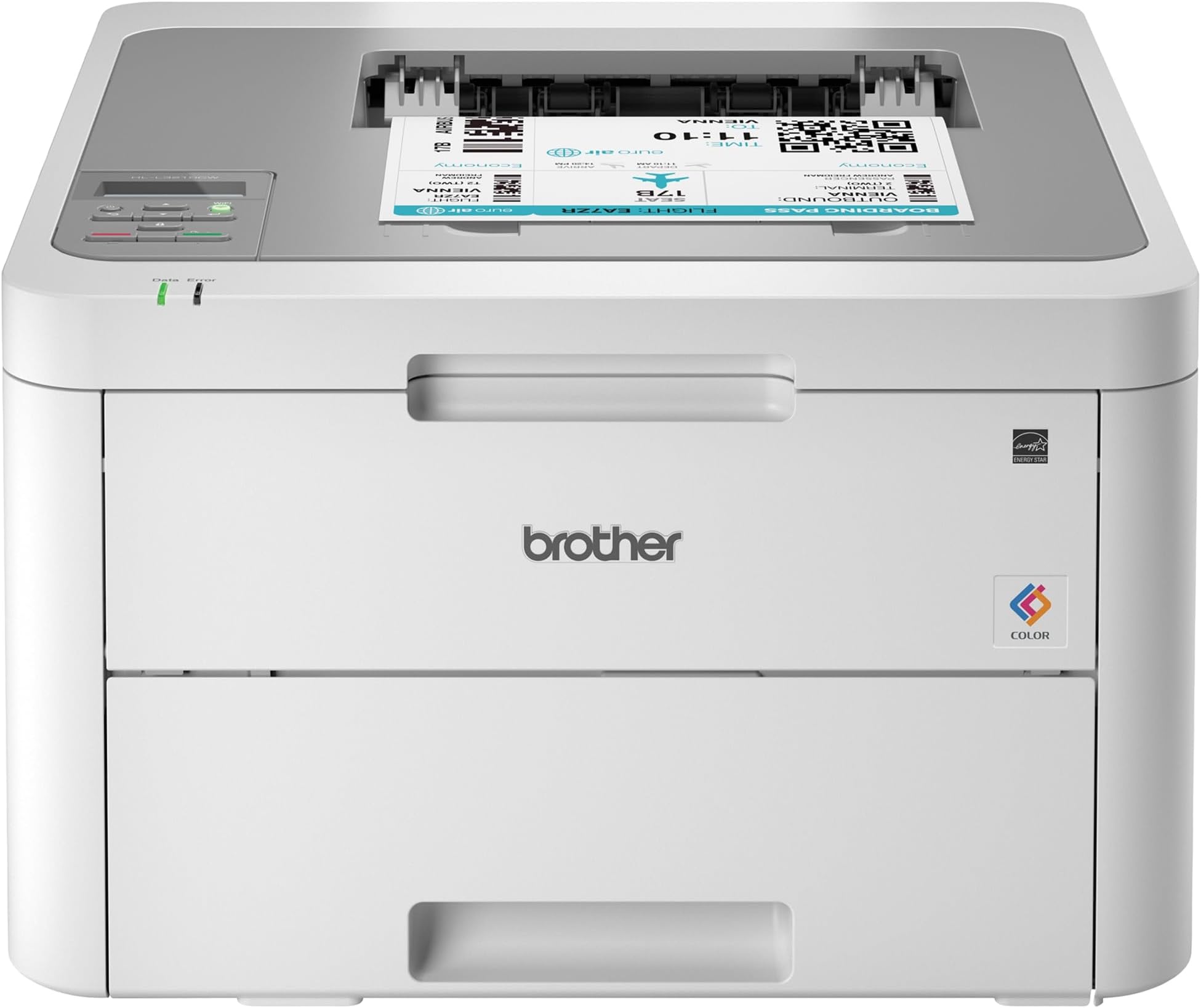
The Brother HL-L3210CW is a compact digital color laser printer designed for home and small office use. It delivers sharp, vivid color prints at speeds up to 19 ppm, supports wireless and USB connectivity, and features a 250-sheet adjustable paper tray plus a manual feed slot for diverse media types. With affordable toner options and a space-saving design, it’s built to boost productivity and elevate your professional image.


| ASIN | B07FMS1DMX |
| Additional Printer Functions | Print Only |
| B&W Pages per Minute | 19 ppm |
| Best Sellers Rank | #245,384 in Office Products ( See Top 100 in Office Products ) #345 in Laser Computer Printers |
| Brand | Brother |
| Built-In Media | CD-ROM Includes Printer Drivers, HL-L3210CW Starter Black Toner Cartridge (1,000 pages),Starter Cyan Toner Cartridge (1,000 pages), Quick Set-Up Guide, Starter Magenta Toner Cartridge (1,000 pages)DR223CL Drum Unit Set (18,000 pgs)**, Toner Cartridges |
| Color | White/Grey |
| Color Pages per Minute | 1 ppm |
| Compatible Cartridge | Arthur Imaging compatible Brother HL-L3210CW Toner Cartridges |
| Compatible Devices | Laptops, PC |
| Connectivity Technology | wired, wireless |
| Control Method | Voice |
| Controller Type | Amazon Alexa, Vera |
| Customer Reviews | 4.3 out of 5 stars 3,481 Reviews |
| Display Type | LED |
| Dual-sided printing | Yes |
| Duplex | Manual |
| Global Trade Identification Number | 00012502651741 |
| Hardware Interface | USB |
| Ink Color | Black |
| Item Dimensions D x W x H | 16.1"D x 18.1"W x 9.9"H |
| Item Type Name | Brother HL-L3210CW Compact Wireless Digital Color Printer with Mobile Device Printing Ideal for Home and Small Office Use |
| Item Weight | 37.8 Pounds |
| Manufacturer | Brother Printer |
| Maximum Copy Resolution Black and White | 600 dpi |
| Maximum Copy Resolution Color | 600x600 dpi or higher |
| Maximum Copy Speed Black and White | 19 ppm |
| Maximum Media Size | 8.5 x 14 inch |
| Maximum Print Resolution Black and White | 600 dpi |
| Maximum Sheet Capacity | 251 |
| Maximum print Resolution Color | 600x600 dpi or higher |
| Model Name | HLL3210CW |
| Model Number | HLL3210CW |
| Model Series | HLL3210CW |
| Number of Drivers | 1 |
| Number of Trays | 1 |
| Other Special Features of the Product | Epeat Qualified |
| Output sheet capacity | 251 |
| Paper Size | 5-x-8-inch |
| Power Consumption | 390 Watts |
| Print media | Card stock, Envelopes, Glossy photo paper, Paper (plain) |
| Printer Connectivity Type | wired, wireless |
| Printer Output Type | Color |
| Printer Type | Laser |
| Printing Technology | Laser |
| Resolution | 600 x 600 dpi or higher |
| Scanner Type | Sheetfed |
| Special Feature | Epeat Qualified |
| Specific Uses For Product | Home, Office |
| Total USB 2.0 Ports | 1 |
| Total Usb Ports | 1 |
| UPC | 012502651741 |
| Unit Count | 1.0 Count |
| Warranty Description | 1 year |
| Warranty Type | Limited Warranty |
| Wattage | 365 watts |
A**.
Exactly What I Needed
This printer is truly plug and play. It took me less than a 1/2 hr to print a photo from my phone (which I’ve never done before). Installation and setup: this printer is heavy. The hardest part was getting the thing out of the box. It only had the printer itself and the power cord. If you are planning on connecting it directly to your computer, you will need to buy the cable separately. You have to take off all the blue tape and the orange protective bits, put the cartridges back in, plug it in, load paper, and then connect it to your network. It was a little tedious to use the up and down arrows to key in the network key, but it’s a one-time thing. I’ve previously only had inkjet printers, so I don’t know how it compares to other laser printers, but I’m very happy with the quality of the images. To really put it through its paces, I ran some different types of paper through it and the printing was spot on for almost all of them. I ran some labels through and it had some issues feeding some of the pages, but it did way better than any other personal printer that I’ve had. I kind of anticipated issues because the printer didn’t have a label option for paper type. All in all, I’m exceptionally pleased with this and am super grateful to have quick, reliable, quality printing.
C**K
Great so far with a small issue.
Using this to print regular letters and office graphics works well and print quality is just fine. With a little trepidation I decided to print a couple of greeting cards on standard greeting card 1/2 fold stock and to my surprise it printed just fine. Color was good paper feed (through the manual feed slot) was great with no problems as mentioned in other reviews or questions answered. The greeting card program I use set the printing options for this printer quickly and straightforwardly. I did set the paper type to thick before printing. So I decided to print the envelopes for the cards and this is where there was a little disappointment. The printing was fine and was handled OK through the manual feed just one issue....the envelope came out a bit wrinkled (only on the back side). Not enough to throw it away but it was noticeable. I didn't consider this to be a problem because I normally don't print envelopes, just write them out. Setting up the printer (drivers & wireless) you need to pay attention and follow instructions as it could be a little confusing to some. After doing this the printer worked fine with wireless printing. In closing I would recommend this printer having had brother machines in the past and found them to be well made and function properly not to mention the price was well suited to my budget.
W**J
Love love love 💕
Update: I have now had to replace all the toner that came in the machine, but I’m pleased as to how much I got out of them! The black went first about two weeks ago, and now I just had to buy the three colors. I’ve been through roughly 3000 prints now! I just got this printer today and I put it to the test! Setup was very easy, took maybe 15 minutes but that’s mostly because my internet is super slow. I’ve printed about 300 pages today and it is so fast!! My old HP Envy 4500 claimed to print 17ppm and this one prints 19ppm. Well I printed 48 pages on this in the same time I would have printed maybe 4-5 pages on the HP! So far it hasn’t lost WiFi connection at all and it has gone into deep sleep many times throughout the day with no problem waking up. I’ve printed from both my computer and iPhone with no problems at all. So far I am loving this printer!!! I did notice I’m the only one that has left a review for the new model so maybe they have fixed all the issues the older model was having? Thus far I have to admit that this is by far the best printer I’ve ever had! No paper jams, fast printing, and as far as quality- it’s better than the old printer but I have so far only printed out curriculum materials for school. If your on the fence I’d say get it!! It’s now a week later and I’m running low on black toner after printing close to 2000 pages! Considering the yield is 1400 pages on the toner it came with and it’s still printing that’s awesome! I did order another black but won’t replace it until it’s completely empty.
M**W
WARNING: CANNOT RESET TONER
(In case you don’t care to read the following essay, I just need to say, Amazon is amazing and their customer service always goes above and beyond. THANK YOU AMAZON. Ceasing with the butt kissing now.) Unless you love wasting money and toner, DO NOT BUY THIS MODEL! Imagine this nightmare I'm living: You have a project due the next day, but you're not sweating it. This printer is new, it's not going to give you any problems. Except it decides it's done using the toner left in its cartridge. It hasn't even made it to 1,000 pages - it makes it to 799. Are those 799 full ink pages? No. It's mostly one address per page printed in size 14 font. This printer has been hijacked until you buy a brand new Brother brand toner cartridge. You then spend an hour with a Brother rep: Us: Yes. I need to reset the toner. I was able to do it on previous models by pressing cancel and secure, but the buttons aren't working on this one. Brother Rep: I can help you with that! Us: Thank you, that would be great. Brother Rep: You are welcome. Brother Rep: Did you replace the toner? Us: No, it doesn't need to be replaced, it needs to be reset. Brother Rep: Are you getting an error on the brother machine's display? Us: Yes, it says replace toner cartridge black (bk). Brother Rep: Thank you. Did you recently replace the black toner cartridge? Us: No, it has not been replaced since we bought it, we've hardly used it. Brother Rep: Thank you. Brother Rep: Thank you for waiting. There is no toner reset steps for the HLL3210CW. Also, the machine comes with a starter cartridge that prints approximately 1,000 pages. Brother Rep: The approximate toner yield is in accordance with the testing protocol ISO/IEC 19798 (Letter). The testing protocol involves continuous printing of a 5% coverage sample page of text. Users who typically print documents with a toner coverage higher than 5% should expect a lower page yield per toner cartridge. Brother Rep: In order to remove the "replace toner" message, you would have to replace the toner cartridge. Us: So because the black toner is "out", the entire printer is hijacked? What if I no longer wish to print with black ink, and only want to use yellow, magenta, or cyan? Brother Rep: <SPAN><DIV><DIV>Your printer is designed to stop ALL printing operations when any of the toner cartridges have reached their end-of-life. Us: So Brother completely did away with being able to reset the toners? Brother Rep: No, however, your machine does not have the option to reset the toner count. If there is an issue with the toner, you have a 90 day warranty. Us: The printer itself has a 1-year warranty. What does that cover? Brother Rep: One moment. Brother Rep: I am still working with you. Us: Great Brother Rep: Thanks. Brother Rep: Thank you for waiting. The 1-year warranty covers a 1 year exchange for any mechanical malfunctions. Us: I feel this issue is a mechanical malfunction since the three previous Brother printers had manual toner reset functions, but I'm guessing Brother doesn't feel that way? Brother Rep: Please wait. Brother Rep: Please press the up or down arrow and select machine info. Us: okay Brother Rep: Then check the page counter. Us: Black is at 799. Does it count how many pages come out of the machine? Or how many full 8.5x11 pages of ink have been used? Because the main thing we use this printer for is printing one address on a 5x7 piece of paper. Brother Rep: How many pages. Brother Rep: The starter cartridge that prints approximately 1,000 pages. Brother Rep You will need to replace the toner. Brother Rep: The testing protocol involves continuous printing of a 5% coverage sample page of text. Users who typically print documents with a toner coverage higher than 5% should expect a lower page yield per toner cartridge. Brother Rep: If you would like to confirm this, please contact s via phone. Phone support is available at 1-877-276-8437. We are open Monday through Friday, 9am to 9pm Eastern time. Commencing rant: Depending on which Brother printer you have, how well you Google and YouTube, and whether or not you have turned off the auto-update firmware, you might be able to reset the toner, which will allow you to (SHOCKINGLY) use up the toner that's still left in the cartridge. Often, for hundreds of pages more. However, Brother is a greedy planet hater, a killer of the environment. They would rather you spend your hard-earned money and throw a still-good chunk of plastic away than actually let you use up what they have given you, what you have already paid for. We should be allowed to use the ink until it starts to fade! I have the right to a barely readable printout! I have the right to chose to switch to blue ink if the black is out. Except Brother says I don’t. I have to buy and replace the black ink before I can use any other ink. "Sucks to be you," says Brother.
J**E
Great Color Laser Printer; Does NOT do duplex
I was looking for a replacement for my 9-year-old Brother HL-3170CDW which held up fairly well until the last 6 months. This printer was slightly slower but more inexpensive so ordered it. It was fairly easy to setup on our wireless network though it did take a couple of tries to find where to input our network password. What I failed to note was that this printer does not do duplex automatically. You can do it manually by using the front opening to the printer. So if duplex is important then find a different model. The colors look great and I look forward to it lasting as long as my other brother printer.
B**Z
Super Nice Printer! NOTE: the front is not a scanner!
I just pulled it out of the box and set it up. Very easy and the step-by-step process is neat and organized. I do need to note that the front slot is NOT a scanner. It is used to print different types of paper, letter envelopes, etc without the need to remove all the paper from the tray, kinda neat... I would have liked that feature advertised a bit more because I spent about two hours of my life trying to figure out why I could not scan anything with it and never ran into any information that told me it was not a scanner. Fortunately for me, I have a second printer that I can use to scan, no problem. But if you are buying this print as an ALL-IN-ONE, I am sorry to say you will be disappointed at the least. My only other concern is that I purchased this printer for around $250 USD but just the color toners alone without the black is around $300 USD for the high-yield package (2500 pages/color) It comes with toners in the 1500 pages/color range with is a lot for me... but you may want to consider your options when looking into these types of printers and compare with your needs, wants, and desires to see if this printer will fulfill the job or a smaller/larger printer may be the one you need. Plus the need for the scan feature.
T**E
Super Happy With This Printer!
At first when I was printing, the first 10 printouts were streaky and dirty with ink dots, trails and I was surprised and afraid that some of the reviews that I read were true. NOT! This thing prints out color printouts on regular paper just fine! This is NOT a Color Photo Printer. If that's what you're looking for, move along! There's nothing to see here folks! If you're looking for a color printer to print out color documents for your personal use, then you're looking in the right direction. This NOT a true LASER printer. It's an LED Laser Printer. Google it. Is it fast? Nah. it's kinda slow getting started, but once it "Receives the Data" it pumps out the printouts rather aquickly. I use it primarily for printing invoices and Mailing labels to send to my customers and they look great.
D**E
A very nice machine at a very good price!
I needed a fairly basic color printer, but I wanted a laser printer because I print images to cut out and make collages. In the past I had some bad experiences with liquids and ink jet images. I was pleasantly surprised to find a color laser printer that was within my budget. This machine has been very reliable, is easy to use and ideal for a non-geek like me. I was even able to set it up and get it running by myself. I have not needed tech support, so I can offer no opinion on that, but so far I have been absolutely satisfied with this printer. Highly recommended!
R**S
Bom custo benefício
A qualidade da impressão em preto é muito boa, entretanto a impressão em cores de fotografias é razoável. De qualquer forma, essa impressora atende bem para uso doméstico e de trabalhos escolares. Ainda não troquei o toner, mas aparentemente, existe uma oferta boa de consumíveis com preços razoáveis. A instalação é tranquila, mas bem demorada. Outra coisa que pode incomodar é o grande espaço que ocupa (apesar que não existe milagre para ter 4 cartuchos de toner em um único aparelho. Até o momento, estou bem satisfeito com a impressora.
C**G
Actually Refurbished
This printer came as factory refurbished, which is actually fine with me given the good price, but it wasn't listed anywhere in the details or description. According to the printer settings it had only printed about 55 pages, and also looks brand new.
C**R
Extremely good printer
Bought this about a year ago now, and have been extremely satisfied with it. Honestly I don't print often, and so far this printer probably has not "paid" for its self yet for the hefty initial investment, but I can already tell it was well worth it. For the 4 years prior I had been using an HP Inkjet printer. As mentioned I dont print super often, so what I was finding is that my ink was constantly drying up and gunking up the printheads. Overtime this got worse and worse, and I was going though ink constantly, which is so expensive! Don't get me wrong, new toner (4x cartridges) for this new printer is insane at first glance, but you get so so many more pages for your money. Quality is sharp and crisp. Colors not as deep as an inkjet, but this is not designed to be a photoprinter. I'm able to go weeks without printing, send a page to it and have it print in moments, without any worry of the printheads getting clogged or drying out. I had so many issues with my last printer so constantly, but have yet to have any problems in the year I've owned this. Prints pretty close to the margins on the top and sides, but there is a solid chunk at the bottom it has issues printing on. If you an find this printer in stock, its absolutely worth replacing your old inkjet. The initial sticker shock feels like a lot, but this is definitely a long term investment!
A**O
Excelente
La compré para mis impresiones en la universidad y sobre paso mis expectativas. Es para una oficina mediana, ahora vendo impresiones a mis compañeros para aprovechar lo más que pueda este equipo. Silenciosa y muy rápida. Llegó como nueva ningún detalle a simple vista.
A**N
Great laser printer and easy to setup
This is the third laser printer I've tried and I finally found one that works really well and is easy to setup. All the other printers had issues with wireless printing and didn't work well with Mac. This one was the first one where setting it up took less than 15mins to setup. It works great on Mac and Windows. Wireless printing is effortless and works really well. The print quality itself and color looks fantastic. Only downfall is that it's not very feature rich. It doesn't print double sided, which I was surprised when I fount out. It's alittle bulky and heavy. All that aside, if your looking for a simple and reliable laser printer this is a good choice.
Trustpilot
3 days ago
3 weeks ago