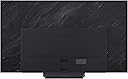
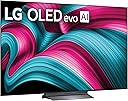
🔥 Elevate your living room with LG’s OLED evo — where every pixel tells a story!
The LG 65-Inch OLED evo AI 4K C5 Series Smart TV (2025) redefines home entertainment with its cutting-edge Alpha 9 Gen8 AI Processor, delivering stunning 4K visuals enhanced by AI Super Upscaling. Its OLED evo panel offers perfect blacks and vibrant colors, even in bright rooms, while Dolby Vision and Dolby Atmos provide immersive cinematic sound and picture quality. Designed for gamers, it boasts a lightning-fast 0.1ms response time, 144Hz refresh rate, and compatibility with NVIDIA G-Sync and AMD FreeSync. Powered by webOS 25 with Alexa built-in and extensive smart features, this TV is a sleek, future-proof centerpiece for any modern home.


| ASIN | B0DYQM4BDB |
| Additional Features | Amd freesync, Built-In Speaker, Google Cast built-in, Multiple Voice Assistance, Nvidia G Sync |
| Annual Energy Consumption | 302 Kilowatt Hours Per Year |
| Antenna Location | Home Viewing |
| Aspect Ratio | 16:9 |
| Audio Input | HDMI, USB, Bluetooth |
| Base Depth | 9.1 Inches |
| Base Width | 18.5 Inches |
| Best Sellers Rank | #24,232 in Electronics ( See Top 100 in Electronics ) #354 in Smart TVs |
| Bluetooth Version | 5.3 |
| Brand | LG |
| Built-In Media | Power Cable, Remote Control, Stand, User Manual |
| Color | Black |
| Compatible Devices | Smartphone |
| Connectivity Technology | Bluetooth, Ethernet, HDMI, USB |
| Connector Type | Ethernet, HDMI, Optical, RF, USB |
| Content Sharing Direction | Mobile to TV |
| Contrast Ratio | High |
| Control Method | Remote |
| Controller Type | Remote Control |
| Customer Reviews | 4.5 out of 5 stars 1,375 Reviews |
| Display Backlight Setting | Pixel Dimming |
| Display Backlight Technology | Self-Luminous |
| Display Language Options | English |
| Display Refresh Rate in Hertz | 120 |
| Display Size Class | 65 Inches |
| Display Technology | OLED |
| Display technology | OLED |
| HDR Format Supported | Dolby Vision, HDR10 |
| Hardware Interface | Bluetooth, Ethernet, HDMI, S/PDIF, USB |
| Integrated Surround Sound Format | Dolby Atmos |
| Internet Applications | Apple TV, Disney Plus, HBO Max, Netflix, Prime Video |
| Item Dimensions D x W x H | 23.1D x 144W x 87.9H centimeters |
| Item Weight | 40.8 Pounds |
| Item Weight Without Stand | 36.6 Pounds |
| Manufacturer | LG |
| Mfr Part Number | OLED65C5PUA.AUS |
| Model Name | OLED65C5PUA.AUS |
| Model Number | OLED65C5PUA.AUS |
| Model Series | C5 |
| Model Year | 2025 |
| Motion Enhancement Technology | AI Super Upscaling 4K |
| Mounting Type | Wall Mount |
| Number of Audio Channels | 2.2 |
| Number of Batteries | 2 AAA batteries required. |
| Number of Items | 1 |
| Number of Packs | 1 |
| Operating System | WebOS |
| Picture Quality Enhancement Technology | AI Picture, OLED Dynamic Tone Mapping Pro, a9 AI Processor 4K Gen8, a9 AI Super Upscaling 4K |
| Power Consumption | 163.9 Watts |
| Refresh Rate | 120 Hz |
| Refresh rate | 120 Hz |
| Remote Required Battery Quantity | 2 |
| Remote Required Battery Size | AAA |
| Resolution | 4K |
| Response Time | 0.1 Milliseconds |
| Screen Finish | Glossy |
| Screen Mirroring Technology | AirPlay 2, Google Cast |
| Screen Size | 65 Inches |
| Screen size | 65 Inches |
| Signal Format | ATSC1.0 (Terrestrial), QAM (Cable) |
| Size | 65 Inches |
| Speaker Description | Dolby Atmos, AI Sound Enhancement (Wow Orchestra) |
| Special features | Amd freesync , Built-In Speaker, Google Cast built-in, Multiple Voice Assistance, Nvidia G Sync |
| Specific Uses For Product | Entertainment |
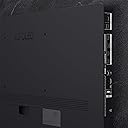
| Total Number of HDMI Ports | 4 |
| Total USB 2.0 Ports | 3 |
| Total USB 3.0 Ports | 3 |
| Total Usb Ports | 3 |
| Tuner Type | ATSC1.0 (Terrestrial), QAM (Cable) |
| UPC | 195174102688 |
| VESA Mount Standard | 400 x 400 mm |
| Video Encoding | 4K |
| Wireless Technology | Bluetooth |
J**N
Premium TV at a great price. Outstanding for movies and especially gaming.
So this is my first OLED TV. I did extensive research on OLED TVs and this TV and model was always rated in the top three. Sony Samsung and LG. I was using a 50 inch 2022 Sony Bravia LED. While the Sony still worked fine I was looking for something bright colorful deep blacks & would look great using the PS5 and Xbox series X especially showing accurate blacks and contrast. And this TV doesn't disappoint. I was looking for a 50 inch but this TV starts at 42 inch 48 and jumps to 55 inch and bigger. It's extremely hard to find 50 inch TVs these days. But two inches smaller isn't really a big deal. This TV has everything you would expect from a great TV with a reputation like LG. I really don't have any issues with it. Besides getting the right settings. More on that later. I thought I might have a problem with the remote since that was the main complaint in reviews. The mouse in the center is easy to work around. Just press on the outer edge of the circle and it is basically a traditional style remote. The 4 HDMI 2.1 ports are great especially compared to a new Sony which still only comes with two HDMI 2.1 ports. The picture is like looking through glass on 4k content and the Dolby Vision really helps. It also has Dolby Atmos. For a smaller TV the sound is actually really good. Now it is frustrating to try and calibrate this TV if you don't know what you're doing. I didn't until I watched a couple videos on YouTube that explains everything in detail. I suggest looking up Frugal Picks or Digital Trends. These two YouTube channels will explain everything in terms you can understand. Right out of the box a lot of features are automatically on that actually ruin the picture. The three easiest settings you want to do immediately is set the picture to Film Maker. So you get a accurate picture. Disable eye care True Motion and any kind of auto dimming or eco settings.Also the TV is automatically set to store mode. So obviously set it to home viewing. There are all kinds of other settings that are really important but difficult to explain so it really is a must to watch a video on this. Or you might be very disappointed with how it looks with certain settings that are automatically turned on. For games it's easy. Since there are separate settings just for games. When you turn on your console lightly tap on the settings button and a game optimizer will pop up. From here there is every setting you need to get the best colors deepest blacks and everything else you want your console to do. Setting up the game consoles is probably the easiest thing to do without any frustration. It's straight forward. Just watch a video on everything else to get the best possible settings. I really really encourage this. Once everything is set up correctly this TV is outstanding. On a side note this TV comes with the Xbox app. So you can play Xbox games on this TV without having a console everything is set up streaming from the cloud. You will still need to set up a Xbox account and get a Game pass subscription. And you will need a controller. I think you can also use a PS5 controller or most controllers that use Bluetooth. I would check on this.
O**D
Blown away by the picture quality and size
I upgraded to the 77” LG C5 from a TCL R646 and it completely changed how I watch TV. I knew it would be good, but I honestly didn’t expect this big of a difference. The first thing that stands out is the picture quality. The blacks are truly black (not that grayish look you get with LED TVs), and the contrast makes everything pop. Movies look incredible—especially anything in Dolby Vision. It really feels like a theater experience at home. Brightness was something I was a little concerned about with OLED, but this model handles it really well. Even during the day, the picture is clear and vibrant. At night, it looks absolutely insane. The size is perfect for a living room setup. 77 inches sounds big (and it is), but once you get used to it, it just feels right—especially for movies and sports. Another thing I noticed is how smooth everything looks. Whether it’s streaming, sports, or gaming, there’s no blur or lag. If you game at all, this TV is awesome for it. Setup was straightforward, and the smart interface is fast and easy to use. Everything loaded quickly and connected without any issues. Only minor downside is the built-in sound is just okay—but that’s expected. Pair it with a soundbar and you’re set. Overall, this feels like a premium product in every way. If you’re on the fence, I’d say go for it—it’s one of those purchases you won’t regret.
A**R
Well worth the 2026 price for a 2025 TV
I think I'd actually rate this at 4.8 stars, but that's not an option. This TV is replacing an LG OLED C9, which I bought in 2018 or so. The C9 finally suffered from either burn-in or worn-out pixels, not sure which. Got some blue tint near the bottom of the screen and the color distortion spread up about a fourth of the way in the middle. Not terrible. I watched it for a few months with this and it didn't bother me a great deal. For the price you pay for this 2025 set in 2026? The C5 is more than worth it. Chose a picture mode, but then found I couldn't adjust tint and color in that mode. Went to the "standard" mode and then I could. I found I had to lesson the color and adjust the tint to get the color on facial images right. Keep in mind that different sources may need different settings. The remote, though fairly intuitive, takes some getting used to, but it didn't take all that long to figure out how to make the adjustments with it. Had to go online to figure out why "color" was grayed out in other modes. As for sound, I have my TV hooked up to my audio system with HDMI. I only like listening to the audio system (7.1 surround) when listening to music or watching a movie. Otherwise, I prefer the TV sound. You can choose the TV sound you like, but be aware that different choices limit the volume range. I tried them all, but found that the one that worked best for me was the "sports" mode. Simply allowed me to get the volume and clarity I need for voices. The TV sound is more than adequate and considering the TV is only 1.8 inches at its widest, the speakers are pretty decent. Final comments? The colors pop a little more than on the older LG, but, truthfully, I wouldn't have replaced the older TV if I hadn't had the color distortion. I don't notice a lot of difference in resolution. OLED technology simply produces the best picture in my opinion and picture quality has remained pretty much the same over the years. After watching this TV for a few months, I am more than satisfied with it. Reading what others say is confusing at best. Some have no clue how to calibrate for picture and sound. Professional recommendations, which I used to start, were not very good in my opinion. This surprised me as in the past I always thought they were close to spot on. It took a couple of weeks of watching and recalibrating to finally get the picture I wanted. What was important to me? White balance, colors that popped without being over-saturated, clarity/sharpness, and, perhaps most important of all, facial tint/image. I'd regularly go back into the settings menu and do minor adjustments. Keep in mind that getting the facial tint correct is not an easy thing to do. It's different for TV shows (makeup) and live images, as well as for live vs recorded. But, I finally got it right. I'll stick with the standard setting for picture and the sports mode for audio, but each need to be tweaked to get them just right. This isn't unusual. Experts say that TVs of the exact same make and model may need different settings. Thankfully, I have enough knowledge and patience to get them right. Don't be afraid to ask for help. By the way, I don't use my TV for anything but a monitor. I don't game with it. I only use it to display DirecTV and to watch DVDs. And, I don't have to adjust when I switch between the two. I used the TV remote only to adjust settings, but the DirecTV remote is great for TV shows and is about the only one I use anymore except when watching a DVD. Different service providers may need different picture/sound settings, but, as mentioned, I don't have to adjust going from DirecTV to DVD and back.
R**M
LG's BFI TAMES BILBO's and SMAUG's HORRID GLOWING!
Comparison: My new LG 4K Smart OLED TV (OLED55C5PUA, 2025) vs my old LG 4K Smart OLED TV (OLED55CXPUA, 2020) Sources Used: Sony UBP-X700 4K Ultra HD Player (October 2024) and 4K Ultra HD Blu-ray discs. Connectors: Zeskit Maya 8K 48Gbps Certified Ultra High-Speed HDMI Cable 16ft CL3 In-Wall Rated Remote Control Solution: As others rightly indicate, the new remote that comes with this TV is not up to the tasks required. I ended up using the remote that came with the previous version of this TV - the "LG Remote Magic Remote Control" (AKB75855501) - which is available on Amazon. LG TV's UNIQUE STANDOUTS SUMMARY - "Nightmare Alley" (2021, 4K, Guillermo del Toro) joins perfect details and colors to allow the genre's nihilism free rein. - "Pinocchio" (2022, 4K, Guillermo del Toro), a brilliantly filmed, very dark stop-motion animated film that hits every button (Note: not for young children). - "TRON: Legacy" (2010, 2K upscaled to 4K, Joseph Kosinski) is everything a gorgeous Sci-Fi drama - with stellar soundtrack - should be thanks to LG and Disney. (DETAILED EVALUATIONS BELOW) Preface: All my viewing was in HDR mode for 4k. I used the movies listed below, all of which benefitted from excellent motion smoothing, without awful sheen/glow, when rendered using moderate level of this TV's Black Frame Insertion (BFI) in Game Mode and a touch of extra brightness. Bright or dark room did not matter. (See bottom of page for comments on 2K SDR/Regular Blu-ray.) THE HOBBIT - THE DESOLATION OF SMAUG (48fps): If you hated the 48fps of The Hobbit, your troubles are over! Watch this movie with correct BFI and generally accepted parameters for Game Mode on this TV. Then the natural appearance of everything in this movie will bowl you over. Faces are normal. The spiders of Mirkwood show markings that are easier to see and have colors that make sense on those horrid creatures. Seeing the etching on Smaug's hide (without the sheen) is worth every penny. STAR WARS (2020 UHD Release)(24fps): The movie is fun and impressive to watch given how old it is. The color and lighting are very good. Its sheen was tamed very well on this TV, and scenes filmed outdoors were very natural. (When I watched this movie on my previous LG TV - the OLED55CXPUA, 2020 - I was distracted by the less manageable sheen/glow.) DUNE, PARTS 1 and 2: - (Dune1, 24fps) The abundance of sand colors and sunlight make the DUNE movies bright overall. Beautiful browns in their various shades are a treat. In the midst of all that brown, you should notice subtle dark shades of green on clothing, and quilt-like stitching on the jackets. Facial features are beautifully rendered. The Bene Gesserit ship passing through and out of The Spacing Guild's Heighliner (at 20m:50s) and the Worm Spotter aircraft's flight (at 1h:01m:50s) should not break up in their movements across the screen. In the battle scenes when the Harkonnen invade, you should see no tearing or empty space in the rolling flames. - (Dune2, 24fps/48fps) It took almost the entire movie for me to register that there was no lag or choppiness in Dune Part 2 at all... none (at least with BFI engaged). Turns out Dune Part 2 occasionally used 48fps in some places instead of 24fps only, an approach that worked almost magically. It now takes 1st place as the best all-around film in my collection. BLADE RUNNER 2049 (24fps): The BFI nailed the surrounding colors and movement of K's police vehicle as it passed behind buildings. The vehicle's movement was smooth and the snow/rain contrails moving over and past the back of the vehicle were easy to pick out. Colors were incredibly detailed and vibrant at every turn. 1917 (24fps): This movie benefits enormously from BFI and reduces the number of "jittery" scenes to two: 1) the stuttering movement as the camera views an embankment and pans left to right just after the two soldiers narrowly escape the collapsing tunnels, and 2) the panning left to right as the two soldiers are in a barn looking through wood slats at a plane in the distance. OBLIVION (24fps): I've watched this movie many times and this LG TV brought out colors better than the previous LG. The motions were very smooth and details abounded. Things to look for are Vicca's tears running down her face and off her nose as she betrays Jack, and the flickering lights when Julia and the hapless people are in the sights of the drone programmed to kill them (the flickering lights should not tear or have holes). FORD v FERRARI (24fps): The most interesting and exciting (and perpetual) visual experience I had with this movie was the heightened detail seen on clothing I don't recall seeing on the previous TV. But most of all the colors of red and brown in their various shades were able to make me fall further into the movie as everything seemed so very natural. THE PRESTIGE (24fps): This is a very detailed movie where the differing shades of brown are everywhere. Especially look for the brown variants (and other colors) in the weave of the tweed coats, especially prominent near the end of the movie. GEMINI MAN (60fps): I know what you're thinking: this movie is intolerable for its irremediable sheen/glow. You're right. It's also too intimate: it's as close to "being there" than I could tolerate... feels creepy, like eavesdropping. I played this all the way through again but came away with no changed opinions, except for very slightly better colors all 'round. HOWEVER, the climax near the end of the movie is visceral in how it renders the minigun being used to shred the store where the heroes are sheltering. TECHNICALLY SPEAKING, I must say that one of the most impressive demonstrations of BFI motion smoothing is how, in the opening scene, the filmmaker was able to sweep the camera across the ribbed structure above the train station and not induce seizures. (On the other hand, you might want seizure medicine handy if you try to view that panned ribbed structure with no BFI enabled.) On the whole, its motion smoothing and details are absolutely amazing. Regarding 2K SDR (i.e., regular Blu-ray), my results were either very good or very poor. For instance, the original releases of Avatar, Total Recall (2012), and The Imitation Game rendered outstanding results. On the other hand, The Last Samurai and Sherlock Holmes: A Game of Shadows were a disappointment. While the upscaling and motion smoothing were excellent on all these 2K movies, the Last Samurai and Sherlock Holmes renderings were too dark or dull, foggy, and wispy. The previous model of this same TV (OLED55CXPUA, 2020) did not have such challenges and disparities. As I write this, I notice the screen's gradual dimmer is working very well to ensure no image burn-in occurs when I stop typing for a while. (At the moment, I am using the TV's input connected to my computer.) Even though the dimming feature is not good for watching movies, it is a must for anything else. Thankfully, when using the 4k input for movies, and Game Mode is enabled, the TV will not dim on its own.
B**I
Fantastic TV!
I upgraded from a plasma TV to this and I'm astounded! It takes a lot to impress me but this TV is fantastic! The color levels the brightness the contrast everything is just stunning. I picked this up on prime Day and I got a heck of a deal and it's worth every penny. The reason I chose this over its main competitor was due to the Dolby vision. My source uses it where the competitor won't license this for some reason now so that was simple. I'm sure the picture would have been pretty dang good even though they don't license it but.. regardless this was still $300 or $400 cheaper during the prime deal. Not LG's top tier but I'm sure glad I want this route..The reason it only gets four stars are two things.. The first thing is it was a pain in the you know what to get set up. I'm pretty tech savvy but trying to get this to marry with my Yamaha receiver that's a few years old was a bit of a challenge. It is now perfect but it was frustrating at first. Second, the damn remote sucks! It's not ergonomically friendly.. The pointer sucks and the input button wheel is terrible. After using the remote and messing with it for about a week now, it's become a little easier but wow they really went backwards with this. I kind of see what they're trying to do but it's terrible. LG if you read this stuff get rid of this remote and start over! That sounds stupid to take it down a star for the remote but that's the main reason. Now that I have all the settings and everything where I want I may look at getting a universal remote so I don't have to deal with it. Honestly if it wasn't for the remote and I keep dwelling on this it would have got five stars even with the difficulty in setting this up. But don't let the remote hold you back this is a fantastic TV especially at this price now!
Trustpilot
2 weeks ago
1 day ago