Desertcart purchases this item on your behalf and handles shipping, customs, and support to Poland.
📸 Print your moments, stick your story — anytime, anywhere!
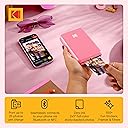
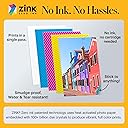
The KODAK Step Instant Color Photo Printer is a lightweight, portable device that wirelessly connects to smartphones via Bluetooth or NFC. Utilizing ZINK zero-ink technology, it produces durable, vibrant 2x3-inch sticky-back photos without the need for ink cartridges. The accompanying KODAK app offers extensive editing tools, enabling users to personalize prints with filters, stickers, and borders. With a rechargeable battery supporting up to 25 prints per charge, this printer is designed for social media enthusiasts, travelers, and creative professionals seeking instant, high-quality photo prints on the go.


| 1実行あたりの最大コピー数 | 1 |
| ASIN | B08YFJR71D |
| GTIN (Global Trade Identification Number) | 00843812154383 |
| UPC | 843812154383 |
| print_media_type | 感熱紙 |
| おすすめ度 | 5つ星のうち4.4 1,721 レビュー |
| インク色 | ブラック、シアン、マゼンタ、イエロー。 |
| コントローラーの種類 | モバイルアプリケーション |
| シリーズ番号 | 20 |
| スキャナータイプ | フォト |
| デュプレックス | シンプレックス。 |
| トレイ数 | 1 |
| ハードウェアインターフェイス | ブルートゥース |
| ブランド | KODAK |
| ブランド名 | KODAK |
| プリンター出力 | カラー |
| プリンタ出力 | カラー |
| プリンタ採用技術 | ZINK Zero Ink |
| プロセッサ数 | 1 |
| モデルシリーズ | Step |
| モデル名 | KODAK Step Instant Photo Printer |
| ユニット数 | 1.0 個 |
| ワット数 | 7.4 W |
| 両面印刷 | いいえ |
| 互換デバイス | プリンター |
| 出力シート容量 | 10 |
| 初期ページの印刷時間 | 60 秒 |
| 印刷技術 | ZINK Zero Ink |
| 同梱商品 | プリンターとアクセサリー。 |
| 品目の寸法 (D x W x H) | 12.7奥行き x 7.6幅 x 2.5高さ cm |
| 商品の用途 | ソーシャルメディア共有, パーティー。, ファミリーイベント。, 旅行。 |
| 商品の追加説明1 | ネットワーク対応 |
| 商品の重量 | 0.26 キログラム |
| 型番 | RODMP20AMZP |
| 接続技術 | Bluetooth, NFC |
| 最大コピー解像度(カラー) | 400 dpi |
| 最大コピー解像度(モノクロ) | 600 dpi |
| 最大コピー速度(モノクロ) | 1 ページ/分 |
| 最大メディア(用紙)サイズ | 2X3 Inch |
| 最大入力シート容量 | 10 |
| 最大印刷解像度(カラー) | 300 dpi |
| 最大印刷解像度(モノクロ) | 313 dpi |
| 最大印刷速度(カラー) | 1 ページ/分 |
| 最大印刷速度(モノクロ) | 1 ページ/分 |
| 特徴 | ネットワーク対応 |
| 管理方法 | アプリ |
| 紙サイズ | 2 x 3 インチ |
| 色彩深度 | 24 bpp |
| 追加のプリンタ機能 | 印刷のみ |
| 通信・接続インターフェース | Bluetooth, NFC |
| 電力消費サイズの測定単位 | 7.4 ワット |
| 電気 | いいえ |
C**E
Easy to set up and very nice quality
Brought this for my 12 year old daughter to start journaling and what a fantastic product. Easy to set up with the app and the print quality was far better than I expected from other reviews. Does the job perfectly. Super happy with this, it only arrived a couple of hours ago but it’s already printed about 20 pictures and they look fab! Would recommend!
E**.
Easy to use, picture quality not brilliant but perfectly fine
Easy to use and connect to mobile app. It’s about the same size as a small portable hard-drive, and lightweight. Picture quality is great, not brilliant but perfectly fine for a relatively cheap mini photo printer. If you’re looking for something that prints top quality photographs, then a printer that uses non-zinc paper, like ones made by Canon would be better, though they are pricier. To place the photo paper in: Slide back off the printer and place the paper in with the blue calibration card first facing down and then the photo paper on top (back facing down - ie. plain white side facing up) App is downloadable on the AppStore using the QR code found in the quick start guide. There are several other Kodak apps, so make sure it’s the Kodak Step Prints app. NB: if you don’t have the QR code to hand, then simply connect to the printer via Bluetooth via your mobile settings (press and hold power button on the side of printer until white light shows) and it will take you to the AppStore link. Charges via USB, but no plug adapter is included, so will either need to plug directly into a USB charge socket, or use any other plug adapter (phone, camera etc) that has a USB port. Can’t speak for Android, but have had no problems connecting to the app using iOS. There size of the photos are 2x3, so may need to edit photos, but can do so easily in the app which has a useful indicator of what will be printed. There are other editing tools within the app and the ability to add borders too. Also included with the pack are five sticky borders that you can stick onto the photo. Very pleased with this so far! Only downside is that there are only five photos sheets included so will need to purchase more! Edited to add more info: Still going strong several months later - occasionally a thin line will appear on the prints. If this happens, just recalibrate the device with the calibration card. Also, the printer will take any 2x3 zinc paper so it doesn’t have to be the Kodak stuff. Only thing to note here is that you’ll need to keep the original blue Kodak calibration card as the other cards (i.e. Canon do not work).
T**O
Súper!
Muy práctica y útil, me encanta que imprime a color sin necesidad de cartuchos. La amo.
L**S
Miniskrivare
Hög kvalitet på korten. Bra app för redigering.
Y**5
Pretty good !
The printer is pretty good, I bought it since I don’t have a normal printer and this one was pretty cheap, one thing though when you try to print more than 1 photo at the time and I’ve probably wasted film bc of this, but it will print a duplicate of a photo when you try to print more than one at a time. After a while the photos do develop a bit of a blue tint, this is good if you need a small photo printer !!
Trustpilot
2 weeks ago
4 days ago