


⚡ Power Your Productivity with the Ultimate 13-in-1 Docking Station!
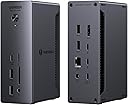
The UGREEN Thunderbolt 4 Dock Revodok Max 213 is a premium 13-in-1 docking station designed for professionals seeking maximum connectivity and speed. Featuring dual Thunderbolt 4 ports with 40Gbps transfer rates, support for dual 4K@60Hz or single 8K displays, and 90W laptop charging, it offers unmatched versatility. With 2.5Gb Ethernet, SD/TF 4.0 card readers, and broad compatibility across Mac and Windows devices, this aluminum-built dock transforms any workspace into a powerhouse of productivity.


| ASIN | B0DQWJNJ21 |
| Brand | UGREEN |
| Brand Name | UGREEN |
| Compatible Devices | Laptops |
| Customer Reviews | 4.3 out of 5 stars 171 Reviews |
| Hardware Interface | Ethernet, Thunderbolt 4 , USB 3.2 Gen 1 |
| Manufacturer | Ugreen Group Limited |
| Manufacturer Part Number | 25054A |
| Model Number | 25054A |
| Number of Ports | 13 |
| Total USB Ports | 5 |
G**O
Increíble calidad
Increíble, súper conectividad y velocidad!!! Calidad de construcción y materiales impecable!
2**E
Excellent dock
So far this dock has been rock solid. My past experience with a competitor dock has been very sour, and I started thinking it's my system, but once I switched to this UGREEN dock it's like night and day - everything just works! I have an ultrawide monitor, a DAC, a mouse/kb combo and an external SSD connected to it, and as I switch the one USB-C cable connected to it from my home laptop, to work laptop, and back - things just switch over, it takes a couple of seconds and I'm back to using the computer. It also stays very cool - slightly warm to the touch but that's it. Conversely my previous dock would get hot enough that it was difficult to touch it. I am very happy with this dock and can't recommend it enough.
J**S
Great for value
I’ve had this dock for a month and it works perfectly good I run it using a M4 Max and under heavy loads it does get warm but only when I’m pushing my Mac to the Max using Davinci and editing a 4K timeline with masking effects de-noising and colour grading and I’m running a dual monitor set up
U**S
solid, well-arranged, hassle-free
This dock has worked steadily without problems out-of-the-box, supporting a Dell XPS running Ubuntu 25.04+. I have a 4k display connected with a (UGreen) USB-C to DP 1.4 cable, and another ancient display connected to the built-in DP port with an old DP 1.1 cable. I expect everything would work fine with earlier kernels and other cables, as well. I saw a review mentioning troubles with HDMI. DisplayPort is actually a preference for me, because HDMI is proprietary and seemed like it might eventually invite 3rd party drivers on Linux, whereas DP is an open standard. So I haven't even tried HDMI. The USB-C to DP cable was not expensive, and gave me no trouble. (I did have to change settings on a monitor to select DP input.) I like that the fast USB-A ports are on the front. Slower USB-A ports in the back are perfect for keyboard and mouse, and if you want an attached SSD or something, you have more TB/USB-C in the back. But if you want to dynamically connect something, you want the faster USB-A ports to be in the front, right? Why don't others get that? The box is shockingly heavy. I imagine they would've wanted it lighter, if possible, but were forced to make it heavy. Perhaps it's unavoidable, if you want a robust power supply? I previously tried a (reconditioned) Dell WD22TB4 before this, and it just suddenly quit after a couple of days. So, maybe heavy is good. (Or they knew I'd think like that and added a slab of steel to impress me? I doubt it.) Plus, it stays put. Anyhow, I spent a lot of time weighing other options, and this box feels like the perfect balance of capability and cost, and has been rock-solid. My displays come up from sleep in about 2 seconds. I have successfully used the (much less expensive) OWC "Bus-Powered 5-Port Multi-Adapter" TB3 mini-dock with my setup (including HDMI without 3rd party drivers, so go figure). However, there were a few occasions with older kernels, when it had a big problem waking up after sleep, though it seems stable with newer kernels. It's passive and has limited ports, so I have to unplug power or juggle connections when I want to add some temporary extra connection. I did briefly create a problem for myself with the UGreen dock, when I disconnected the laptop in clamshell mode, plugged something into the dock, typed some keyboard keys, power-cycled the dock, etc, before realizing I hadn't reconnected the laptop. After reconnecting, I had to open the clamshell and unlock the laptop, in order to bring back the displays. No big deal. Be aware that other docking stations that connect via USB-C only (rather than Thunderbolt) are going to require "Display Link" drivers.
S**N
Great extension for a Mac Mini M4 Pro - drives my 3 monitors with no issues
I ordered the UGREEN Thunderbolt 4 Dock specifically to find a relatively lower-cost option to drive my 3 monitor setup in my creative studio. While I would have loved to have had a Thunderbolt 5 solution, I wasn't willing to put out the extra money for my specific needs. I have been running this for about 6 weeks now and have had not issues. I connect my three monitors using the 1 display port on the UGREEN, 1 Thunderbolt/USB-C on the UGREEN and the HDMI port on the back of the Mac Mini M4 Pro. Additionally, I have connected a Logitech Video Camera via USB on the back of the UGREEN Dock as well as my Bose Companion 3 Series 2 sound system via a back UGREEN USB port. As you can see from my photo, this still leaves all the ports on the fronts of both the UGREEN dock and my Mac Mini. I am not a gamer/video producer so all monitors are running at 60Hertz. My setup is mainly for AI development, 3D printing, day-to-day browsing and tasks. Love the low-profile, small footprint of this dock.
Trustpilot
2 months ago
2 weeks ago