Desertcart purchases this item on your behalf and handles shipping, customs, and support to Poland.
โจ๏ธ Elevate your typing game โ once you try it, no going back!
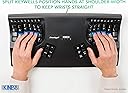
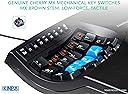
The Kinesis Advantage 2 KB600 is a premium ergonomic mechanical keyboard featuring a unique 68-key layout with tactile brown switches. Engineered for long-term comfort and durability, it supports USB connectivity and is compatible across major operating systems. Ideal for professionals seeking a transformative typing experience that minimizes strain and maximizes productivity.


| ASIN | B01KR1C5PY |
| Amazon ๅฃฒใ็ญใฉใณใญใณใฐ | ใใฝใณใณใปๅจ่พบๆฉๅจ - 87,134ไฝ ( ใใฝใณใณใปๅจ่พบๆฉๅจใฎๅฃฒใ็ญใฉใณใญใณใฐใ่ฆใ ) ใใฝใณใณ็จใญใผใใผใ - 1,240ไฝ |
| GTIN (Global Trade Identification Number) | 00607998600078, 05050914962609 |
| UPC | 607998600078 |
| ใใใใๅบฆ | 5ใคๆใฎใใก4.4 446 ใฌใใฅใผ |
| ใซใฉใผ | ใใฉใใฏ |
| ใญใผใใผใใฎ่ชฌๆ | ใใซใใกใใฃใข |
| ใญใผใใผใใใใฏใฉใคใใฎใซใฉใผใตใใผใ | ๅ่ฒ |
| ใญใผใใผใใฌใคใขใฆใ | QWERTY |
| ใทใชใผใบ็ชๅท | 600 |
| ในใคใใใฎใฟใคใ | ใกใซใใซใซ |
| ในใฟใคใซๅ | Tactile Brown Switches and QWERTY Keycaps |
| ใปใฏใทใงใณๆฐ | 3 |
| ใใฉใณใ | Kinesis |
| ใใฉใณใๅ | Kinesis |
| ใใฟใณๆฐ | 87 |
| ใกใผใซใผๅ็ช | KB600 |
| ไบๆใใใคใน | ใใฝใณใณ |
| ๅฉใๆ | ๅทฆๅณๅ ฑ็จ |
| ๅๆขฑๅๅ | USBใฑใผใใซ |
| ๅ็ฎๅฏธๆณ๏ผL x W x H๏ผ | 41.9้ทใ x 20.3ๅน x 7.6้ซใ cm |
| ๅๅใฎๆจๅฅจ็จ้ | ใชใใฃใน |
| ๅๅใฎ่ฟฝๅ ่ชฌๆ1 | ใจใซใดใใใใฏ |
| ๅๅใฎ้้ | 2.2 ใใณใ |
| ๅ็ช | Advantage 2 |
| ๅค้จๆฉ้ข่ชๅฎๆ ๅ ฑ | Nรฃo aplicรกvel |
| ๅฏพๅฟใใใคใน | ใใฝใณใณ |
| ๅฟ ่ฆใชๆๅฐใชใใฌใผใใฃใณใฐใทในใใ ใใผใธใงใณ | Ubuntu 16.04 Xenial Xerus, Windows 7, macOS 10.12 Sierra |
| ๆฅ็ถๆ่ก | USB |
| ็นๅพด | ใจใซใดใใใใฏ |
| ่ฃฝๅใฎๆจๅฅจ็จ้ | ใชใใฃใน |
| ้ไฟกใปๆฅ็ถใคใณใฟใผใใงใผใน | USB |
| ้ต็คๆฐ | 68 |
R**U
ๆ ฃใใใจไปใฎใญใผใใผใใไฝฟใใชใใชใใพใใ20ๅนดใ่ถ ใใ่ไน ๅใใใใพใใ
ๅไปฃใฏ2004ๅนด่ณผๅ ฅใ20ๅนดใใพใใ2026ๅนด3ๆใพใงไฝฟใใพใใใๅ่งฃๆ้คใใใ้ใซRใจWใๅๅฟใใชใใชใไฟฎ็ใๅฟ ่ฆใซใชใใพใใใๅ็ดใชใธใฃใณใ็ทใง็ดใใฎใฏใใใฃใฆใใใฎใงใใใไฝใใฎๅบๅใใใจๆใฃใฆ2ไปฃ็ฎใ่ณผๅ ฅใใพใใใๆ้ตใฎๆ่งฆใจๅไปฃใฎๅผฑ็นใ ใฃใใใกใณใฏใทใงใณใญใผใๆน่ฏใใใไฝฟใๅฟๅฐใๅคงๅน ใซไธใใฃใฆใใพใใใคใใฏ360ใ่ฒทใใใใจๆใฃใฆใใพใใใงใๆง่ฝใจ่ไน ๅใ่ใใใจ็ธๅฝๅ ใซใชใใงใใใใ
ใ**ใ
ๅคๆ ใญใผใใผใใฏไฝฟใใใใใ๏ผๆ ฃใใใฐ๏ผ
ใใใจ่ฆใงๆธๆใใใชใใฏๆญฃใใใ ๆญฃใใใใใพใ ่งฆใใฆใใชใใ ่งฆใใใจใใใพใง่ธใฟ่พผใใ ใชใใฐใๆฅตไธใฎใฟใคใใณใฐไฝ้จใใงใใใงใใใใ ใใ ใใๆฐๆฅใฎๆ ฃใใๅฟ ่ฆใซใชใใพใใใฉใใใฆใๅคๆ ็ใชใญใผ้ ๅใงใใใใ ใใใไนใ่ถใใใชใใฐใไปใพใงๅณใใฃใใใจใฎใชใๅฟซ้ฉใชใฟใคใใณใฐใๅพ ใฃใฆใใพใใ ๆ ฃใใใฐใญใผใฎใชใใใๆฉ่ฝใงใ่ชๅใ ใใฎใญใผใใผใใซ่ฒใฆใฆใใใพใใใใ ้ฃใ่จใใฐใ้ซไพกใงใใใใจใใใกใณใฏใทใงใณใญใผใ่ฒง็ธใงใใใใจใๆๅคใจใใซใคใใจใ ๆฎ้ใฎใญใผใใผใใไฝฟใใซใใใชใใใจใไปไบบใ่งฆใใใจใๅบๆฅใชใใใจใ ใพใใๅคๆ ใญใผใใผใใซใฏใใใใใใจใงใใ ใใใๆใฃใฆใใฆใๆใไฝใใ็ๆณ็ใชใฟใคใใณใฐไฝ้จใใใใซใใใพใใ
H**A
ๅคๆ ใญใผใใผใใฎไปฃๅ่ฉ๏ผใจใฆใๆบ่ถณ๏ผ
3ๅฐ็ฎใฎKINESISใจใใฆใใ10ๅนดใใใๆ็จใใฆใใพใใWindowsใงใMacใงใใกใใใจไฝฟใใฆใใพใใ ใใ ๆๆฐใฎMacOSใ ใจ็ธๆงใฎๅ้กใงใใใใ๏ผMacๆจๆบใฎๆฅๆฌ่ชๅ ฅๅใงใญใผใๅๆใซใชใใผใใใใใๅ ฅๅใใใใญใผใฎๅๆ ใ้ ใใฃใใใจใใๅ้กใ็บ็ใใฆใใพใใใใ ใใใฏGoogle IMEใไฝฟใใจ็บ็ใใชใใฎใงใKINESISใไฝฟใ้ใซใฏGoogle IMEใๆ้ฉ่งฃใใจๆใใพใใ ใใผใ็ใซใฏๅ ดๆใฏๅใใพใ๏ผใใ ๅ ฅๅใฏๆฌๅฝใซๆฅฝใ็นๆฎใญใผใฎ้ ็ฝฎใ็ฌ็นใชใฎใงๆ ฃใใใพใงใฏๅคงๅคใงใใใๆ ฃใใใจๆ้ฆใธใฎ่ฒ ๆ ใใชใใฆ่ฏใใงใใ ็นใซ้ทใๆๆธใๆธใๆนใซใฏใจใฆใๅใใฎใงใฏใชใใงใใใใ๏ผ
T**R
Un gran invento, pero prรกcticamente tienes que aprenderte las nuevas posiciones de las teclas
Un diseรฑo fuera de serie en la bรบsqueda de un teclado ergonรณmico que reduzca las dolencias y malestares de quienes pasan muchas horas tecleando textos. Sin embargo, lo devolverรฉ, porque en mi opiniรณn, dado su diseรฑo curvo, las teclas tienen una posiciรณn inusual, por no decir extraรฑa, por lo que se tiene que reaprender la posiciรณn de las teclas para llegar a dominar este teclado. Tengo 50 aรฑos y empezar de nuevo significarรญa una preocupaciรณn, mรกs que un apoyo.
W**L
Great product!
Initially, my words per minute dropped to 15 when using but after just a week it was up to 50 and now 75+. You can tell the ergonomic benefits you get especially after a long session at the desk where your hands and wrists arenโt sore. While it is expensive it is more than worth it for those who use a computer constantly
A**A
Amazing keyboard for RSI
I was recently diagnosed with RSI. A general economic keyboard did not help the situation and this is where I decided to try this. First challenge was you have to relearn how to use this keyboard as all the characters are slightly displaced. So I actually tracked my progress on typing test.com. on the first week I was at 13 words per minute and subsequently I progress back to 60 words per minute. the only biggest thing I hate about this keyboard is that it is not wireless, given how long it is really been in the industry.
A**E
Sehr geeignet bei RSI
Hat meine Probleme mit RSI sehr verbessert. Innerhalb von einer Woche werden die Schmerzen in der Hand bereits spuerbar weniger. Beste Investition in meine Gesundheit und in meine Arbeit als Programmierer.
C**S
Expensive but worth it
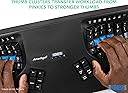
I've experimented with so many other keyboards before landing on this one. Started with a Typematrix before college, switched back to regular keyboards like keychron Q1, then got a Moonlander (which is also split, ortholinear, and has thumb clusters). The biggest thing all of those other keyboards miss that the Kinesis gets right is the keywell - it's convex so it encourages a natural wrist position, and all your fingers rest perfectly on each key. The column of keys for your pinky is slightly higher up and the column of keys for your middle finger is slightly lowered... because your fingers are different lengths. The thumb clusters encourage using your thumbs for super common keys like enter and backspace rather than your weak pinky. And these thumb clusters are way more natural to use compared to the Moonlander. When your fingers are on the home row, you can access all the thumb cluster keys without moving your hand because of the varying heights and angles of each of the thumb cluster keys. Clearly a lot of thought and research went into the design of the key layout. Also, it's super easy to remap keys. It's onboard - you press the remap button, press the key you want to move, and the destination key, and you're done. Makes it really easy to experiment with different positions; for instance, I switched the shift key with the one above it on both sides so that my shift keys were on the home row since it's one of the most common keys. When it comes to build quality and premium feel... Yeah, it's plasticy, yeah it has abs keycaps that will get shiny over time, yeah it has no backlight, and yeah it's wired, but clearly the money was spent on making the most comfortable keyboard, not the most flashy or premium feeling. Even though it's plastic, it feels super durable and I don't think it'll break very easily. If you can't do wired connection, the Kinesis 360 Pro is wireless and very similar, but honestly I prefer the simplicity of the wired connection on this one. No worrying about charging. I also like that it's one solid unit rather than distinct halves. Less to keep track of, less positioning to adjust, but that also means it's less flexible since you can't change the distance between each half of the keyboard like you can on the 360. I think this one is easier to have in your lap though than the 360 with its two distinct parts. All depends on your needs and wants. Speaking of having it in your lap, one downside of this keyboard is that it's raised higher than a lot of other keyboards. The actual keys are lowered down into the unit, but to enforce that, the actual body itself rises up quite a bit. You'll need to make sure you have a chair that can go high enough or a keyboard tray that makes it lower so you're not hurting yourself by scrunching up your neck and shoulders to reach the higher level. I find placing it in your lap is a super comfortable way to use it that gets around this, but consider getting a drafting chair if you need your chair to raise up higher than your current one does. Also, just a small thing, but I love having dedicated function keys (F1-F12). Might be silly, but I've never had a keyboard before where you can just press a function key - without holding down a separate "fn" key or other layer shift. If you use VS Code or develop in general, there's often a number of super useful shortcuts tied to the F1-12 keys, and it's very handy to access them at the press of a button without any key combos or anything else. Highly recommend this keyboard if you experience any sort of pain in your wrists, arms, shoulders, or neck from sitting at a desk typing all day. It's so so worth it. My pain went away so fast. Just make sure the rest of your setup is ergonomic as well. The Kinesis Advantage 2 User Manual has a whole section on how to make the rest of your desk setup ergonomic. Make sure to follow it.
Trustpilot
1 month ago
1 month ago