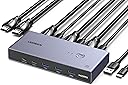
![UGREEN 8K@60Hz HDMI KVM Switch, KVM Switcher Support 4K@120Hz, 4 Port USB3.0 Switcher [1 USB C and 3 USB A Port] for 2 Computers Share 1 Monitor and Keyboard, Mouse, Hard Drive, Printer](https://m.media-amazon.com/images/I/71XgABrTcGL.jpg)


🚀 Elevate your dual-PC setup with 8K clarity and lightning-fast control!
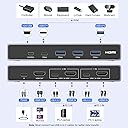
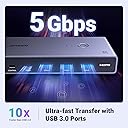
The UGREEN 8K@60Hz HDMI KVM Switch is a sleek, compact device that lets professionals seamlessly share one ultra-high-definition monitor and four USB 3.0 peripherals between two computers. Supporting resolutions up to 8K@60Hz and backward compatibility with 4K@120Hz, it ensures crystal-clear visuals. With plug-and-play compatibility across major OS platforms and popular HDMI devices, plus flexible switching via remote or button, it’s designed to maximize productivity and declutter your workspace.


| ASIN | B0CFFCPL26 |
| Batteries Required? | No |
| Best Sellers Rank | 17,269 in Computers & Accessories ( See Top 100 in Computers & Accessories ) 56 in KVM Switches |
| Colour | Grey |
| Customer Reviews | 4.3 4.3 out of 5 stars (267) |
| Date First Available | 11 Aug. 2023 |
| Item Weight | 150 g |
| Item model number | 25961 |
| Manufacturer | Ugreen Group Limited |
| Part number | 6941876229611 |
| Product Dimensions | 10 x 5 x 1.5 cm; 150 g |
| Switch Type | 2-way |
| Voltage | 5 Volts |
| Wattage | 60 |
B**.
Fast switching, small remark to be aware of
Only one remark, it doesn't cut off the screen when you switch between machines. Small in issue in my case as I'm switching between PC and laptop. If you make your main screen primary and you switch away from the laptop, you might lose control of the laptop as some of the apps won't flick back to your laptop screen. Other than that, it's absolutely great. I've had many KVMs, this one is switching very fast and super reliably. Running 4k@120Hz as it says on the tin.
S**S
Great UGREEN quality
I do like the UGREEN brand. Reasonably priced, but they put out some really functional and quality items. This KVM is no exception. Solid build, the ports on the front and back have a really nice snug feel, nothing loose other than wobbly. All the buttons have a quality click to them, and the remote, although light, still has a decent click about it. All cables are included, though what was a surprise given the rear ports are USB-C, the USB cables are USB-C to USB-A, and you get the HDMI cables included as well (4x, you will need to supply the cable to your monitor). Oddly, or unusually for UGREEN, there was no power adapter included, though everybody has loads at home already, I certainly do, so that wasn't an issue for me. It’s plug and play, nothing complicated about it. Currently using it for a Mac Studio and MacBook Pro with zero issues, but will be adding some small factor PCs for a project soon.
D**N
Generally works well, but not always
When it works well I can get 144hz HDR and VRR on both hdmi ports. Usb ports work well too, usually. But it's not consistent. Sometimes I have to switch sources to stop the screen flickering. Occasionally, I've had to reset it by unplugging everything. And the usbs might randomly disconnect. I thought the power source might be the problem, so I bought an adapter with the specified amps and volts, but it didn't make any difference.
S**.
Excellent quality and performance
I was impressed by the quality of the switcher. The provided cabling is also of high quality. It works very well with split between my own mac and my work windows laptop. I usually purchase cables and adaptors from Ugreen and they provide good products :)
A**E
KVM switch
Amazing little device, allows me to switch between work laptop and gaming pc effortlessly using the same peripherals for all devices connected and use just one screen. Important to make sure you get one with the correct video connections I.e. HDMI or Display Port. About the size of a chunky mobile phone
M**N
Not recommended for gaming
Works fine when used with work laptop. But screen blacks out for a few seconds every -2 minutes during gaming on PC at 2k@60Hz. I need to plug HDMI directly to PC when gaming. Kind of defeats the purpose.
T**R
WARNING: Bad quality item with misleading info
I am very disappointed with the item for a couple of reasons: * In the description there is this note from the seller on the bottom >>> NOTE: 1, To ensure stable transmission, the power cable must be connected to a 5V/1A or above power source. ( Cable Included, Power Adapter is NOT Included); As you can see there is "Cable included". That is not true! There is NO cable included. They probably want you to buy one of their cables which without discount requires another £10 on top. Also, from the images you get the impression that the power supply is included. This power supply (without discount) costs another £35! Luckily I have one of mine with enough wattage. * After installation, the monitor (Samsung Odyssey 49 inches) switching between my Macbook Pro and Windows/Linux Desktop was working fine. However, none of the extra USB ports were working with my keyboard (both cases with dongle and direct cable).
F**I
Works as expected (even with docking station once I used thunderbolt to output video to the KVM). Currently have it connected to a 34in 2k monitor. It's able to output at 2k 240hz without any issues. With freesync premium pro and gsync. HDR10+ also working according to Windows. I have my gaming PC and work machine connected to it. Work machine goes through a docking station which this product doesn't officially support, and I can confirm it wasn't working when using the HDMI port on the docking station (this was expected). I got around this limitation by using the thunderbolt 4 port to output video to the ugreen KVM switch. Unfortunately I don't get the full 240hz but I don't need that for my work machine. I had to buy a thunderbolt 4 to HDMI 2.1 cable to get everything working. Docking station I'm using is the Lenovo 'ThinkPad thunderbolt 4 workstation dock'. Gaming PC is directly connected to the KVM switch. Which works as you would expect.
S**N
Doesn't work with my USB keyboard. MKA-7C Psych eagle mechanical keyboard. USB camera not working.
B**T
This does exactly what I was hoping it would do: Allow me to swap between 1 HDMI monitor and a few USB Peripherables between 2 PCs without having to swap cables every time I did. AKA, it's a great KVM. Note, to anyone looking, this is NOT a docking station, so it provides an HDMI signal pass though, not USB to HDMI support. I saw at least one negative review complaining USB-C did not provide video output. That's not what this device is. Pros: - All the Ports! - 2 USB-C and 3 USB-A ports, all at USB 3.0 is solid. I would not have complained about USB 3.2, but I suspect you need to spend a lot more for something like that, or start looking at high end USB Docks. 5 ports is plenty, and since it only needs 1 to each PC, it helps give you more ports for your PC. - Solid - I was surprised with how heavy the package was. This is a solid metal unit with some weight to it. All the cables provided were nice, including braided USB-A to USB-C cables. The HDMI and switch cables are not braided, which is a shame, but they're still solid cables. - Sharp looking - Total opinion here, but I think the unit looks great. Not that I see it, it's under a stand to hide all my cables (Saves me effort for managing, and gives me more desk space), but if you have it out in the open, it will look great. - Worked without power - I was worried it wouldn't get enough power without the power adapter, but I have plenty of bricks I could have used if that was an issue. But it worked great with just a single PC connected providing power, and with 2 PCs plugged in and providing power, it's a non-issue. - No issues with a USB 3.0 high speed 1080P 60 FPS camera! My Razor Kayo Pro is notorious for issues with hubs, and it works great along side my keyboard and headset adapter. So I can use an RGB keyboard, audio, and a high speed camera though it with no issues. - HDMI is clear so far - I only have 1080P 75hz monitor attached to it, but it looks just as good as it did with a direct connection. That's always a worry with devices like this, will I end up with signal issues. None so far, though I'm pushing much though it to be fair, and far from the full HDMI 2.1 advertised. - Switching is quick. Swapping between PCs is 5-10 seconds, and most of that delay is the expected "Device reconnecting" delays from Windows. I wouldn't expect much faster overall, so it's as instant as you'll get with a switch. - Supports USB-C to USB-C - I had a spare USB-C to USB-C cable, and that's what I'm using for one of the PCs. I wasn't expecting any issues, but it's good to know that will work. Notes: - This does NOT provide a connection that tells your PC you have a keyboard connected, and the monitor also does not appear "connected" when you swap. It is a complete cutoff. This was fine for my use, but I know some people want that persistent connection for reasons such as desktop arrangements. - This DOES work with Docks. However, it will not work well in SWITCHING with a Dock. If you want to swap a dock between 2 PCs, this is NOT what you need. If you want to KM swap between a PC and a laptop with a dock, this is perfect. Cons: - Only the USB cables are braided. The HDMI and the switch are not. It feels a little bad on such a premium product, particularly the switch not being braided. At least with the HDMI cables, they're running behind your PC, so that's not a major issue, but having the switch cable braided would add a nice touch of class and durability. Ultimately, its a minor gripe. - No power adapter included. It doesn't look like it's needed, but it would have been nice to have, just in case one of the switch connections isn't supplying full power over USB 3.0 (an older PC with only USB2 ports for example). Not a major issue, and to be fair, I'm happier they included 2 HDMI cables rather than 1 power adapter, so if I have to choose, they chose well. - I would have loved a USB-C to USB-C cable as well. It works fine, but having 2 USB-A to USB-C and one USB-C to USB-C would have given you all the cables to connect it to everything including your own charger, and helped made the KVM more flexible. Again, a minor gripe. - No Keyboard shortcuts. It's not advertised as such, so I'm not taking points off for it, but it would have been nice. That said, in this price range, that's unlikely. So, overall, it does everything I wanted, does it well, and my complaints are ultimately very minor criticisms that won't really affect my use of this long term. The real test now is how long will it last, and given how sturdy every part of the product feels, I expect it will last for quite a while. Also, UGreen has a solid rep for supporting products, so I have confidence if I run into issues, they'll make it right. Highly recommend if you need a switching KVM. 2 USB-C and 3 USB A with an HDMI 2.1 on a unit is overall great, and while there are cheaper options, the construction of the device is top tier, and you get a great company in UGreen to support it. If you are looking for a dock, or a USB-C to output to HDMI, this is NOT that kind of solution. It's a KVM, used for swapping keyboards, mice, other peripherals, and displays between 2 PCs.
T**I
Produto excelente comprei ele em 2022, ainda funciona perfeitamente. Eu no caso tenho dois notebooks, um de trabalho e outro de estudo, trabalho homeoffice. Então a noite quando ia fazer minhas coisas era aquela bagunça, desplugar o mouse, teclado, headset, HDMI do segundo monitor, pra conectar no meu notebook pessoal, no outro dia de manhã a mesma novela pra conectar no meu notebook do trabalho. Hoje com um simples toque eu transfiro os periféricos de um notebook para o outro. A qualidade do KVM é excelente, produto muito bom.
L**A
Excelente producto, consideren tener un cargador con cable usb-usb tipo c porque el producto no lo trae y lo necesita. Funciona bien, yo conect{e una macbook y otra laptop con Windows y todo bien, reconoce el mouse y el teclado en ambas. En la macbook lo uso como pantalla extendida y lo detecta automáticamente. El switcheo tarda entre 3 y 5 segundos, el manual dice que puede tardar hasta 12-13 dependiendo de la distancia y la resolución
Trustpilot
2 months ago
1 day ago