Buy anything from 5,000+ international stores. One checkout price. No surprise fees. Join 2M+ shoppers on Desertcart.
Desertcart purchases this item on your behalf and handles shipping, customs, and support to Poland.
๐ Elevate your home network โ stay connected, stay ahead!
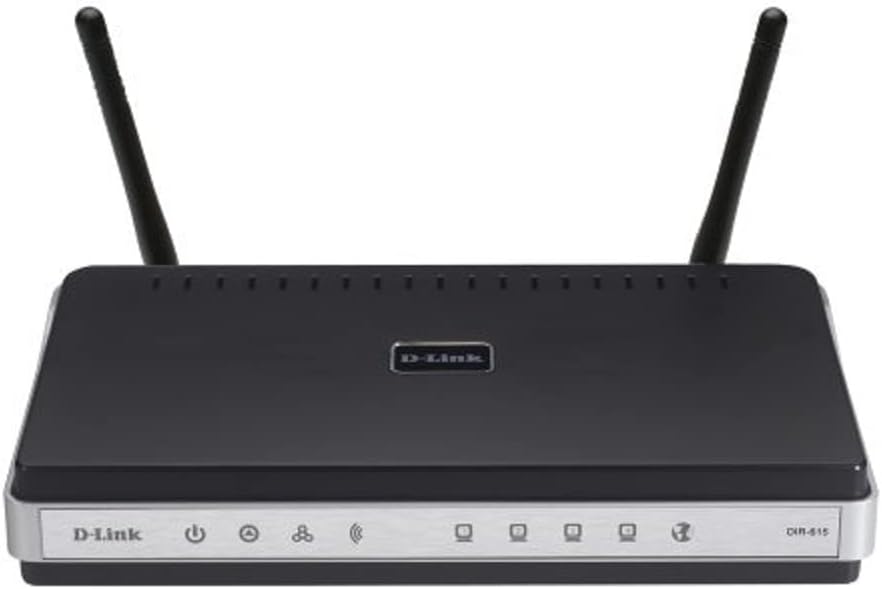
The D-Link DIR-615 Wireless N Router delivers reliable 300 Mbps Wi-Fi with dual external antennas for enhanced range and speed. Featuring 4 Ethernet ports, built-in QoS for optimized traffic management, and parental controls, itโs designed to support multiple devices in a busy home or small office environment. Ideal for professionals seeking affordable, easy-to-setup networking with solid performance.
| ASIN | B000Y9PAXY |
| Antenna Location | Home |
| Antenna Type | Fixed |
| Best Sellers Rank | #113,878 in Computers & Accessories ( See Top 100 in Computers & Accessories ) #2,400 in Computer Routers |
| Brand | D-Link |
| Color | One Color |
| Compatible Devices | Gaming Console, Personal Computer |
| Connectivity Protocol | Wi-Fi |
| Connectivity Technology | Ethernet |
| Control Method | App |
| Coverage | Home |
| Customer Reviews | 4.2 out of 5 stars 44 Reviews |
| Data Transfer Rate | 100 Megabits Per Second |
| Frequency | 2.4 GHz |
| Frequency Band Class | Dual-Band |
| Is Modem Compatible | No |
| Item Weight | 3.2 ounces |
| LAN Port Bandwidth | 10/100 megabits_per_second |
| Manufacturer | D-Link Systems, Inc. |
| Maximum Upstream Data Transfer Rate | 300 Megabits Per Second |
| Mfr Part Number | DIR-615 |
| Model Name | DIR-615 |
| Model Number | DIR-615 |
| Number of Antennas | 2 |
| Number of Ports | 4 |
| Operating System | Linux |
| Other Special Features of the Product | QoS, WPS |
| Security Protocol | WPA, WPA2-PSK |
| Special Feature | QoS , WPS |
| UPC | 000000046343 635145508052 790069302299 790069309120 999992691832 790069303302 |
| Wireless Communication Standard | 2.4 GHz Radio Frequency |
| Wireless Compability | 2.4 GHz Radio Frequency |
M**Z
Easy to setup but unreliable connection
This is the first and only router I've ever installed. I found the setup very simple and straightforward. I've had the router for over 2 years now and I used to go 2 or more weeks without any problem and then suddenly not being able to connect until I reset it. Lately, I've been having to reset the router 4 to 6 times a day. I have 2 teenagers at home who have smart phones, an iPad, 2 laptops, a Wii and 2 smart tv's that stream Netflix and other content. I suppose we get heavy use out of our router, but it's very irritating to have to go and reset it several times a day. If you plan to get heavy use out of your router you might want to look for something else. 23 Dec 2013 Review update: Thanks to Mike's question about updating the firmware I checked to see if I had the latest and sure enough it was several versions behind. I had pressed the button within the Admin console before to check for firmware updates and it always came back with "This Firmware is the latest version". However, when I went to the D-Link site I found that there were several updates ahead of mine. I followed the instructions and installed the firmware update about a week ago. The only snag I ran into was restoring my original configuration file. It simply did not work and I had to manually apply my old configuration settings (passwords, etc.). I'm going to wait a few months and if I don't have any more problems I will up the rating.
T**C
Positive! mainly
The unit is fairly small and neat (large paperback sized) and was a joy to install - the CD was easy to follow and it all went completely to plan, which is not something I'm used to with computers. It's been up and running for a while now and it seems to be working well. I've had a couple of drop outs on my laptop, which are probably the laptops fault since the connection to my main computer seems stable. I've not checked the range but my house seems to be well covered. Gripes - the front of the unit is chock full of lights, many of which flash in use. It's simply too busy to have in your line of sight so on top of the set top box is out. And that's it. Oh - and Amazon made a complete hash of the order and I had to chase them around for two weeks. Three days before dispatch and then it gets lost and they wanted me to wait forever before sending a replacement...not good. [edit] The unit failed completely in July 2011 so it was a short life - it wasn't abused in any way. It was replaced by....the same model because it was incredibly cheap!
M**I
Not what it says on the tin
I bought this thinking it would be a new router -what I got what a plain white box with "virgin router" written on the side in biro. I tried to set it up manually, as I have a fairly good knowledge of routers, but hit a problem, but was unable to connect it wirelessly. Called D-Link for support and to my surprise found out that this was a router that was originally supplied by Virgin media for use with their equipment and was never meant to be sold, hence D-link were iffy about supporting it and wanted me to call Virgin. Firmware version on software was "VM" so registered to virgin media, so most of the settings that D-Link were describing to me were missing and they stopped supplying this in 2010! This was not as advertised and has been sent straight back for a refund.
J**D
NOT a modem
I had thought that this was a wireless modem but it is NOT. It is only a router and you must have a modem connected to the internet to connect this to. It works ok for most of the home network wireless PC's but one would not connect to internet so went back to old wireless modem.
M**N
Great range, Great router
I have always used cable internet, but my mum has a wifi enabled laptop and she wanted a router that would allow her to be in the kitchen with her laptop. As I have never had a wifi network in my house, I was looking for a router that is easy to set up and has a good range. The router comes with a cd that give you a quick walkthrough on how to do the initial set up. After that, feel free to enter the ip address to configure your own personal settings. While the range is good, it falls slightly short of my expectations, as I have some "wifi blind spots" in my house still, which may cause disconnections. If your looking for a mid-priced, easy to set up router then this is great.
T**S
Problem linkin to theVirgin internet - but resolved!
Bought this wanting a better wireless network so I could use my new tablet (Samung P1000 Tab). Tried installing it but it refused to connect to the internet. After several tries over several days was getting very annoyed until I came across this advice over the net: "Before following these directions, please make sure everything is wired correctly. The network cable from the sat. cable modem plugs directly to the back of the dlink where it says WAN or INTERNET. When you are sure that is correct.. proceed to.. 1. Pull the power cord from the sat. cable modem, make sure the lights go off and leave it off. 2. With the power ON on the dlink router, press and hold the reset button on the back of the dlink router. (It is on the back, small usually red, you may need to use a pen) Hold it in for about ten seconds. Then let it go. Now unplug the power cord from the dlink, make sure the lights go off. 3. Power on the sat. cable modem. Wait about a minute. 4. Power on the dlink, wait about a minute. Reboot any computers, rescan for wireless and reconnect." This worked a treat! Now my network is much better and has not dropped yet. (As for the Samsung tab - it is brilliant)
Trustpilot
2 weeks ago
4 days ago