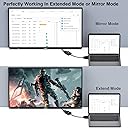
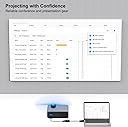
Desertcart purchases this item on your behalf and handles shipping, customs, and support to Poland.
🔌 Connect like a pro—never miss a pixel or a meeting!
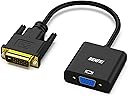
The Benfei Active DVI-D to VGA Adapter is a high-performance, plug-and-play converter that connects DVI-D output devices to VGA displays, supporting up to 1080p Full HD resolution at 60Hz. Featuring quad-shielded cables and gold-plated connectors, it guarantees reliable, crystal-clear video transmission without signal loss. Compact and durable, it’s perfect for professionals needing seamless multi-display setups across desktops, laptops, and projectors.


| ASIN | B07D3XZ9SD |
| Best Sellers Rank | 28,679 in Computers & Accessories ( See Top 100 in Computers & Accessories ) 64 in DVI to HDMI Adapters |
| Brand | BENFEI |
| Cable Type | DVI-D, VGA |
| Cable type | DVI-D, VGA |
| Colour | 1 PACK |
| Compatible Devices | Monitor, PC, Television |
| Compatible Phone Models | No Compatible Phone Models |
| Compatible devices | Monitor, PC, Television |
| Compatible phone models | No Compatible Phone Models |
| Connector Gender | Male-to-Female |
| Connector Type | VGA |
| Connector type | VGA |
| Country Of Origin | China |
| Customer Package Type | Rigid Box |
| Customer Reviews | 4.6 out of 5 stars 6,143 Reviews |
| Data Transfer Rate | 1.65 Gigabits Per Second |
| Frequency | 60 Hz |
| Indoor Outdoor Usage | Indoor |
| Item Length | 19 Centimetres |
| Item Shape | Round |
| Item Weight | 1 Ounces |
| Manufacturer | BENFEI |
| Manufacturer Part Number | 000185black |
| Model Name | 000185black |
| Model Number | 000185black |
| Number of Items | 1 |
| Number of Pins | 39 |
| Other Special Features of the Product | Data Transfer |
| Outer Material | Polyvinyl Chloride (PVC) |
| Recommended Uses For Product | Office use, Home entertainment, Conference room setup |
| Special feature | Data Transfer |
| Specification Met | CE |
| UPC | 606682479006 |
| Unit Count | 1.0 count |
K**R
It is a connector....
Nothing much to say - it arrived next day, good and solid quality, works perfectly. Was worth the money so happy
O**R
Just works - What's not to like?
This is one of those simple, bargain price adaptors which you plug in and it just works! Full marks (so far! - no reliability info yet) for fitness-for-purpose. My requirement was to be able to use an old VGA-only monitor with my new DV/HDMI graphics card, as a second screen. I plugged in this device, made a few adjustments to the Windows 10 screen graphics properties for the VGA monitor (chiefly resolution and refresh rate) and away it went. Note the variant I received has male DVI-D connector and female VGA connector. I would recommend this device as good value.
D**.
Excellent Signal Adapter
I bought this adapter in December 2018 to help pair an old Dell monitor with a Radeon RX 460. Right out of the box, it has worked flawlessly. I've had zero issues with picture quality or the physical quality of the product itself. I haven't had any issues with interference with both of my Wi-Fi adapters, whether USB or PCIe based.
N**X
Exactly as described
E**D
Plug & play. Clean, stable picture with no interference.
Great value adaptor that solved the problem of using a graphics card which only had digital outputs with an older monitor that is still very good but only has VGA input. Reviews of similar cheaper products reported interference on the picture but no such issues are observed with this one. The picture is clean and stable.
E**I
Great for a second screen!
I have a graphics card with a low profile bracket so it contains a DVI-D 24+1 slot (The one with one flat pin and not the four extra connectors surrounding it) and my HDMI slot. If you are looking to run a second screen and only have a VGA port on that screen, this does the job. Plug and play. Easy.
S**L
Good quality buy
Don't throw away a decent monitor just because your graphics card doesn't have a vga output. Buy one of these adaptors and save yourself some cash. This is a sturdy good quality adaptor and I have been very happy with mine. Great buy.
M**N
Incorrect video levels
Digital video signals for computers use 0 to represent black, and 255 to represent white (full video levels, a.k.a PC levels, a.k.a. full swing). Digital video signals for televisions use 16 to represent black, and 235 to represent white (limited video levels, a.k.a. TV levels, a.k.a. studio swing). DVI is a computer standard, never used for televisions, so it should always use full video levels. This device assumes you're using limited levels, so all shadow and highlight detail is lost ("crushed blacks"). However, I was able to mitigate this to some extent. I'm running Debian, so I used the "xcalib" utility to adjust the graphic card to output TV levels: xcalib -d :0 -alter -b 6.25 -co 91.25 Squeezing 256 brightness levels into 221 brightness levels causes ugly banding, but my graphics card supports dithering, which makes the banding less obvious. I enabled dithering using xrandr: xrandr --output DVI-1 --set dither=on The result isn't perfect, but it's a big improvement over the default, and IMO acceptable for a low cost device. I assume it's possible to do the same calibration in other operating systems. Note that the incorrect levels aren't all bad, because it means you can watch videos encoded with TV levels without scaling the levels, which gives you slightly higher quality. Reset the calibration to defaults with "xcalib -d :0 -alter -c", and tell your video player to output limited levels (e.g. using MPV "--video-output-levels=limited"). Theoretically this could be automated with MPV's lua scripting.
F**R
L’ho preso per collegare un vecchio monitor VGA al PC con uscita DVI: funziona senza problemi
L’ho preso per risolvere un piccolo problema di connessione: avevo un monitor VGA ancora perfettamente funzionante e un PC con uscita solo DVI-D. Questo adattatore mi ha permesso di riutilizzare il vecchio schermo, collegandolo in pochi secondi senza bisogno di driver o configurazioni. Il collegamento è immediato (plug & play): basta infilare l’adattatore nella porta DVI-D e poi collegare un normale cavo VGA (che non è incluso, ma nel mio caso ce l’avevo già). Lo uso per visualizzare il secondo schermo, utile per tenere aperte email, fogli Excel o browser mentre lavoro sul principale. L’immagine è stabile, nessun tremolio o sfarfallio, e anche la risoluzione (fino a 1080p) è più che sufficiente per l’uso quotidiano. Non è un adattatore attivo, quindi non fa miracoli su qualità o conversione digitale/analogico, ma se le uscite e gli schermi sono compatibili, fa esattamente ciò che promette. Robusto nella costruzione, compatto, e con un attacco solido. Un oggetto semplice, ma risolutivo per chi ha ancora periferiche VGA da sfruttare.
P**R
Adapter
Adapter Handig in gebruik . Werkt alleen niet als de video - kaart van de pc actief is ..
R**K
CUMPLE CON SU MISIÓN
Todo correcto.
P**H
allt fungerar bra
den fungerar bra
L**L
Adaptateur actif
Parfait. L'image sur mon écran VGA est très bonne. A recommander !
Trustpilot
1 month ago
1 month ago