

Buy anything from 5,000+ international stores. One checkout price. No surprise fees. Join 2M+ shoppers on Desertcart.
Desertcart purchases this item on your behalf and handles shipping, customs, and support to Poland.
🔋 Keep your Raspberry Pi running like a boss—anywhere, anytime!
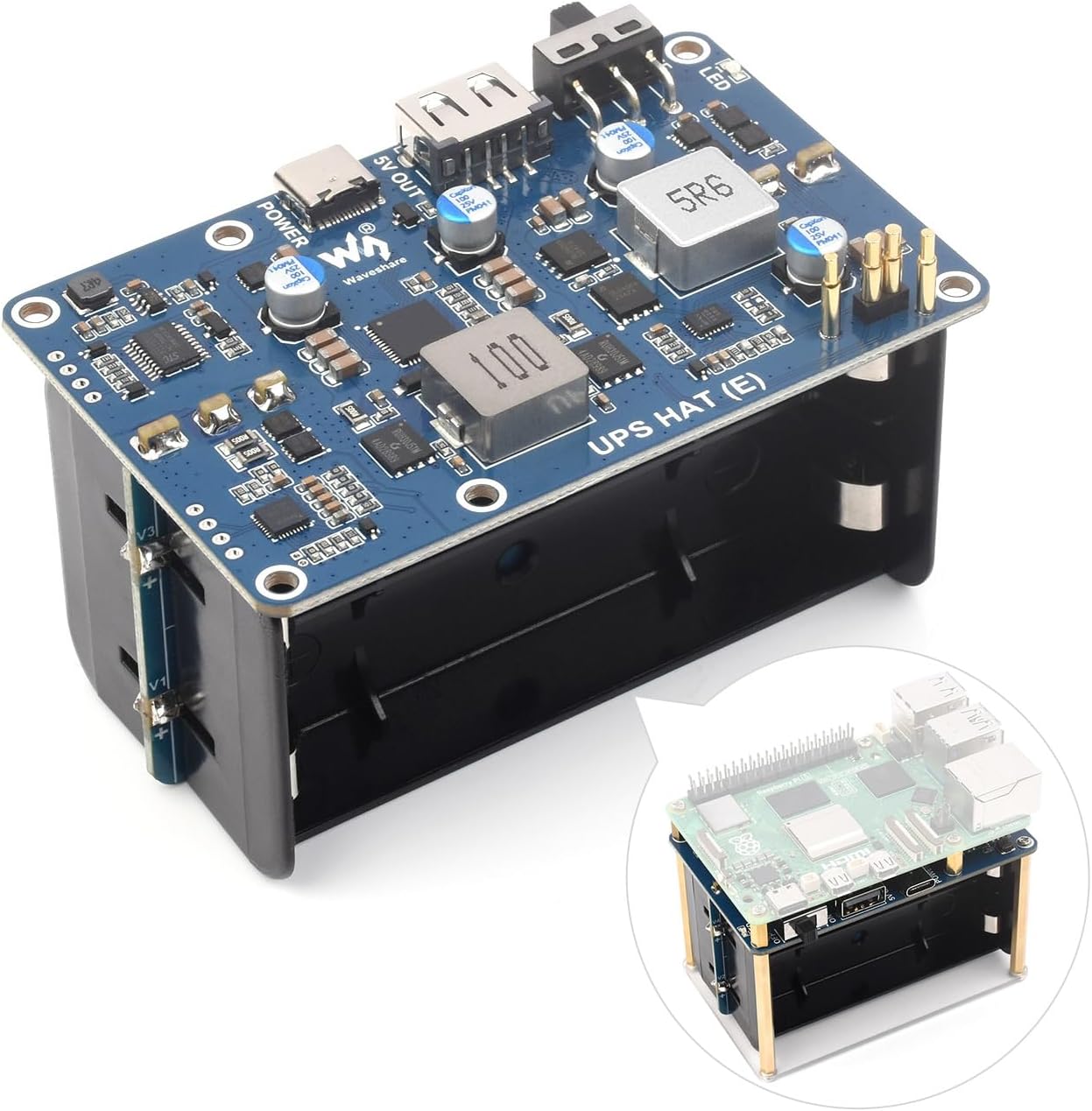
The Waveshare UPS HAT (E) is a compact, high-performance uninterruptible power supply designed for Raspberry Pi 5, 4B, and 3B+. It supports four 21700 lithium-ion batteries (not included) and features a bi-directional Type-C fast charging port with PD3.0 up to 40W. Delivering a stable 5V/6A output via pogo pin connectors, it enables seamless power backup and real-time battery monitoring through I2C communication. Ideal for makers and professionals seeking reliable, smart power management for their Pi projects.


| ASIN | B0DBLMFX57 |
| Amperage | 6 Amps |
| Battery Cell Type | Lithium Ion |
| Best Sellers Rank | #70,071 in Computers ( See Top 100 in Computers ) #97 in Computer Uninterruptible Power Supply Units |
| Brand | Waveshare |
| Color | black |
| Connector Type | Type-C, pogo pins |
| Customer Reviews | 4.2 4.2 out of 5 stars (53) |
| Enclosure Material | Plastic or Lightweight Metal Alloy |
| Form Factor | Compact |
| Item Weight | 0.13 Kilograms |
| Manufacturer | Waveshare |
| Maximum Power | 30 Watts |
| Mfr Part Number | UPS HAT (E) (EN) |
| Model Number | UPS HAT (E) (EN) |
| Output Current | 6 Amps |
| Output Voltage | 5 Volts |
| Output Wattage | 30 Watts |
| Power Plug Type | No Plug |
| Voltage | 5 Volts |
| Wattage | 40 watts |
F**D
So far so good. I almost couldn't fit the batteries I bought for it, I had to use a plier to squeeze the connectors on the hat a bit to make it fit, but it worked. My use case is a bit different, I am building a plotter for a bigger ship and I need a way to do a controlled shutdown (using GPIO) but also turn the whole thing on or off from a switch located on the control table. Part of that plan is to put the on-off switch in "off" and use another switch connected to the pins, we'll see if it works.
C**A
A COSA SERVE: L’UPS, svolge la funzione di gruppo di continuità e/o fa andare il Raspberry a batteria. ARRIVA CON: − Viti e distanziatori per attaccargli sopra il Raspberry. − Base di plastica. − Nessun manuale… dovete cercarlo in rete con il nome esatto del prodotto ed è in inglese. − Nessuna batteria, quelle previste sono quattro al Litio 21700 DIMENSIONI: − La base è identica al Raspberry. − L’altezza è 5,8cm. DICHIARA: − Alimentazione/ricarica rapida dalla porta USB-C PD3.0 fino a 40W. − Standard I2C per la comunicazione stato batteria al Raspberry. − Gestione intelligente delle batterie. UTILIZZO: − Non è proprio per tutti. Ma in genere chi ha il Raspberry è uno smanettone. − È alimentato dalla porta USB-C. − Fornisce alimentazione al Raspberry dalla porta USB-A. − Il LED rosso indica che sta caricando le batterie. − È meglio montarlo sotto il Raspberry perché così c’è la comunicazione I2C via bus con i 4 pogo pins a molla che toccano il bus del Raspberry sotto la motherboard senza la necessità di altri collegamenti. TEST (foto e video): − Il marito ha recuperato 4 batterie 18650 da 3350mAh, da un elettrodomestico con il motore rotto. Non sono quelle previste (21700) che hanno una capacità maggiore. Comunque il nostro Raspberry è quello che consuma di meno tra quelli previsti. − È stato montato come dalle foto. − Con un cavo da USB-A a micro-USB ho collegato l’UPS al Raspberry. − Con un cavo USB-C ho alimentato l’UPS. − Ho collegato un monitor alla porta HDMI. − Tramite l’interruttore sull’UPS si può accendere il Raspberry. − Funziona. − Per abilitare nel Raspberry la comunicazione I2C con UPS e seguire il manuale alla voce “Enable I2C Interface” − Può essere installato il software UPS_HAT_E.7z che fornisce informazioni sull’UPS (tensioni, correnti, ecc). Io il software non sono riuscita a scaricarlo con il comando wget come da istruzioni. Invece l’ho scaricato con il browser. − Per aggiungere anche l’indicatore dello stato di carica nella barra in alto del sistema operativo c’è un comando Python, che mi dava errore. Ho risolto installando “sudo apt-get install python3-pyqt5” da terminale. IN SINTESI: Ottimo per il nostro Raspberry PI 3B+. Manca il cavo di collegamento tra USB-A e Micro-USB che ho recuperato da un altro prodotto. L’alimentatore con spina micro-USB del Raspberry PI3B+ non può essere collegato direttamente all’UPS che ha una presa USB-C. RAPPORTO QUALITÀ/PREZZO(47€)=**** Nella mia scala: *Insufficiente (da evitare) **Discreto (se proprio serve…) ***Buono (fa il suo mestiere) ****Ottimo (è fatto proprio bene, costasse un po’ meno..) *****Eccellente (perfetto ed è un affarone)
N**L
The pogo pin connection design made assembly a simple job. I have never seen this design on a board before, but once the pins are lined up its great and makes it possible to still use the GPIO for a fan. The battery size they specified provides ample energy. The USBA and USBC output and a USBC. I also like the fact that it came with standoffs. There's ample documentation on the WaveShare wiki providing details and sample code for monitoring every aspect of its operation. It's also well built with the quality of the PCB being excellent.
A**Z
Update 15.03.26. Mein Fehler: Ich hatte das Teil zum Laden an einem USB Port einer DELL Dockingstation angeschlossen. Offensichtlich lieferte diese entweder eine zu geringe Spannung oder Strom. Ich hatte nicht aufgegeben sondern es erneut mit einem originalen RASPI Netzteil versucht - und siehe da, der UPS E Hat funktioniert einwandfrei!!! ———- vorherige Rezension ————/- Endlich in den Betrieb genommen. Doku nur online. Freude währte leider nur kurz. Nach zwei Stunden Betrieb tot. Keine Spannung an den Kontakten zum PI mehr. Schade.
C**N
Le premier reçu ne fonctionnait pas, ce qui était très dommage. Cependant, le service client a été réactif, a pu m'aider rapidement à expertiser ma carte, et la nouvelle carte reçue fonctionne parfaitement, avec toutes les fonctionnalités de diagnostic batterie attendus. Un bon UPS, avec un bon service client. Merci!
Trustpilot
5 days ago
2 weeks ago