Description
🕶️ Stay sharp on the road with time that’s always in sight!
- SLEEK SPACE SAVVY DESIGN - Miniature footprint fits perfectly on any dashboard or air vent without clutter.
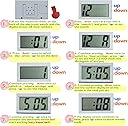
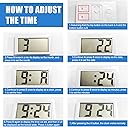
- INTUITIVE ONE HANDED CONTROLS - Simple UP/DOWN buttons let you set time, date, and even a 60-second stopwatch in seconds.
- DURABILITY MEETS AFFORDABILITY - Crafted from aluminum and plastic, built to last years without breaking the bank.
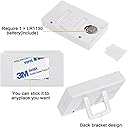
- VERSATILE INSTALLATION OPTIONS - Stick it with double-sided tape or use the included bracket for a secure, stylish fit.
- EFFORTLESS TIME DATE VISIBILITY - Large jumbo LCD screen ensures you never miss a beat on your drive.
The hautllaif Car Dashboard Digital Clock features a jumbo LCD display showing time and date in a compact 2.5x1.5x1.3 inch frame. Designed for easy installation on dashboards or air vents, it offers intuitive button controls for setting time, date, and a stopwatch. Made from durable aluminum and plastic, this mini automotive clock delivers long-lasting performance and sleek functionality, perfect for professionals who value precision and style on the go.