We remain fully operational. Our teams are working around the clock to ensure your deliveries continue safely.

DOWNLOAD THE APP


Customer Services
Copyright © 2025 Desertcart Holdings Limited
DOWNLOAD THE APP





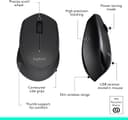

⌨️🔋📶 Elevate your workspace with wireless freedom and marathon battery life!
The Logitech MK345 Wireless Combo pairs a full-sized, spill-resistant keyboard with a comfortable right-handed mouse, both powered by long-lasting batteries (up to 3 years for keyboard, 18 months for mouse). Operating on a reliable 2.4 GHz wireless connection with a 33-foot range, it offers seamless plug-and-play compatibility with Windows and Chrome OS devices. Designed for professionals seeking comfort and efficiency, this combo delivers quiet typing, ergonomic mouse control, and media shortcut keys to enhance productivity at home or office.


| ASIN | B00PFFCMV0 |
| Are Batteries Required | Yes |
| Best Sellers Rank | #761 in Computers & Accessories ( See Top 100 in Computers & Accessories ) #20 in Keyboard & Mouse Sets |
| Box Contents | Keyboard, Mouse, USB receiver, 2 AAA alkaline batteries in keyboard (pre-installed), 1 AA alkaline battery in mouse (pre-installed), User documentation |
| Brand | Logitech |
| Brand Name | Logitech |
| Colour | Black |
| Compatible Devices | Laptop, PC |
| Connectivity Technology | Wireless |
| Country of Origin | China |
| Customer Reviews | 4.0 out of 5 stars 7,811 Reviews |
| Importer Contact Information | Savex Technologies Private Limited, S1, Gala No:1-2, 101-102, Perana Industrial Complex, Anjur Phata- Mankholi Rd Village, Bhiwandi District, Thane, 421302, Maharashtra, Registered Add: Savex technologies Private Limited, 124, Maker Chambers - III, Nariman Point, Mumbai 400021, Maharashtra India. |
| Item Type Name | Keyboard and Mouse Combo |
| Item Weight Unit of Measure | 603 Grams |
| Keyboard Description | Multimedia |
| Keyboard Layout | QWERTY |
| Manufacturer | Logitech, Logitech |
| Manufacturer Contact Information | Logitech |
| Movement Detection | Optical |
| Network Connectivity Technology | Wireless |
| Number of Batteries | 1 AA batteries required. |
| Number of Keys | 104 |
| Operating System | Chrome OS, Windows 7, Windows 8, Windows Vista, Windows XP |
| Other Special Features of the Product | Wireless |
| Packer Contact Information | Logitech Asia Pacific Ltd, Unit no. 1003, Tower 1, Cheung Sha Wan Plaza, Cheung Sha Wan Road, Kowloon, Hong Kong. |
| Power Source | Battery Powered |
| Special Feature | Wireless |
| UPC | 097855107886 097855196613 |
| Unit Count | 2 Ounce |
| Warranty Description | I year warranty |
H**9
Low cost and quality keyboard mouse set
Simple and comfortable to use. I have this same set at home and in the office. Works perfectly.
C**R
Pretty Decent Wireless Keyboard and Mouse combo
The following is my review of the Logitech MK 345 Wireless Keyboard and mouse combo:- ------------------------------------------------------------------------------------------------------------------------------------------------------------------------ This product is a combo which means it comes with a Wireless Keyboard and Wireless mouse. Before i get into the review here are the contents in the box:- 1)One wireless Keyboard with 2 built in AAA Duracell Alkaline batteries. 2)One wireless Mouse with 1 built in AA Duracell Alkaline Battery. 3)One USB receiver for connecting the keyboard and mouse to a Desktop or Laptop 4)Warranty paperwork & 5)User Manual The Keyboard is a Logitech K 345 wireless keyboard.It works on the 2.4ghz wireless band.(The same band used by Wi Fi N routers). The keyboard is black in color and the keys are predominantly black in color with a few blue accents on the 12 function keys.The underside of this keyboard is blue in color. It is a full size desktop keyboard with 12 function keys on top as well as numeric keys at the side. It has an on/off switch on the top right side of the keyboard. It comes with a palm rest on the bottom to rest your palm while typing. It comes with 2 AAA Duracell Alkaline batteries built in and logitech claim that these will last for 48 months or 4 years.However,i have yet to test this claim. The operating range of this keyboard is about 10m. It has auto standby which means that the keyboard will go into a low power state automatically when not in use to preserve the battery and you don't need to worry about draining the battery incase you forget to switch it off. The mouse included is a Logitech M 275 wireless mouse which also operates on the 2.4 ghz wireless band. It is a standard size mouse which could be used comfortably with people with small,medium and large sized hands. It is black in color on the top and blue on the underside. It is an optical mouse with 1000 Dpi (Dots Per Inch) resolution.It has an invisible optical sensor which means that the laser beam emmited from the sensor on the bottom of the mouse cannot be seen with the naked eye unlike the sensors on other optical mice which emit a red laser beam from the sensor on the bottom. It has a left and right click button as well as a scroll wheel in the center which can also be pressed like a button. It comes with a single AA Duracell alkaline battery built in and logitech claims that this battery will work for 18 months based on 8 hrs a day usage.It also has an on/off button at the bottom and this also features auto standby. The operating range for this mouse is about 10 m. The only flaw i feel this combo has personally is that the USB adapter which comes with it is not a unifying one which means that it is paired exclusively with the mouse and keyboard it comes with and if you lose the adapter the combo becomes useless as you cannot buy a spare one from the store and use it with your particular combo.You will have to buy a new combo altogether. ------------------------------------------------------------------------------------------------------------------------------------------------------------------------------------------ Overall it's a good product for office and home use as well as some light gaming as well. All in all it's a pretty decent combo for all it's worth and if you can overlook this one flaw it's a good buy. I hope this info was helpful to you.Thank you for reading my review.
T**A
Good product
Excellent though no lights of led of mouse or lbs but works smoothly
Y**M
Horrible Downgrade in Quality - Ruined a Classic! ⭐
I have been a loyal user of the Logitech MK345 since 2019 and have bought this exact combo 5 times over the years. My older ones broke due to my own mistakes, but the quality was always solid and premium. However, the new one I just received is a massive disappointment. Logitech has completely downgraded the plastic, it feels hollow, light, and extremely cheap. On top of that, the mouse response is laggy. Honestly, a local ₹500 mouse performs and feels much better than this. It is very sad to see a great product ruined by extreme cost-cutting. I am returning this immediately. Logitech just lost a loyal customer.
N**A
Better than Microsoft 800, 2000, 3000 and logitech MK260, MK270 and MK330
Loved it. Pros: Keyboard 1. Good tactile feedback. Not as good as mechanical keyboard though. Keys are quite silent though. 2. No. delay in typing. And gaming performance is good. eg: Counter strike etc 3. Can recognize 6 keys at a time. But, only 5 are distinctly recognized. 6th key doesn't work with certain key combinations. 4. Ergonomic palm rest. Keyboard doesn't feel as big as in the images. The extra keys work with only FN key pressed and doubles up as function keys as well. Good thing for saving space. 5. Water resistance is an added advantage. 6. Have a premium feel. 7. Caps-lock light is present. Mouse: 1. Feels sturdy. The plastic is of good quality. 2. The scroll wheel is precise and can be controlled easily. 3. Gaming performance is fine. But, not recommended for serious gamers that play 3d shooters like Counter strike and all. For normal tasks its quite smooth. Didn't felt as if I am using a wireless mouse instead of wired one. 4. Good battery life all round for both the keyboard and mouse. Also, both of them have on/off switch. So full points there. 5. Use a invisible light for tracking. That doesn't distract even in the night. 6. Works on most surfaces. Although, Logitech claims that it works even on glass. But, it was not a smooth experience for me. Cons: Keyboard: 1. Would have liked the special keys to be separate than the function keys. But, then the size of keyboard would have increased. 2. Didn't come with a unifying dongle. That is perhaps the biggest con. Although, both the keyboard and mouse work with the same dongle. But, it's not a unifying dongle that would work with other Logitech wireless products. Mouse: 1. A little bit smaller for me. I use it for my HTPC with occasional gaming session. But, due to its size, I have to hold it in a claw position. And that's not the preferred position for me. 2. At the price, I would have expected even better top of the line gaming performance. I miss the promptness of a wired gaming mouse in 3d shooters. You would perhaps need to tinkle with mouse settings to get it to suit your gaming style. 3. Only 1 year of warranty for the combo. Overall, I am quite satisfied with the purchase. Been using it for the last 2 months as I got a awesome deal from Amazon for just Rs1300 and was quick to grab that. It's a much better combo then Microsoft 800, 2000 and even 3000 desktop wireless combo with much better tactile response and battery life. Although, Microsoft 800 can recognize 7-8 keys at a time. Not a big deal breaker for me in this segment. Also, It's model number is MK345. Which makes it more advanced than MK 260, MK270 and even MK330 though you would get an unifying dongle with those. But, still even at Rs 2000 it's a steal.
C**A
Good but not durable
Works effortlessly and smooth. but not durable Mouse last only 1yr and keyboard 2yrs Even earlier keyboard from Fingers last only for 1yr.
P**V
A fine deal for what it is. Not premium, but good looking, somewhat comfortable and functional.
I am writing this review, keeping in mind that I bought this product for ~ Rs.1900 ----------- Batteries ----------- Both the keyboard and the mouse come equipped with Duracell batteries. Keyboard uses 2xAAA, and mouse uses 1xAA. The batteries are marked "Original Equipment Accessories", and have a expiry dates in 2021. The batteries were isolated to save them from discharging during shelf period. Additionally, both, the mouse and the keyboard have nice power On/Off switches. I can't comment on the battery life yet, but the package states 24 months for KB, and 18 months for mouse, depending on usage. ----------- Keyboard ----------- Keyboard model is K345. It has a glossy finish in the keypad region. This makes it a dirt magnate. The keys are well spaced out, and it took me only a few strokes to get accustomed to it. The keys have a fair bit of travel, so people that like tactile feel would like this. The strokes are not exactly silent, and I wouldn't type this review at night if someone were sleeping nearby. I might even call it loud for my taste. The F-key row is separated from the main keypad area by about half a row height. This is fine. You can press Left Alt + F9 with right hand and Left Alt + F8 with Left hand. Although one doesn't need to anyway, generally (except for some silly old software that fails to believe a right Alt key exists). Keyboard has a Caps Lock LED, but no Num Lock or Scroll Lock indications (only available through software). One of the reviews I read mentioned that the keyboard doesn't sit flat. This is true. If I press on the bottom left corner, there is a play of about 1mm. This does not bother while typing because the left hand resting on the palm-rest keeps it pinned down. ----------- Mouse ----------- Mouse model is M275. It has a decent plasticky feel. I had imagined the grip area might be rubber, but it's not. There is again a strip of that glossy plastic just above the grip. The buttons feel sturdy. Not silent, but not extremely noisy either. The scroll wheel is wide, and has a hard rubber material. A green LED on the top middle comes on for a few seconds after powering on the mouse, and goes off to save power. The optical sensing uses a low power infrared diode. You can see the glow on a mobile phone camera, though it is faint and certainly not visible to human eye. It uses a mix of PWM and time lapse pulsing between high accuracy and low power modes. You can't set anything though. It's all factory programmed. Even the resolution (1000 DPI) is not user settable. Contrary to some reviews, the mouse is actually pretty smooth running. No jitters in my experience (work desk environment). The scroll wheel has locking grooves. It doesn't scroll freely like hyper-scroll wheel. (Smooth scrolling option is available if you install the SetPoint software available for download at Logitech) ----------- SetPoint Software ----------- The software is available for download at http://support.logitech.com/en_ch/software/setpoint The download is about 80MB. Additionally a Chrome extension needs to be installed to activate smooth scrolling on webpages. The installer guides through this. The software is simple. It allows to configure three of the keyboard special keys (home, email, and calculator), and gives a few notification options, including low battery notifications. Mouse settings are limited to speed, trails, scroll amount, smooth scroll, button swap et al. The notifications replace the standard windows 8/8.1/10 notifications. Even volume notifier. The software isn't a resource hog. It takes about 20MB on RAM, and hardly any CPU / Disk activity. ----------- Verdict ----------- Mouse and keyboard share a common receiver. It is a nano receiver, so suitable for laptops. It is not a unifying receiver though, so you can't use it with other Logitech products. Mouse has a little place to store it safely. I think that's all there is to say about it. A good design for what it costs. Would have liked rubber palm rest and mouse grip, and quieter keys. Also it wouldn't hurt if the keyboard would sit flat on the desk. Both the devices are comfortable to use for long spans of time. I am a designer and I have used the mouse the entire day today, with no complaints. And writing this review was a pleasure, so the keyboard is not a pain either. Build quality is good enough. It doesn't feel fragile, although I wouldn't want to drop it. My recommendation, if you've got the money, buy it. Otherwise buy a cheaper one, or wait for a good deal. There's no point in extending your budget uncomfortably with super high expectations. The design is good looking. Not premium, but good looking, and functional. --------- Shipping and Packaging ---------- The shipment was sent via Delhivery. This had me a little nervous because Delhivery doesn't have a great reputation. I was on the verge of cancelling after I learnt this. I was a little taken aback though, when they managed to deliver on the third day. The delivery was done at 9:00 AM, though that has more to do with the local Delhivery staff, I believe. Perhaps the package is not easy to carry on a motor bike, so they wanted to drop it off first. It was a pleasant surprise, anyway. Your mileage may vary with Delhivery. The packaging was fine, the inner case was dented in a few places, but nothing serious. A note regarding the pictures. I do NOT have particularly filthy fingers. It's just that the keyboard can very easily attract and show dirt. Most of what is visible as grime is actually Hit Spray!
D**T
Solid Basic Wireless Keyboard/Mouse Combo
Its Being a Long time since i wrote my last review , hope i still cover all the basic points and finally the real issues that everybody misses... First of all my old DELL wireless keyboard stopped working so i brought this one , it had some battery issue otherwise was working fine for the last two years I consider this a BASIC or starter wireless keyboard and mouse, and I am reviewing it IN THAT CONTEXT (even though there are a couple of Logitech wireless combos that are below this one). In that regard, it is quite good. Right from the outset I was very impressed with it's no-hassle plug and play aspect. I literally removed it from the box (batteries came already installed), plugged the tiny nano-receiver into a USB port on the old laptop that I happened to have handy at the time and both the keyboard and mouse were recognized and responsive in under 30 seconds. From box to working in a minute or two. That is probably record time for any computer accessory that I've ever installed. ➤'TIP: While this is plug-and-play and works perfectly without installing any drivers or software, you can get some added functionality if you install Logitech's Setpoint software. I have provided the link for it on the bottom of this review. '➤IMPORTANT NOTE: Many people comment that the mouse is small. This is partially an ILLUSION due to the SHAPE of the mouse, which is a bit different from others. If you see my comparison photos, you will see that it is not much smaller than other mice. I used two standard size mice and one very small travel mouse for comparison. Some people have also commented on the light weight of the mouse. This is actually true as it is in fact relatively light: Here are my weight comparisons (without/with batteries): Included Mouse (M275)-63g/86g VX Revolution (M-RBU126)- 83g/110g Marathon (M705)-87g/135g VX Nano (M-RC134)-73/95g FIRST IMPRESSION (Overall): Both the keyboard and the mouse are fairly light. There is protective plastic on the keyboard which once removed reveals an attractive glossy surface around the key portion of it. The palm rest has a flat rather than glossy finish and has small indentations which give it some very subtle texture. The mouse has a very narrow wraparound glossy collar (also covered with protective plastic). The sides (indentation for thumb and opposite side) have the same flat sheen and textured design as on the keyboard's palm-rest. The result is a sort of two-toned black on black look. Aesthetically, the mouse and keyboard co-ordinate very well. MOUSE: This is quite obviously a right-handed mouse. Some might consider the mouse to be on the SMALLER side. This is really a MATTER OF PREFERENCE and as I already noted, this is largely an illusion. I have used both larger and smaller mice and sometimes it is just a matter of what you are accustomed to. I usually prefer the smaller mice because they seem easier to maneuver around with subtle finger movements. It has an overall ergonomic shape that feels pretty comfortable and natural in my own medium-sized hand. I can understand those with bigger hands preferring something a little more substantial. This is a great mouse to use with a laptop (or as a dual-use travel/stationary mouse), especially since it works with the nano receiver and has the small look. This is a no-frills mouse. It has the basic left and right click button and wheel. It does not have any extra buttons that you find on some other mice that are usually programmed to move forwards or backwards through web pages, zoom, etc. The wheel does have a push button. When depressed, it puts the mouse into a 4-way scroll mode, that is you can scroll in four directions around a page by moving the mouse as you would normally move the cursor. Depress again to return to cursor control. It is made of a rubber-like material which gives it a nice feel. The mouse seems responsive and I have not had any issues with losing connectivity so far. KEYBOARD: Normal full-sized keyboard. There is an on/off switch and an LED Caps Lock indicator. The "Function" and "Control" keys might be a little larger than on other keyboards (especially the Function key) and it seems like the space bar was made a little smaller to accommodate this. I have not found it to be a problem for me, but felt I should note it any way. There are the typical flip-out feet to set the keyboard on an angle. The palm-rest is angled nicely and feels a comfortable size, not too obtrusive nor too diminutive. The keys feel soft when pressed and are fairly quiet. Logitech claims this to be a spill-resistant design. I have not tested this out yet, but if you knew me, you'd know that I will be able to report on this feature fairly soon. There is a full range of function keys across the top with default shortcut/media keys displayed as icons (Home, Mail, Search, Calculator, Media Player, Previous, Play/Pause, Next, Mute, Decrease Volume, Increase Volume). You need to download the Setpoint software from Logitech's website for these to work properly and the way that you want them to. BATTERY LIFE: Logitech claims that this combo has "Advanced energy-efficient design" which should yield a very generous battery life of 3 years for the keyboard and 18 months for the mouse. Of course there is no way to prove or disprove this just yet. Packaging : When i opened the plastic wrap than immediately the USB connector fell out i was a bit surprised as the whole box was not even opened yet , then i found that the whole box was badly torn and a hole was there where it came off , as we all know that connector is the main thing without it its useless and the hassle of invalid return because of missing items i would suggest the seller or amazon to better take care of this issue and hope no one else faces it again IN CONCLUSION: I will say again that this is good basic or starter combo. If you are in the market for such for yourself or someone else, I don't think that you can go wrong with this. The main point should be making sure that the user will be comfortable with a smaller rather than more substantial mouse (at the risk of sounding sexist I will go out on a limb and say that this mouse is probably perfectly suited for many female users). If it is for someone who is not a gamer/cutting edge/latest gadget type of a person who just needs the best of the basics without a lot of extras, than this might just be perfect. It is also a good choice if you need something fairly portable or for occasional use with a laptop. I have provided a few pictures below hope they help in making your choice... Questions/Comments welcome.
Trustpilot
3 weeks ago
1 month ago