Desertcart purchases this item on your behalf and handles shipping, customs, and support to Poland.
🚀 Elevate your internet game with the ultimate all-in-one speed and security hub!
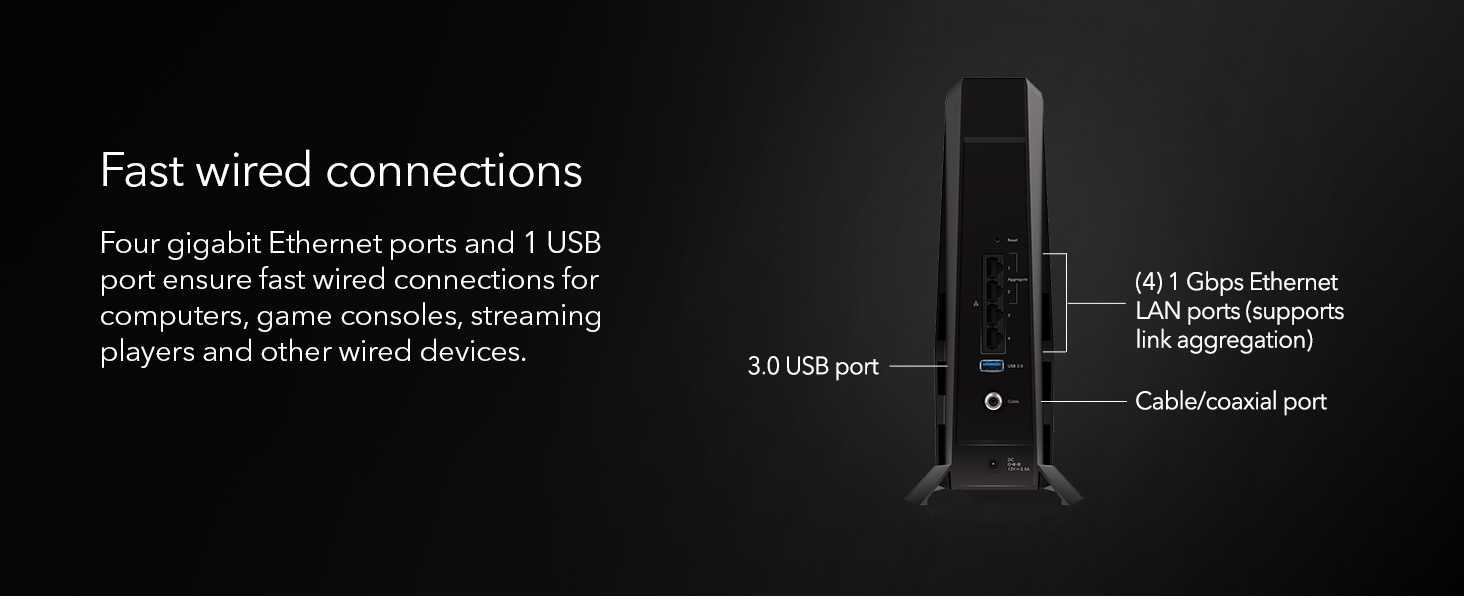
The NETGEAR Nighthawk CAX30 is a cutting-edge modem-router combo featuring DOCSIS 3.1 and WiFi 6 (AX2700) technology. It delivers blazing-fast wireless speeds up to 2.7 Gbps, covers up to 2,000 sq. ft., and supports 25 devices simultaneously. Equipped with 4 Gigabit Ethernet ports and a USB 3.0 port, it offers versatile wired connectivity. Compatible with major cable providers like Xfinity, Spectrum, and Cox, it replaces your existing modem and router while providing enhanced online security through NETGEAR Armor.


| ASIN | B0D6GZDYS3 |
| Antenna Location | Business, Gaming, Home |
| Antenna Type | Internal |
| Best Sellers Rank | #141 in Computers & Accessories ( See Top 100 in Computers & Accessories ) #1 in Modem Router Combos |
| Brand | NETGEAR |
| Built-In Media | Ethernet cable, Nighthawk® AX6/6 Stream WiFi 6 Cable Modem Router (CAX30), Power adapter, Quick start guide |
| Color | Black |
| Compatible Devices | Gaming Console, Personal Computer |
| Connectivity Protocol | Wi-Fi |
| Connectivity Range | 2000 square_feet |
| Connectivity Technology | Wi-Fi |
| Control Method | App |
| Controller Type | App Control |
| Coverage | 2000 sq. ft. |
| Customer Reviews | 4.2 out of 5 stars 1,760 Reviews |
| Data Transfer Rate | 2700 megabits_per_second |
| Frequency | 5 GHz |
| Frequency Band Class | Dual-Band |
| LAN Port Bandwidth | 1000 Mbps |
| Manufacturer | NETGEAR |
| Maximum Upstream Data Transfer Rate | 1000 megabits_per_second |
| Mfr Part Number | CAX30-200NAS |
| Model Name | CAX30-200NAS |
| Model Number | CAX30-200NAS |
| Number of Antennas | 4 |
| Number of Items | 1 |
| Number of Packs | 1 |
| Number of Ports | 4 |
| Operating System | ZyNOS |
| Other Special Features of the Product | 6 stream WiFi, One USB 3.0 port |
| Router Firewall Security Level | high |
| Router Network Type | cable |
| Security Protocol | WPA/WPA2/WPA3 |
| Special Feature | 6 stream WiFi, One USB 3.0 port |
| UPC | 606449170979 |
| Unit Count | 1 Count |
| Voltage | 12 volts_of_direct_current |
| Warranty Description | 1 Year Limited |
| Wi-Fi Generation | WiFi 6 |
| Wireless Communication Standard | 802.11ax |
| Wireless Compability | 802.11ax |
W**E
Outstanding value at the price
Bought this combo modem/router because my old one was having issues staying connected to the internet. Received it, set it up with a direct connection from my PC, then a quick call to Optimum to have it provisioned and off to the races. I have since downloaded the Nighthawk app and been pleasantly surprised at the ability to easily manage the router. The speed both up and down are very good. The WiFi setup was easy, opting to go with Smart Connect has been a great success, one network name for all devices connecting. Would recommend this for anyone who is looking to pay for their modem once rather than a monthly forever charge. The Armour security trial needs to be determined whether to continue with it but it protects all devices on the network.
P**H
Best 2in1 wifi modem
CAX Modem Review: Reliable Performance and Impressive Speed and save on ISP rental fees As an avid internet user who relies heavily on a stable connection for both gaming and entertainment, I recently decided to upgrade my modem and went with the CAX modem. After using it for a few months, here’s my take on this device. Design and Setup: The CAX modem has a sleek, modern design that fits well in my home office setup. It's compact, which is great for saving space, and the LED indicators are clear and intuitive, giving you an immediate status update on your connection. The setup process was surprisingly easy; I followed the instructions included in the box, and I was online within 20 minutes. The modem is compatible with most major ISPs, making it a versatile choice for different users. Performance: Where the CAX modem truly shines is in its performance. With my previous modem, I often encountered buffering issues and dropped connections during high usage times and packet loss. However, since switching to the CAX, I’ve experienced significantly faster speeds, particularly when streaming 4K content or gaming online. The modem supports DOCSIS 3.1, which allows for lightning-fast download speeds, and I can confidently say it lives up to its promises. Connectivity: The CAX modem features multiple Ethernet ports, which is a fantastic addition for anyone with multiple wired devices. The Wi-Fi range is impressive as well; I’ve noticed a stable connection even in rooms that previously had weak signals. This feature has been extremely beneficial for my family, enabling seamless browsing and streaming on multiple devices without any lag. Value for Money: With its robust performance and modern features, the CAX modem is reasonably priced, especially considering the cost savings on rental fees from ISPs. If you’re a heavy internet user, investing in a quality modem like this can lead to significant long-term savings. Conclusion: Overall, the CAX modem has exceeded my expectations. Its design is user-friendly, setup is a breeze, and its performance is flawless. For anyone looking to enhance their home network experience, the CAX modem is certainly worth considering.
E**8
Easy to setup using Spectrum ISP
I received my modem, and it looks like a used unit — it wasn’t sealed and had a lot of noticeable fingerprints. However, Amazon customer service took care of the replacement, even though the process was a bit slow. As for the Netgear Nighthawk modem‑router combo, it’s impressive. It was easy to set up, the range is excellent, and it delivers the full speed of the internet connection I’m paying for. I love that when I’m downloading something at full speed, my other devices can also stay connected without slowing down. Overall, it’s a solid and reliable upgrade.
N**E
Do not buy preowned
DO NOT BUY Do not buy a used router. If pre owned, you must submit a ticket through netgear in order to register the device to you. During my first phone call I was told that it would take one day to reset the password and register the device in my name but by the third call was told it would take 7-10 business days. It ended up taking two weeks or 11 business days. Every representative I have spoken to has a different explanation and is not well informed. Now that I have the device registered in my name I was told I need to have the login information for the router reset from the previous owner. I was told on July 15 that registration into my name would also reset the router login password. Today I was told that I needed to buy the warranty extension to receive any further technical assistance regarding the login credentials, due to me buying the router pre owned through Amazon. I asked if there was a way to do this reset without technician support and was initially told no. I was transferred to another representative that informed me that there were articles online I could research if I wanted to do it myself but that Netgear will not assist me unless I pay for warranty extensions. A brand new router would have the warranty but is only for one year. Netgear representatives were difficult to understand and not patient with any questions. I was talked over, transferred to an AI assistant or simply hung up on.
N**I
Easy sey up but Readyshare issues remain
So far, so good. This is replacing my 6-year old Netgear C7800/AC3200 router/modem thay was nearing EOL. Set up was a breeze this time around using the Netgear and xFinity apps. I did not have any issues moving from the old router to the new one. Speeds and connections seem good. While the Readyshare works fine with the Roku's in the house, I cannot get it to connect to my PC that is running Win 11 Home edition -- thus the 1 star down grade on the rating. Apparently there are known issues with this and I haven't gone down the rabbit hole to fix it yet. I had Readyshare issues on the old router that required me to reset it back to defaults to get it to work again, but I am not so sure I am going to worry about it that much at this point since it still works fine with the Roku's. I will update this review as time passes.
S**K
Reliability
The Nighthawk runs so seamless, strong connections, easy setup to the everything we needed connected, not only is it nice to have it for the reliability, look wide it’s sleek and almost helps our game room look more put together
P**N
Fast, reliable modem‑router combo that handles heavy streaming and uploads
I bought this modem and router combo about a year ago, and it’s been solid from day one. My internet stays fast and stable, and I haven’t had any random dropouts or slowdowns. I consistently get over 250 Mbps, which lets me upload long videos to YouTube while streaming at the same time without any issues.The setup was simple, the connection has been reliable, and the speeds are exactly what I need for heavy daily use. After a full year, I’m still very happy with this combo — it’s been one of the best upgrades I’ve made for my home internet
A**R
Worth Every Penny
Setup was straightforward, but I ran into some hiccups getting it activated with Xfinity — most likely due to customer service errors, not the hardware itself. Once it was online, I noticed the CAX30 is more sensitive to static or noise in the lines than cheaper modems I’ve used. That actually turned out to be a benefit: NETGEAR’s support helped me pinpoint the issue, and with their diagnostics, I was able to get Xfinity to replace faulty lines that had been causing problems for a while — even with my previous modems. In terms of performance, this modem/router combo is a beast. It handles: • 3 PS5s • 2 laptops • 4 phones • 2 tablets • 10+ smart devices (Alexa, Google Dots, smart TVs, LG washer/dryer, Ring cameras, etc.) …with zero stability issues. The Wi-Fi range is excellent, easily covering my two-story house with strong, consistent signal. I also appreciate the multiple Ethernet ports, which are a big plus for gaming — especially when you want that low-latency wired connection for consoles or PCs. The only minor issue I ran into was with a smart air purifier that wouldn’t connect until I temporarily split the 2.4GHz and 5GHz bands. Once it was connected, I merged them back and everything’s been smooth since.
Trustpilot
3 weeks ago
1 day ago