💼 Elevate your storage game—because your data deserves the best!
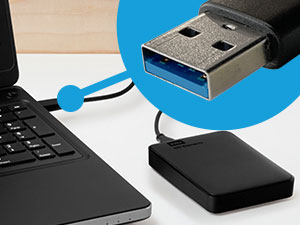
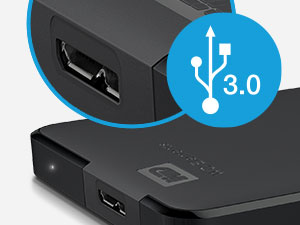
The WD 6TB Elements Portable External Hard Drive delivers massive, reliable storage in a sleek 2.5-inch design. Featuring USB 3.2 Gen 1 connectivity for fast 5Gbps transfers and true plug-and-play compatibility with both Windows and Mac, it’s the perfect solution for professionals needing effortless, high-capacity backup and media storage on the move.


| ASIN | B0D3GW9R4G |
| Additional Features | Portable |
| Best Sellers Rank | #2 in External Hard Drives |
| Brand | WD |
| Built-In Media | SuperSpeed USB-A cable (5Gbps), Quick install guide, WD Elements Portable hard drive |
| Cache Memory Installed Size | 6 |
| Color | Black |
| Compatible Devices | Desktop, Laptop, Tablet |
| Connectivity Technology | USB |
| Customer Package Type | Standard Packaging |
| Customer Reviews | 4.6 out of 5 stars 312,704 Reviews |
| Data Transfer Rate | 1 Megabytes Per Second |
| Digital Storage Capacity | 6 TB |
| Enclosure Material | Plastic, Metal |
| Form Factor | 2.5-inch |
| Hard Disk Average Latency | 1 Milliseconds |
| Hard Disk Description | Mechanical Hard Disk |
| Hard Disk Form Factor | 2.5 Inches |
| Hard Disk Interface | USB 3.2 |
| Hard Disk Rotational Speed | 1 |
| Hard-Drive Size | 6 TB |
| Hardware Connectivity | USB 3.0 |
| Installation Type | External Hard Drive |
| Item Dimensions L x W x Thickness | 8"L x 3"W x 6"Th |
| Item Weight | 44.8 Grams |
| Manufacturer | Western Digital Technologies, Inc. |
| Media Speed | [50-150 MB/s] |
| Model Name | Elements Desktop |
| Model Number | WDBHJS0060BBK-WESN |
| Number of Items | 1 |
| Read Speed | 1050 Megabytes Per Second |
| Special Feature | Portable |
| Specific Uses For Product | Multimedia, Personal |
| UPC | 718037904313 |
| Unit Count | 1.0 Count |
| Warranty Description | 2 year Limited Warranty |
A**Y
Reliable 5TB portable drive that just works – perfect for backups and extra storage
I’ve used a bunch of these WD Elements drives over the years, and this one is exactly what you’d expect – simple, no-frills, and it does the job really well. Plugged it into my Windows laptop and it showed up right away, no software install needed. Same thing on my Mac – plug and play, formatted it quick and good to go. USB 3.0 speeds are solid for a spinning drive – copying big video files or game backups takes time but it’s consistent and way faster than USB 2.0 junk. The 5TB gives you a ton of space. I use it mainly for Time Machine backups, storing old photos/videos, and keeping Steam libraries I don’t play often. Fits everything I need without worrying about space for a long time. The drive itself is pretty quiet – you hear a faint hum when it’s working
R**Y
Seamless Storage Solution at an Unbeatable Price
The WD Elements Portable External Hard Drive is a fantastic choice for Mac Air users seeking reliable storage without breaking the bank! It's incredibly user-friendly with true plug-and-play functionality, solid build quality that inspires confidence in (data's safety) encryption and comes at an accessible price point and outstanding value. Whether you're backing up important files, storing your media library, or need extra space for creative projects, this drive handles it all with ease. A smart investment that simply works.
K**N
Great value storage, reliable so far
Great quality for the price. It works well and is fast enough for storing documents and everyday files. My advice is to buy two and keep a backup, family photos and travel memories are too important to risk losing.
C**N
Great product
Compact size, good functionality and good quality
D**T
5 TB of Space so You Can Stop Deleting Things… Eventually
So you wanted storage. Lots of it. You wanted to keep every photo, every movie you said you’d watch “later,” and every game you’ll probably uninstall in two weeks anyway. Enter this WD Elements 5 TB drive — your digital hoarding companion. What it offers: Five terabytes. Yep, 5 TB. That’s enough to fill with backup after backup of backups. Reviewers report it hits around 100–135 MB/s for large sequential transfers. GadgetsGenes +3 Happy TechFam +3 Review Finder +3 Plug‑and‑play simplicity: Just USB it, and you’re off (on a Micro‑B connector, because apparently USB‑C is still optional). Happy TechFam +1 Great value: At one point the 5 TB version dropped to ~$89, making it one of the more affordable “massive storage” options. Tom's Hardware Lightweight and portable enough to toss in your bag. Reviewers like the portability. GadgetsGenes +1 What you don’t get (and what you’ll be forced to accept with a sigh): It’s still a mechanical hard drive. That means spinning parts, slower speeds especially when dealing with lots of small files, and vulnerability to drops. Reviewers measured write speeds around 80–100 MB/s or less in some tests. Techwatch.de +2 Review Finder +2 No fancy extras: No hardware encryption, no bundled high‑end file‐management software, no USB‑C (in the standard model). If you were hoping for premium features, you’ll feel that absence. GadgetsGenes +1 Mixed reliability feedback. Some users swear it works flawlessly; others report failures within a couple of years, especially if handled roughly. ProductReview.com.au +2 Reddit +2 My summary in plain English (with a side of sarcasm): If you’re looking for a “put‑it‑in‑a‑drawer and never think about it” backup device, this is a great pick. It gives you lots of space for not lots of money. If, however, you’re planning on using it for mission‑critical data (like 10 years of family archives), expecting SSD‑speeds, or you’re planning to travel with it and subject it to being tossed in a backpack with your laptop and coffee tumbler — well, maybe temper the expectations. Don’t rely on it as the only copy of anything. Final verdict: Buy it if you need capacity and want a simple solution. Treat it with respect (i.e., don’t drop it, plug it into a USB‑3 port, remember: backup your backup). Expect it to get the job done, but don’t expect miracles.
K**K
Very nice
Easy to use, and easy to set up for both pc and mac. It holds a lot and is high quality.
B**.
Fantastic Drive
I’ve had and have been using this drive for nearly four years. It works flawlessly. I had to reformat it to use it on my Mac and Windows computers but that only took about 15 seconds, 20 tops. Works great and is quite reliable. Do yourself a favor and get this drive.
K**S
Good drive! You'll buy it.
First order of business: I ordered this drive (WD Elements 5tb) and received it in about 18 hours. I checked the shipping label, and it is their proprietary delivery service. USPS, take note. The box it came in was pretty regular, no fancy presentation. Which is fine. I don't like paying for felt lining. It has one port on the back, and comes with a USB cable. I plugged it into my laptop and checked it out. Drive capacity actually reads 4.54 Tb. Which isn't unusual for larger volumes. It came formatted as NTFS. Which is great, because FAT32 has a file size limit of 4gb. Next test: I plugged it into a 3.0 Anker USB Data Hub. The drive revved up, then started clicking. I recognized those clicks as motor failures from a power drop, so the USB hub is not going to do it. This beast of a portable drive needs a main-line. It can be used in USB 3.0 or 2.0 But I highly encourage 3 for faster speeds. Especially with a volume this size (You are buying it for a reason, right?) Next test: A phone mount. Similar to a Samsung Dex setup, the device I used is a Baseus USB C mount. It connects my Note10+ phone to HDMI, and...for this test...a USB 3.0 port. I wasn't sure if it would work, because the hub charges the phone, and would have to "lend" some power to the 3.0 port to power the drive. It worked. I plugged it in, and my exFAT/NTFS app fired right up. It recognized the drive, mounted it, and was ready to go. For the technical folks out there, this was by powering the phone dock with a samsung travel adapter that came with my phone. It has a variable output, but can pack a whopping 11v-2.25a (24 watts) at its highest. This 24 watts was enough to fast charge my phone, AND have the drive running. Final test: Directly into the note10+. I used a USB C - USB A adapter that came with my phone and connected them together. It worked. My phone was powering the darn thing. So there we have it. This little pocket sized drive (seriously, my wallet is larger) can be plugged into 3.0, 2.0 or directly into my phone. It came formatted NTFS, just the way I prefer. Description: I purchased a black one. As I said, it is wallet-sized. It has one port for the cable, and a small status light. The light appears to stay a solid color for both standby and active. A power failure results in a blinking status light. When the drive is spinning, you can feel a humming purr, barely audible. The casing is plastic, but solid and sleek looking. It has four non-slip dots on the bottom. Pros: Huge storage for the price, powered through USB only, NTFS formatted, small. Cons: None discovered yet. Recommended Uses: This would be a perfect drive for home network storage, office/school/home work. It would also be ideal for gaming consoles even as modern as the XBox One X. Or a handy volume for torrents. Or a handy volume for backing up a system or family photos. Possible Uses: It runs on 3.0. While Pro Gamers might chuckle at the idea, it could be used as a Steam Library. Initial load times might be slower than a built in solid state drive, sure. But so what? This is 5Tb. Portable. For under 120. It could also be used for beginner-level production. Again, it is slower than a dedicated solid state drive, of course. But for a new youtuber, or designer, or developer...this can store a lot of content.
Trustpilot
3 weeks ago
1 month ago