


Buy anything from 5,000+ international stores. One checkout price. No surprise fees. Join 2M+ shoppers on Desertcart.
Desertcart purchases this item on your behalf and handles shipping, customs, and support to Poland.
🔌 Power your productivity with triple-display magic!
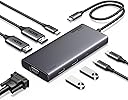
The UGREEN 8 in 1 USB C Docking Station is a versatile, high-performance hub designed for professionals craving expanded screen real estate and fast data transfer. Featuring dual 4K HDMI ports plus a VGA port for triple display setups, 100W power delivery to keep your laptop charged, and ultra-fast 10Gbps USB 3.2 Gen 2 ports, it supports a wide range of devices including MacBooks and Windows laptops. Its plug-and-play design ensures seamless compatibility, even with Linux, making it a cost-effective powerhouse for modern multitasking.


| ASIN | B0CR6KNF3X |
| Best Sellers Rank | #38,832 in Electronics ( See Top 100 in Electronics ) #544 in Laptop Docking Stations |
| Brand | UGREEN |
| Color | grey |
| Compatible Devices | [Inferred: UGREEN brand devices and devices with HDMI, VGA, USB, USB-C interfaces] |
| Customer Reviews | 4.2 out of 5 stars 515 Reviews |
| Hardware Interface | USB Type C |
| Manufacturer | Ugreen Group Limited |
| Mfr Part Number | 35588 |
| Model Number | 35588 |
| Number of Ports | 9 |
| Total USB Ports | 4 |
| Total Usb Ports | 4 |
| Warranty Description | 2 year |
| Wattage | 100 watts |
L**G
Inexpensive, works with Linux, I'm happy.
Bought this thing to replace a Dell-branded dock that my company had provided for my work-from-home setup, which cost probably ten times what this thing does. Over the past year or so, I've lost hours of productivity fighting with it's DisplayLink® "technology" -- i.e. flaming hot garbage -- before giving up on it. Buggy kernel drivers, weird crashes, and I never could get more than one external display to reliably work . This UGREEN product, on the other hand, Just Works. I'm running Kubuntu (Ubuntu 22.04lts + KDE Plasma + XOrg), and I plugged and played. Two external monitors connected via HDMI are detected and working independently. I've tried both mirroring the laptop display to the first external monitor and extending the display across all three monitors, and both configurations work as expected. It doesn't even have an issue running through my cheapo 2x2 KVM switch box to share displays/keyboard/mouse with my desktop system. The only thing this model doesn't have is a gigabit Ethernet port, which I didn't need as my laptop has a wired network port built in, but just be aware. It also doesn't come with its own power adapter, but according to the documentation, it'll take up to 100W of input power via USB-c and provide up to 85W of pass-through power for charging the laptop. I haven't tried different chargers with it, but it seems to work fine and provide plenty of power using my laptop's 65W charger. UGREEN seems to make good stuff at a good price point, but considering the abysmal Linux support of much more expensive products, this thing is a steal at around 30 bucks. I rarely leave product reviews, but as much of a gamble as it can be finding hardware with good Linux support, I thought I'd give a shout out. So, there you go. If you have a laptop running Linux, and you want to drive two external displays, buy this thing.
J**N
Muy buena calidad al tacto
Llego muy rápido aún no lo pruebo pero se siente de muy buena calidad
D**R
"Great Features, But Compatibility Issues with Dell Laptops"
This docking station has a lot of great features, including dual HDMI ports, DisplayPort, USB-A/C 3.2 ports, and 100W PD charging. The build quality is solid, and it works seamlessly with my friend’s MacBook. However, I was disappointed to find that it wasn’t compatible with my Dell laptop. Despite trying multiple setups, I couldn’t get the dual monitors to work as advertised. It’s a shame because the docking station has so much potential, but the compatibility limitations are a dealbreaker for me. If you’re using a MacBook or another compatible device, this might be a great choice, but Dell users should double-check compatibility before purchasing.
J**O
Works well.
Used around the world. Great product.
T**Z
Works great on my dual monitor setup. Better than I expected.
Been trying to find something like this for a while, so when it showed up on my feed I was ready to jump. I have dual monitors connected to my laptop. 1 HDMI and 1 VGA. I had previously bought something like this but it would not extend VGA and HDMI. It would only run one of them. Received this today and set it up. It kept my previous monitor setting intact and now allows me to extend my monitors and only needs my USB-C port. Will update if there are any issues in the future but not having any issue right now.
V**E
USB communication issues
The HUB cause write errors on my external hard drive used for backing up data. It only did this when I was using ROBOCOPY and it seemed to work OK with cut and paste. This was tried with two different external hard drives and two different laptop computers with the same results. Exhaustive testing showed it was not a driver or software issue. Had to use CHKDSK to repair the discs. The replacement HUB I purchased of a different brand did not cause a problem.
V**S
Wow!!!
What a major difference from other docking stations that I have used. I had forgotten I changed my docking station and when I turned my screens back on, I was impressed. I also like that the cord has a protective woven cover, which will help protect the connection. I will be ordering an additional one to have at work.
A**R
Turn one port into many!
Works great! It allows my laptop to run 2 additional monitors, wireless phone charger, presentation remote control, thumbdrives for saving files to run on my work 3D printer and laser cutter/engraver, and calculator cables. I'm happy with it!
T**R
Does what it needs when I am setting up at work.
Allows me to quickly connect the keyboard, mouse and monitor to the work laptop when I am at work at a different office.
J**N
Runs perfectly for quad screen on Lenovo P16v
I am very impressed with this. Have 3 external screens and with the the local screen, essentially a quad screen setup on a Lenovo P16v Gen 2 laptop All screens connected and running as extended screens on windows 11 from just one usb-c port. Simple plug and play with no issues straight out of the box. Now replaces a Lenovo docking station for less sockets and tidier desktop.
A**O
GRAN DOCK STATION, COMPLETA
En la era de los portátiles ultradelgados y minimalistas, la disponibilidad de puertos en los dispositivos ha disminuido considerablemente. Esto puede resultar en un desafío para quienes necesitan conectar múltiples periféricos simultáneamente, como ratones, memorias USB, monitores externos y cargadores. Es aquí donde entra en juego el Hub USB Multiconector, un dispositivo que promete ampliar las capacidades de conexión de cualquier portátil o equipo de sobremesa. Diseño y Construcción Este Hub destaca por su diseño compacto y elegante, lo que lo hace ideal para acompañar a portátiles modernos. Su construcción parece robusta y duradera, ofreciendo una buena resistencia al uso diario. Además, su formato ligero lo convierte en una opción fácilmente transportable, lo que es ideal para usuarios que se desplazan con frecuencia. Funcionalidad El Hub ofrece una variedad de puertos que cubren la mayoría de las necesidades actuales: - **Dos puertos USB-A**: Estos son los puertos estándar más comunes, compatibles con una amplia gama de dispositivos como ratones, teclados, y memorias USB. - **Dos puertos USB-C**: Cada vez más populares, estos puertos son esenciales para dispositivos más modernos, ofreciendo una mayor velocidad de transferencia y mayor versatilidad. - **Un puerto USB-C adicional para cargas de hasta 100W**: Este puerto es especialmente útil para cargar dispositivos mientras se sigue utilizando el Hub, asegurando que no te quedes sin batería mientras trabajas. - **Dos puertos HDMI**: Permiten conectar monitores externos con resolución 4K, lo cual es ideal para configuraciones de trabajo con múltiples pantallas o presentaciones. - **Un puerto VGA**: Aunque puede parecer algo anticuado, este puerto es esencial para conectar proyectores o monitores más antiguos, lo que añade una capa extra de compatibilidad. Rendimiento Los puertos USB-A y USB-C ofrecen velocidades de transferencia de hasta 10 Gbps, lo que los sitúa en la vanguardia de la tecnología actual. Esta velocidad permite transferir archivos grandes en cuestión de segundos, siempre y cuando el dispositivo al que esté conectado sea compatible con estas velocidades. Sin embargo, es importante tener en cuenta que, si el equipo no soporta estas velocidades, se producirá un cuello de botella, limitando el rendimiento. Conclusión El Hub USB Multiconector es una solución versátil y completa para aquellos que necesitan expandir las capacidades de conectividad de sus equipos, ya sea para trabajo, estudio o entretenimiento. Su variedad de puertos y la inclusión de opciones tanto modernas como tradicionales lo convierten en una herramienta indispensable para cualquier usuario que necesite conectarse a múltiples dispositivos al mismo tiempo. La alta velocidad de los puertos USB es un gran punto a favor, aunque la experiencia de uso dependerá de la compatibilidad del equipo con estas velocidades. En resumen, este Hub es una excelente inversión para mejorar la productividad y la funcionalidad de cualquier portátil o equipo de sobremesa.
C**N
Funciona para dos monitores
Excelente producto Ugreen siempre es calidad. Lo ocupo con una laptop con windows, para tener dos monitores adicionales. Todo funciona al a perfección.
T**T
Oldukça kaliteli
Oldukça kaliteli ve işlevsel. Hiçbir sorun yaşamadım. Bu güncel serilerde genel olarak ürünlerin kablosunu bira uzatmışlar, kimine göre hoş kimine göre kötü. Beni rahatsız etmedi.
Trustpilot
1 week ago
4 days ago