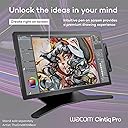
🎨 Elevate your artistry with precision and color that commands attention!
The Wacom Cintiq Pro 27 is a professional-grade 27-inch 4K UHD pen display featuring 8192 levels of pressure sensitivity, 99% Adobe RGB color accuracy, and a 120Hz refresh rate. Designed for creative professionals, it offers customizable ExpressKeys, multi-touch support, ergonomic pen adjustments, and versatile mounting options. Bonus software trials enhance your creative toolkit, making it a powerhouse for digital artists, animators, and designers.


| ASIN | B0B43T9HPC |
| Active Surface Area | 551.19 square inches |
| Box Contents | Wacom Pro Pen 3, tray, 4x standard ¼ inch mount options, Bonus software (3-month trials of Capture One, Clip Studio Paint EX, Toon Boom Harmony & Storyboard Pro, and MASV file transfer service) |
| Brand | Wacom |
| Brand Name | Wacom |
| Colour | Black |
| Compatible Devices | Windows 10 and later, macOS 10.15 and later |
| Connectivity technology | mini DisplayPort, HDMI , USB Type-C, USB Standard-A |
| Customer Reviews | 4.1 out of 5 stars 27 Reviews |
| Display Type | LCD |
| External Testing Certification | Não aplicável, 009461901796 |
| Item Weight | 7.21 kg |
| Item height | 0.1 inches |
| Manufacturer | Wacom |
| Model Name | Cintiq Pro 27 |
| Model Number | DTH271K0A |
| Model name | Cintiq Pro 27 |
| Native Resolution | 3840 x 2160 pixels |
| Network Connectivity Technology | mini DisplayPort, HDMI, USB Type-C, USB Standard-A |
| Operating System | Windows 10 and later, macOS 10.15 and later |
| Operating system | Windows 10 and later, macOS 10.15 and later |
| Pressure Sensitivity | 8192 Levels |
| Pressure sensitivity | 8192 Levels |
| Product Features | Multi-Touch Screen |
| Screen Size | 27 Inches |
| Special feature | Multi-Touch Screen |
| Specific Uses For Product | 3D Modelling, Animation, Designing |
| Target Audience | Teacher |
| UPC | 753218985057 |
D**M
Backlight leak/ bleed
Got a faulty unit with glaring backlight bleeding from one edge. Returning. I intend to get another one.
D**B
الكفاءة
الكيبلات التابعة له لا تتماشى مع جهاز الماك IMac
J**N
Best Pen Display I've ever used
The most enjoyable pen display I have ever used. After one year of using it almost every day, I absolutely love drawing with it. It's such an enjoyable experience. I feel like I have so much pen control and the etched glass feels amazing to draw on. The touch is an okay experience. I only use it for zoom and moving the canvas around. I have to turn off touch to draw on Clip Studio Paint, and remove all other gestures for it to be usable for me. But pinch to zoom and moving the canvas are pretty important to me though since I started from an Ipad Pro. It's a huge beautiful display. The 120hz is a really nice bonus in my opinion even for drawing. It just feels like a treat compared to 60hz drawing displays. And then I can also use it for gaming as well. It's pretty nice. The sound noise is as noticeable as my PC that's running Noctua NF-A12s. When listening to music, I don't notice it at all. It's not that bad. I have only ever used an Ipad Pro, Kamvas 13, and a movink but it blows all of those out of the water. Although it rightfully should, considering how expensive this display is. I would definitely recommend this if you can afford it. I wouldn't recommend the stand though. That stand is expensive for what it is, and it still has wobble unless you plant it on the table and put a cloth pad underneath like I do. I'm not an artist that moves the screen a lot though so it's good enough for me. Try an Ergotron or go a little more for a XOOT.
M**G
Thought I Would Never Need a Cintiq...
I'm a professional artist and have avoided getting a Wacom Cintiq due to the price. Instead, I'd been using off-brand interactive screen displays, my last one being the Dell Canvas 27. I'd used the Canvas for years and loved it, though it was never perfect. Since Dell stopped supporting the Canvas a few years back, I thought it best to get a different interactive pen display in case Windows updates caused the old drivers to cease to work. I really liked the size of the Canvas 27, but it seemed that no one other than Wacom had a 27" interactive pen display. So, I bit the bullet and bought this, hoping I wouldn't regret my decision. The fact is, drawing and painting on the Cintiq Pro 27 is by far the best experience I've ever had. It's smooth, fluid, and simply a joy to work with. I thought the Canvas was a better alternative when I'd purchased it because I didn't really think there could be that much difference in experience. I freely admit I was wrong. The quality of line, the effortlessness of drawing/painting on the Cintiq is unparalleled. For anyone who thinks that these off-brand pen displays can compare ... they can't. Don't get me wrong, they are good. Even great. And they are certainly not near as expensive. But the experience using the Cintiq simply blows them away, from my limited experience having owned and used a few different brands. Having said that, the Cintiq Pro 27 is not perfect. While I like the pen (the adjustable weight really helps it), it seems cheap, which is surprising considering it's importance and what you pay for this entire unit. The buttons on the left and right side (at the back) are useless. They are just not comfortable nor convenient to work with. The pen holder is ... bad. I don't use it. If you screw it into one side or the other, you block use of the buttons (but since you probably won't use them anyway, perhaps that's not a big deal). That's pretty bad design, imo. If you place the pen holder at the top, then you block some of the air vents used to cool the Cintiq. Again, bad design. Not sure what they were thinking when they made this thing. I've heard people complain about the fan noise using the Cintiq Pro 27. I don't even hear it. So, it's a total non-issue for me. I'm giving this 5 stars because it's an utter joy to draw/paint on and the small form factor makes it pretty light overall, which makes it easy to move about on the monitor arm I have it attached to.
J**A
Amazing tablet
Once you go touch screen you can't go back haha. Perfect and amazing tablet as I always expect from Wacom. I was hesitant to upgrade from my 22HD with the scroll bars on the back given this unit only has buttons behind the tablet, but of course the touch screen makes up for it. The cooling fans are a wonderful touch, and I am not baking like a shrimp on the bbq as my old Wacom had. I love this tablet. Yes, it's spendsy, but you pay for the quality you get. It's an excellent workhorse for the professional artist.
Trustpilot
3 weeks ago
2 days ago