๐ฏ Master your smart home with a single tapโbecause convenience is the new luxury.
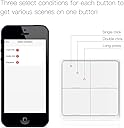
The MOES Wireless Smart Scene Switch is a sleek, battery-powered 4-gang controller that connects via Zigbee to the MOES Hub, enabling up to 12 customizable smart home scenes. Designed for easy wireless installation and seamless integration with MOES smart devices, it offers one-touch automation without the need for voice commands or app navigation, perfect for millennial professionals seeking effortless, stylish home control.


| ASIN | B0BJKBR1J6 |
| Actuator Type | Push Button |
| Brand | MOES |
| Brand Name | MOES |
| Circuit Type | 4-way |
| Colour | 4 Gang White |
| Connectivity Protocol | ZigBee |
| Connector Type | Wireless |
| Contact Material | Metal |
| Contact Type | Normally Open |
| Control Method | Remote |
| Controller Type | Amazon Alexa |
| Customer Reviews | 4.6 out of 5 stars 141 Reviews |
| International Protection Rating | IP54 |
| Item Dimensions | 10 x 10 x 2 Centimeters |
| Manufacturer | Wenzhou Morning Electronics Co.,LTD |
| Material Type | Plastic |
| Model Number | ZT-SY-EU4S-WH-C-MS |
| Mounting Type | Wall Mount |
| Number of Items | 1 |
| Number of Positions | 3 |
| Operating Voltage | 3 Volts (DC) |
| Operation Mode | ON-OFF |
| Part Number | ZT-SY-EU4S-WH-C-MS |
| Switch Type | Touch Switch |
| Terminal | Button |
| Unit Count | 1.0 Count |
| Upper Temperature Rating | 50 Degrees Celsius |
| Wattage | 1.5 Watts |
Y**Y
Works Fine with Home Assistant and Zigbee
I'm using Home Assistant and a Conbee II Zigbee USB stick; had absolutely no issues with connecting to HA. HA sees the button presses just fine, perhaps slightly quicker than a ZRC-90 Z-Wave switch I have, but nothing dramatic. I do wish there were an easy way for the button presses to show up as states in HA so I could use them in Node-RED, but building automations works perfectly well. This is purely esthetic, but I didn't like the lights being at the bottom of the buttons. When they're at the bottom, your finger covers them up when you press a button. Ultimately, I've just mounted my switches upside down on the wall and rearranged my automations so that button 1 is actually "button 4". Speaking of mounting, I'm not much on drilling holes if I can avoid it; I found that a couple of large Command strips on either side of the mounting plate work fine, though the tabs for the strips will show a bit at the bottom. Medium size strips will probably hold it just fine, though the dimensions may cause it to wobble a bit on the wall when you press a button. The best piece of advice I have is this: once you're sure you're going to keep this switch, use a screwdriver to pry out the locking tab that secures the switch to the mounting plate. As far as I can tell, the locking tab serves absolutely no purpose aside from being annoying. When you slide the switch onto the plate on the wall, it stays in place perfectly fine without that tab. And as you'll know five seconds after opening the package, that locking tab is just an absolute pain in the rear to deal with. Just break it out with a screwdriver and you'll save yourself a lot of headache when you need to slide it off the wall. All in all, this is a nice, responsive switch that I'd highly recommend.
J**O
Muy limitado
Solo se puede conectar con el hub de la misma marca y todos los dispositivos que se quieran controlar deben estar en el mismo hub que es muy inestable. No es compatible con ningรบn otro hub.
B**S
Works well with Zigbee2MQTT and Home Assistant!
I got this product as a replacement for the Flic buttons, which have been way too flaky (even with their hub) for my liking. Since I already had a pretty significant Zigbeen network set up in our home, I thought that this set of buttons should work much better, and initially at least, I have been proven right. The product was a breeze to set up. It comes with two strips that you can use to attach this to anywhere you might like; my placement was on a remote control holder (where my two Flic buttons had been attached previously) in our basement TV room. The main use case for me is to control the lights and turn on various scenes (coupled with the input source on the TV/receiver, such as for karaoke night), and for that, the buttons work fantastic. My smart home is run through Home Assistant, and my Zigbee network is set up via Zigbee2MQTT. The product was found and set up automatically via Z2M, with it showing up in Home Assistant soon after. Amazon doesn't let me include external links in reviews, so I can't directly link it; however, if you search for "Home Assistant TS0044 blueprint", you will be able to find an automation blueprint that has been set up for this product; I used that to set up all the actions that I needed for the 12 possible button press combinations that this product supports. Overall, I would recommend this product!
J**N
Works with Home Assistant
No problems getting it set up with home assistant. Looks nice and the buttons have an unusually satisfying click.
R**Z
Works with home assistant
Platform: Home assistant OS with Sonoff zigbee dongle running Z2Mqtt. Works brilliantly when I use it to control my Shelly dimmer relays through home assistant. Solid materials, satisfying tactile feedback on button press. Love the indicator lights that confirm button press. Great value for quality.
Trustpilot
2 weeks ago
2 weeks ago