Buy anything from 5,000+ international stores. One checkout price. No surprise fees. Join 2M+ shoppers on Desertcart.
Desertcart purchases this item on your behalf and handles shipping, customs, and support to Poland.
🚀 Elevate Your Connectivity Experience!
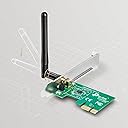
The TP-Link N150 Wireless PCI-Express Adapter (TL-WN781ND) is a high-performance networking solution that offers wireless speeds of up to 150Mbps. It features a PCI Express interface for broad compatibility, advanced security protocols including WPA/WPA2, and user-friendly management software. With a 2-year warranty and dedicated technical support, this adapter is designed for seamless integration and reliable performance.
| ASIN | B0036AFAEW |
| Best Sellers Rank | #3,185 in USB Computer Network Adapters |
| Brand | TP-Link |
| Built-In Media | Package Contents Wireless AdapterDetachable Omni directional antennaResource CDQuick Installation Guide |
| Color | Black |
| Compatible Devices | Desktop |
| Compatible Operating System Family | Windows |
| Customer Reviews | 4.2 out of 5 stars 4,073 Reviews |
| Data Link Protocol | IEEE 802.11b , IEEE 802.11g, IEEE 802.11n |
| Data Transfer Rate | 150 Megabits Per Second |
| EU Spare Part Availability Duration | 2 Years |
| External Testing Certification | Não aplicável |
| Global Trade Identification Number | 00693536405045, 00845973050511, 05053460566369, 06935364050511 |
| Hardware Interface | PCI |
| Item Dimensions L x W x H | 4.76"L x 3.09"W x 0.8"H |
| Item Part Number | TL-WN781ND |
| Item Weight | 40 Grams |
| Manufacturer | TP-Link IP Cams |
| Mfr Part Number | TL-WN781ND |
| Minimum Required Operating System Version | Windows 7 |
| Model Number | TL-WN781ND |
| Product Dimensions | 4.76"L x 3.09"W x 0.8"H |
| UPC | 061316113693 777004581483 013059005773 191120005515 168141656699 021111376242 151904929246 845973050511 065030818469 080850499339 230494840725 731215275203 693536405045 749276119879 731215071188 151903616550 |
| Unit Count | 1.0 Count |
| Warranty Description | 2-year warranty |
A**C
Great basic card with great gaming performance
didn't use driver included on CD, I just installed the card and when the computer booted up windows automatically installed the driver and the card has been working perfect ever since. the computer the card is installed in is a self built gaming rig running windows 10. all games run lag free and connection with my router is stable. the only advice i can give is to make sure your computer has a PCI Express X1 slot (PCI, PCIe X1 and X16 are different). if you want windows to automatically install the driver make sure the system has an internet connection either trough Ethernet or however it was connected before installing the card. if you cant connect the system to the internet then us the CD driver. if the CD driver is outdated windows update should install an updated driver once connected to the internet. PCI= old PCI interface. PCI X1= new version of PCI that is for expansion cards to add functions not built into the motherboard. This card uses X1 PCI X16= replaced outdate AGP slot and is for video cards, slot is longer than X1 and normally has a retainer clip on the back of the slot. there is an older version of PCI, I cant recall the name but its long and black. if you have that slot your system is likely running either windows 3.1, 95, or maybe 98. ***update 4/12/2016**** still working great, no driver issues and connection rarely has problems and when it does its normally the router at fault. PS thanks to those of you that voted this review as helpful and made it the top review for this item. its nice to know people find it helpful Update 4/3/2017: Card still works great, the custom computer this card is in has been retired to file server duty and now runs Windows server 2008 R2 instead of windows 10. I would no longer recommend this card for gamers as there are far faster cards out there such as wireless AC cards (requires an AC router to make a difference). Also wouldn't recommend as the primary connection method for a file server (I use ethernet). This card would be quite useful still for users who do not wish to do extreme gaming ( basic internet based games are ok). For simple internet usage (social networks, YouTube, Netflix, ext.) This is a more Than Able card and provide many years of reliable service.
W**A
Works great in Windows 8.1
I bought this thinking that the utility software that comes with the card would simplify setting the card up as a wireless access point in my computer. However, on trying the AP setup in the utility, I found that it was not enabled in the utility presumably because the utility makes the assumption that only windows 7 is capable of creating a "hostednetwork". Well, windows 8 is also capable of creating a hostednetwork, and the utility, IMHO, should recognize this. Perhaps future versions of the utility software will change so that it supports setting up a hostednetwork on windows os' 7 and above. This is my only reason for a 4-star review. However, I found some excellent details on how to set up a hostednetwork msy be found by searching for "windows 7 access point setup." Though the instructions are for windows 7, it does work for Windows 8. The access point can share the computer's internet connection. In fact, do not set the the TL-WN781ND to be the shared adapter - it is not necessary to setup the access point, but this is the only step in the above directions that is not needed. What you do need to do is set the network adapter that connects to the internet on the computer to allow other users to access the internet through this device - which is in the property pages for the internet adapter under "Sharing." Be sure to uncheck the box that states allow other users to change the sharing of this adapter. After all this is setup, what will happen is that in the network adapters screen, you will see another adapter called something like Microsoft virtual network adapter. If you mistakenly disable this, it disappears from the network adapters in the Network and Sharing Center, but can be re-enabled by going to the Device Manager, opening "network," finding the Microsoft Virtual Network adapter, right clicking, and re-enabling the adapter - then it moves back to the Network and Sharing center. Use the default IP address assigned to the virtual network adapter, otherwise, any WiFi device you connect to this AP will not get a "good" IP address and will not be able to connect to the network. Finally, the hostednetwork does not automatically come back if you put the computer to sleep, turn it off, or hibernate it. I hibernate mine, and I thought that there must be an event that I could trigger on to restart the hosted network. So, I went to the event log, opened up "System" and sure enough, there is an event logged that states something like "windows recovered from a low-power event." If you click on this, in Windows 8.1 at least, you will see an option in the Event Viewer to "Create a basic task from this event." I did this. I created a batch file that simply has the command "netsh wlan start hostednetwork". I then specified this file as a "program to run" to the task. In addition, I set the task to run with the highest permissions. Now, when the computer resumes from hibernate, the batch file runs and my new AP is up and running. It took me about 4-hours to figure all this out and I know my way around computers. For anyone who is interested, I received version 2.2 of the card.
D**R
Fair reception but solid data throughput
I am so glad I made the switch from a USB adapter to this one. I needed a wireless adapter for my 7 year old desktop and had been through several USB adapters including a LinkSys and a MediaLink. They were all highly rated but suffered equally from poor reception and, worse, slow data speeds with frequent downtime (no link). Since PCI cards are cheap these days I finally took the plunge (well, technically I took the plunge a couple of years ago but got the wrong type of PCI interface so I was stuck with my laggy USB adapter this whole time). I gave this card a try and, after a painless installation, I was initially disappointed to see a "fair" connection strength. Clearly I'm too far from the router and the two-sided marble fireplace in between is not helping. I ran a few network performance benchmarks (SpeedTest plus Microsoft and Google Drive file transfers) and was shocked to see speeds of 10-15Mbps with upload speeds being slightly higher. That means the card is able to transmit better than the Verizon FIOS wireless router!! Even my wife commented on how peppier the Internet browsing feels and she typically couldn't care less about that kind of stuff. The days of moving the USB adapter around in hopes of better reception are over.
H**I
Super easy to install and works well
Update: Lowered to 3 stars because it died literally a week after leaving this review. Sad to see it only lasted 1yr. I've been using this for about a year now with zero issues. Installation was as simple as can be short of it being a usb item - just open your case, put it in the right slot and push it in til it snaps, with the antenna coming out of the back of your case, screw it in, put side back on case, plug your computer back in and turn it on. That's it. I didn't need any additional software on Windows 10. It worked perfectly from the start. I've not had issues with it dropping connection or anything. It just....works, no matter if playing MMO's or streaming video. Pros: Cheap Don't have to spend $20+ on hellishly long ethernet cables that would stretch across the apartment to make tripping hazards Easy to install Works for Windows 10 without any additional drivers/software - plug n play No issues with dropping connection Cons: Not much other than the price went up $5 since I bought it.
N**.
Great Overall *See Update*
This network adapter has met my expectations. It doesn't get better reception than the USB adapter that I had beforehand, but I do get more Mbps. With the USB Adapter I had before hand I was getting 15Mbps Down 3 Up. Now I am getting 22 Mbps down and 3 up. That's fine for me. The computer this is for is just for web browsing, so I don't need it for gaming or anything. I am on Ubuntu 16.04 LTS if it matters to you. I installed this card and the OS had no problem at all with it. Now I feel like my ITX computer is complete. UPDATE 3/4/2017: This card has given me nothing but problems since shortly after this review. It keeps dropping the connection and I get very inconsistent speeds. This behavior was only present in the computer with this adapter in it. It's too late to return it now, so I guess that money is burned, but if I can stop you from purchasing it, then maybe I can save you the heartache. I put this in a regular Windows 10 machine I built myself and it still gives me issues, even after downloading the proper drivers. It's total junk. Fortunately I have an extra Edimax USB adapter laying around and it works great. So get something from Edimax I have never had a problem with that company -- I will stay with them from now on. And stay away from this adapter.
J**T
Wireless N150 PCI-Express review
I got this card in the mail with a computer case. It had plastic wrap around the cardboard box, and everything inside was in mint condition packaged nicely. At the time of this writing, the product was shipped and sold by Amazon. When I put this card into the computer I'm using, it didn't install right away. Which is no problem since there was a small disk included with it. So no complaints there. Instead of using the installer, I went to device manager on Windows 7 and made it search for the driver on the disk so I wouldn't get any extra junk-ware loaded onto my computer. I would just like to note that there were folders for Windows XP, Vista, 7, and 8. So you shouldn't have any problem installing it on any of those OS's provided you use the disk. As far as connectivity goes, it's what I expected. I'm a couple of rooms away and have 4/5 bars. There is no lag or anything of the sorts, getting the full speed my ISP provides. I would just like to note the only obstacle between me and my router is one door, and when I close it the connectivity does not go down. tl;dr ~ Alright connectivity, got what I expected provided the price. ($15 USD) Works on Windows XP, Vista, 7, and 8. Exactly what I needed.
S**A
Throttles itself under long-term use.
Does it work? Yes, it works for basic purposes if you are not using the internet all that much and your PC spends the majority of it's time off. In those situations, it works very well, after my PC being off overnight I'm getting 4-5 MBps (it reports 52 Mbps regularly with spikes down to 33 Mbps, which means it should register at 6-7 MBps which it's not) through two rooms but only about 15-20 feet of distance. During any kind of gaming or being used for more than about an hour consistently streaming video, this card either throttles itself or simply overheats like nobody's business, and then it struggles to report even 1Mbps, and speedtest reports it as 0.88Mbps down with 1.2 Mbps upload! My old USB2.0 Netgear adapter almost never overheated and I got a consistent 3MBps with low ping even when gaming, though it finally died recently. If you plan on doing minimal on the net, it works. If you plan on doing any kind of gaming or content streaming, skip this one and either get a USB or a Powerline adapter.
D**N
Love it! Perfect for my gaming PC build!
This Wireless PCIe card was perfect for my PC build. I only pay for 30 MBPs download speed through my provider, so I didn't need something over the top. I play a lot of games online and stream a lot of Netflix/Hulu with my wife. This card has been great so far! It's rated at 150 MBPs, so if you aren't paying for anything more than that, I would recommend this little guy hands down. My download speed with this wireless card is still about 30 MBPs when tested through speedtes.net, so I am very pleased with the result. The other thing I love about this is that it isn't a USB card sticking out of the case and having the possibility of falling out. If your looking for an inexpensive wireless card for your PC, do yourself a favor and buy this card! Pros: Fast true speed Fast shipping Connected directly to motherboard, as opposed to USB small and non-intrusive space wise Cons: Non so far
E**I
işini yeterince görüyor.
linux mint 22.3 ile sorunsuz biçimde tak çalıştır kullanma imkanım oldu. tabii 150mbps bugün için yeterli bir hız mı tartışılır ama pek çok evde internetin hala bu hıza ulaşamadığını düşünürsek fiyatının hakkını verdiğini düşünüyorum.
M**N
Efficient
Very reliable and easy to install
T**D
did what its supposed to do!
Cheap, quick and was here next day. The card did its job and an improvement over the USB wifi adaptor i had
K**N
Barato, eficiente y muy bien presentado
Sinceramente me estoy haciendo adicto a los productos de Tp-Link, ya habÃa comprado una antena de 8dB de la que estaba muy contento pero la tarjeta WiFi sobre la que la usaba da bastantes problemas en Linux y me decidà a buscar otra. De paso que cambiaba buscaba una WiFi N, barato e interna y después de evaluar otros productos con doble antena y 300Mbps me decanté por esta, pues ya tenÃa la antena externa y tampoco necesitaba lo más de lo más. También buscaba que funcionara 'out of the box' en linux y para eso tenÃa que asegurarme que llevaba chip Atheros. Y ya de paso me propuse estrenar el PCI-e 1x que tenÃa mi placa y que lleva muerto de risa 4 años, además es la ranura que más alejada quedaba de otras tarjetas y favorecÃa el paso de aire para refrigeración. Esta tarjeta me costó 11,48 el 2 de Abril de 2012 (vendida por Amazon), me llegó muy rápido y cumplió todas mis expectativas. Para empezar la presentación es excelente, viene en una caja precintada, y dentro lleva la garantÃa, las instrucciones y algunos folletos con otros productos de la firma. La tarjeta en sà viene en la clásica bolsa antiestática con un precinto y me sorprendió lo minúscula que és, la antena es más grande que la propia tarjeta :-D. Encajó perfectamente a la primera y le enganché la antena grande que ya tenÃa, desenroscando la que venÃa con la tarjeta. Linux Mandriva 2010.2 la detectó sin mayores problemas, no hubo que hacer nada, configuré la Mac en el router (tengo filtro mac) y encontró mi red enseguida conectándose a ella sin mayores problemas. La llevo testeando 36 horas y sinceramente va de maravilla, velocidad estupenda y estabilidad de momento a prueba de bombas. Se me acabaron las inestabilidades y las transferencias son fiables y rápidas. Recomendada al 100%.
M**O
Ottimo prodotto
Ottimo rapporto qualità prezzo. Nonostante non sia veloce come lempou recenti è facilissima da installare con doppia piastra in dotazione per adattarla a PC normali o slim, funziona perfettamente e vieni subito riconosciuta sia da Windows che da Linux.
Trustpilot
2 weeks ago
2 weeks ago