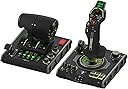
✈️ Take control like a pro — fly smarter, not harder!
The Turtle Beach VelocityOne Flightdeck is a premium HOTAS joystick and throttle system for Windows 10 & 11, featuring the world’s first Flight Touch Display, a customizable OLED HUD, and hall-effect contactless sensors. With 139 programmable buttons and the Flight Hangar app, it offers unparalleled precision and customization for serious air and space combat simulation gamers.


| Button Quantity | 139 |
| Additional Features | Flight touch display, Audio Advantage, Throttle controls, Modular Stick, HOTAS System |
| Power Source | Corded Electric |
| Hardware Platform | PC, Desktop |
| Controller Type | Joystick, Throttle Quadrant, Yoke |
| Connectivity Technology | USB |
| Compatible Devices | PC, Windows |
| Item Dimensions | 6.93 x 20.63 x 10.04 inches |
| Package Quantity | 1 |
| Item Weight | 9.41 Pounds |
| Color | Black |
I**E
Great for beginners
Very user friendly joystick that is perfect for people just getting into flight simulation. You can control pretty much everything from this one controller, and it offers plenty of customisable features. Only concern is the rubber grip can catch quite a bit of dirt/muck as you rub your hand on it.
"**"
Great quality!
Great quality, packaged in a very thought out and well presented way. Its really smooth, and working really well with MSFS2020 on Win 11. Plug and play out of the box after switching from Xbox to PC mode. An additional BT app is available for connecting to a mobile device, but the functions are limited to colour changes, sensitivity and dead zones along with a firmware section which can be changed in other ways. To sum this up: this stick is amazingly well designed, constructed, customizable in everyway to the point you can hand the stick from right to left and the wrist support can interchange and move up and down. Would I purchase more turtle beach products based on this? The answer is absolutely!
M**P
Good build but some drawbacks
Not bad, good quality build, good ergonomy with quite a few buttons Main drawbacks: - as many have mentionned already the Stick is way to hard to move to properly simulate any type of aircrafts, it feels like a constent battle, personlly I wouldnt recommend it because of that unless you are willing to tinkier with the spring inside (otherwise to play Arcade stuff should be fine but then its kinda overkill joystick) - the base is too narrow comparing with the height of the stick and its stifness so you need to either hold the base with your hand or attach it to something with the screw (might be solved by replacing the tension spring as mentionend above) - the Trim wheel is not recognised or not working efficently at least in MSFS
M**Y
Excellent product with good build quality
Very good piece of kit. I havehad many different sets of HOTAS and joystick systems over the years from Saitek, Honeycomb, Logitech and Thrustmaster and believe this one I'll be sticking with for a while. It has all the buttons you could ever need and although I find the touch screen a bit gimmicky. I can certainly see how others can make good use of it. It is of good build quality and seems to have the perfect resistance on each axis, especially the throttles.
B**E
turtle beach at their best
I ordered this for my gaming PC but use it on both PC and Series X It arrived in branded box on removing your meet with a well made but lightweight flight stick. Now I’ve been using the Turtle Beach VelocityOne Flightstick with Microsoft Flight Simulator 2020 and 2024 on both PC and Xbox Series X,for sometime and it’s been a great addition to my setup. The flightstick is well-built, responsive, and comfortable to use, offering a much more immersive experience compared to a standard controller. The button layout is intuitive, with plenty of programmable buttons and controls that work well for managing flight functions without needing to dive into menus. The Hall-effect sensors give smooth and precise inputs, which makes a noticeable difference in handling aircraft, especially during takeoff, landing, and maneuvering. The throttle lever and hat switches add to the realism and give good control over flight operations. Compatibility was straightforward — it worked right out of the box with both Flight Sim 2020 and 2024, with minimal setup. Whether flying casual or more advanced aircraft, this flightstick strikes a nice balance between accessibility and realism, making it a solid choice for beginner and intermediate sim enthusiasts. Overall, the VelocityOne Flightstick offers great value, solid performance, and a more immersive experience for flight simulation fans on Xbox and PC.
M**.
Great stick with two pretty big flaws
Good quality stick with plenty of features. Incredible number of axes and buttons for this price range. Most of the buttons feel really good and have positive feedback. The two buttons next to the trim wheel on the stick are way too easy to press, so I wouldn't bind them to critical functions. The tiny joystick on top of the stick is a really nice touch and great for camera control if no VR or headtracking. And having two throttle axes at this budget is pretty amazing, even if this is not a proper Hotas. The stick is plug and play on PC and Xbox. In MSFS 2024 the default setup was pretty good but I did need to configure the trim wheel and change a few buttons around to suit me. The display on top of the stick allows for some configuration on the fly, like stick speed. It even has a chrono, helping with dead reckoning navigation (for people who are into that kind of thing). However this stick has two big flaws. The biggest one is the stiffness. It's unbelivably stiff and it has no way of tweaking it without opening it up. After 20 minutes of doing circuits in a GA my hand was numb. I read you can mod it to fix that up, but it should not be needed. The second flaw is stick travel. It's just too short. It's fine for GA or airliners but for any kind of combat you have to pick between precision or turn rate (even with the precision profile). If you're willing to mod it yourself (potentially voiding the warranty) and only fly GA and airliners then this ks a great stick for the money. Otherwise I'd look elsewhere.
S**N
Macht einen sehr wertigen Eindruck, die Software für den PC ist intuitive und logisch aufgebaut. Verarbeitung und Haptik ist gut, ja nicht so gut wie Virpil und co, ist aber Preislich auch ganz anders aufgebaut. Touch Panel hat eine leichte Verzögerung stört mich aber nicht weiter da ich da nur Sekundäre Funktionen drauf habe. Preislich iist er mich ca 350-400 genau da angesiedelt wo es wenig Konkurrenz gibt und auch sehr Fair aufgestellt. Ich kann ihn nur Weiter empfehlen ist auf jeden fall ein massives Upgrade von Logitec X52 Pro und X56 aus, diese hate ich beide vorher.
A**R
Amazing. Switched my thrustmaster 16000 and rudimentary throttle quadrant for this to play Warthunder sim in VR and DCS and so far all I’ve played is Warthunder, but it works like a charm. Haven’t had this much fun flying in a long time, you have to map out each button for Warthunder and DCS but anyone who plays will know this already. The only complaint I have is that one of the 6-8 hat buttons doesn’t have a binding for if you click down and only works directionally. Would be an issue if there weren’t FIVE OTHER hat switches that do let you bind clicking it. Buy it you won’t be disappointed.
Q**.
Quality
M**O
Questi Flight Stick si presenta in una confezione curata e ben strutturata. Al suo interno, oltre al controller, troviamo il cavo USB c. È possibile invertire il poggia polso sul dorso dello Stick per i mancini ed è anche regolabile in altezza con relative tacche di orientamento. Il feedback è buono, forse un po' troppo resistente al suo rientro in posizione centrale. Ha un ottima compatibilità grazie all'ultimo update che consente oltre alla modalità PC e Xbox quella per terze parti, ovvero per tutte quei giochi non ottimizzati dalla casa produttrice. Si dovrà soltanto eseguire una mappatura dei pulsanti. Sostanzialmente verrà letto come un normale controller. Le impostazioni sono davvero molte, relative a trim, sensibilità, inversione assi, colore dei led, luminosità display e led ecc. Il mini touch pad sarebbe davvero utile, peccato che ad oggi soffra di una sensibilità decisamente imprecisa. Il cursore viene mosso correttamente in basso e verso l'alo l'input non è coerente con il movimento del dito. Ha molti tasti fisici personalizzabili, molti inaspettati, che rendono il controller, utilizzato da solo, molto sfruttabile per tutte le shortcut utili a chi lo usa con il simulatore e non. Con Flight simulator 2020 si comporta egregiamente, lo utilizzo prettamente su Xbox series x. Mi è bastato impostare alcuni parametri per mia comodità ed ero già pronto al volo. Unica pecca ancora non risolta è che pigiando il pulsante home dell' Xbox il cursore tenderà ad andare in basso a destra senza fermarsi, il che rende impossibile spostarsi nel menù della dashboard. A livello di feedback non ho apprezzato gli spostamenti dal punto zero, troppo rigidi e accompagnati da un ticchettio un po' fastidioso. In conclusione lo trovo un ottimo prodotto e con un buon qualità prezzo, ha tutte le comodità per chi vuole usare mfs da console e dal punto di vista estetico è veramente piacevole.
J**D
Parfaitement reconnu et intégré à Flight simulator 2020. Facile à programmer. Fonctionne bien. Certaines personnes regrettent sa stabilité sans doute pour des jeux de combat. Mais pour piloter dans l'aviation civile, il n'y a aucun problème.
Trustpilot
1 day ago
2 weeks ago