🎥 Elevate your live stream game with the palm-sized pro that’s rewriting the rules!
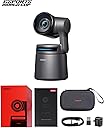
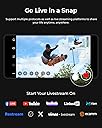
The OBSBOT Tail Air is a compact 4K PTZ camera featuring AI tracking, gesture control, and versatile connectivity options including HDMI, USB-C, Ethernet, and wireless. Designed for professional live streaming and content creation, it supports NDI streaming protocols and offers up to 2.5 hours of battery life, making it ideal for dynamic, on-the-go broadcasting across platforms like YouTube, Twitch, and Facebook.


| ASIN | B0CJLJHS3T |
| Antenna Location | Streaming |
| Are Batteries Included? | Yes |
| Best Sellers Rank | 6,450 in Climate Pledge Friendly ( See Top 100 in Climate Pledge Friendly ) 427 in Webcams 6,452 in Climate Pledge Friendly: Shop All |
| Box Contents | Micro HDMI cable, USB-C cable, and lithium battery |
| Brand | OBSBOT |
| Brand Name | OBSBOT |
| Camcorder Type | Webcam |
| Colour | Black |
| Compatible Devices | Smartphone, Desktop, Laptop, Tablet |
| Country of Origin | China |
| Customer Reviews | 4.1 out of 5 stars 309 Reviews |
| Digital Zoom | 4 x |
| Effective Still Resolution | 50 MP |
| Effective Video Resolution | 3840 Pixels |
| Exposure Control Type | Automatic |
| File Format | JPEG |
| Flash Memory Bus Interface Type | UHS-I |
| Flash Memory Speed Class | C10 |
| Flash Memory Type | Micro SD |
| Flash Memory UHS Speed Class | C10 |
| Flash Memory Video Speed Class | V60 |
| Flash memory type | Micro SD |
| Focus Type | Auto Focus |
| Form Factor | The form factor of the OBSBOT Tail Air is a compact and streamlined design, with dimensions of 69.65mm x 73.25mm x 132.5mm in its working state and 69.65mm x 73.25mm x 135.5mm in its off state. |
| Has Image Stabilization | No |
| Image Aspect Ratio | 16:9 |
| Image Stabilization Type | false |
| Item Weight | 0.8 Kilograms |
| Lens Type | Zoom |
| Log Gamma Curve | True |
| Manufacturer | OBSBOT |
| Maximum Aperture | 1.8 f |
| Maximum Display Resolution | UHD MP |
| Maximum Focal Length | 12 Millimeters |
| Maximum aperture | 1.8 f |
| Maximum focal length | 12 Millimeters |
| Minimum Focal Length | 4.8 Millimeters |
| Model Name | Tail Air |
| Model Number | Tail Air |
| Network Connectivity Technology | Ethernet, HDMI, USB |
| Number of Batteries | Lithium Polymer batteries required. (included) |
| Optical Sensor Size | 1/1.8-inch |
| Photo sensor technology | CMOS |
| Product Features | 4K With 1/1.8" Sensor, 8 Pieces Lens, f/1.8 Aperture, AI Tracking (People/Animals/Objects), Face Detection, NDI Supproted (RTMP/RTSP/VISCA/UVC/OSC Supprot), Tinest PTZ 4K Camera, Power Storage 2.5H |
| Product Warranty | 2 Year Manufacturer |
| Screen Size | 1.8 Inches |
| Sensor Type | CMOS |
| Shooting Modes | [POSSIBLY] Car, sports, portrait, landscape |
| Style Name | Black |
| Supported Audio Format | AAC, PCM |
| Supported Image Format | JPEG |
| UPC | 792105740348 |
| Upper Temperature Rating | 40 Degrees Celsius |
| Video Capture Format | MJPEG, H264, H265 |
| Video Capture Resolution | 1080p, 4K |
| Video capture resolution | 1080p , 4K |
| Viewing Angle | 160 Degrees |
| Water Resistance Level | Not Water Resistant |
| White Balance Settings | Auto |
| Wireless Compability | 2.4 GHz Radio Frequency, 5.8 GHz Radio Frequency |
| Zoom | Digital |
J**K
So small yet so powerful! Ideal ptz camera to have in your box of tricks on a live stream
I must admit I was unsure at first. I hadn't come across Obsbot products in the past and all the sales information on the Tail Air almost seemed to be too good to be true. A full 4k30fps ptz camera that fits in the palm of your hand, has a built in battery, able to record, has NDI and AI tracking.... surely not. But in fact I was wrong! It is true and wow does it do it well. I bought the camera as a trial for work as we do streaming of live events from concerts to sports to corporate events and award ceremonies with the plan to put it in along side our usual cameras and give it a test not believing it could be as good as our more expensive PTZ cameras but surprisingly it not only matches them but beats them on a number of key areas. Yes it doesn't have SDI output and only has micro HDMI out and USB C on the body of the camera so you find yourself having to use adapters but that's a small price to pay for what had to be one of the smallest and most powerful PTZ cameras on the market. Coupled with its small size you have it's inbuilt battery, NDI Hx3 and the ability to connect and control over WiFi which gives you a really powerful camera that is so handy to have in your box of tricks on a job. We've so far used it on conferences' on the panel table giving us perfect shots of guests speaking during q&a, on stage as an audience camera where you could hardly see it in the corner of the stage, as a main lectern camera on an awards night and during sports presentations on pitch connected to an additional battery to give us over 6 hours of battery life to show presenters and guests live on the big screens in the ground where the battery and wireless NDI hx3 comes into its own as everything is fast paced and needs to be cleared from the pitch very quickly and a number of other events where we have struggled to wire or power any other camera or the director hasn't wanted a big and ugly camera in shot. Overall I'm very, very impressed with its size, quality and overall usefulness out on jobs. If you are buying this camera on its own rather than as a bundle there are a few additional items you will have to pay for, which is something you need to bear in mind when looking at the purchase cost. Firstly you will have to pay extra for the NDI HX3 licence - the camera works perfectly fine without NDI but its worth purchasing especially if you use vmix or OBS. Secondly I would strongly advise getting the USB c to network adapter so you can use a wired connection as well as wireless for those jobs you csnt trust the wifi and thirdly for the complete set go for the Obsbot Remote as that makes it so quick and easy to get the camera up and running and in position on a job. You can control it via your phone and computer software like vmix etc... BUT sometimes it's just easier to grab the remote and put the camera where it needs to be - just quick and simple and with the added bonus that 1 remote will control up to 3 cameras! Previously we have had the logitech mevo start 3 pack and a couple of go pro in our box of tricks for those times where you need those additional camera shots or small footprint but I think we are now looking to replace the mevo'a with Tail Airs as the mevo are only 1080p and a fixed shot where as the Tail Air are full ptz with tracking ability if needed - which is so much more useful in the box of tricks. Overall I'm so impressed by this little camera and cant recommend it enough - it really has opened up so many more creative ideas and workflows and we are looking at buying more as a company.
B**N
Great quality 4k30fps footage
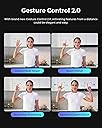
I love the small format of this camera, at 360g this thing is tiny yet plenty of function not usually found in web cam. The gimbal stabilize the camera when powered up, I can adjust camera angle by just moving the camera with my hand and it will stay put. There is a 1/4" tripod mount and having this mounted on a tripod it is agile and takes no time to set up the shot I want. The 4k30fps footage is clear and very smooth, even when zoomed in there is still a lot of quality in the video. The follow me/tracking works really well and for 1 man band this will add a lot of dynamic to the videos footages. There are gesture control for start recording, zoom in and out etc, just be hand gesture which is very cool indeed. There is built in battery with this camera which allows me to work remotely, I can use it on the go and in remote places as long as I have my phone on cell data. The phone app is easy to use and connection to my wifi network is a breeze, however, I only managed to connect this to my 2.4Ghz WiFi but it refuse to connect to my 5Ghz band which I am not sure if it is the camera or my router problem. There is a micro SD card slot where I can record video on to and also streaming function when connected to the internet. The camera gimbal can be controlled by the phone app and there are so much camera function to make professional videos. My favourate is the ISO range settings which is not usually found in budget camera or web camera.
M**S
OBSBOT: Tail Air (Pan-Tilt-Zoom Streaming Camera)
This product really is something special! it's rich in features and just overall a super versatile camera , making it useful in so many different scenarios. 🟢 𝗣𝗿𝗼𝘀: ⚪ The camera comes with it's own hard case where it's well-protected when not in use. ⚪ Build quality feels premium and it looks really smart. ⚪ Very versatile due to it's portability, rechargeable battery and ability to record/stream on the fly. ⚪ The tracking works brilliantly and the gesture control makes certain tasks more accessible so you don't need to keep adjusting through the app. ⚪ The picture quality great and can even handle low-light surprisingly well compared to other cameras on the market (but it is advised to use good lighting for best results). ⚪ The in-built microphone captures vocals very clearly within close proximity (It has a mic-in port, so you can use a TRS cable to a receiver for a wireless mic set-up). ⚪ The stabilisation is perfect! ⚪ Works well with PC/Laptop via USB cable (UVC mode must be enabled through the app first). ⚪ Many mounting possibilities with the 1/4" thread on the camera base and it can also be placed on a flat surface. ⚪ 2.5 hr battery life on a full charge (recording 1080p at 30fps), though you can also charge whilst using. 🟡 𝗡𝗲𝘂𝘁𝗿𝗮𝗹: ⚪ The NDI feature requires an activation key (separate purchase). ⚪ There is room for improvement on the Apps User-Interface, however, it's still more than usable. ⚪ You can get video flicker with certain indoor lighting (most cameras suffer from the same issue); this can be easily resolved with a good light set-up. 🔴 𝗖𝗼𝗻𝘀: ⚪ The only real negative I can think of is the lack of information within the instruction manual when it comes to various connections; I had to figure it some things myself and search online for tips.
S**E
Amazing Streaming/Vlogging Camera
Very good quality streaming camera from Obsbot made from very good materials. I have been using this streaming camera for three months and I have had no issues, I have been using it on an iPhone 14 Pro Max and iMac. On the iMac initially I thought the setup would be a pain but I am pleased to say it was very quick and easy just a case of going to Obsbot website download the software (Obsbot Center) and installing it, then you just need to turn on the camera, load the software and it should detect the camera and follow the prompts, it took me about five minutes to have it fully running. If you want to use the camera with OBS or Streamlabs Desktop in the Obsbot Center software you will need to create a virtual camera this is just a case of clicking on one button then in OBS or Streamlabs Desktop add the camera as a source its very simple. On the iPhone it’s just a case of installing the mobile app and just like on the iMac connect to the camera and follow the prompts. My only real grumble is you can not use the mobile app unless you register for an account and login which I do not like it also wants to use location services which I do not see why it needs this BUT you can turn it off or change it to only use while in application. There is only one button on the camera the on/off button so you have to control the camera with either your mobile device or computer, Obsbot does sell a remote control that can get on amazon at time of writing this it cost £79. Camera/image quality is very good at 4K so far I have experienced no delays in the image/quality which is exactly what you want. You can use hand gestures to zoom in/out, turn on/off tracking, recording & dynamic zoom these work great in a well lit room BUT I have noticed a few times in low light the camera struggles to see/recognise the hand gestures and I have had to try a few times for it to activate. Comes in a good quality case that has padding so will help to protect the camera. Overall I am happy with the steaming camera and I would definitely recommend it.
N**G
Unreliable at best
Having invested in 3 tail airs, with a view to invest in a few hundred. testing has shown these units to be very unreliable, Often issues will present with the cameras firmware and software seming to be the cause of these. even with updates turned off. some days the device no longer works desipte no change in setup.
L**K
Amazing Camera
I’ve had the opportunity to use a variety of webcams, but the OBSBOT Tail Air Streaming Camera 4K stands out for its exceptional quality and innovative features. The first thing that caught my attention was the 4K video quality. The clarity and detail in the videos are simply amazing. Whether I’m streaming or recording, the high-resolution output ensures that my content always looks professional and engaging. But what truly sets the OBSBOT Tail Air apart is its AI tracking system. This feature is a game-changer for creators like me who move around a lot during streams or recordings. The camera follows my movements accurately, keeping me in the frame at all times. It’s like having my own personal cameraman! The AI system doesn’t just track movements - it also adjusts the focus and lighting in real time, ensuring that I always look my best on camera. This level of automation allows me to concentrate on my content without worrying about technical details. Good Battery LIFE In conclusion, the OBSBOT Tail Air Streaming Camera 4K is a top-notch webcam that delivers on both quality and innovation. Despite its premium price, I believe it’s a worthwhile investment for any serious content creator. Its superior video quality and advanced AI features have certainly taken my content creation to the next level. I highly recommend it!
G**R
Excellent AI features with NDI make this a top value vlogging camera
THis is a remarkable camera that provides lovely crisp 4k videos that are so much better than those from a standard webcam. What makes it even better is that this camera can stream them live such as for youtube Vlogging and live broadcasts. Icing on the cake, it can do this wirelessly, as well as wired. The real magic is that I can communicate with this camera by using the app, hand signals or even with an optional remote control. This remote can also operate up to three cameras at the same time. Of course, the main top feature of this camera is that it can smoothly track, faces, objects and animals. This PTZ is the tour de force of the Osbot Tail Streaming camera. The tracking is motorised and uses a smooth pan/ tilt/ zoom (PTZ) function that follows seamlessly with the object that it's locked onto. As a streaming video camera this makes absolutely the best thing if I'm wanting to move around or zoom. The camera has a built in battery that will last up to two hours, but only on 1080p and a lower frame rate. IT does drop down a bit once I use the 4k and faster framerate option. But nothing is lost, as I can also run it from USB to power it, as well as transmit the video data to a mobile device. The camera does have some image stabilisation built in, but it not as steady as I would like. However, to be fair, it's not really a mobile camera, but intended to be placed on a tripod, or steady fixed surface, where it can view the whole angle of field intended for the video. This is the best setup that works really well. Some things it does not like, are if I move too quickly out of frame. IT will follow, but only at the maximum speed of the motorised gimbal. This is ok, for reasonably slow action changes, but quick jumps out of shot will leave the subject behind untill the camera follows and pans into position. The camera comes in a really nice and well protected hard zipped case. IT can be easily carried and run on location via it's built in battery, or with accessories added, such as a power bank to the USB, an external mic plugged into the 3.5mm jack and of course NDI. Look Ma, no cables! This camera comes in at close to the £500 mark, so it's not cheap. But the fact that it's like having an intelligent camera person on the back end of it does make it worth the price. Add to that the NDI transmission, the app, solid build and portability and you have a virtual film crew on hand. I Love it!
P**K
Obsbot tail
There is absolutely no doubt that this is a well built camera with some great features for a portable webcam, from what I can tell during my somewhat unsuccessful trial run. The design looks great, the item is well made and comes well packaged and with a high quality carry case. My only problem is that the main thing I want this to do - connect to my Mac for conference calls and to record presentations - I just cannot get to work. I’ve been through all the videos and instructions I can find to use WiFi, Bluetooth or a wired connection to get it to work. But with no avail. I can physically see the camera connection works, and I can select the camera in calls, but it just shows a red camera symbol instead. I am fully aware that owing a Mac is the likely cause of this issue. But I really struggle with justifying the price when the available support and documentation is not sufficient/ doesn’t exist. My only other option is to purchase a usb c to Ethernet cable (£99!!) and hope that works, or just give up completely. I want this to work so much, but I just don’t know what to do to solve it. For the price, it’s incredibly infuriating. Let’s hope something gets updated to help me soon!
Trustpilot
2 days ago
3 days ago