






CE-DP0E12-S1
Product ID: 58319987
Details
- BrandSIIG
- ColorDP to DP (4
- Compatible DevicesMonitors
- Hardware InterfaceDisplayPort
- Special FeaturePlug and Play
⚡21.6Gbps total bandwidth
📺Supports 4K UHD @30Hz
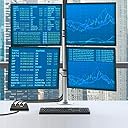
🖥️4 independent display outputs
Buy anything from 5,000+ international stores. One checkout price. No surprise fees. Join 2M+ shoppers on Desertcart.
Desertcart purchases this item on your behalf and handles shipping, customs, and support to Poland.
🚀 Unlock your multi-monitor potential and dominate your workspace like a pro!
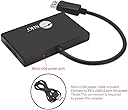
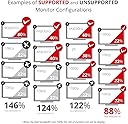
The SIIG CE-DP0E12-S1 MST Hub transforms a single DisplayPort 1.2 output into 4 independent displays, supporting 4K UHD resolution at 30Hz and multiple display modes including mirror, extend, and video wall. With a robust 21.6Gbps bandwidth and plug-and-play setup, it’s designed for professionals seeking to maximize productivity across diverse monitors. Backed by a 2-year warranty and Silicon Valley-based support, this hub is a reliable upgrade for any multi-display workstation.


| ASIN | B0761DWK8K |
| Best Sellers Rank | #1,026 in DVI-HDMI Adapters |
| Customer Reviews | 3.8 3.8 out of 5 stars (93) |
| Date First Available | September 1, 2017 |
| Is Discontinued By Manufacturer | No |
| Item Weight | 7 ounces |
| Item model number | CE-DP0E12-S1 |
| Manufacturer | SIIG |
| Product Dimensions | 4.14 x 2.6 x 0.67 inches |
W**S
4-Port HMDI Display Port
I was looking for a 4 or more port for all my HMDI wires and this product works great. I am able to add multiple devices using this into one display/monitor
C**O
Can’t use it yet
Can’t use it as there is no display port on my laptop but a dvi and hdmi. Perhaps I need an adapter that I have searched amazon for and could not find at all. I will update this when I see if it works or not.
M**R
Works perfectly!
I have 5 monitors and I was able to patch video to 4 of them from one display port. It's plug and play, I would definitely recommend this to anyone running multiple displays. 6/20/21 UPDATE I know this is late, but maybe it will help others with their purchase. Quick fix is to power the hub from an external USB and not the PC's USB ports. Simply buy, or use a higher end USB charge cube. One with a 10W or higher rating will do nicely. People who are experiencing random monitors not working at times is due to powering the hub from your computers USB ports. Using a DSO scope and voltage signal DAQ, I monitored the power when plugged into different USB ports. Without getting into great detail of my findings,(USB 2.0 was used in all testing, USB 3.1 gen 1 and 2 have added Vbus pins and 900mA capacity. That is all the detail I'm getting into) the average USB port can't handle the inrush current and provide proper line regulation that this hub is loading at times. My fix was to design and build my own [email protected] switch mode power supply and upgrage to a better USB power cable. Using a 12Vdc 3A Meanwell PS, I designed a buck circuit to bring that down to 7.2V then through a simple pi filter and into a low noise adjustable LDO. The end result is a clean 5.1Vdc with an average of 12uV of ripple at a 1000mA current load. Quick note if anyone is wondering, I'm running the buck in continuous mode @ 180khz(keeping switching noise harmonics out of audio range). Was all of this really necessary, NO! However as an EE that's how I roll, creating unnecessary steps to prove something is or isn't working.
K**M
Only worked for 1 monitor
This only worked for one monitor. The color was off with one, when I plugged in a 2nd, the other monitor stayed blank and the picture started flashing. Mine did not come with the micro USB power supply and I tried several different ones plugged into different USB 3.0 slots and power adapters with no luck.
T**R
Good, but understand what you're getting into first.
It's a good product, just be aware of the limitations: 1. The external power source is essential. I found that using a dedicated power supply rather than just usb off of the computer worked better. I also found that using a usb-c (Plugged into the power supply) to micro usb (plugged into the adapter) worked better than a standard usb to micro usb. 2. You have to be using this with a video card that is already very performant because the splitting of screen streams is resource intense and will degrade quickly if your machine can't keep up. 3. Expect lower resolution and lower refresh rates than a direct connection to a single monitor. If you try to output at the highest performance there is a chance that any blip in the power supply will cause one screen to turn off for a second and then back on. 4. If you're using this on a laptop or docking station, find out what the highest wattage your laptop or docking station can use and get that power supply.
L**H
Works great...does exactly what I need.
Price was right and it works perfectly for my 4 monitor setup.
M**E
It just works
This device is being used to turn 1 Display Port into 2 on a system that already has 2 Display Ports. This gives the end user 3 monitors but only splits 1 output. Pros: Quick and easy to use. Completely seamless. Cons: Just a small nitpick. I wouldn't have minded maybe another inch or two on the cable length so it could sit flat on the desk. Really irrelevant, but it would have been nice.
D**S
Undependable Splitter
I have been using it for 12 months. I have 3 Dell 24" monitors. When my laptop was refreshed, the USB C Dell docking station only includes 1 Display port out so after researching options, I purchased this product. It worked well for the first couple of months, but as time went on it became reliable when I'd start up my computer. Some days all monitors would be recognized on startup and others just 1 or 2. The solution I figured out was to go and unplug all 3 HDMI cables from the splitter and then plug them back and the computer would then recognize them all. This led to the need to update the display settings so that the computer knew which one was there. I replaced all the display port cables 2 times to make sure it was not a cable issue. I checked for driver updates and firmware updates. The other problem was that during the day as I was working, the screens would momentarily go black for about 3 - 5 seconds. Not all at once, it was just one at a time at different times during the day. I have bought other SIIG products which have worked well so I was disappointed that this did not work well, but I Have given up on it and it will be recycled.
Trustpilot
2 weeks ago
2 weeks ago