Buy anything from 5,000+ international stores. One checkout price. No surprise fees. Join 2M+ shoppers on Desertcart.
Desertcart purchases this item on your behalf and handles shipping, customs, and support to Poland.
🚀 Unlock pro-level expansion for your Orange Pi Zero 2W — because your projects deserve more!
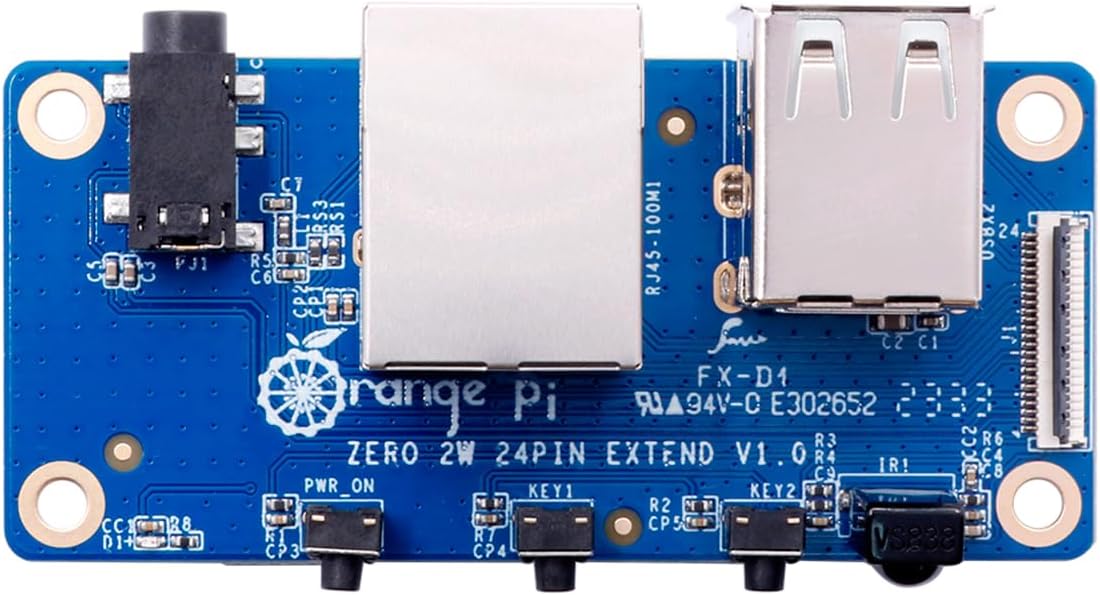
The Orange Pi Zero 2W Expansion Board is a compact 24-pin interface add-on designed exclusively for the Orange Pi Zero 2W single board computer. It enhances your device with dual USB 2.0 ports, a 100Mbps Ethernet port, infrared receiver, 3.5mm audio and TV out, plus customizable hardware keys. Perfect for makers and developers seeking to elevate their mini PC’s connectivity and control options in a sleek, space-saving form factor.
| ASIN | B0CHMTT4XP |
| Best Sellers Rank | #945 in Single Board Computers (Computers & Accessories) |
| Brand | Generic |
| Built-In Media | Orange Pi Expansion Board for Orange Pi Zero 2W |
| CPU Model | MediaTek MT8125 |
| Compatible Devices | Orange Pi Zero 2W |
| Connectivity Technology | Infrared |
| Customer Reviews | 4.1 out of 5 stars 141 Reviews |
| External Testing Certification | FCC |
| Manufacturer | Shenzhen Xunlong Software CO.,Limited |
| Memory Storage Capacity | 16 MB |
| Model Name | Orange Pi Zero 2W |
| Operating System | Linux |
| Processor Brand | ARM |
| Processor Count | 1 |
| RAM Memory Installed | 4 GB |
| RAM Memory Technology | LPDDR4 |
| Ram Memory Installed Size | 4 GB |
| Smart Home Compatibility | Not Smart Home Compatible |
| Total Usb Ports | 2 |
| UPC | 768510248922 |
| Unit Count | 1.0 Count |
| Warranty Description | No |
| Wireless Compability | Infrared |
A**N
Very nice little sbc.
A lot of reviews had me believing I couldn't access this without a mini HDMI to HDMI adapter or cable. However that's just not the case. USB serial adapter gets you direct serial console. After you have serial console you can connect wifi easily with nmcli and from there you will find ssh already running. Connect to the device and use it. I went as far as tigervnc install inside the orange-pi arch image. As for the Mali GPU you will need to do a bit of reading to figure out what bit to flip and how. All in all the documentation isn't wonderful but it's thorough. The unit performs well this far during testing. Was good value in my book. Support is lacking . All and all a very versatile and powerful sbc.
J**K
Good little board, tinkering is required.
I really like this board. There is a lot that can be done with it. I will note that all the OS are not maintained. You can get a diet pi os to kinda work, lets just say that I have not been able to get a lot of their provided OS systems working. Any sudo update will render a lot of errors and out of date packages. You’re going to have to fiddle around with repos if logs bug you. That being said. It makes a great little headless server. Maybe run tiny llama on it for some projects. I got mine for $35-40 and i think that’s is the best value. Anything over that price point is inflated and not really worth it. “To me” I rather spend extra money on an SBC with better specs at that point.
M**N
Not Plug and Play
I purchased this expansion board solely for the PWR button feature. Unfortunately when you connect the expansion board, the PWR button only performed a Hard Shutdown. Not good. Apparently there is several software packages that need to be installed and configured. I guess that Raspberry Pi spoiled me in this area. The ethernet adapter did work perfectly fine.
J**F
An excellent expansion board addon giving more options for connectivity and IO
I got the expansion board to go with an OrangePi Z2W I already owned. Cheaper than adding USB peripherals to get basic ethernet (10/100 FE) , additional USB, IR, and buttons to the base board. Works perfect with the official OrangePi Debian images. Not with the Armbian Trixie image. Its likely I could have gotten it to work with some custom edits to the armbianEnv.txt file but I opted to go with the older Bookworm official image. Customs (Agriculture division) did decide to apparently open it before it landed in the Amazon warehouse due to the word "orange" on the box. No fault of Amazon, thats how they got it.
C**S
A board, and company, not ready for prime time
I was looking for an alternative to a Raspberry Pi Zero 2 board for a hobby project and was excited to see this board come out recently. It has failed to work in pretty much all respects. First, I prepped the SD Card image even using the exact brand they tell you to use due to compatibility problems. A red power LED comes up, but no output to the screen. Changed out my HDMI cable and still nothing. Tried a third time and finally got a boot display. Unfortunately, the mouse and keyboard connected to the second port are never powered up by the system so it's unusable. Power off and swap ports and then adapters. Next I even reformatted the SD card from scratch. The system never booted again but still shows it's powered. Clearly a problem if all these fixes don't solve the issue. To make matters worse, when you try to go to their forum page to find other similar issues, the forum board is completely overrun with spambots, completely pushing out any legitimate posts. If you can't run proper forum measures for this in 2023, it's probably a sign of larger issues. I had high hopes, but it needs to go back as defective as it just will not work. Between this and the forum I have little hopes for a working solution any time soon.
E**K
Love These! They are Much Better than an ESP32. Perfect for Makers!
Perfect for Makers. This is your Swiss Army knife. A handy little controller, these are perfect for just about everything as long as it's not compute intensive. Whether you want to control a robot or automatically water some plants or even run a low traffic web server. This board can do it all! It can even -- although just barely -- play a YouTube video. I have about half a dozen of these... I love that I can install Debian on them, plug in a monitor, and do my development work right on the board. it's a full blown desktop computer! Do you just need email and word processing? This can actually do it for a fraction of the cost of a ~real computer~. I tried using/programming an ESP32 and it was a pain.... For an extra $5 to $10 bucks you can get a flexible easy to use and a hugely more powerful system. The Docs could be better it took some effort to track down the info needed to directly control the I/O from asm64. But if you are using Python or C it comes with a pre-configured library so that should be simple. Hint: Instead of getting the Orange PI Expansion Board, just get a hub with a type C interface. It runs faster and is a lot more flexible. Another hint: An LED status monitor is really helpful and also fun to make a light show.... I have tried several different models of them and this is the one that I like the best: Ultra-Small RPi GPIO Status LED & Terminal Block Breakout Board Module for Raspberry Pi
T**M
Bluetooth does work, but need the right OS
It’s ok. The OS support isn’t great. I’m doing a BLE/Classic BT projects and getting the device stable was a challenge. A lot of information suggests to go with DietPI. I did and it was a mess. Device kept crashing. I then tried Armbian and it was much more stable and the drivers worked out of the box. Lots of information suggests that Bluetooth is not well supported on this board but I had no issues with the current version of Armbian (Trixie) as of the writing of this review.
W**T
Great/better alternative to the Raspberry Pi model
I am currently using my 2G model to mine VerusCoin using ccminer with a hashrate of 1.8 Mh/s (could be higher if i were using a wall plug thats more than a 5v 1.8A) and have yet to see it crash/crap itself after 2 hours of mining at up to 100% CPU usage. I added heatsinks(not shown) and 2 5v 30mm intake fans that keep the temps down, for regular use you wont need more than a heatsink on the cpu to keep it cool. (You could get by with no heatsink as it was reading between 50-60°C during use, but it's better safe than sorry) Overall a surprisingly powerful computer for it's size, I definitely recommend. (I did test it with a desktop style OS first to test its functionality as a computer and it would definitely work as one, especially if you got the 4G model) Things to note: You need to flash an SD card with an official Orange Pi compatible OS from their website. Download links will take you to Google drive (If you're not signed into Google drive you'll recieve an error saying you can't download due to a download quota/limit, that error almost got me pullin my hair because it doesnt tell you that all you need to do is sign in) If you recieve a failed to mount sd card error during boot, make sure it's seated properly and that you're using a good quality SD, I'm using a SanDisk Extreme 64Gb. Avoid OrangePi OS(Arch). F××k wget and pacman, curl and apt are better. (Arch linux is harder/for more experienced users) Oh if you noticed not antenna in my photos, it did come with the antenna I just forgot to put it back in the little DIY case i made before taking the pictures
Trustpilot
4 days ago
2 weeks ago