


🎤 Own the room, not the remote.
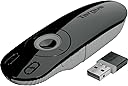
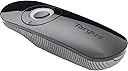
The Targus Laser Presentation Remote AMP13US combines advanced KeyLock technology to prevent accidental button presses with a powerful 50-foot wireless range via a mini USB receiver that stores inside the device. Featuring an ergonomic design, built-in laser pointer, and backlit buttons, it ensures professional, seamless presentations across Windows, Mac, and Chromebook platforms. Powered by included AAA batteries, this sleek remote is your ultimate tool for commanding attention and delivering flawless presentations every time.




| ASIN | B002NU5OAQ |
| Additional Features | Ergonomic |
| Battery Type | AAA |
| Best Sellers Rank | #92,798 in Office Products ( See Top 100 in Office Products ) #570 in Telephone Audio Conferencing Products |
| Brand | Targus |
| Built-In Media | LASER PRESENTATION REM KEYLOCK BLK GRY |
| Button Quantity | 3 |
| Color | Black |
| Compatible Devices | PCs and MacBooks |
| Connectivity Technology | Wireless |
| Controller Type | Button Control |
| Customer Reviews | 4.5 out of 5 stars 507 Reviews |
| External Testing Certification | não aplicável |
| Global Trade Identification Number | 00092636246433 |
| Item Type Name | Targus Wireless USB Laser Presentation Remote |
| Item Weight | 0.23 Pounds |
| Manufacturer | Targus |
| Max Number of Supported Devices | 1 |
| Maximum Number of Supported Devices | 1 |
| Maximum Range | 40 Feet |
| Mfr Part Number | AMP13US |
| Model Name | AMP13CA |
| Model Number | AMP13US |
| Number of Batteries | 2 AA batteries required. (included) |
| Special Feature | Ergonomic |
| UPC | 803982802941 999992313949 078667262949 777780517546 092636246433 071030517950 777785824649 666669998449 999993748733 617407429572 168141468582 |
| Unit Count | 1.0 Count |
| Warranty Description | Limited One Year Warranty |
A**R
Perfect for what I needed.
It's small size and sleek design make this easy to use. I teach a graduate class where my computer is in an ackward spot in the room, with this remote, I can operate my presentations from anywhere in the room. the USB link, conveniently stores in the battery compartment and is accessed easily by pushing the release mechanism on the back. It fits easily into my hand and is extremely light. I has convenient lock button next to the on/off switch. This is great so when I am talking and waving my hands around I don't accidently push buttons. The laser pointer is in the center button, works well. Well integrated small and well priced.
M**K
Targus Laser Presentation Remote
I work in a large university and often teach in a large classroom with 150+ students. I like to walk around as I speak to engage the students, and I'm often 50+ feet away from my netbook. This remote works very well with a quick response time. The small size is easy to hold and it fits into my netbook case. The receiver stores inside the battery compartment and is very small, extending about an inch from the USB port. It also has a lighted dial which is useful in a dark room, though I haven't had a need for it, but it does look nice. I would highly recommend this unit.
S**A
Works great - much better design than the previous version.
I owned the previous Targus laser presentation remote... It does the exact same thing except this one is much sturdier and has a green/red LED light around the middle button. The last version had cheap buttons - the right side totally tore off. This version doesn't have rubber buttons and seems well made. The battery also lasts long - It's been over a year of use and I still haven't had to replace the battery.
D**L
Good remote. No complaints.
Pros: This is a good remote for the price. The receiver is compact and can store inside of the remote. I've found range to have no issues in classroom settings (haven't used it outside of the classroom). The batteries seem to last a while. Also, the lock feature is handy when you're having someone use the remote who doesn't know what the extra buttons do. This remote works well with my Mac in Keynote and PowerPoint. The size and feel of the remote is just about perfect. It's easy to hold, but doesn't stick out of your hand while you're presenting. Cons: The remote has small plastic pieces that help secure the back onto the remote (you open up the back to store the receiver or to replace the battery). These pieces can easily become bent outwards if you don't put the back on just right. I was able to bend the pieces back in place, but I'll have to be more careful putting the back on when I do it next time. Also, I purchased one that died after about a year - it just stopped turning on. I tried replacing the battery with no effect. I wasn't too upset as I've been fairly hard on the remote over the last year (and it was just probably a dud). This fact didn't keep me from buying the same remote to replace the broken one - really there's not much better out there.
C**8
Now works great on Mac OS X
There is much to really like about the presenter. The distance from which it works, feels good in hand, extra battery holder...but one major negative is on a mac I can't start a ppt. show using the start show button. The button will end the show but not start it. So if you do a practice run through your slides and get to the end of the show, you need to walk back to the computer to start the show. No big deal if computer is close by but a hassle if it is on the other side of the auditorium. I have tried it on OS X 10.6 and an old powerbook running 10.4. Same result. The button works fine on windows PCs. Other than this it works great. If anyone knows a fix to this problem...please post a comment. ****Update**** User error on my part. If you open the back cover just above the battery there is a little sliding switch. It is very small so can be overlooked. It let's you choose from 3 options: 1) PC 2) Mac KN - this is Keynote 3) Mac PPT once I switched it to mac, it works flawlessly. I updated my review to 5.
S**N
Now works with Mountain Lion on Mac
Original Review: Great product I've used for a long time. I frequently recommended this remote to friends. Now it no longer works with the latest OS from Apple: Mountain Lion. Very frustrating. I wish the company would say something instead of continuing to see a product that no longer works. Edit: 10 October 2012 After calling Targus, they mailed me a new unit free of charge that works correctly on the new macs. This is excellent customer service and it's clear that new units have been fixed and no longer have this flaw. Excellent product for the price. Back to 5 stars
S**L
Great Product/Lousy Packaging
This is a great, light, easy to use all in one PowerPoint presentation control. The controls are touch distinguished and you can turn off the unused ones. It comes in packaging that was so difficult to open and get at the device that at one point I was ready to hit it with a small axe. What is the matter with 90% of the electronics (and other product) manufacturers. A few have gone to easy to open bubble packs, not Targus on this one. Get with it guys, It ain't nice to make us run the risk of cuts and bruises to get at the products we buy!
S**R
Remote control for a projector
I was skeptical about this remote control. Would it work on my Mac Powerbook? It has a small switch inside that you set for Keynote (Mac) or Powerpoint (Mac & PC). It also has a tiny USB receiver that plugs into the computer to "connect" the two. When I plugged it in, my Powerbook said that it does not recognize the keyboard. After diddling with it for a while, I learned to start the Keynote program, hit Play, and then plug it in. It then works flawlessly. The built-in laser pointer is not very bright, so it is not very useful, less so than my other laser pointers. I really wanted a remote that let me move around and control the progression of "slides", so it works well for its intended purpose. Turning it on is a bit erratic. You push a button to turn it on and hold the button down to turn it off. Sometimes it does not turn on with a single push and I find that I must hold it down to get it to turn on. So far, this is a minor issue.
Trustpilot
1 month ago
3 weeks ago