Buy anything from 5,000+ international stores. One checkout price. No surprise fees. Join 2M+ shoppers on Desertcart.
Desertcart purchases this item on your behalf and handles shipping, customs, and support to Poland.
🚀 Power up your home network with speed and style!
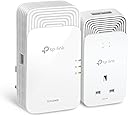
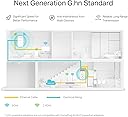
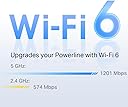
The TP-Link PGW2440 KIT is a cutting-edge G.hn2400 powerline adapter set featuring AX1800 WiFi 6 for ultra-fast wireless speeds, an extra power socket to maintain outlet availability, and 2+1 gigabit Ethernet ports for high-speed wired connections. It supports up to 300 meters of coverage over existing electrical wiring, smart roaming with OneMesh routers, and includes an energy-saving mode that cuts power use by up to 85%. Ideal for seamless 8K streaming, gaming, and whole-home internet boosting with a 3-year warranty.


| ASIN | B0C9F23VYJ |
| Best Sellers Rank | 1,542 in Computers & Accessories ( See Top 100 in Computers & Accessories ) 8 in Powerline Network Adapters |
| Box Contents | 2 × Ethernet Cable, PGW2440+PG2499P, Quick Installation Guide |
| Brand Name | TP-Link |
| Compatible Devices | Desktop, Game Console, Laptop, Printer, Smartphone, TV, Tablet |
| Compatible Operating System Family | Windows |
| Country of Origin | China |
| Customer Reviews | 4.0 4.0 out of 5 stars (80) |
| Data Link Protocol | Ethernet, Gigabit Ethernet |
| Data Transfer Rate | 2400 Megabits Per Second |
| Hardware Interface | Ethernet |
| Item Dimensions L x W x H | 15.7L x 8W x 6.5H centimetres |
| Item Weight | 880 Grams |
| Manufacturer | TP-Link |
| Manufacturer Part Number | PGW2440 KIT |
| Minimum Required Operating System Version | Windows 10 |
| Model Number | PGW2440 KIT |
| Product Warranty | 3 Years |
P**N
Does what it say on the tin!
Excellent product. Had a few TP Links over the years and this one isn’t any different. Does the job with all the modern bells and whistles. Upped a week 2meg WiFi at back of house to 200meg. They did need pairing out of the box. Instruction are so easy to follow. After that they just work. The wifi extender has more options and features than our home router. Signal range is also very good.
M**M
These work
Great product, easy set up
A**L
Plugged stop working barely using it for couple of hours.
I bought the TP-Link PGW2440 powerline kit to replace older TP-Link adapters that had become slow. I specifically chose this G.hn model expecting better performance and improved resistance to electrical interference. Instead, the product failed almost immediately. After just a couple of hours of very light use, the unit providing Wi-Fi stopped working entirely. The adapter was uncomfortably warm to the touch and no longer delivered power at all. This raises serious concerns about build quality and safety. I may have received a defective unit, but a device that fails this quickly is unacceptable. Given the price and TP-Link’s reputation, this was extremely disappointing. The kit is being returned.
R**M
Great, stable WiFi 6 connection, but can't buy individually
So far working fine, stable connection between the two units. I'm updating this review two months later, and have still had zero issues with this - it's been powered on non-stop. The down side is that you seem to only be able to buy these as a pair. Which makes adding an additional WiFi access points both expensive and wasteful. Hopefully TP Link will rectify this soon (or more second hand ones will start becoming available!). I had another issue, which is not the fault of this unit, but worth considering as I've seen it before: My ~2yr Dell XPS laptop (with Intel WiFi - the same as used by many manufacturers) decided it liked WiFi 6 much better then my main router's WiFi 5. That meant that the laptop kept trying to connect to the WiFi 6 signal from this TP-Link unit even if I was only a couple of metres away from the router itself! I came up with two solutions to this problem: Firstly, using the "tp plc" app on my phone, I changed the signal strength of the PGW2440 WiFi access point down so the laptop couldn't pick it up from the room with the router in, and I persuaded my ISP to give me a free router upgrade to one that did WiFi 6 - so now I only have WiFi 6 everywhere. Frustrating that it wasn't possible to fix it with a setting on the laptop itself (it feels like the "prefer WiFi 6 at all costs" setting is baked into the Intel WiFi driver/hardware) but hopefully that'll be useful for somebody!
A**R
Wow. At Last!
After upgrading to the latest BT Superfast Fibre Broadband in my home (Single Story Bungalow), I still could not get acceptable coverage in the most important room in the house. My Games Room/Office. It's 19 metres from the main building with about 1.5 metre gap between it and the house and several solid brick walls. Total 25 metres from the main router which is located as far away as possible. The technician that installed it insisted that it was so fantastic that if there was a weak spot that he would leave me three repeaters to boost it. I'm no computer expert but if you try and install the repeaters in a link (3) number 3 ends up with barely more than you have without it. I absolutely did not want to run anymore wires! I phoned BT for technical advice luckily spoke to 'The Guy' that clearly knows what he's talking about. He said that BT doesn't sell anything like that but Amazon does. So, I researched the customer reviews and the only couple of problems (not for me) that customers might have with this setup is that you can't by an an additional extender without buying the full kit which could make this setup very pricey. However, my setup works far better than I imagined. I can't speak for how it might work in a multi story building but in my house (the two units are separated by 25 metres and a lot of masonry and there is ZERO degredation at the farthest end. Super Fast & Reliable. I highly recommend this setup!
A**3
Only way to add extenders to the network is to buy the complete kit again
I find it rather disappointing that TP-Link has chosen not to sell their WiFi extenders, specifically model PGW2440, as standalone products. Instead, the only way to expand your network coverage is by investing in an entire new kit, which feels quite frustrating for many users. During my exploration of the TP-Link forum, I stumbled upon a multitude of threads where users expressed their frustrations and dissatisfaction regarding this limitation. Many loyal customers, including myself, have invested in a variety of TP-Link devices and prefer to maintain a cohesive system with a brand they trust. Regrettably, it appears that TP-Link has overlooked a significant opportunity to cater to the needs and preferences of its customer base. On the performance side, the functionality of the extenders is commendable, displaying reliable signal strength and straightforward wireless connectivity. However, I’ve noticed that the units tend to run hot, generating a considerable amount of heat during operation. Additionally, their bulkiness can pose a challenge, as they may struggle to fit comfortably in certain locations. The accompanying app does provide basic functions for managing the devices, but it could benefit from a more modern interface and refresh to enhance user experience. Nonetheless, it meets essential requirements, such as facilitating firmware updates, which is a fundamental feature for maintaining optimal performance.
T**S
Works well - even over 50 year old wiring
Works well - even over 50 year old wiring. Simple plug and play, worked first time and so far is proving reliable and robust
G**S
Excellent item
Perfect item for high speed wifi. Delivery was right on time and no delays
D**E
attention prises anglaises
B**A
Not as powerfull as expected for the price and is bulky
Trustpilot
2 days ago
2 weeks ago