Description
- Designed for Magix Vegas Pro 16 - Compatible with Windows 7-11 - Backlit keys
- Dimmable light with five selectable levels - Built-in dual USB-ports 2.0
- Scissor-switch keys - Color-coded labelled shortcut keys with graphical commands
- Dimensions - 17 5/8” x 6” x 11/4” (446mm x 150mm x 30mm) - Net weight - 2.1 lbs (950 grams)
- Number of keys - 104 (ANSI version) 105 (ISO version) Manufactured for 10.000.000 keystrokes per key
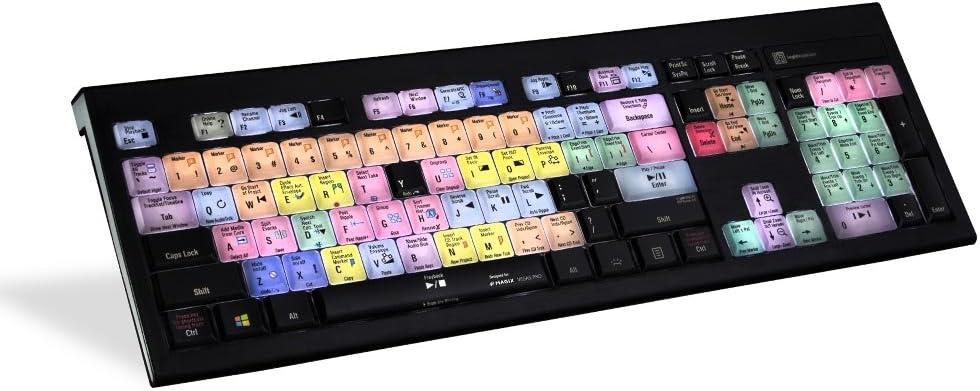
The ASTRA backlit keyboard with numeric keyboard features an elegant, slim line black keyboard with low-profile scissor-switch keys for a light, yet responsive feel. With five selectable light levels, the ASTRA is the perfect choice for any lighting environment. The keyboard features two USB 2.0 ports to enable you to connect e.g. your mouse, contour shuttle or a USB-dongle. The ASTRA keyboard is developed with two USB cables. One for the keyboard itself, and one for the USB hub, at the back of the keyboard. The reason for having a separate cable for the USB hub, is to avoid problems with installations, that require a KVM extender. To power the keyboard, you need to plug in the grey USB connector. If you need to activate the USB hub, on the back of the keyboard, you need to plug in the black USB connector. Watch video about the two cables here. The Magix Vegas Pro dedicated LogicKeyboard, also features all the regular letters, numbers, and symbol labelling that you will find on a conventional keyboard, it can simply be used as a substitute for it. Easy to set up and use. No software required. Product Specifications Designed for Magix Vegas Pro 16 Compatible with Windows 7-10 Backlit keys Dimmable light with five selectable levels Built-in dual USB-ports 2.0 Scissor-switch keys Color-coded labelled shortcut keys with graphical commands Dimensions - 17 5/8” x 6” x 11/4” (446mm x 150mm x 30mm) Net weight - 2.1 lbs (950 grams) Number of keys - 104 (ANSI version) 105 (ISO version) Manufactured for 10.000.000 keystrokes per key 1.8 meter cable with separate keyboard and hub connections (to avoid interference with USB extenders)
Review: Very nice keyboard - I bought this keyboard to use with Movie Studio 17. The shortcuts that Movie Studio 17 and Vegas Pro use are pretty much the same. I will be using it with Vegas Pro 19 soon though. The keys feel pretty good, not as good as my Kensington Pro Fit keyboard, but good. I find it nice to have all of the shortcuts color coded right in front of me instead of having to look at my cheat sheet for the most common ones. The shortcuts are also grouped by color, peach for goto commands, green for edit, yellow for markers, etc, etc. The backlighting is nice even in a fully lit room. Now I gave the keyboard five stars because it has helped with my editing but I have two complaints about it. Maybe it is just me but, I have a tendency to hit the caps lock key when I try to hit the shift key. For some reason I just do that. Then, I wish this keyboard had multimedia controls. I do not have a outboard audio interface and I really miss not having the volume controls on my keyboard. If this keyboard had multimedia keys it would be perfect. I have not used the built in USB connections because I have a convenient USB hub right on my desktop. All in all, I like this keyboard and would recommend it if you are using Magix Movie Studio VER 17 and below, (I don't know if it works with the new simpler version of Movie Studio) or if you are using Vegas Pro. Now if it just had multimedia controls....... A quick update, Windows 10 will allow you to have two active keyboards. So what I do now is keep my Kensington Multimedia keyboard to my left and use its volume controls while I am editing with the LogicKeyboard. Not ideal, but it does work.
Review: Just what I expected - Simple plug and play install, and gives you two extra USB sockets on the back edge. cheers CD