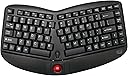



WKB-3150UB
Product ID: 49111695
Details
- BrandAdesso
- ColorBlack
- Compatible DevicesChromebook
- Connectivity TechnologyRF
- Keyboard DescriptionErgonomic
- MaterialPlastic
📶30ft wireless range
⌨️Split ergonomic keys
🖲️Removable 1000 DPI trackball
Desertcart purchases this item on your behalf and handles shipping, customs, and support to Poland.
⌨️🖲️ Work smart, scroll smarter — the ergonomic keyboard that keeps up with your hustle!
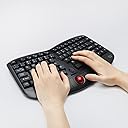
The Adesso WKB-3150UB is a wireless ergonomic keyboard featuring a split key design and integrated palm rest to minimize wrist strain. It includes a high-precision removable 1000 DPI optical trackball and scroll wheel for seamless navigation without a mouse. Operating on 2.4 GHz RF wireless technology, it offers up to 30 feet of reliable range and supports multiple Windows versions. With membrane switches rated for 5 million keystrokes and an auto sleep function, it delivers quiet, durable performance and up to 6 months of battery life on 2 AAA batteries. Compact and portable, it’s ideal for professionals seeking comfort and efficiency in any workspace.

| ASIN | B075ZBGX6F |
| Additional Features | Not_Performance_Used |
| Antenna Location | Office |
| Best Sellers Rank | #7,880 in Our Brands ( See Top 100 in Our Brands ) #3,365 in Computer Keyboards |
| Brand | Adesso |
| Built-In Media | Keyboard, battery AAA*2, Manual |
| Button Quantity | 87 |
| Color | Black |
| Compatible Devices | Chromebook, Desktop, Laptop |
| Compatible Operating System Family | Linux, Windows |
| Connectivity Technology | RF |
| Customer Reviews | 3.8 out of 5 stars 443 Reviews |
| Enclosure Material | Plastic |
| Global Trade Identification Number | 00783750007429 |
| Hand Orientation | Ambidextrous |
| Item Dimensions L x W x H | 13.8"L x 9.4"W x 1.5"H |
| Item Type Name | Ergonomic Computer Peripherals |
| Item Weight | 1 kg |
| Keyboard Description | Ergonomic |
| Keyboard Layout | QWERTY |
| Manufacturer | Adesso Inc. |
| Mfr Part Number | WKB-3150UB |
| Model Name | WKB-3150UB |
| Model Number | WKB-3150UB |
| Number of Batteries Required | 2 |
| Number of Items | 1 |
| Number of Keys | 87 |
| Number of Packs | 1 |
| Number of Sections | 3 |
| Recommended Uses For Product | Office |
| Series Number | 3150 |
| Special Feature | Not_Performance_Used |
| Style Name | Compact |
| Switch Type | Membrane Switch |
| Theme | Ergonomic Computing |
| UPC | 783750007429 |
| Unit Count | 1 Count |
| Warranty Description | 1 Year from Purchased Date |
S**D
Works great!
When this gimmick arrived it was actually smaller than I expected. That being said I started using it and realized it was exactly the size it needs to be. The typing action is quite nice and the hands are in a very natural and comfortable position. I'm typing this review on it it, as a matter of fact. I'm currently fighting an arm/shoulder injury, and being able to keep my hands on the keyboard to move the pointer with the trackball is a godsend! I find the feel of it to be quite cheap. I one time pressed the left click button too hard and thought I had broken it. Thankfully it was just stuck, but if the construction weren't so shoddy this would not be an issue. I really love having a scroll wheel on here, so very convenient! For trackball users, the right/left click button layout is not ideal. I have to either take my thumb off the trackball to left click, or use the other hand. Both are bad options, and cut down on productivity. In a perfect world they would find a way to position the left click button to facilitate one handed operation, the way you use any mouse or trackball. Overall I am quite pleased with this keyboard and it has been a shoulder saver for me not to have to reach for the mouse all the time!
P**Y
Great for 6 months, then malfunctioning
I like this keyboard. It's comfortable and not larger than I need (no keypad). The keys feel good. The trackball is too fast and I can't set its speed separately from the computer's mouse speed, which is annoying. But after about 6 months, it started malfunctioning. It doesn't actually register all of the keystrokes. I assume it has something to do with the communication with the computer, because it doesn't randomly drop keystrokes. It seems like sometimes it nods off and a whole series of keystrokes just don't make it to the computer. So I'll have to back up and start typing again where the keyboard left off. Very frustrating.
W**A
Best keyboard ever for me!!
Been through many keyboards, large, small, usb, wireless, ergonomic, standard, etc. And this wireless, Adesso 3150 fits me perfectly. Have been using it exclusively for the last couple of years. I may have to sit at my computer 8 to 10 hours a day and if I have to continually go back and forth with my arm from the keyboard to a mouse, my arm is pretty worn out by the end of the day. But with the layout of this Adesso, I barely have to move my arm/hand to type, scroll, select, and click. I scroll simply by keeping my hands in the "home" position and using either thumb. If the application I'm using requires and lot of scrolling and moving the screen "cursor" a lot, e.g., the internet (Amazon, etc.), I'll keep my left hand in the "home" position and move my right hand down about an inch to use the trackball with my middle finger, left click with my forefinger, and right click with my fourth finger. All in all very little, if any, movement at all of my left arm and only minimal movement of my right arm. It's quiet and comfortable for as long as I'm using it. No other keyboard that I've tried (many) or viewed comes even close to matching this Adesso 3150 with respect to these ergonomic features. And that includes other offerings from Adesso. The two Triple A batteries required may last anywhere from 4 to 10 months from my experience. I never turn the keyboard off unless changing the batteries or cleaning the trackball (which I may do once a year). I like a steeper slant to the keyboard and purchased an ESC Flip Keyboard stand which I attached to the keyboard bottom that provides this. Initially, the track ball is not quite as responsive as a mouse but with use, it comes to match it. All in all, I recommend it highly.
A**G
Just a super helpful review that I wish I had before purchasing this
Just got it today Feb 23, 2023: (I got it for school stuff/programming/tall desk at home and I have medium sized female hands) Note: this keyboard might feel slightly wide for small hands. It worked nicely for me and my bf. Short answer is that I recommend this if you: 1) don't mind a slightly loud keyboard. It's not like so loud that I would hear it over headphones but it's not quiet like the description stated 2) if you DON'T need to travel with this. 3) if you don't mind the height because you either like a slightly raised keyboard OR you have a height adjustable keyboard tray OR you can adjust your chair so your arm can be leveled to how you want. ( I have an adjustable keyboard tray) 4) if you want some kind of mouse on a numpad-less ergo split keyboard for less reaching to right/left (At the time of writing this; This was the only numpad-less ergonomic split keyboard with a trackball mouse that I could find on amazon. I specifically wanted an ERGONOMIC "numpad-LESS" keyboard with something to move the cursor, I didn't care if it was a trackball, pointer stick or touch pad but this was the only one on amazon right now unfortunately). More detailed explanation below with better description for the photos I took: -This feels and looks like a mechanical keyboard even though it says that it is a membrane one. I can't be bothered to remove the key to actually check. (Youtube to see/hear the difference between the two types of keyboard) -The one I received sounds a mechanical keyboard with a lot of feed back noise. So if you want something quiet then I'd recommend to skip this. I don't mind the loud click clacks though. It's NOT loud like a type writer at least(not that anyone really uses those anymore lol) -The photos for the amazon page shows that there is a numLock button that allows you to use the right hand side like a numpad (for example pressing numlock makes j k l ; become 1 2 3 + respectively). They must have changed the design and didn't update the photos because I see one photo in the review that has three light indicators (capsLock, numlock and battery). Which is a shame because I like using a numpad BUT hate the extra space it takes so "toggle" design would have been perfect if they had a stand-alone num lock button that is not on the fn keys. Mine only has two light indicators(capsLock and battery) see my photos above and no numbers on the keys circled above in my photos. Note: I don't need that feature but some might so beware that the amazon photos are misleading! Side note, I like NOT having a num pad because I like having my keyboard centered to me and numpad takes up EXTRA space. If you need a numpad for a job then checkout the numpad adesso version of this. I saw it in a related link when I got this so idk if it is still around. OR you could just get a wireless numpad that you can put anywhere. -The split keyboard design feels good. I just wish they did something for the CTL/alt buttons(like put an alt under the left spacebar and CTL under the right spacebar(see photo with green text above for my wistful wishes lol). The buttons for both are super small and I have to awkwardly reach for them OR lift my hand completely and look directly at the keys to find them (see photos above for what I mean). -The actual keys themself require more pressing distance than I am used to. So it may feel like you have to press super far at first if you had a super short key distance previously. (See photos above of my old one compared to this). I got used to it so it's fine. So far it doesn't hurt my hand that I have to press a little bit farther. There is more feedback from this keyboard compared to my old one so I feel that it is easier to type as I strive to not look at my hands while typing. -The trackball mouse feels like a normal trackball mouse lol. WARNING if you have never used one before it will feel weird. Just be sure to decrease the cursor speed in the window's setting, or else it will feel too fast. I personally switch between using thumb/index finger to use the trackball (like how I use a touch pad on laptops almost). I wanted something to control the mouse so I wouldn't have to keep reaching far right for the mouse which is annoying for me on a desk that is too tall. -Love the scroll wheel in the middle. mine works with no issues. -Idk what the battery is like so I'll update in a few months if I have any issues.
J**.
Poor Quality, Poor Customer Service
August 2026, 2nd purchase: This keyboard is the best ergonomic layout for shoulder pain. But the keyboard doesn't work reliably. My first one lasted a year; I searched for another manufacturer but none helped my 'mouse shoulder' pain. So I decided I'm willing to buy a new keyboard once a year... Now this second keyboard has an occasionally unresponsive mouse and keys within the first month of use. The 'product support' listed by Amazon is a nonexistent website link, and an 800 number to 'Adesso Home Lighting', where they are obviously accustomed to getting wrong number calls from Amazon keyboard buyers! LOL. 07/2026 update: Stopped working after 13 months; the ball and keys both became unresponsive, and finally replacing the batteries wouldn't solve it anymore. Original review, July 2025: Like many other reviewers, I bought this keyboard due to shoulder/neck pain due to long hours on the computer with my mouse arm reaching too far (I have to switch back and forth between mouse and keyboard all day long). This center trackball setup took care of the problem quickly and noticeably (though full recovery also required PT and chiro care!). It does take some time to train your hands to use a mouse in this way, but it will come! I have been using the keyboard for a year now; my only complaint is the battery (2 AAA) life is short compared to standard keyboards. Every other month or so the trackball will start being less than responsive, and replacing the batteries fixes it. But to me that is not a dealbreaker when the item prevents so much pain for me.
S**Y
No right shoulder pain
There will be several caveats to my five-star rating, but when you have suffered as long as I have and tried as many products as I, it deserves five stars. It is tiny, wireless, easy to set aside, uses only one USB slot, and has greatly improved my ergonomic situation. It took me about two weeks to adjust to the new movements. After three weeks I tried to go back to the separate mouse (just to see), and right away realized how much better a built-in roller ball is! Caveats: I wish it had 2 more inches in the split (I have big arms and 2" wider would give me more comfort). I wish the wrist rest were 2 inches deeper. Toss the batteries it comes with - they are crap - install name brand. It is missing the 10 key. I use that all the time in my line of work, but it has been worth it to retrain myself to use the number keys on the keyboard. Not only does it make the device smaller, but it keeps me from, yet again, lifting my hands away from the keyboard.
E**N
Love the Compact Size
I have been looking for a smaller, ergonomic, wireless keyboard for about 2 years. I have very small hands and wrists and have had carpal tunnel surgery on both, so my hands tend to be pretty weak. There is no way I can type on the built-in, flat, laptop keyboard or any "regular" keyboard. I had been using Microsoft ergonomic keyboards for many years but they are really big and clunky. The problem is that when I travel anywhere, I have to take my keyboard with me -- but all the Microsoft ergonomic keyboards have that big number pad other control keys on the right side. This ends up making the keyboard a good 6 inches longer. I always found that very frustrating since personally I have never once used that number pad and have absolutely no need for it. If I want numbers, I use the ones at the top of the keyboard. So taking the keyboard along on trips was always a pain because it was so big I had to put it in my checked bag. Finally I found this one that seemed to be all the things I've been looking for: 1) ergonomic; 2) small enough to easily fit in an overnight bag or under-the-seat luggage; and 3) wireless. I've had it only a few days, and am not entirely used to it yet, but so far, pretty good. Just a few drawbacks: 1. Really dislike the trackball -- it doesn't give me enough control and is too far of a stretch for my thumb to reach. I almost didn't order the keyboard because of the fact that it had the trackball. FORTUNATELY, you don't have to use it if you don't want -- this keyboard works just fine if you still want to use a regular mouse. So for me the trackball is just a pretty little bit of red accent on the keyboard -- purely cosmetic as far as I'm concerned. I'll never use the built-in scroll wheel, either. 2. SUPER ANNOYING is the fact that for some bizarre reason, this keyboard is set to numbers lock when you start it up. So you end up typing numbers instead of letters. Several times I had to pull my old keyboard out of retirement because I could not turn off the numbers lock on this one. Just clicking on the num lock button (F12) will not turn it off. I almost returned the keyboard because of my frustration with this. Evidently this frustrates other people too, because someone else asked what to do about that. My thanks to R. McMillon for explaining that you have to click the Fn key AND the F12 num lock key. What a STUPID idea to set this up as a default!! 3. The keys are very loud -- louder than any keyboard I've ever had. Do not believe the false marketing that says the keys are quiet -- they are NOT. This is problematic when I'm trying to take notes on slides, etc., during conference calls. I can't just mute myself because I am typically leading the call. All the keyboard noise in the background is really aggravating when listening back on recorded conference calls and I'm sure it bothers other call participants, too. I really wish I could figure out a way to make them quieter. All in all, I am happy to have FINALLY found a smaller, more compact ergonomic keyboard that can easily be put in a bag and taken along to meetings or on airplanes or wherever. Update on August 5, 2021 -- Ultimately, I ended up going back to my huge old clunky Microsoft ergonomic keyboard because of the problems I mentioned. As long as I'm working from home, it's fine. The problem was when I traveled. So now this Adesso keyboard has been relegated to being my travel-only keyboard. But of course, COVID hit a few months after I initially wrote this review and so it hasn't seen any use in over a year.
E**G
No More Pain. Keyboard Functions Well.
The ergonomic layout has relieved the pain I used to get in my shoulders from jamming my hands together in from of my body as required by archaic keyboards. The trackball is just the right size (remember to adjust your Windows mouse settings for speed and sensitivity!) and the left and right buttons function appropriately. I like the split space bar that I can trigger with left or right thumb as needed. And the setup and connection was flawless. I had a bluetooth keyboard that required arcane setup rituals and provided questionable connectivity, but this keyboard was incredibly simple to setup and use. I liked this keyboard so much I bought a second one for my other computer and threw the bluetooth monstrosity away..
D**Y
A small ergonomic keyboard for the table lacking space.
This one is a small but functional keyboard, that does its job well. Though, trackball appeared to be no so useful, it's too small and sensitive, and located too low from the finger position, thus if you'd force yourself to use this trackball instead of using it naturally. Also, it feels very much when standing that there is a lack of soft stand for wrists. In summary, this keyboard is interesting as a small ergonomic one with a nice trackball feature for the table lacking space.
B**R
Very good, comfortable keyboard & trackball device
This is a very good keyboard & trackball solution. The keyboard is good quality - the keys are light, soft, don't wobble or make undue noise. The lettering is large, high contrast and easy to see. The trackball is very smooth and removable for cleaning. The scroll wheel is a very nice touch. Overall, I am very satisfied. Although the keyboard is a bit expensive, I still feel it's good value for money. I cannot comment about durability yet, as I've only had it for a few weeks. My only minor gripe is that the keyboard is using standard AAA batteries and has no built-in possibilities for recharging. But this is only a minor point. It does have a good life on one set of decent batteries (not the ones that come with it - those are rubbish). EDIT 4 months later: no issues with durability so far. Battery life is amazing! Still using the same pair of batteries that I put in four months ago, and I am using this keyboard at least five days a week! This keyboard may not be for everyone, but it works for me so well that I'm just about to order another because I found myself carrying it around to every computer that I use.
T**N
VRAIMENT DECU ARNAQUE
J AI MIS 4 ETOILE POUR QUE MON COMMENTAIRE APPARAISSE MAIS VRAIMENT DECU. QUAND JE L AI COMMANDE IL ETAIT AVEC PAVE NUMERIQUE DONC CLAVIER COMPLET ET A RECEPTION QUEL DECEPTION CELUI CI A DISPARU ET LA PHOTO DU PRODUIT REACTUALISE. MON POSTE NE ME PERMET PAS D AVOIR PLUSIEURS BRANCHEMENT USB JE SUIS OBLIGER DE ME LANCER DANS L ACHAT DE PRODUIT COMPLEMENTAIRE ET PAS PRATIQUE ET SURCOUT. VRAIMENT TRES DECU. MEME PAS ENCORE ESSAYER DU COUP. ARNAQUE VUE LE PRIX REEL DU PRODUIT
J**C
Love - but not at first sight. This relationship needs work.
This keyboard is full of small irritant points while you get acquainted to it. I will NOT be love at first sight. However, it's the only one I could find with a pointing device arranged in a way that I could type and use the mouse without having to continually change my position. So I decided to give it a try, and spend some "quality time" together to "build the relationship". The first times the experience was really bad: really hard to use the trackball, too fast and too little dexterity on my thumb. There was definitely an annoying learning curve, and have to try many things before I could find comfort with it. It's been some weeks, I'm not completely done taming this one... but I feel that patience is paying off: I can now sit in a comfortable position - whether it is on a chair, or in lotus/seiza (japanese sitting) positions - and type for hours with my whole body in a relaxed and natural position. This makes my overall energy, mood and disposition improve. If you are a patient person, I strongly recommend this one. But if you are looking for instant gratification, this is probably not your best bet. Some adjustments that I had to do, to find comfort with this keyboard: - The keyboard used to slide down my lap in some positions. I had to apply some gaffers tape to give it more grip. - I had to down the mouse speed at the beginning, to find comfort with the trackball. Now it's back to normal speed. At first your body will tend to tense because of the lack of familiarity with the trackball, but with time you will start to find ease (ex: relax your shoulders and use your whole arm more naturally, and not just your thumb)
V**A
Small and compact
Loved the size and weight. But need to adjust to small size. Keys are closer together
Trustpilot
3 weeks ago
1 week ago