Desertcart purchases this item on your behalf and handles shipping, customs, and support to Poland.
🎥 Own Your Studio, Command Your Stream
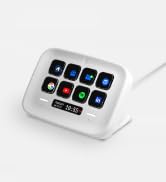
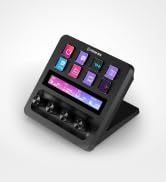
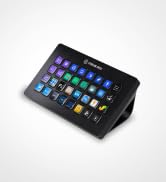
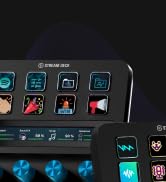
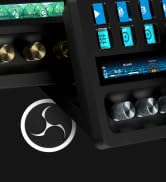
The Elgato Stream Deck + is a professional-grade audio mixer and studio controller featuring 8 customizable LCD keys, 4 multifunction dials, and a touch strip. Designed for seamless integration with Mac and Windows via USB-C, it supports multi-action triggers and smart profiles for efficient workflow automation. Unlock powerful software like Elgato Wave Link and access a vast library of plugins and assets from the Stream Deck Store, making it the ultimate all-in-one production console for content creators and streamers.


| ASIN | B0BJL8SJ59 |
| Audio Input | USB |
| Best Sellers Rank | #248 in Musical Instruments ( See Top 100 in Musical Instruments ) #1 in Digital Audio Workstation Controllers |
| Brand Name | Elgato |
| Connectivity Technology | USB-C |
| Customer Reviews | 4.6 4.6 out of 5 stars (4,623) |
| Frequency | 20 KHz |
| Included Components | USB Cable |
| Item Dimensions D x W x H | 5.51"D x 5.43"W x 4.33"H |
| Item Highlight | LCD keys, dials and touch strip, Multi actions and smart profiles, Unlocks Wave Link mixing, Works with Mac and PC |
| Item Weight | 470 g |
| Manufacturer | Corsair |
| Manufacturer Part Number | 20GBD9901 |
| Model Number | 20GBD9901 |
| Number of Items | 1 |
| Number of Packs | 1 |
| Output Connector Type | USB Type C |
| Power Source | Corded Electric |
| Software Update Supported to Date | unknown |
| UPC | 840006645146 |
| Unit Count | 1 Count |
| Voltage | 1 volts |
| Warranty Description | 2 year manufacturer. |
J**A
Game changer but with a learning curve
If you can afford it, I think the Stream Deck + is one of the best upgrades you can make to your setup. You don’t even need to be a streamer to get a lot of use out of it. The customization is probably the best part. You can create macros to do things like turn off or disconnect your monitors and control them directly from the Stream Deck. The dials are also fantastic, and in my opinion, they’re the biggest advantage over other Stream Deck models. Being able to independently control the volume of games, your browser, Discord, and other apps without having to constantly go into Windows settings is a game changer. That said, it’s not perfect. Occasionally, when I turn on my PC, the Stream Deck doesn’t load the profile I have configured, and I have to open the official Elgato software for it to load properly. I also had some issues with my PC detecting it when using a USB 2.0 cable. This could be specific to my PC, because after switching to a USB 3.0 cable, it has always been recognized correctly. However, the occasional profile loading issue still happens. My recommendation would be to wait for a sale around $150 before buying it. Also, expect a small learning curve with Elgato’s software. I’d definitely recommend watching a few YouTube reviews from people who have actually used it before buying, so you understand that you’ll need to spend some time configuring the software to get everything working the way you want. Once you understand how the software works, though, you really start to see how powerful and versatile this thing can be.
M**E
From Button Mashing to Command Center — The Elgato Stream Deck Is Pure Gaming & Streaming Magic
The Elgato Stream Deck has completely transformed my daughter’s gaming and streaming setup — and I don’t say that lightly. What immediately stands out is how intuitive and satisfying this device is to use. The customizable LCD keys, smooth dials, and touch strip turn complex actions into effortless, one-tap commands. Scene changes, audio adjustments, app launches, macros — everything that used to interrupt her flow now happens seamlessly and instantly. The visual clarity of the keys is excellent, the responsiveness is spot-on, and the overall build quality feels premium and purpose-built. This isn’t a gimmicky accessory — it’s a serious productivity and performance tool disguised as a sleek piece of hardware. What I love most is how quickly it becomes indispensable. Once it’s set up, you wonder how you ever streamed or gamed without it. My daughter raves about it daily, not because it’s flashy, but because it actually makes everything easier, faster, and more enjoyable. If you’re a gamer, streamer, content creator, or even a power user looking to streamline your workflow, the Elgato Stream Deck is absolutely worth it. It’s one of those rare products that lives up to the hype — and then exceeds it. Highly recommended.
T**E
Have 2 For Symmetry
So I bought 2 because I wanted to keep using the small streamdeck I already had and I liked the symmetry 2 could bring. Both work great together and still give me plenty of buttons I need. Once set up, I am able to switch easily between my speakers and headphones, mute my mic, and open all other applications I need at any time, even control making all my streamdecks go to sleep at the same time.
R**R
A must have for anything you might do. Not just for Content Creation!
First off, the hardware is top-notch. The buttons are easy to press and have a nice illuminated design. The tactile dials are a brilliant addition, and their ability to both turn and be pressed for functions like muting or switching inputs is fantastic. The interactive touch screen above the dials works seamlessly and adds a clean and modern touch to the device. The solid stand with a rubber grip ensures it stays firmly in place on your desk. The angle of the stand is just right, giving you a clear view of the Stream Deck+ without requiring an additional stand. Plus, the USB cord is conveniently designed for easy plug-in. Now, let's talk software. While there might be a learning curve, the effort is absolutely worth it. The Stream Deck software and the accompanying Wave Link software provide immense customization options. You can make this device work exactly the way you want it to. Whether you're using it as a controller for specific applications or for various tasks, the customization options are limitless. You can change the look of your Stream Deck+ and fine-tune how individual buttons function, such as launching apps, adjusting volumes, starting streams, and more. I must emphasize that the Elgato Stream Deck+ is not just for streamers. I personally use it for various tasks, including volume control, productivity, and even gaming. It's a versatile powerhouse that caters to a wide range of needs. In summary, if you're contemplating getting the Elgato Stream Deck+, do it without hesitation. It's a premium device that delivers on all fronts. Whether you're a content creator, gamer, or simply someone who values efficient control over your digital tasks, this device has it all and more. It's a true game changer, and I wholeheartedly recommend it to anyone seeking a versatile and powerful control solution.
L**K
Wish I knew about this years ago
Wow. This is something that makes you say "I wish I knew about this years ago." The Stream Deck brings real, tangible improvement to my workflow. I'm not a huge gamer or streamer, and this is for mostly for productivity. It's fast, stable, and generally easy to configure. Bonus: the same device on both my Mac and PC. I found two downsides: there are some limitations with Key Logic, and since that is software, it can be improved. The angle of the device is fixed. That is a bit more difficult to change. The base plate is removable, so this might help with some mods.
P**E
Great product
Love this thing. If you want one button and customizable macros, this thing is great. I’m not a streamer, but I utilize it to launch programs, switch characters in game, and application volume controls. The volume control is where this shines. You do need to set it up and play around with settings. Get ready to Google and YouTube.
M**X
LOVE IT!!!!!!
Okay so I work from home and am a bit of a gamer so, I spend OODLES of time at my computer (and I have the carpal tunnel and cubital tunnel syndromes to prove it lol) and basically all I do all day long is type out the same stuff over and over and dont move... Theres a lot of time to be saved from not having to type the same sentence out over and over again randomly (and for someone like me, remembering key combos isnt in my wheelhouse).... i originally bought a knockoff version of this company's stream decks and I really changed my life, however I really should have just spent another $40 and just bought this in the first place. It took about 30 minutes of messing around once I simply plugged it in and its basically ready to go. It was SO much easier than the other device I got to get it working. Their marketplace is pretty decent and there are like a million plug ins to find and try out. Basically I refuse to write an essay about how this thing works because if your reading reviews I am pretty sure you know WHAT your looking at/for and this thing is AWESOME! The price initially put me off despite thinking it would be useful... it was worth EVERY penny (and they do seem to have deals from time to time). I HIGHLY recomend this (I guess I'd recommend any of their stream decks that suit your particular needs as this one does for me). Love the dials. SUPER nice quality and clicky and tactile (and dont feel like your going to accidentally scroll one of them too far)... As some other reviews said, if your on the fence, DO IT!
M**E
A Game-Changer for New Streamers
First Impressions: Right out of the box, the Stream Deck Plus felt solid and well-made. Setting it up was a breeze, and I customized it to fit my needs in no time. What I Liked: • Ease of Use: The 15 programmable LCD buttons let me set up hotkeys for quick access to essential functions, making managing my stream and other apps much simpler. • Extra Controls: The rotary knobs and touch screen add flexibility for adjusting audio and other settings. Now, I can easily tweak my mic volume or switch scenes in OBS without hassle. • Customization: Being able to personalize each button with icons and even GIFs is awesome! My Stream Deck now looks just the way I want it. What Could Be Better: • Software: Occasionally, the Elgato software can be glitchy. Some plugins have crashed or didn’t work correctly, and the plugin installation site can be slow. But overall, it’s manageable. • Price: For a newbie streamer, the cost might seem steep. However, considering its functionality and build quality, I think it’s a worthwhile investment. Conclusion: The Elgato Stream Deck Plus has become an indispensable tool in my streaming setup. Despite a few minor issues, I’m thrilled with the purchase. If you’re starting out in streaming and want to enhance your broadcasts, I highly recommend checking out this device. Hope my review helps! Good luck with your streams!
A**E
Great Addition to your Set up
This has been one of my best purchase in 2025, I bought this primarily for my MSFS and have enjoyed using it too for other apps. Fully customizable buttons, touchscreen and dials a must have for productivity and gaming enthusiasts.
N**S
100 punten
Geweldig. Echt top. Super functioneel en intuïtief. Zoveel functionaliteiten had ik niet verwacht.
A**E
Perfekt für Gaming & Streaming
Für Streaming und Audio wirklich eine große Erleichterung Ich nutze das Stream Deck + hauptsächlich für Gaming, Streaming und die Audiosteuerung und möchte es inzwischen nicht mehr missen. Besonders praktisch sind die vier Drehregler, mit denen ich Lautstärken schnell und direkt anpassen kann. Gerade beim Spielen oder Streamen muss man dafür nicht ständig in Windows oder andere Programme wechseln. Die Tasten lassen sich individuell belegen und man kann damit unter anderem Programme starten, Szenen wechseln, Musik steuern, Mikrofon und Audioquellen schalten oder eigene Shortcuts hinterlegen. Durch die Profile kann man für verschiedene Spiele und Anwendungen unterschiedliche Funktionen speichern. Die Touch-Leiste und die Drehregler machen die Bedienung deutlich übersichtlicher als bei einem normalen Stream Deck. Auch die Möglichkeit, Plugins zu nutzen und die Funktionen individuell anzupassen, gefällt mir sehr gut. Die Verarbeitung ist hochwertig, die Einrichtung geht schnell und die weiße Version sieht auf dem Schreibtisch richtig schick aus. Für mich eine klare Aufwertung des gesamten Setups und besonders für Streaming und Audiosteuerung sehr zu empfehlen.
S**.
Un peu cher mais super quali !
Top
ナ**ア
ダイヤルいいぞ!
はじめてのストリームデックです。勢いで買いましたが、非常に満足しています。 ボタンでのショートカットはもちろん、ダイヤルが素晴らしいです。 ゲームやブラウザ、通話など様々な音量を調節するときに、ダイヤルでサッと調整できるのが嬉しいです。人によってはこれだけでも買う価値があるかもしれません。 問題点は ・単純に机を圧迫する ・高さがあるためじゃまになるかも ということくらいです。 写真を見て想像できるくらいの大きさですが、置き場所を確保してから購入するのが良いと思います。
Trustpilot
2 months ago
1 month ago