Buy anything from 5,000+ international stores. One checkout price. No surprise fees. Join 2M+ shoppers on Desertcart.
Desertcart purchases this item on your behalf and handles shipping, customs, and support to Poland.
🚀 Elevate your workflow with precision, power, and silent style!
The TECKNET Wireless Bluetooth Mouse offers versatile connectivity with support for up to 3 devices, a high-precision 4800 DPI sensor adjustable across 6 levels, and an ergonomic design featuring silent clicks. Its energy-efficient system delivers an impressive 24-month battery life powered by 2 AA batteries, making it a reliable companion for professionals seeking seamless performance across Windows and Mac platforms.


| ASIN | B000Q7V0W4 |
| Antenna Location | Office |
| Are Batteries Included? | No |
| Are Batteries Required | Yes |
| Battery Average Life | 24 months |
| Best Sellers Rank | 577 in Computers & Accessories ( See Top 100 in Computers & Accessories ) 29 in Mice |
| Box Contents | TeckNet BM308 Mouse+Manual |
| Brand Name | TECKNET |
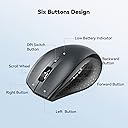
| Button Quantity | 6 |
| Colour | Grey |
| Compatible Devices | Windows 2000, 2003, XP, Vista, Win7, Win8, Win10, Win11, Mac, etc. (Note: side buttons cannot be used in Mac OS) |
| Country of Origin | China |
| Customer Reviews | 4.4 4.4 out of 5 stars (10,497) |
| EU Spare Part Availability Duration | 3 Years |
| Embellishment Feature | LED |
| Enclosure Material | Metal, Plastic |
| Hand Orientation | Ambidextrous |
| Hardware Platform | PC |
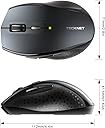
| Item Dimensions L x W | 10.5L x 6.5W centimetres |
| Item Weight | 75 Grams |
| Manufacturer | TECKNET |
| Model Name | BM308 |
| Model Number | EWM01308 |
| Mouse Maximum Sensitivity | 3200 Dots per Inch |
| Movement Detection | Optical |
| Network Connectivity Technology | Bluetooth |
| Number of Batteries | 2 AA batteries required. |
| Operating System | Windows 2000, XP, VISTA, 7, 8, 10 |
| Power Source | Battery Powered |
| Product Features | 2 Additional keys, 24 months battery life, Bluetooth, Connect Up to 3 Devices, TeckNet TrueWave Tracking |
| Product Finish Type | Glossy |
| Product Warranty | 1 |
| Range | 15 meters |
| Style Name | Modern |
| Theme | Bluetooth/Wireless Mouse |
| Unit Count | 1.0 count |
M**D
Great Ergonomic Mouse with Amazing Performance!
I’ve been using the TECHNET Bluetooth Mouse for a few weeks now, and I’m thoroughly impressed! The sensitivity gives me precise control, over whether I’m working. The ergonomic design fits perfectly in my hand, making it comfortable to use for long hours without any strain. It's incredibly easy to set up with Bluetooth, and the wireless connection is stable with no lag. I also love how portable it is, making it perfect for travel. Overall, this mouse is a fantastic choice for anyone looking for a reliable, high-performance wireless mouse at a great price!
J**Z
One little mouse with cheap price tag and hefty quality
Hello fellow tech lover, if you are about to purchase this item and are a bit dubious as to why it's so cheap, I hope I will put your doubts at rest. After all, I was in your shoes as well. After buying an expensive bluetooth Logitech for over £50 which caused me enormous amount of headaches and frustration with Logitech Support I threw it in a drawer and started looking again. After a few considerations between Microsoft and other makes I came across this product and I have to say I was very surprised by it's reviews. Considering the price tag I thought I'll give it a go and have not been disappointed. As soon as I got the product, it synced beautifully with both my Macbook Pro and my Surface 3 (Windows). Mind you, I could only sync it with one device at any given time, i.e. if I sync it with Macbook, I have to re-sync it with Surface 3 and vice versa. It doesn't remember more than one device - but that's not a problem. I use it mainly at work anyway. The feel of the mouse is amazing, it's not too small, it's not too big, perfect for carrying around and saving that one extra USB port as it's Bluetooth. I use it every day for 9 hours and the battery has lasted so far without changing - bought it beginning of August. Once I disabled in the Bluetooth settings that annoying feature where the laptop cuts of power for the bluetooth device to conserve power, the mouse works flawlessly. I'm well please with this little and cheap product, if only everything was as good and cheap.
E**S
Excellent value overall
Overall, this is exceptionally good value for money. The mouse (normally) works absolutely fine and is comfortable to use, and feels of a far greater quality than the price suggests. I'd only have two slight quirks, but I think these are mainly due to bluetooth mouse in general, and are probably my fault for not researching, not the mouse's fault. Firstly - bluetooth connection, whilst very convenient as has no wires or adapters is sometimes a bit patchy and requires 're-pairing'. Whilst this only takes 30secs or so, and happens maybe a few times a month, it is a bit annoying, but to be honest, in my opinion is a price worth paying, as i am sure to lose an adapter for the other style of wireless mouse! Secondly - whilst the battery saving does work, it is sometimes noticeable that this gets through its fair share of batteries, averaging about a new set a month. Not really too bad, but I'd certainly say a set of rechargables is a good idea. Overall, very good product, the two gripes above alone prevent me from giving it 5 stars, but I think in fairness to TeckNet, regardless of how much I'd paid for a bluetooth mouse, i'd never give it 5 stars! Do make sure that you have an inbuilt bluetooth adapter, or seperate dongle. I would however say, that if you don't have inbuilt bluetooth and only would use a bluetooth adapter for this mouse, to not buy this, as the problems above are avoided with adapter based mice.
M**J
Excellent mouse with no setup or dongle required!
Highly portable but not on the small side, which is exactly what I wanted! The main reason I bought it was because you don't have to plug anything in to the USB to make it work. It connects via bluetooth 3.0 or 5.0 and as long as your device has bluetooth 3 or 5 then it should be detected easily. I have tested and used this mouse on my Android phone, Fire Stick, Steam Deck, Laptop and my main PC with no issues whatsoever! You get 2 side buttons, which are a great addition for gaming or even just for extra handy hotkeys in photoshop or other programs. The buttons and mouse-wheel are solid and not flimsy/loose like a lot of cheap mice are. It also has a decent weight to it, which is due to the thickness and high quality of plastic used. I like that and hate to feel cheap thin flimsy rubbish which is what most bluetooth mice are made of. So I feel you get the best of all worlds with this mouse as it's more than good enough to be a permanent fixture either as a desktop mouse or just leave it on your armchair and use it to control your Smart TV/Fire Stick etc. The things you can use it for are limitless. The switch underneath turns it off and conserves the batteries while you store or transfer it. The batteries will last you an awful long time too, which I was quite surprised by as bluetooth devices usually drain quite a lot of power. But as long as it's in close range to your device, you'll get a lot of time from your batteries. In my experience if you're more than a couple of feet or so away then you may see them drain quicker. Which goes for all BT devices. I only have one slight criticism and that is that the side grip isn't rubber, it's just hard plastic with a matte texture. But for the price of it you can't really complain, and it feels comfortable enough for me for even long gaming sessions! As a PC gamer of nearly 30 years I've had loads of mice, but I think you could easily spend a lot more than this and get a lot less in return. So I'd say it's quite a bargain! I'm very happy with mine and even bought 2 more as gifts for family members.
M**E
Excellent quality
Great mouse works very well. Had it over a year I think just doing the old feedbacks as I like to make sure the item is good and last and this is definitely a good product battery life is amazing too uses an AA battery.
A**R
The price is what sold me on it, but it was the size I was worried about. I don't have big hands, but I don't have small hands either (they're in that annoying in between stage of bigger than average, but smaller than large for an adult male). This mouse is great, though was a pain to pair with android, and I thought it was busted. I ended up testing it on my Windows 8 PC and it worked just fine, then I later figured out how to get it to work on my Android Tablet without any issue. I'll go into that a little later. Pros: -Not that small, just slightly smaller than my favorite M510 Logitech mouse. It's the large hump near it's rear that makes it decent fit for my hands without having to change my grip to something uncomfortable and unusable. -On windows, all the buttons work and did something, again I'll go into that later. Cons: -None really, the android connection issue is an Android issue that I solved. If I had to pick one, it would be that the printed manual says it has an 8 month battery life as to the 18 that this page claims, kind of a huge difference in time. Android Connection Fix: 1st: Connect the device like you would any other. Go into Settings > Bluetooth > Turn it on > Scan. On initial turn on of the mouse it should go into search mode where it should then be discovered by your tablet/phone. If not press the connect button (top middle) on the underside of the device. 2nd: Notice how janky the cursor is, that seems to happen every time you pair this mouse for the first time. Turn off your bluetooth, and then on again to kill the connection with the mouse. 3rd: When bluetooth is back on, press "Bluetooth 3.0 Mouse" to initiate re-pairing, and on the bottom of the mouse press the connect button to re-establish a link to the tablet. You should notice now that the cursor is smooth and working as it should. Mouse Buttons Functions (Windows): -Orange side buttons = back and forth (top = forward, bottom = back) -Everything else works like it should, right click, scroll wheel/middle click, left click. Works just fine and is very responsive. Mouse Buttons (Android): -Orange (top): seems to not do anything for me -Orange (bottom) and Left Click: acts as an Android "back" button -Right Click: acts like a one finger touch -Scroll Wheel: scrolls between home screens and drawers in launcher, and then normally in apps like Photo Gallery, and Browser -Middle Button: acts like "home" takes you to your launcher, you can also activate the long press "home" feature (which on my Note Pro launches Google Now) Since I'm writing this on my Tablet using/testing a keyboard I don't know if I can upload pictures from Amazon's Android App. I'll do that when I reconnect with my PC and maybe correct any spelling mistakes I might have made but using an external keyboard doesn't pick up. With that said, I can't be more pleased with my purchase, after solving that Android Mouse issue. It's one of those purchases that luckily doesn't cost much and for me is worth the risk. The manual was in proper English and was rather informative.
Z**E
Il mouse si connette immediatamente. Non dà alcun tipo di problema. E' comodo e facile da utilizzare. Funziona anche su superfici "difficili" - io lo uso direttamente su un tavolo in legno, senza tappetino, e va alla grande. E' dotato di pulsanti "indietro" e "avanti", comodissimi in numerose situazioni, soprattutto durante la navigazione sul web. Tasti che rispondono bene, rotellina che funziona perfettamente, leggero, ergonomico e affidabile. Al momento, nessun difetto da segnalare.
T**D
The back and forward button only work while browsing internet. These two buttons do not work in Microsoft apps such as word
J**S
Works like it should for a decent price! Have had no issues whatsoever 😊
J**A
I bought three of these units to use in place of the mouse pads on my machines. On Vista and Windows 7 they are working great - I like the feel and the resolution which makes them so fast that it took some time to adjust to it. I like the single AA battery also. The only negative other than going to sleep too quickly (have to click on a button to wake them up) has been on Windows 8 where it keeps losing connection. I don't use bluetooth on the Windows 8 machine so I had to use an old bluetooth radio and it might not be functioning correctly on the newer machine. But I really like them on my workhorse Windows 7 laptop. Update 2/26/2015: I use one of the three on my Dell - I use it a lot since I really dislike the pad. I should have mentioned that the old bluetooth mouse I had died and that it had never worked very reliably. This one goes to sleep too soon so that I have to awaken it often - even if I am using it. It appears to have a time limit of use. This mouse has already gone through one battery in the 3 months that I used it. I have also noticed that it will go into gyrations - that is, I suddenly am unable to get it to stop moving. I move it a fine amount and it keeps going so I bring it back and it goes over the opposite direction too far. I think that all I need to do is shut it off and on again to stop that. The neat thing is that it is possible for me to move it that fine amount most of the time. It also will sometimes say that it is connected, but the mouse pointer does not move. I have noticed that when it is moved too far away from the machine (or the machine moved away from it), the link is lost - quickest and surest fix is to cycle its power. It is unnecessary to re-install it - I have found that most of the troubles I have had with the unit are due to something that I do - like drop it or move it too far away or something like that. Just POR and it works again. And it hooks up quickly - just remember to push on the right button before you expect it to move - it falls asleep fast. All in all I find it to be very good and won't change its 5 stars to 4 even though it is pretty close to that.
Trustpilot
5 days ago
3 weeks ago